
More project photos (2)
The problem
Cricket fans follow a match one ball at a time, but most free score apps bury the score behind ads, refresh slowly, or show only the total without explaining what just happened. A fan who misses the video feed wants to know who is batting, how many runs are needed, what the last ball did, and whether a wicket has fallen — within seconds, not minutes later. The Android Cricket Live Score App with Ball-by-Ball Updates and Match Alerts is built around that gap: it presents the live score, the over-by-over story of the match, the full scorecard and instant alerts for wickets, fifties and results in a single clean app. The demo ships with a seeded India-versus-Australia T20 chase that works offline, and the production build connects to a licensed cricket-data API for real live scores. For students, it demonstrates a real mobile product: a working score engine, a commentary feed, an alert rules engine and a Material interface.
Licensed feed supplies live scores in production; the demo uses seeded match data.
Follow the working sequence
How it works
The app works as a pipeline from a delivery to a notification. A match engine holds the state of the game — runs, wickets, balls bowled, the two batsmen at the crease and the current bowler — and every delivery updates that state once. The score screen recomputes the totals, the run rate and the required rate from the same state, so every screen agrees. The same delivery is then written into the commentary feed as one over-labelled entry describing what happened, and the alert engine checks the new state against its rules: a wicket, a batsman reaching fifty or a hundred, or the match ending. When a rule fires, the app queues a push notification and adds the event to the alert inbox. The scorecard aggregates the same deliveries into batting and bowling figures. In the demo the deliveries come from a seeded simulation; in production they arrive from a licensed cricket-data API — only the data source changes.
- The app loads the match list — seeded demo matches offline, or live fixtures from the configured cricket-data API in production.
- The match engine holds one state object: runs, wickets, balls bowled, the two batsmen, the bowler and the target.
- Each delivery updates that state once — runs added, wicket recorded, strike rotated on odd runs, new batsman sent in on a dismissal.
- The score screen recomputes the total, overs, run rate and required rate from the same state and redraws; the demo build does this refresh in 0.5–0.8 ms (measured in the demo build, local Chromium).
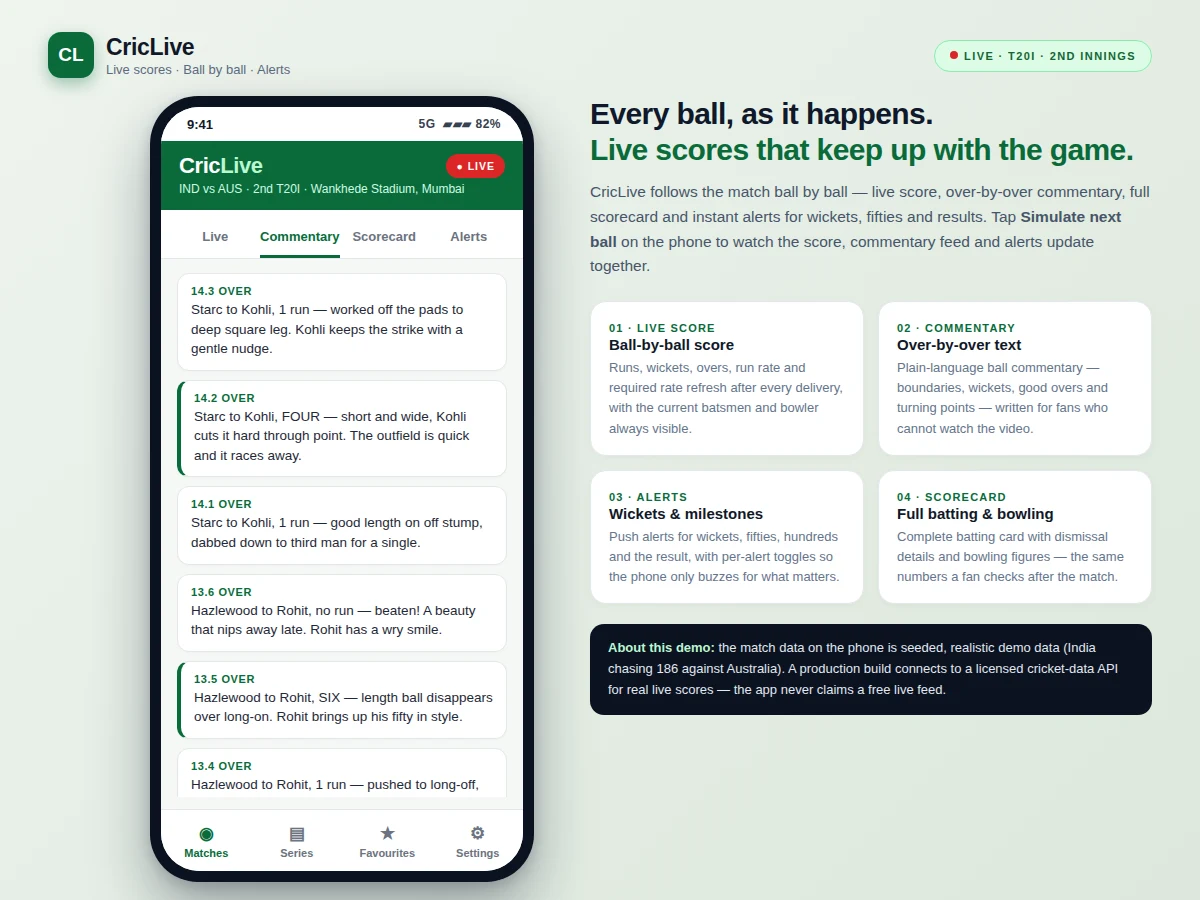
- The commentary engine appends one over-labelled entry for the delivery, describing the outcome in plain language.
- The alert engine checks the new state against its rules — wicket, fifty, hundred, result — and queues a push notification plus an inbox entry when a rule fires.
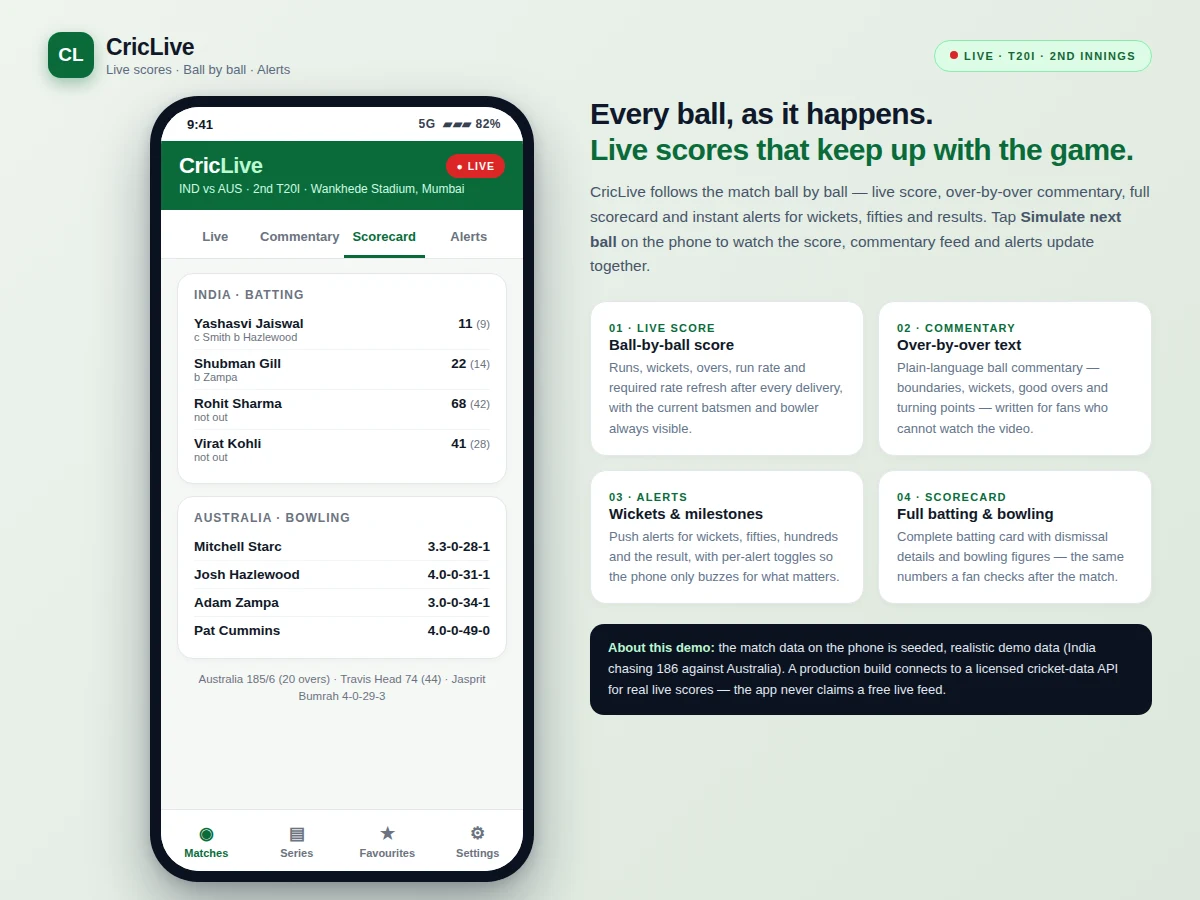
- The scorecard aggregates every delivery into the batting card and bowling figures, so the post-match numbers always match the live score.
Tech stack:
- Kotlin
- Jetpack Compose · Material 3
- Android Studio
- Room (local match cache)
- WorkManager (alert scheduling)
- Retrofit · licensed cricket-data API
- Firebase Cloud Messaging (push alerts)
- Git
| Parameter | Value |
|---|---|
| Platform | Android (Kotlin, Jetpack Compose) |
| Minimum Android version | API 24 · Android 7.0 (design target) |
| Match format in demo | T20 · 120 balls per innings (cricket rule) |
| Score refresh | 0.5–0.8 ms (measured in the demo build, local Chromium, single-file prototype) |
| Commentary entries | 1 entry per ball, over-labelled |
| Alert types | 4 (wicket, fifty, hundred, result) |
| App screens | 4 tabs: Live, Commentary, Scorecard, Alerts |
| Live data source | Licensed cricket-data API (paid, buyer-supplied key) |
| Demo data | Seeded India vs Australia T20 chase, works offline |
Project features
The app is built around four capabilities that a cricket fan actually uses during a match. The live score screen shows the total, the overs, the run rate and the required rate, with the two batsmen and the current bowler always visible. The ball-by-ball commentary feed turns each delivery into one plain-language entry — boundaries, wickets and quiet overs alike — so a fan who cannot watch still follows the story of the game. Match alerts push a notification the moment a wicket falls, a batsman reaches fifty or a hundred, or the result is decided, with a separate on-off toggle for each alert type. The full scorecard carries the batting card with dismissal details and the bowling figures for after the match. Around those four, the app adds a seeded match simulator for offline demonstration, a favourites list, and a series view — everything a student needs to show a complete mobile product.
- [Live score screen] Runs, wickets, overs, current run rate and required run rate recomputed after every delivery, with the two batsmen, their scores and the current bowler always on screen.
- [Ball-by-ball commentary feed] One over-labelled plain-language entry per delivery — boundaries, wickets, maidens and quiet overs — so the story of the match is readable without video.
- [Match alerts] Push alerts for wickets, fifties, hundreds and the match result, with a separate on-off toggle for each alert type in the settings screen.
- [Full scorecard] Complete batting card with dismissal details and runs and balls per batsman, plus bowling figures (overs, runs, wickets) for every bowler.
- [Seeded match simulator] A built-in simulation engine plays a realistic T20 chase ball by ball, so the whole app — score, commentary, alerts and scorecard — can be demonstrated offline with no API key.
- [Favourites and series view] Follow a team to get its matches first, and browse the series schedule and results from the same app.
- [Clean Material interface] Four-tab navigation (Live, Commentary, Scorecard, Alerts) with a dark-green match theme, readable at a glance during a live game.
What is included
- Complete Android source code (Kotlin + Jetpack Compose)
- Working demo build with a seeded match and ball-by-ball simulation
- Ball-by-ball commentary engine and alert rules engine
- Scorecard, favourites and series screens
- Setup guide including cricket-data API key configuration steps
- Project report PDF (background, architecture, match engine, API integration, testing)
- PPT presentation for final review
- Viva Q&A preparation document (Android lifecycle, state management, API integration, push notifications)
Limitations & prerequisites
- Real live scores need a paid licensed cricket-data API (for example, Sportmonks or CricAPI); no free live feed is claimed, and the buyer supplies the API key and subscription.
- The demo match data is seeded and simulated, not a real live match — scores and commentary in the demo are illustrative.
- Simulated outcomes are weighted random deliveries, not a prediction model; the simulator cannot forecast a real match.
- Push alerts in the production build need Firebase Cloud Messaging setup and a device with Google Play services.
- Ball-by-ball text in the demo is template-based commentary, not written by a human commentator.
- Scores refresh only when the feed delivers a new ball; the app cannot invent deliveries between feed updates.
- No video streaming is included — the app covers scores, text commentary and alerts only.
Frequently Asked Questions
Where do the live scores come from?
Real live scores come from a licensed, paid cricket-data API such as Sportmonks or CricAPI — there is no free live feed, and the buyer supplies the API key. The app is built so the score engine, commentary and alerts never depend on which provider supplies the feed. The demo ships with a seeded India-versus-Australia T20 chase so every screen works offline without any key, and the production build swaps the data source while the score engine, commentary and alerts stay the same.
Does the demo work without internet?
Yes — the demo runs entirely on seeded match data and needs no internet at all, because the India-versus-Australia T20 chase is stored locally and the built-in simulator plays it ball by ball with no network. The simulator, the commentary text and the alert rules all run from the same local data, so every screen works offline. Nothing in the demo — score, commentary, alerts or scorecard — needs a connection. Internet is needed only in the production build, to fetch live scores from the licensed API and to deliver push alerts.
What does the match simulator do?
The simulator plays a realistic T20 chase one delivery at a time, picking each outcome — dot ball, single, boundary, six or wicket — from a weighted set of outcomes. Each simulated ball updates the score, the commentary feed, the alert inbox and the scorecard together, so a reviewer watches the whole app react to the same delivery. It demonstrates the flow of a live match; it does not predict real matches, and every outcome is drawn from the simulator, not from a real feed.
Can I follow my favourite team or a series?
Yes — the favourites screen pins a team so its matches appear first, and the series view lists fixtures and results for the series. Favourite-team alerts are a separate toggle, so the phone only buzzes for the team chosen, and adding more teams, leagues or tournaments is a straightforward extension of the same match list. The match list is the same data source the live score screen uses, so favourites and series never drift out of sync with the scores.
What is the main technology used?
Kotlin with Jetpack Compose and Material 3, built in Android Studio, is the main technology used. Room caches matches locally for offline viewing, WorkManager schedules alert checks, Retrofit talks to the cricket-data API, and Firebase Cloud Messaging delivers the push alerts to the phone. Git tracks the source through the build, and the project report documents the architecture for the viva. The demo that ships with the project is a single-file working prototype of the same screens and flow, so the design can be reviewed before the Android build is compiled.
Is this project suitable for a final-year project?
Yes — for Computer Science, IT and mobile-application programs, because it demonstrates Android app architecture, state management, REST API integration, local caching, background work and push notifications, all inside a product every cricket fan understands. The project also covers background work and caching, so the viva discussion can go beyond the visible screens. The viva kit covers the lifecycle, the match engine and the API integration, so the student can explain every part of the build with confidence.
Components & software requirements
- Kotlin
- Jetpack Compose · Material 3
- Android Studio
- Room (local match cache)
- WorkManager (alert scheduling)
- Retrofit · licensed cricket-data API
- Firebase Cloud Messaging (push alerts)
- Git
Delivery information
Built-to-order project. Delivery timeline is shared after order confirmation based on current queue.
Support terms
Complete documentation, setup guide, and viva preparation included. Support for setup and explanation provided.
Download free synopsis (PDF)
Enter your name and WhatsApp number — the synopsis PDF downloads immediately. We may send occasional project updates on WhatsApp; no spam.