
More project photos (2)
The problem
A single job posting routinely pulls in hundreds of resumes, and the first shortlist is the most expensive step in hiring: reading every resume by hand is slow, and early screening varies wildly depending on who reads it. Large companies rent cloud applicant-tracking suites; small recruiters and college placement cells get nothing simple, offline and explainable. This project builds the recruiter-side tool — a desktop app that imports a folder of resumes, scores each one against a job description with transparent keyword and skill-weight matching, and returns a ranked shortlist where every score can be traced back to the skills that matched and the ones that missed. The scoring scope is deliberately honest: TF-IDF-style keyword weighting against an editable skills taxonomy, no deep-learning NLP and no black box. Note the deliberate difference from the Online Resume Builder Web App with ATS Score Checker on this site — that project helps a candidate write a better resume; this one helps a recruiter screen many resumes at once.
Creates the session, imports resumes and reviews the shortlist.
Follow the working sequence
How it works
- The recruiter creates a screening session and imports resumes — a folder of PDF and DOCX files, or drag-and-drop — and the app extracts text per file with PyMuPDF/python-docx, flagging files it cannot read.
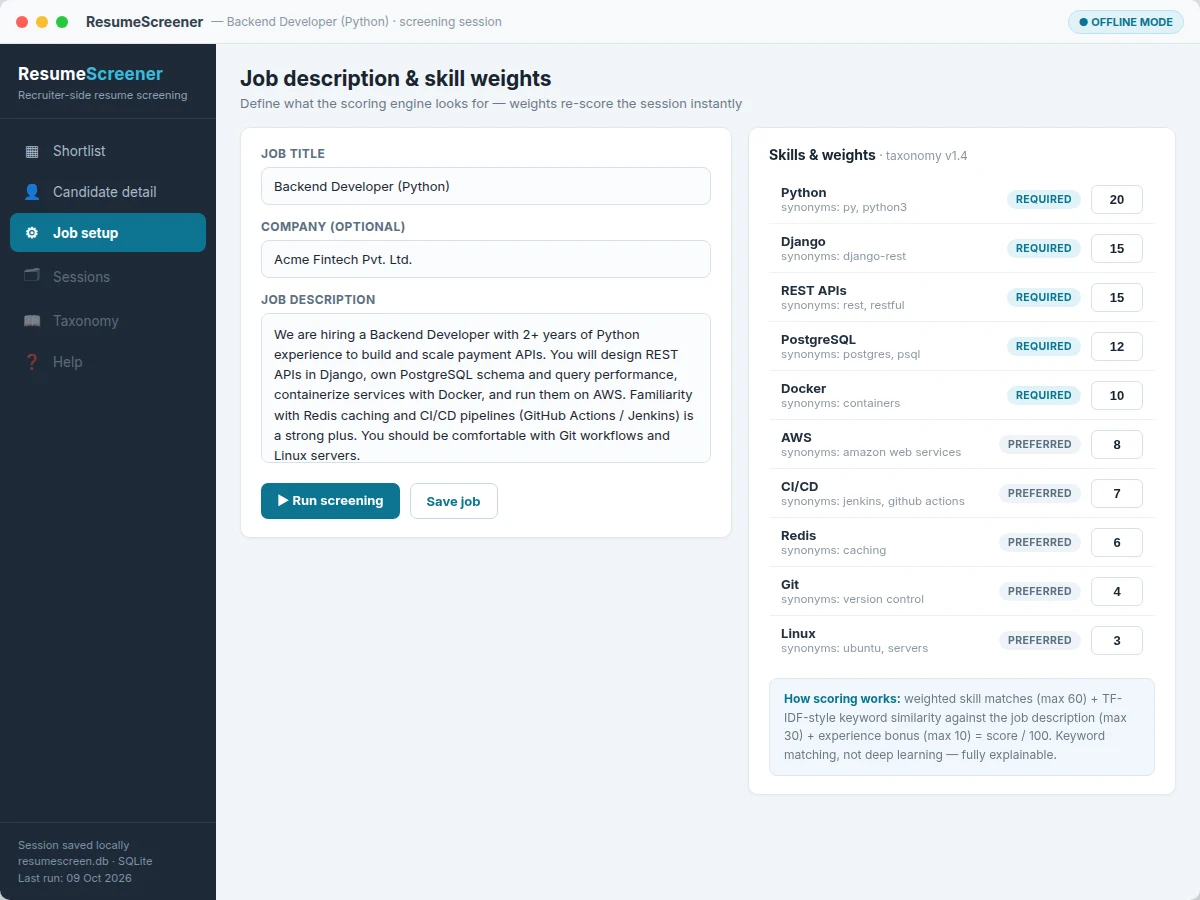
- The job description is pasted in, required and preferred skills are selected from the editable taxonomy, and each skill gets a weight reflecting how much it matters for the role.
- The engine normalizes every resume (lowercasing, tokenization, synonym mapping through the taxonomy) and records which taxonomy skills each resume mentions.
- Scoring combines weighted skill matches with TF-IDF-style term scores against the job description, normalized to a 0–100 match score with a separate experience bonus.
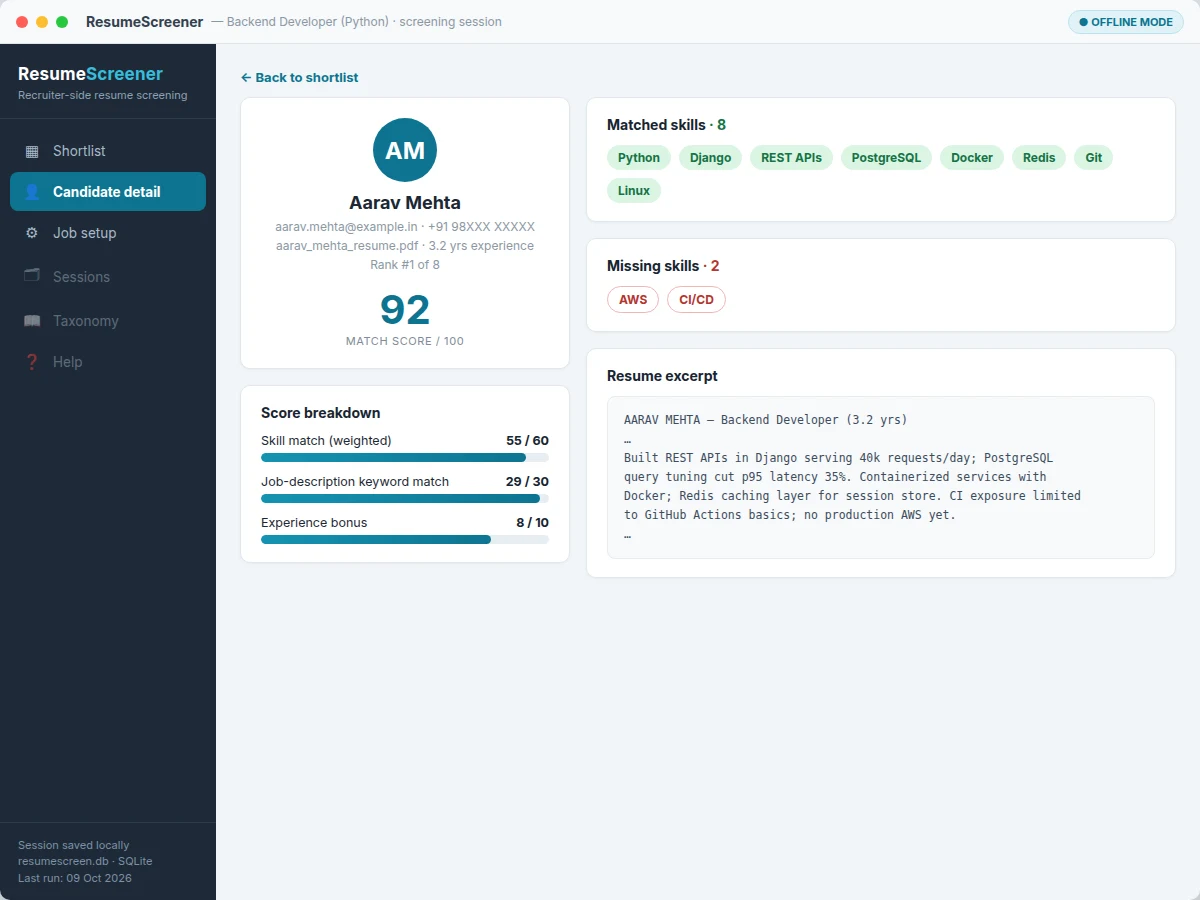
- The ranked shortlist renders in the desktop UI; clicking a candidate opens the skill breakdown — matched chips, missing chips, and the per-component score split.
- The recruiter reviews the verdict bands, exports the shortlist to CSV, and the session (job, weights, results) is saved to SQLite for reopening or re-running later.
Tech stack:
- Python 3, PyQt6
- PyMuPDF, python-docx (resume text extraction)
- scikit-learn (TF-IDF-style scoring)
- SQLite (sessions, jobs, results)
- pandas (CSV export)
- PyInstaller (offline executable packaging)
| Parameter | Value |
|---|---|
| Supported resume formats | PDF, DOCX (text-extractable files only) |
| Scoring method | Keyword + skill-weight match scoring, TF-IDF-style weighting, 0–100 scale — explicitly not deep-learning NLP |
| Skills taxonomy | Bundled default taxonomy, editable file, synonym-aware (e.g. JS → JavaScript) |
| Job setup | Job description text + required/preferred skills with per-skill weights |
| Database | SQLite local file; jobs, resumes, screening sessions and results tables |
| Export format | CSV: rank, candidate, score, verdict, matched/missing skills |
| Import capacity | Approximately 500 resumes per screening session (design target) |
| Verdict bands | Shortlisted ≥ 80, Review 60–79, Rejected < 60 (configurable) |
| Runs | Fully offline; packaged executable for Windows 10+ (design target), source runs on Linux/macOS |
Project features
- [Bulk resume import] Point the app at a folder (or drag and drop files) and it extracts text from every PDF and DOCX resume, showing a per-file import status so corrupted or password-protected files never silently vanish.
- [Job description + weighted skill setup] Paste the job description, then pick required and preferred skills from the built-in taxonomy and assign each a weight — so a "must-have" Python skill counts more than a "nice-to-have" Git skill.
- [Synonym-aware skills taxonomy] The taxonomy maps variants to one skill ("JS" → JavaScript, "k8s" → Kubernetes), and the whole file is editable — the recruiter owns the vocabulary, not the app.
- [TF-IDF-style match scoring] Every resume is scored 0–100 from skill-weight contributions plus TF-IDF-style term weighting against the job description, so rare, discriminating skills move the ranking more than generic words.
- [Ranked shortlist table] Candidates are listed by score with matched/missing skill counts, experience, and a Shortlisted / Review / Rejected verdict band — sortable and filterable at a glance.
- [Per-candidate skill breakdown] Click any candidate to see matched and missing skill chips plus the score breakdown (skill match, job-description keyword match, experience bonus), so every ranking is explainable.
- [CSV export of the shortlist] One click exports the ranked list with scores, verdicts and skill columns — ready to hand to a hiring manager or attach to a placement-cell record.
- [Saved screening sessions] Jobs, resumes, weights and results live in a local SQLite database — close the app, reopen next week, and the whole session is exactly as you left it.
What is included
- Desktop application source code (Python, PyQt6) plus a packaged offline executable
- Editable skills-taxonomy file with default synonym mappings
- SQLite schema with a sample screening session pre-loaded for the demo
- User manual covering installation, taxonomy editing and scoring logic
- Project report PDF (background, scoring methodology, text-extraction pipeline, evaluation on sample data)
- PPT presentation for final review
- Viva Q&A preparation document (TF-IDF, tokenization, desktop packaging, honest scope limits)
Limitations & prerequisites
- Scoring is keyword and skill matching, not deep-learning NLP — a skill paraphrased in a way the taxonomy does not cover scores zero; the documented fix is editing the taxonomy, and the report demonstrates this with an example.
- Scanned or image-based PDF resumes are out of scope — there is no OCR stage; only text-extractable PDFs and DOCX files are supported.
- The match score is a ranking signal, not an absolute quality measure — changing a skill weight reorders the shortlist, because the score reflects the recruiter's stated priorities.
- Unusual resume layouts (multi-column, heavy tables) can garble extraction order; the app reports a low-extraction-confidence flag per file instead of pretending the parse is perfect.
- Screening results inherit whatever the job description and taxonomy emphasize — the app does not claim bias-free outcomes, and the report discusses this explicitly.
- Desktop-only as shipped — no mobile client and no cloud sync; sessions stay in the local SQLite file.
Frequently Asked Questions
How is this different from the Online Resume Builder Web App with ATS Score Checker?
That project sits on the candidate's side — it helps one student write and format a single resume. This app sits on the recruiter's side — it takes dozens or hundreds of resumes and ranks them against a job description. Different user, different problem, different codebase.
Does it use AI or deep learning?
No. Scoring is keyword and skill matching with TF-IDF-style term weighting — transparent, explainable and fully offline. The report states this scope explicitly so the viva is never caught claiming more than the build does.
Can it read scanned resumes?
Not as shipped — image-based PDFs need an OCR stage that is out of scope. Only text-extractable PDF and DOCX files are supported; unreadable files are flagged during import.
How exactly is the match score computed?
Each resume gets weighted points for matched taxonomy skills (required skills weigh more than preferred), plus a TF-IDF-style keyword similarity against the job description, plus a small experience bonus — normalized to 0–100, with the per-component split shown for every candidate.
Can the skills and their weights be changed?
Yes — the taxonomy is an editable file (add skills, add synonyms, change weights), and the app re-scores the session immediately when anything changes.
Is this project suitable for a final-year project?
Yes — for Computer Science and IT programs. It demonstrates text processing and parsing, an original scoring algorithm, a database-backed desktop application, and honest evaluation, all packaged as an installable offline app.
Components & software requirements
- Python 3, PyQt6
- PyMuPDF, python-docx (resume text extraction)
- scikit-learn (TF-IDF-style scoring)
- SQLite (sessions, jobs, results)
- pandas (CSV export)
- PyInstaller (offline executable packaging)
Delivery information
Built-to-order project. Delivery timeline is shared after order confirmation based on current queue.
Support terms
Complete documentation, setup guide, and viva preparation included. Support for setup and explanation provided.
Download free synopsis (PDF)
Enter your name and email — the synopsis PDF downloads immediately. We may send occasional project updates; no spam, unsubscribe anytime.