
More project photos (2)
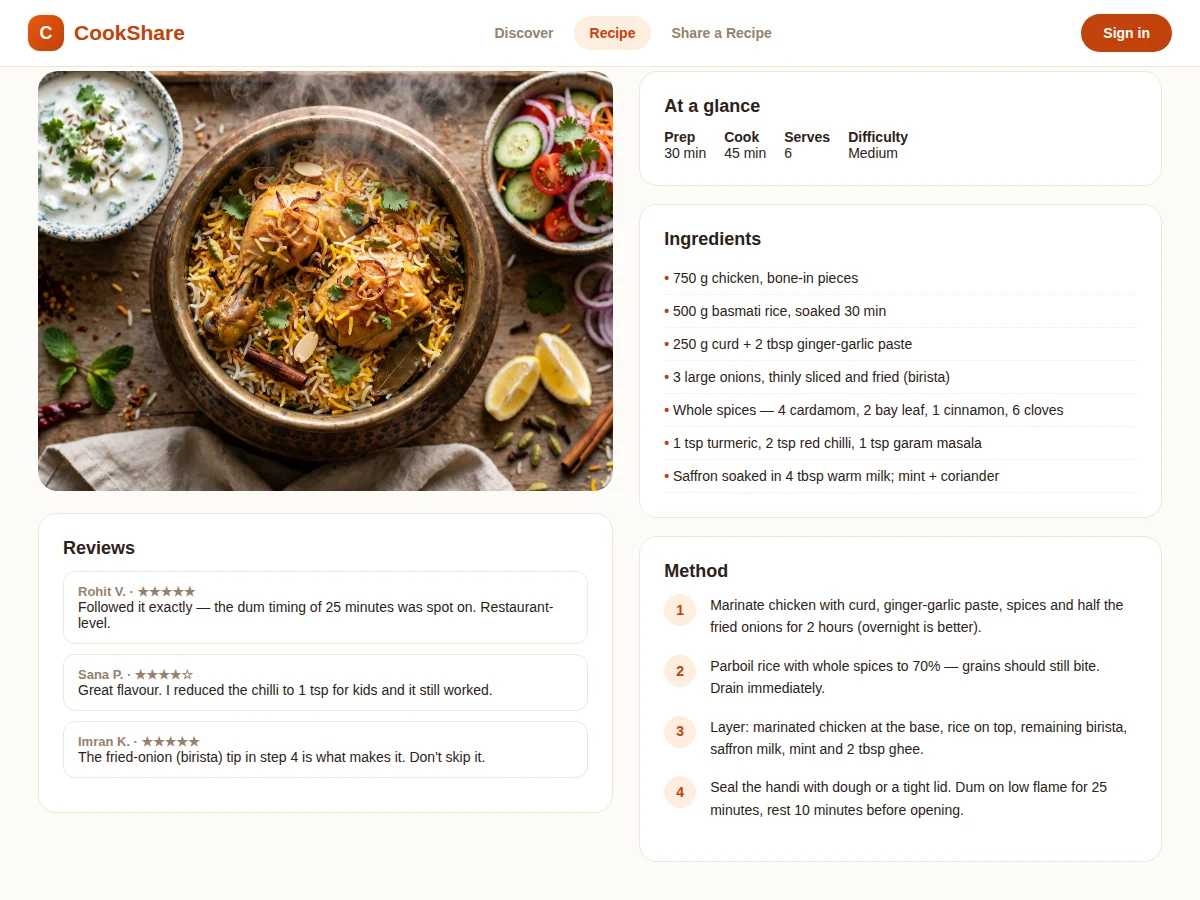

The problem
Family recipes live in notebooks, phone galleries and memory — and when someone wants to share one properly, social media gives them a caption box and buries the post in a day. Cooking needs structure: an ingredient list you can shop from, steps in order, timings that were actually tested, and reviews from people who cooked it. This project builds a dedicated recipe platform around that structure: a publishing flow (basics → ingredients → method steps → photo), a discovery feed with category and diet filters, recipe pages with at-a-glance timings, and a review system where cooks report how the recipe turned out for them. Engagement is honest — likes, saves and ratings rather than vanity metrics — so the best-tested recipes rise. The demo ships with realistic recipes, reviews and photos so the platform feels alive on first load.
How it works
- A cook signs up and opens the publishing flow: title, category, diet, timings, servings and difficulty.
- Ingredients are entered one per line; method steps are added as numbered cards with optional per-step notes.
- A cover photo is uploaded, resized and thumbnailed by the image pipeline, then the recipe is published with a clean URL.
- Other users discover it via the feed, category filters or search — including ingredient search ("what can I make with paneer?").
- Cooks try the recipe and leave star ratings plus written reviews noting substitutions or timing tweaks.
- Likes and saves accumulate; the feed ranking weighs recency, rating and engagement so tested recipes surface.
- Authors watch their dashboard for views, likes and saves per recipe.
Tech stack:
- Frontend: HTML5, CSS3, JavaScript (responsive)
- Backend: PHP (Laravel) or Node.js + Express
- Database: MySQL (users, recipes, ingredients, steps, reviews)
- Image handling: upload, resize, thumbnails
- Search: full-text across titles and ingredients
- Auth: session-based user accounts
- Deployment: shared hosting or VPS
| Parameter | Value |
|---|---|
| Recipe sections | Basics, ingredients, method steps, photo |
| Filters | Category, diet, max time, difficulty |
| Search | Full-text on titles + ingredients |
| Reviews | Star rating + written review per user per recipe |
| Photos | 1 cover photo per recipe (design target) |
| Demo dataset | Approximately 48 recipes with reviews |
Project features
- [Guided recipe publishing] Multi-section form — basics, ingredients, numbered steps, cover photo — with validation before a recipe goes live.
- [Rich recipe pages] At-a-glance prep/cook time, servings and difficulty, full ingredient list, numbered method, and author info.
- [Ratings & reviews] Star ratings plus written reviews where cooks report substitutions and results, shown on every recipe.
- [Discovery & filters] Category chips (breakfast, festive, healthy), diet filters (veg, vegan, non-veg) and text search across titles and ingredients.
- [Likes & saves] One-tap likes and a personal saved-recipes collection for each user.
- [Author profiles] Each cook's published recipes, total likes and average rating in one place.
- [Photo uploads] Cover photo per recipe with resizing and thumbnails generated on upload.
What is included
- Complete web application source code (frontend + backend)
- Database schema with migrations and seeded recipe data
- Publishing flow, recipe pages, discovery feed and review modules
- Image upload and thumbnail pipeline
- Project report PDF (background, system design, database schema, methodology)
- PPT presentation for final review
- Viva Q&A preparation document (content modeling, search design, image handling)
Limitations & prerequisites
- The demo uses generated food photographs as placeholders; a live community needs real user-uploaded photos.
- One cover photo per recipe in the demo build; step-by-step photos are listed in future scope.
- Ingredient search matches text, not semantics — "coriander" and "cilantro" are different strings to the search.
- Nutritional information is not computed; the demo does not include a nutrition database.
- Email notifications for new reviews are stubbed and need the buyer's SMTP credentials.
Frequently Asked Questions
How is a recipe published?
Through a guided flow: basics (title, category, diet, timings, servings, difficulty), ingredients one per line, numbered method steps, then a cover photo. Validation runs before publishing so incomplete recipes can't go live.
What makes the recipe page useful for cooking?
At-a-glance timings and difficulty, a clean ingredient list for shopping, numbered steps in order, and reviews where other cooks report what worked — including substitutions.
How does search work?
Full-text search across recipe titles and ingredient lists, plus category chips, diet filters and a max-time filter for weeknight cooking.
Can users save recipes?
Yes — one-tap saves build a personal collection, and likes plus ratings feed the feed ranking so the best-tested recipes surface.
Do authors get any stats?
Each author's dashboard shows views, likes and saves per recipe, plus their average rating across all recipes.
Is this project suitable for a final-year project?
Yes — for Computer Science, IT and Web Development programs. It is a complete content platform with publishing workflows, search, reviews and image handling. Suitable for B.E./B.Tech final-year projects in Computer Science, IT and Web Development.
Components & software requirements
- Frontend: HTML5, CSS3, JavaScript (responsive)
- Backend: PHP (Laravel) or Node.js + Express
- Database: MySQL (users, recipes, ingredients, steps, reviews)
- Image handling: upload, resize, thumbnails
- Search: full-text across titles and ingredients
- Auth: session-based user accounts
- Deployment: shared hosting or VPS
Delivery information
Built-to-order project. Delivery timeline is shared after order confirmation based on current queue.
Support terms
Complete documentation, setup guide, and viva preparation included. Support for setup and explanation provided.