
More project photos (2)
The problem
Finding a home tutor still runs on word of mouth: parents ask neighbours, call numbers from pamphlets, and discover a tutor's teaching quality only after paying for a month. Tutors, meanwhile, struggle to reach students beyond their immediate locality. This project builds a proper two-sided tuition marketplace: tutor profiles with qualifications, subjects, fees, experience and verified badges; a search with subject, class, locality, fee-range and mode (home/online) filters; ratings and written reviews from past students; and a demo-class booking flow where parents pick day and time slots and the tutor confirms. The free-demo-first model removes the trust barrier — parents judge the teaching before committing to a month. The demo ships with realistic tutor profiles, reviews and bookings so every screen works immediately.
How it works
- A tutor registers with qualifications, subjects, fees and availability, and submits ID documents for verification.
- Admin reviews the documents and activates the profile with a verified badge.
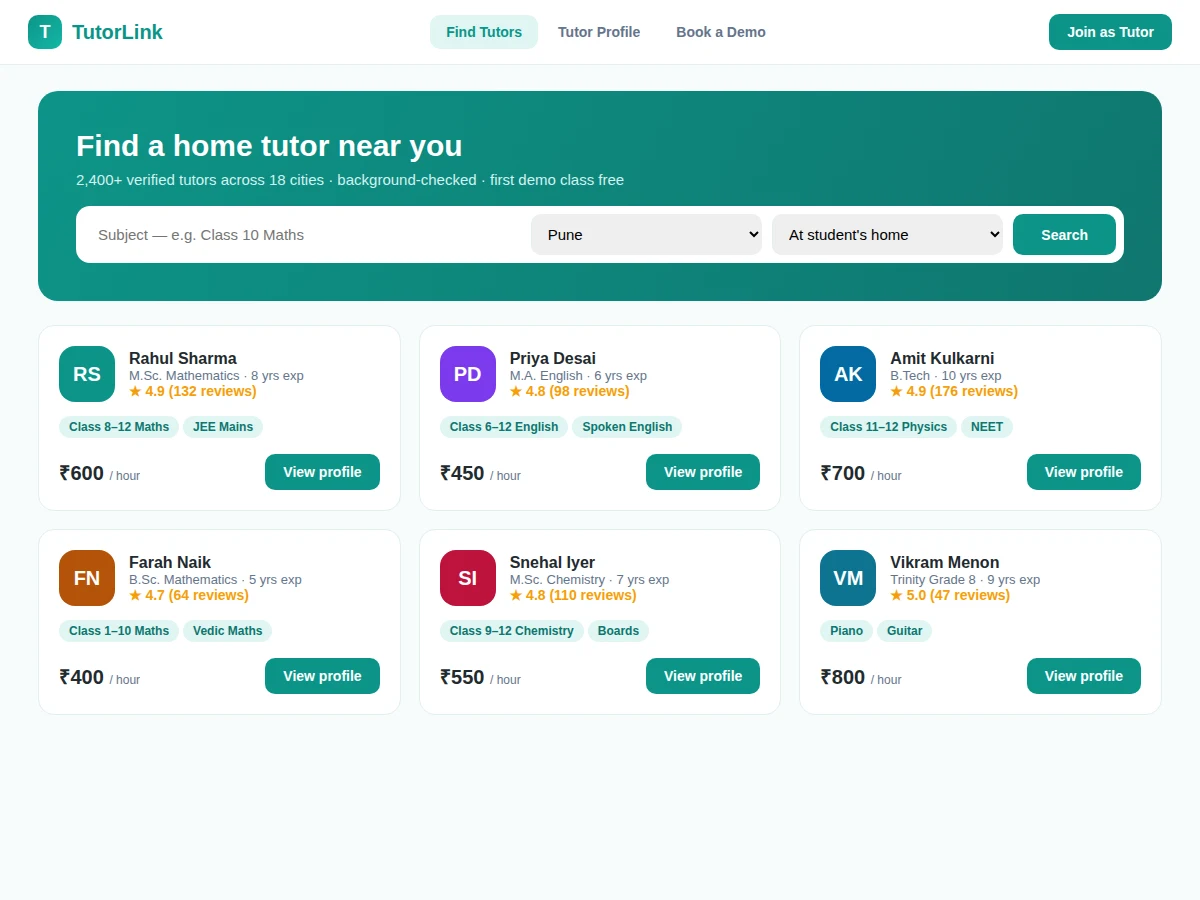
- Parents search by subject, class and locality, and filter by fee, rating and teaching mode.
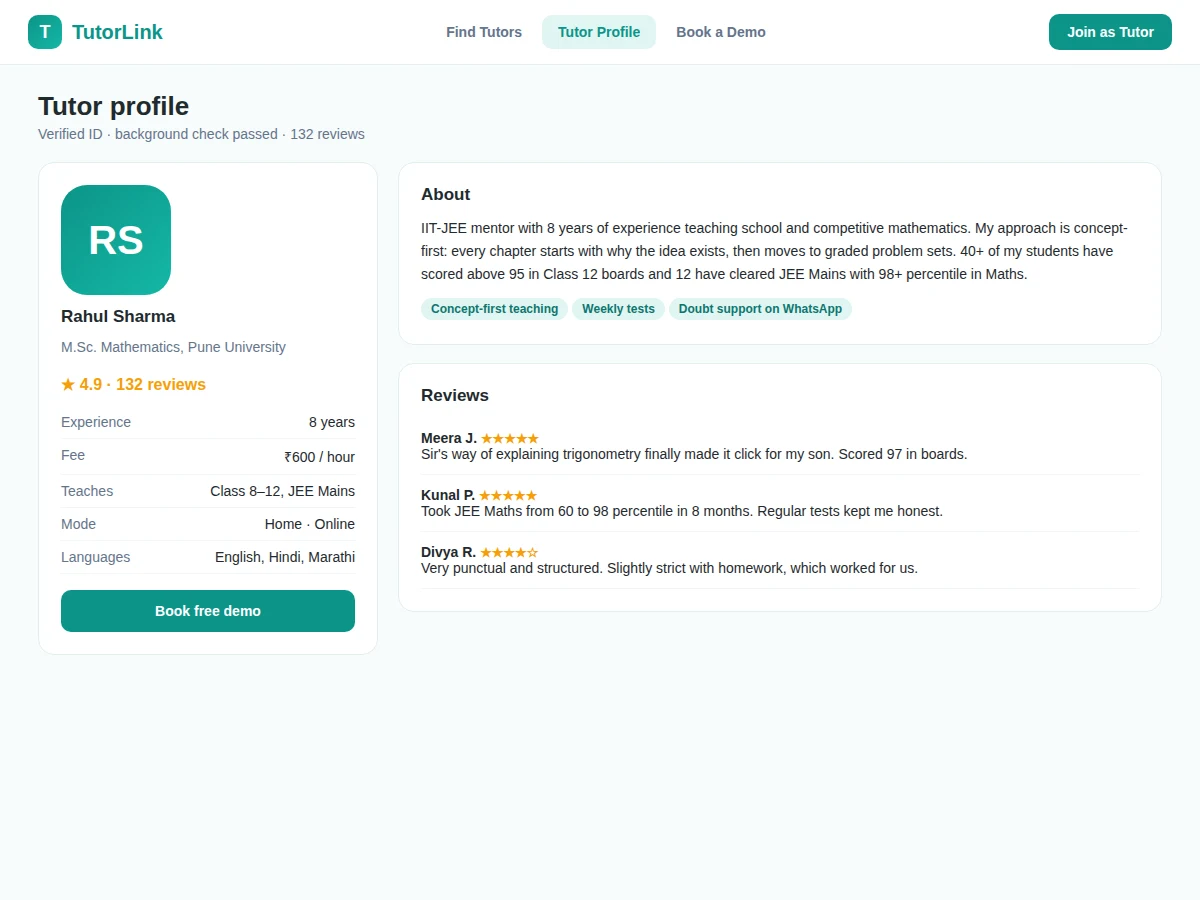
- Opening a profile shows the tutor's background, subjects, fee, reviews and ratings from past students.
- The parent picks preferred days and a time slot and submits a free-demo request with the student's details.
- The tutor confirms (or suggests an alternative slot); both sides receive the booking with a reference number.
- After the demo, the parent can convert to regular classes and later leave a rating and review.
Tech stack:
- Frontend: HTML5, CSS3, JavaScript (responsive)
- Backend: PHP (Laravel) or Node.js + Express
- Database: MySQL (tutors, subjects, bookings, reviews)
- Search: full-text + faceted filtering
- Auth: role-based (parent, tutor, admin)
- Notifications: email/SMS stubs for booking confirmations
- Deployment: shared hosting or VPS
| Parameter | Value |
|---|---|
| Roles | Parent/student, tutor, admin |
| Search filters | 7 (subject, class, locality, fee, rating, mode, gender) |
| Demo booking | Day + time-slot picker with tutor confirmation |
| Verification | Admin document review before activation |
| Reviews | Star rating + written review, verified students only |
| Demo dataset | Approximately 60 tutors, 200 reviews, 120 bookings |
Project features
- [Verified tutor profiles] Qualifications, subjects, classes taught, fees, experience, languages and teaching mode, with ID and background-check badges.
- [Powerful search & filters] Search by subject and class, filter by locality, fee range, rating, gender preference and home/online mode.
- [Ratings & reviews] Star ratings plus written reviews from verified past students, shown on every tutor profile.
- [Free demo booking] Parents pick preferred days and time slots; the tutor confirms and both sides get the booking reference.
- [Tutor dashboard] Manage profile, subjects, availability slots, incoming demo requests and confirmed bookings.
- [Parent dashboard] Upcoming demos, booking history and saved/favourite tutors in one place.
- [Admin verification] New tutor registrations pass an admin review with document checks before profiles go live.
What is included
- Complete web application source code (frontend + backend)
- Database schema with migrations and seeded tutor/review data
- Search, profile, booking and dashboard modules for both sides
- Admin verification queue
- Project report PDF (background, system design, database schema, methodology)
- PPT presentation for final review
- Viva Q&A preparation document (marketplace design, search filtering, booking state machine)
Limitations & prerequisites
- Tutor ID/background verification in the demo is a manual admin step; automated document verification is out of scope.
- Fee payments between parent and tutor are arranged offline — the app books demos and classes but does not process payments.
- Email/SMS booking notifications are implemented as stubs needing the buyer's own gateway credentials.
- The 60-tutor demo dataset is illustrative; a live city launch needs real tutor onboarding.
- Location search is locality-name based; map-radius search is listed in future scope.
Frequently Asked Questions
How does tutor verification work?
Tutors submit ID and qualification documents at registration. An admin reviews them before the profile goes live, and verified profiles carry a badge parents can see.
What does the free demo booking involve?
The parent selects preferred days and a time slot and shares the student's class and topics. The tutor confirms the slot, and both sides get a booking reference — no advance payment.
How do parents judge a tutor before booking?
Profiles show qualifications, experience, subjects, fees, languages, and — most importantly — star ratings and written reviews from verified past students.
Can tutors manage their availability?
Yes — the tutor dashboard has an availability editor for days and time slots, plus incoming demo requests that can be confirmed or rescheduled.
Who handles payments for regular classes?
Parents and tutors settle fees directly. The platform's scope is discovery, verification, demo booking and reviews — payment processing is future scope.
Is this project suitable for a final-year project?
Yes — for Computer Science, IT and Web Development programs. It is a complete two-sided marketplace with search, bookings, reviews and role-based access. Suitable for B.E./B.Tech final-year projects in Computer Science, IT and Web Development.
Components & software requirements
- Frontend: HTML5, CSS3, JavaScript (responsive)
- Backend: PHP (Laravel) or Node.js + Express
- Database: MySQL (tutors, subjects, bookings, reviews)
- Search: full-text + faceted filtering
- Auth: role-based (parent, tutor, admin)
- Notifications: email/SMS stubs for booking confirmations
- Deployment: shared hosting or VPS
Delivery information
Built-to-order project. Delivery timeline is shared after order confirmation based on current queue.
Support terms
Complete documentation, setup guide, and viva preparation included. Support for setup and explanation provided.