
More project photos (2)
The problem
QR codes are everywhere — Wi-Fi sharing, payment counters, event badges, contact exchange — yet the free web generators either watermark the output, upload the data to a server, or cannot read a code back at all. A desktop utility solves all three: everything runs locally, there are no watermarks, and generation and reading live in one tool. QRDesk is that utility. The generator composes payload strings that follow the formats phones actually understand — the WIFI: URI scheme with proper escaping of special characters, vCard 3.0 for contacts, upi://pay intents with payee, amount and note — then encodes them with automatic QR version selection and Reed–Solomon error correction. The reader grabs any screen region or opens an image file and decodes the code inside it with the ZBar decoding engine. Between the two sits a persistent history, so no generated or scanned code is ever lost.
How it works
- The user picks a content type; the form collects the fields and the builder composes the standard payload string — a URL, an escaped WIFI: URI, a vCard 3.0 block, or a upi://pay intent.
- The payload is encoded with the qrcode library: automatic QR version selection (1–40), byte mode, and Reed–Solomon error correction at the chosen level (L, M, Q or H).
- The module matrix is rendered to a Pillow image at the chosen size and colours; the optional centre logo is composited on a white patch covering roughly a fifth of the code width.
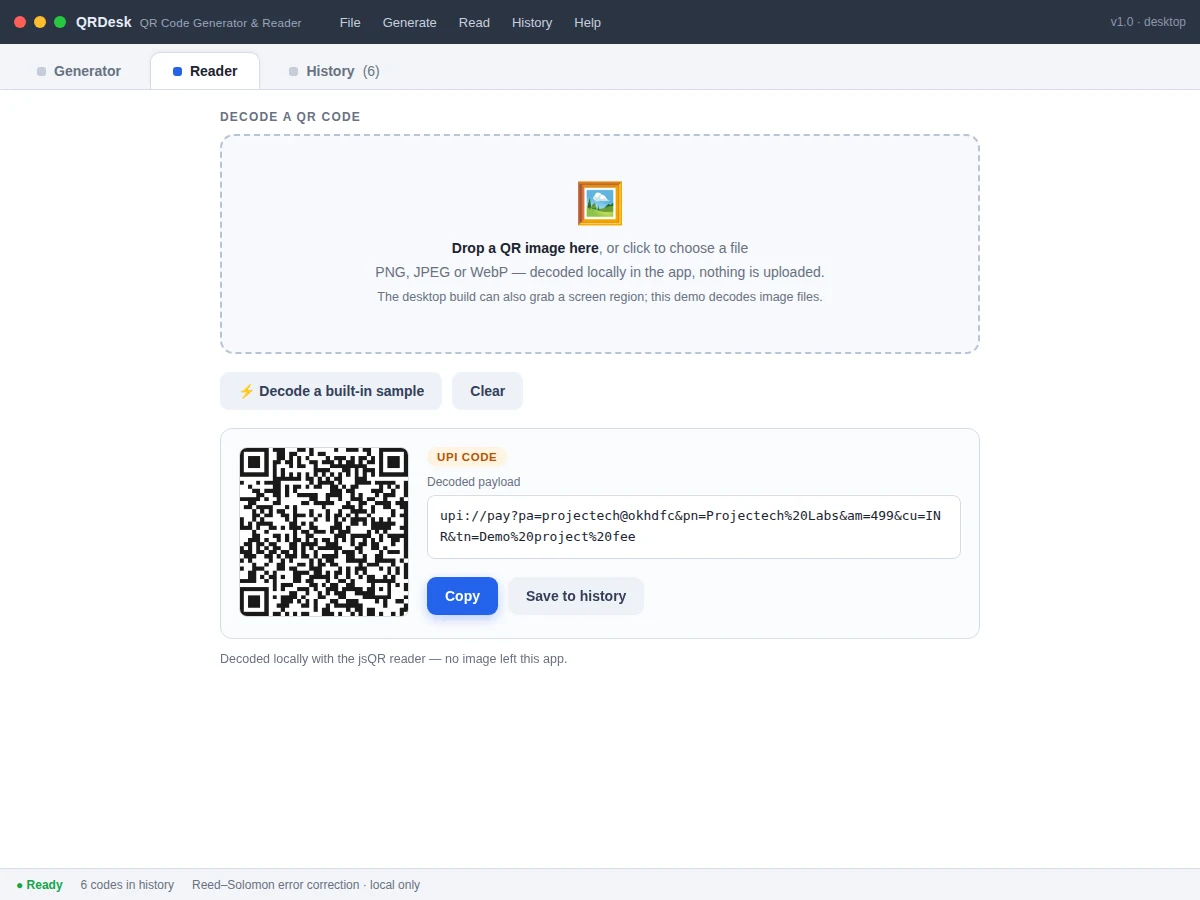
- The reader captures a screen region (mss) or opens an image file, converts it to grayscale, and decodes it with pyzbar (ZBar); the payload is classified and shown with copy, open-link and save actions.
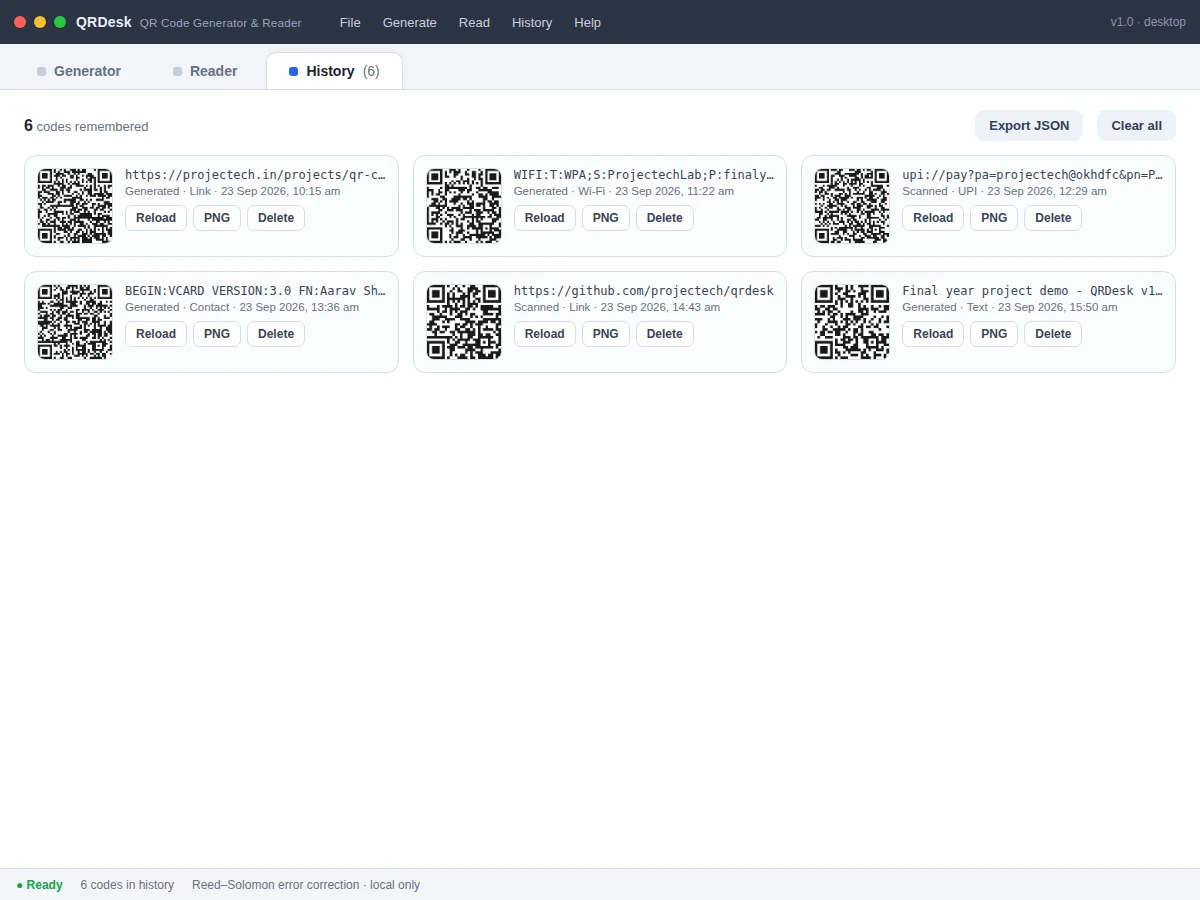
- Every generate and scan event appends to a local JSON history with timestamp, type, payload and a PNG thumbnail, capped at the 60 most recent entries.
- PNG export rasterizes the Pillow image at the selected resolution; SVG export walks the module matrix and emits one rect element per dark module.
Tech stack:
- Python 3.10+
- qrcode · Pillow (generation and rendering)
- pyzbar (ZBar) · OpenCV (decoding)
- Tkinter (native desktop GUI)
- mss (screen-region capture)
- SVG export from the module matrix
- PyInstaller (single-file executable)
- Git
| Parameter | Value |
|---|---|
| QR versions | 1–40 automatic, byte mode, Reed–Solomon EC L/M/Q/H |
| Payload templates | URL, text, Wi-Fi (WPA/WEP/open), vCard 3.0, UPI intent |
| Logo overlay | Centre patch ~20–25% of code width; Q/H correction recommended |
| Reader inputs | Screen-region capture; PNG/JPEG/WebP image files |
| Export | PNG 256–1024 px (expected); vector SVG from module matrix |
| Batch mode | Up to 24 payloads per run (design value) |
| History | 60 most recent entries; local JSON + PNG thumbnails |
| Platforms | Windows 10/11, Linux, macOS (Python 3.10+) |
| Packaged size | Approximately 30–40 MB single-file executable (expected) |
Project features
- [Payload templates] One-click templates for URL, plain text, Wi-Fi credentials, vCard contacts and UPI payment intents. The builder composes standards-compliant strings — escaped WIFI: URIs, vCard 3.0 blocks, upi://pay with payee, amount and note — so phone cameras interpret them correctly.
- [Logo embedding] A centre monogram or logo is composited over the code on a quiet white patch sized to stay within the error-correction budget. The app recommends quartile or high error correction whenever the logo is enabled, keeping the code readable.
- [Batch generation] Paste a list — one payload per line — and generate a full grid of codes in one run, for event badges, inventory labels or table tents, instead of building them one at a time.
- [Screen-region reader] Capture any region of the screen and decode the QR code inside it, or decode from PNG, JPEG and WebP image files. Decoding is fully local; no image ever leaves the machine.
- [Payload classification] Every decoded payload is classified — link, Wi-Fi, contact, UPI payment or plain text — and presented with the right next action: open the link, copy the credentials, or save the contact details.
- [History with reload] Every generated and scanned code is kept with a thumbnail, type, payload and timestamp. Reload any entry back into the generator, export its PNG, or export the whole log as JSON.
- [PNG and SVG export] Raster export at selectable resolution (256–1024 px) plus true vector SVG built directly from the module matrix, so codes stay razor-sharp at print sizes.
- [Custom colours] Ink and paper colours are fully adjustable, with a contrast warning when a combination risks becoming unreadable to scanners.
What is included
- Working QRDesk desktop app (Python source + PyInstaller build script)
- Complete commented source code
- User guide: payload templates, logo vs error-correction trade-offs, screen-region reader, batch mode
- Project report PDF (QR encoding theory, Reed–Solomon error correction, ZBar decoding pipeline)
- PPT presentation for final review
- Viva Q&A preparation document (QR versions, error correction levels, payload formats, image decoding)
Limitations & prerequisites
- Decoding needs a reasonably sharp image: tiny, blurred or heavily obscured codes may not decode — the reader reports "no code found" instead of guessing.
- A centre logo always costs readability; large logos need quartile/high error correction and should be test-scanned with the target phone app before printing.
- Screen-region capture needs OS screen-recording permission on macOS; the user guide covers granting it.
- Whether a scanned Wi-Fi code auto-joins the network depends on the phone's camera app, not on this software.
- No cloud sync: the history lives in a local JSON file on one machine.
Frequently Asked Questions
How is this different from a QR menu or ordering system?
Those are restaurant web applications for table ordering. This is a general-purpose desktop utility for creating QR codes (Wi-Fi, vCard, UPI, links) and reading them back — a different domain and a different build.
Will the embedded logo break scanning?
A logo covers real data modules, so it always costs some readability. The app sizes the logo patch to stay within the error-correction budget and recommends quartile or high correction when the logo is on; the guide shows how to test-scan before printing.
Does it upload my images or payloads anywhere?
No. Generation, reading, history and exports are fully local — the report documents this as a privacy property of the design.
Can it read barcodes as well as QR codes?
The decoding engine (pyzbar/ZBar) supports several 1D formats; this build focuses on QR codes, and the report documents how to enable the others.
Is this project suitable for a final-year project?
Yes — for Computer Science and IT programs. It covers data encoding, Reed–Solomon error-correction coding, image processing for decoding, and desktop GUI design. Suitable for B.E./B.Tech final-year projects in Computer Science and IT.
Components & software requirements
- Python 3.10+
- qrcode · Pillow (generation and rendering)
- pyzbar (ZBar) · OpenCV (decoding)
- Tkinter (native desktop GUI)
- mss (screen-region capture)
- SVG export from the module matrix
- PyInstaller (single-file executable)
- Git
Delivery information
Built-to-order project. Delivery timeline is shared after order confirmation based on current queue.
Support terms
Complete documentation, setup guide, and viva preparation included. Support for setup and explanation provided.