
More project photos (2)
The problem
Houseplant owners most often lose plants to watering mistakes — too much or too little — because every species runs on its own cadence. A snake plant is happy with water every two weeks while a peace lily wants it every five days, and generic to-do apps cannot model per-plant recurrence, distinguish watering from fertilizing and misting, or keep a photographic growth record. Cloud plant apps solve reminders but demand accounts, subscriptions and connectivity for what is fundamentally a personal on-device checklist. This project builds SproutCare: an offline-first Android app where each plant gets its own care schedule (watering, fertilizing, misting) with local notifications, a permanent care-history log, and a dated growth-photo timeline with height and leaf milestones. Everything persists in a local Room database — no sign-up, no server, no internet needed. Because it is built in the open with standard Android tooling (Kotlin, Room, AlarmManager, CameraX), the student can genuinely explain every part of the app in the viva.
The user who adds plants, completes care events and photographs growth.
Follow the working sequence
How it works
- The student adds each plant with its species, room location and watering, fertilizing and misting intervals — from built-in care defaults or fully custom values.
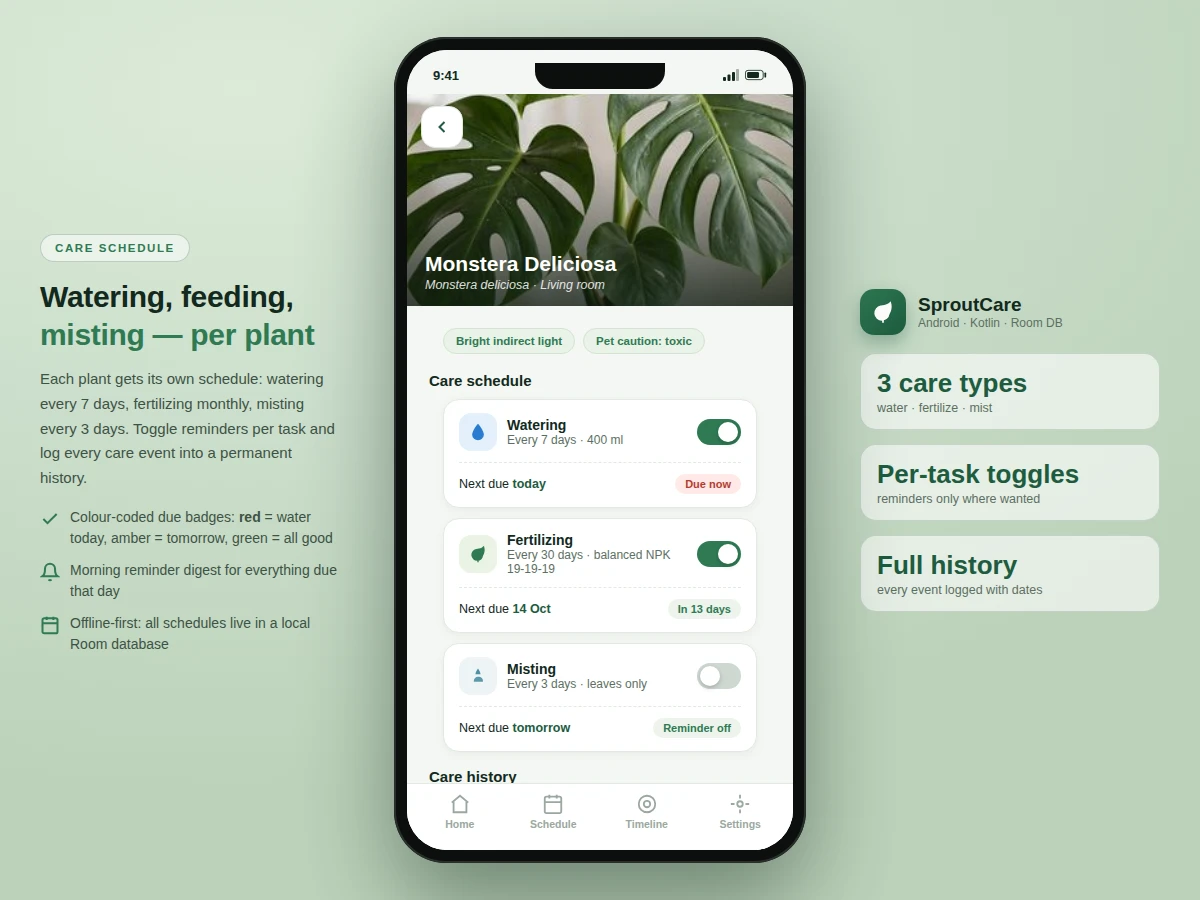
- A ScheduleEngine converts each interval into a next-due date from the last completed event and registers exact alarms with AlarmManager.
- At the scheduled time a notification fires on the matching channel (watering, fertilizing or misting); the user marks it done, snoozes or skips from the notification or the app.
- Every action writes a CareEvent row into the Room database with a timestamp, building a permanent, exportable care history.
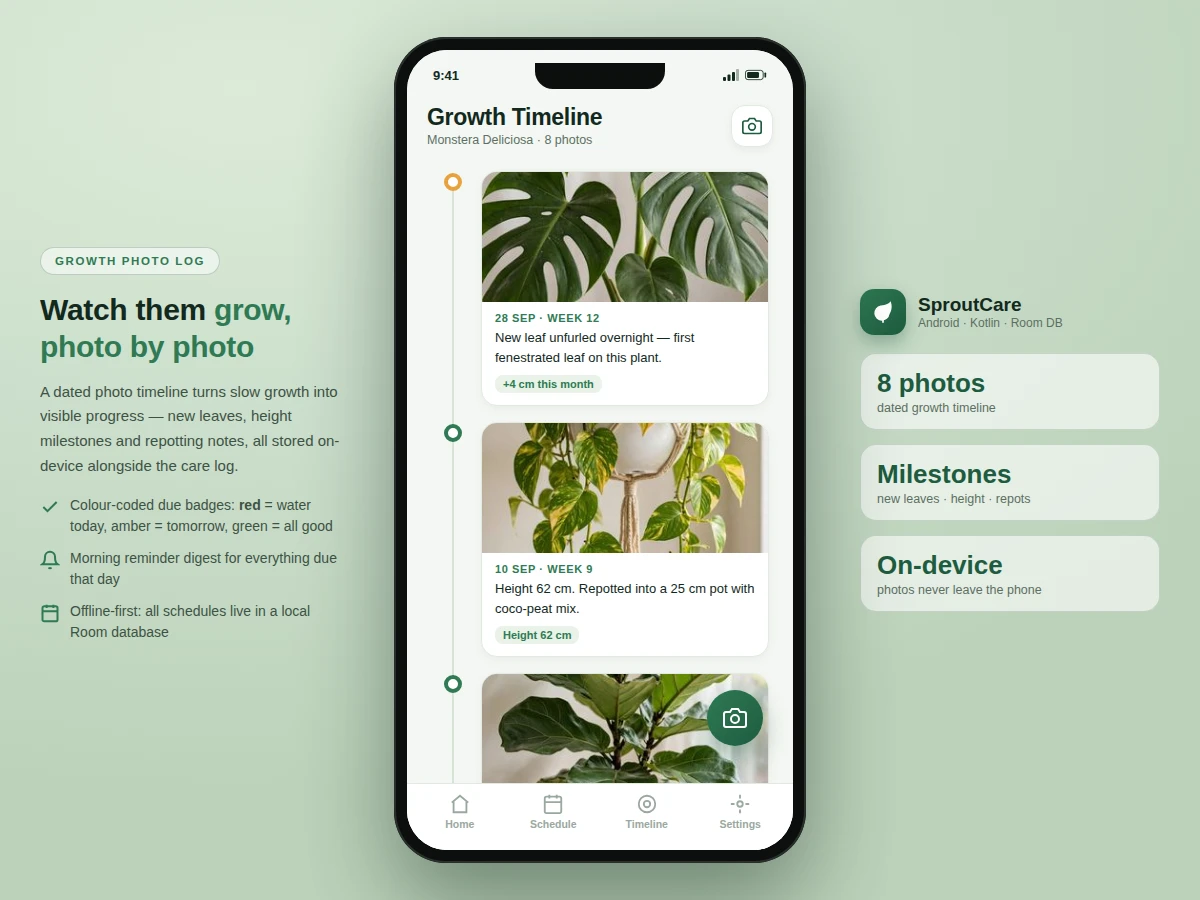
- Growth photos captured with CameraX are stored in app-private storage and appear on the plant's dated timeline with milestone notes.
- On device reboot, a BOOT_COMPLETED receiver re-registers all pending alarms, so no schedule is ever silently lost.
Tech stack:
- Kotlin
- Android SDK (API 26+)
- Room persistence library
- AlarmManager + NotificationCompat channels
- CameraX
- Material 3 (Material Design)
- WorkManager (deferred tasks)
- Coil image loading
| Parameter | Value |
|---|---|
| Minimum Android version | Android 8.0 (API 26) |
| Installed app size | Approximately 60 MB (design target) |
| Database | Room — 4 entities: Plant, CareSchedule, CareEvent, PhotoEntry |
| Reminder mechanism | Exact alarms via AlarmManager; re-registered on boot (design behavior) |
| Photo storage | App-private JPEG, approximately 1–2 MB per photo (expected) |
| Backup | Local JSON export/import; no cloud account |
| Offline operation | 100% — no internet required after install |
| Notification channels | 3 (watering · fertilizing · misting) |
Project features
- [Per-plant care schedules] Each plant gets independent watering, fertilizing and misting schedules with custom intervals, amounts and notes — e.g. Monstera every 7 days / 400 ml, Snake Plant every 14 days. Built-in defaults cover common houseplants and every value is editable.
- [Reliable offline reminders] Exact alarms via AlarmManager with per-care-type notification channels. Reminders survive reboots through a BOOT_COMPLETED receiver and fire without any internet connection.
- [Care history log] Every completed, skipped or snoozed event is stored with a timestamp, so the owner sees at a glance which plants are neglected and which are on track.
- [Growth photo timeline] CameraX capture with on-device JPEG storage and a dated timeline per plant, with milestone markers for new leaves, height measurements and repotting notes.
- [Offline-first Room database] Plants, schedules, events and photo references all persist locally in Room; an optional JSON export/import covers backup and moving to a new phone.
- [Per-task reminder toggles] Notifications switch on or off per care type — keep watering reminders on while silencing misting alerts for low-maintenance plants.
- [Material 3 home dashboard] A glanceable garden grid with colour-coded due badges (today / tomorrow / on track) and a morning digest card listing everything due that day.
What is included
- Complete Kotlin source code (MVVM architecture, Room, CameraX, AlarmManager reminders)
- Installable debug APK with 6 example plants and realistic schedules pre-loaded
- Project report PDF (architecture, database schema, scheduling logic, testing notes)
- PPT presentation for the final review
- Viva Q&A preparation document (Room, AlarmManager, notification channels, CameraX, MVVM)
- User manual: adding plants, editing schedules, logging care, exporting data
Limitations & prerequisites
- Reminder punctuality depends on the device's battery-optimization settings — aggressive OEM battery savers can delay exact alarms; the report documents the whitelisting step to run during setup.
- No cloud sync: data lives on one device; switching phones requires the JSON export/import flow.
- Care intervals are schedule-based, not sensor-based — the app does not measure soil moisture or light.
- Photo timeline quality depends on the device camera; no plant identification or disease diagnosis is included (listed as future scope).
- Tested against the built-to-order target devices; behaviour on heavily skinned OEM Android builds may vary slightly.
Frequently Asked Questions
How do the reminders work without internet?
All scheduling is on-device. The app computes each plant's next-due date from its interval and last completed event, registers exact alarms with Android's AlarmManager, and re-registers them after every reboot through a BOOT_COMPLETED receiver. Notifications use standard Android channels, one per care type. Nothing leaves the phone and no server is involved at any point.
Where is the data stored?
Everything lives in a local Room database: plants, schedules, the care-event history and references to photos. Photos are stored as JPEGs in app-private storage. There are no accounts, no backend and no tracking. A JSON export/import covers backup and moving to a new phone.
Can I change the schedule for each plant?
Yes — that is the core idea. Each plant carries independent watering, fertilizing and misting intervals, amounts and reminder toggles. Built-in defaults cover common houseplants (snake plant 14 days, peace lily 5 days) and every value is editable per plant.
Does it identify plants or diagnose diseases?
No — this is a schedule-and-reminder app, not a vision app. It does not claim plant identification or disease detection; those would need a trained model and a labeled dataset, which are documented as future scope, not shipped features.
Is this project suitable for a final-year project?
Yes — for Computer Science, IT and Android-focused programs. It demonstrates real on-device database design, background scheduling with AlarmManager, camera integration, notification channels and a Material 3 UI in one coherent, explainable app. Suitable for B.E./B.Tech final-year projects in Computer Science, IT and mobile application development.
Components & software requirements
- Kotlin
- Android SDK (API 26+)
- Room persistence library
- AlarmManager + NotificationCompat channels
- CameraX
- Material 3 (Material Design)
- WorkManager (deferred tasks)
- Coil image loading
Delivery information
Built-to-order project. Delivery timeline is shared after order confirmation based on current queue.
Support terms
Complete documentation, setup guide, and viva preparation included. Support for setup and explanation provided.
Download free synopsis (PDF)
Enter your name and email — the synopsis PDF downloads immediately. We may send occasional project updates; no spam, unsubscribe anytime.