
More project photos (2)
The problem
College students who want to study in groups fall back on scattered messenger chats and word of mouth: one chat for planning, another for notes, and session timings buried under hundreds of unrelated messages. Finding the right study partners — the same subject, a similar level, compatible timings — becomes luck rather than design, and planned sessions quietly die because nobody sends a reminder. The result is that group study, one of the most effective exam-prep methods, stays disorganized for most students. This project builds StudyCircle, an Android app that treats study groups as first-class citizens. Students create profiles with their subjects, skill levels, college and weekly availability. A rule-based matching engine scores every open group and surfaces the best fits as a ranked list with match percentages. Each group gets its own session scheduler — topic, date, time and venue — with local reminders, plus a dedicated chat thread so planning and discussion stay in one place. Everything is local-first: profiles, groups, sessions and chat work fully offline, with cloud sync designed as an optional extension.
Creates a profile with subjects, skill levels and availability, then joins groups.
Follow the working sequence
How it works
- The student creates a profile: name, college, subjects with a skill level for each, and weekly availability slots.
- The matching engine scores every open group — points for shared subjects, closer skill levels and overlapping availability — and ranks them by match percentage.
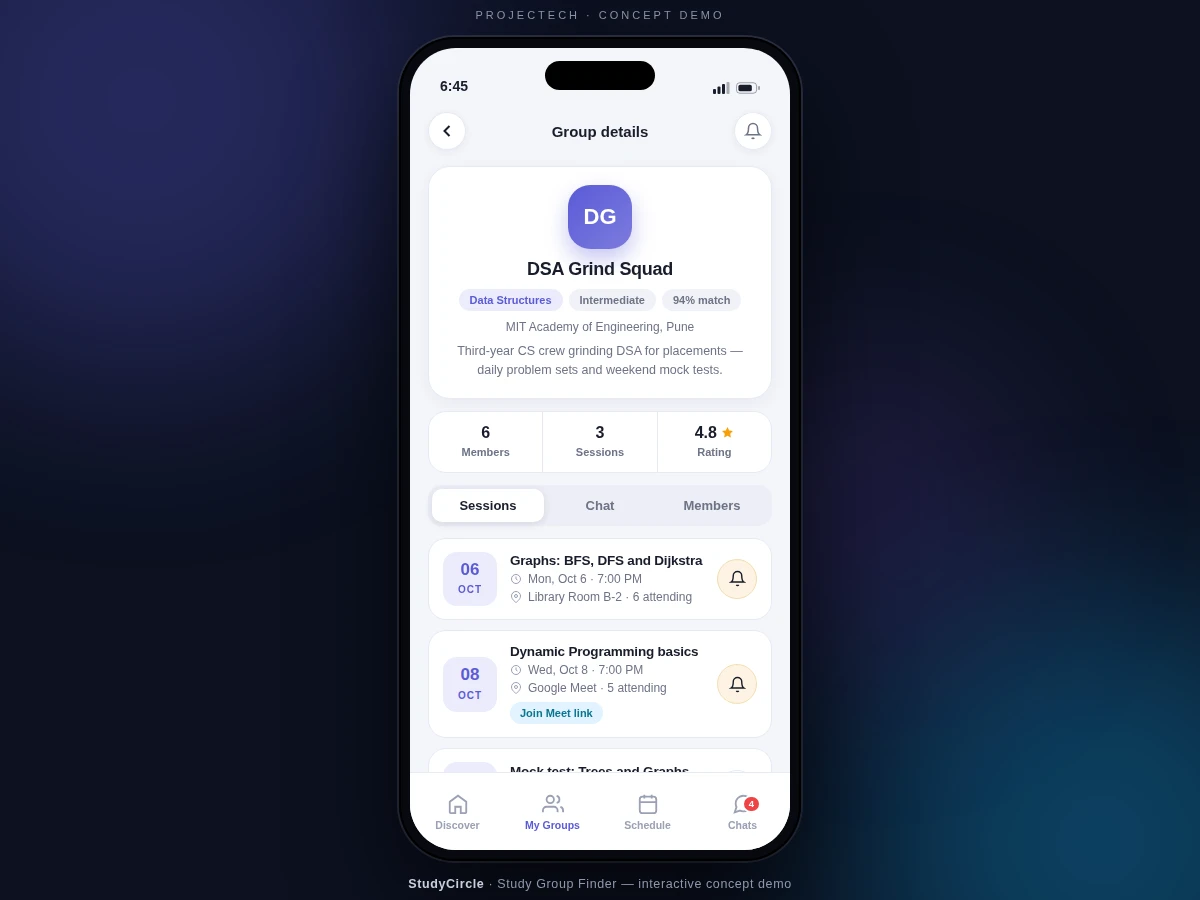
- The student filters by subject, level or college, opens a group to see its members, sessions and description, and taps Join.
- Any member schedules a session with a topic, date, time and venue or meet link; it appears on every member's Schedule screen.
- WorkManager fires a local notification before each session at the member's chosen lead time (default 15 minutes).
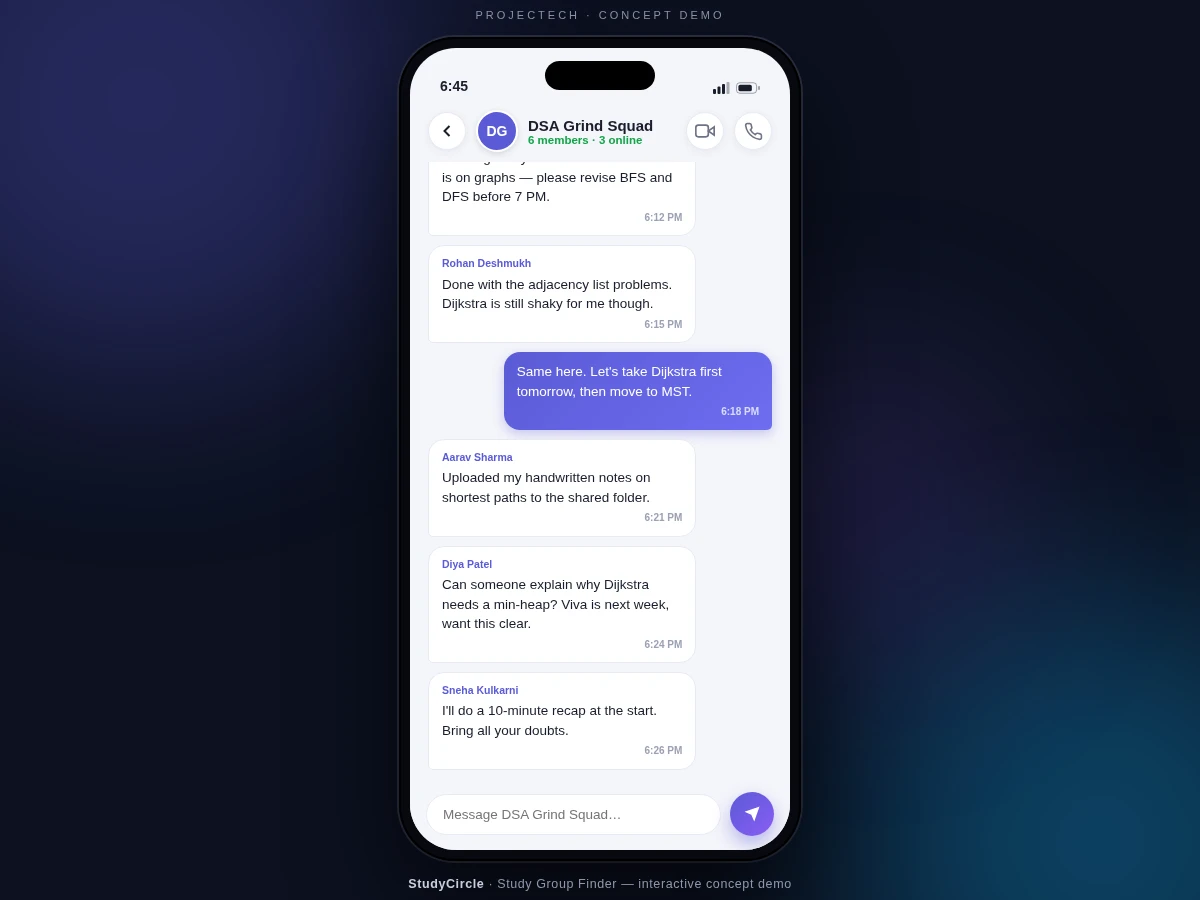
- Members coordinate in the group's chat thread; messages are stored locally in the Room database, newest first.
- The group admin (the creator) manages the member list and can edit or cancel sessions.
Tech stack:
- Kotlin
- Android SDK · Jetpack
- Room database
- WorkManager
- Material 3 UI components
- Navigation Component
- Gradle build system
- Git
| Parameter | Value |
|---|---|
| Minimum Android version | Android 8.0 (API 26) and above (design target) |
| Language | Kotlin |
| Installed app size | Approximately 12–18 MB (expected) |
| RAM | Approximately 2 GB minimum (expected) |
| Local database | Room (SQLite); approximately 5–10 MB for a year of typical use (expected) |
| Reminder lead time | Configurable 5–60 minutes; default 15 minutes |
| Default group capacity | 20 members (configurable) |
| Matching | Deterministic rule-based scoring formula |
| Chat history | Stored locally on device, newest first (design target) |
Project features
- [Student Profiles] Each student builds a profile with subjects, a per-subject skill level, college and weekly availability — the raw material the matching engine ranks every group against.
- [Rule-Based Subject Matching] Every open group is scored on shared subjects, level proximity and availability overlap, then ranked with a visible match percentage. The scoring is a deterministic, explainable formula with no black-box components, so the logic is fully viva-defensible.
- [Group Discovery and One-Tap Join] Browse and filter groups by subject, level and college; joining updates the member count and capacity bar instantly.
- [Session Scheduling with Reminders] Any member can schedule a session with a topic, date, time and venue or meet link; each session carries a toggleable local reminder fired through Android's WorkManager.
- [In-App Group Chat] Every group gets its own chat thread with sender names, timestamps and locally stored history — planning and discussion stay inside the app instead of scattering across messengers.
- [Create Your Own Group] Start a group in seconds: name, subject, level, member cap and meeting mode (in-person, online or both); it becomes discoverable to matching students immediately.
- [Unified Schedule View] All upcoming sessions across joined groups appear in one chronological schedule, so clashing timings are visible at a glance.
Optional customization (developed on request, not in the base build): Firebase real-time sync of groups and chat, Google sign-in, FCM push notifications, admin web panel.
What is included
- Complete Android source code in Kotlin
- Room database schema with seed data (sample students, groups, sessions)
- Matching-algorithm explanation document with the scoring formula worked through
- Step-by-step build and setup guide for Android Studio
- Debug APK for on-device demonstration
- Project report PDF (background, design, methodology, screens)
- PPT presentation for final review
- Viva Q&A preparation document
Limitations & prerequisites
- Groups, sessions and chat are local-first: without the optional Firebase backend, data does not sync across devices.
- The match score is a rule-based heuristic over subjects, levels and availability — it cannot infer latent preferences the way a learned system might.
- Reminder delivery timing depends on the device's battery-optimization settings; aggressive power savers can delay local notifications.
- Capacity limits and chat-history retention are configurable defaults, not stress-tested at large scale.
- The UI targets phones; tablet and landscape layouts are not part of the base build.
- The demo ships with sample student profiles — no real user data is included.
Frequently Asked Questions
Is this project suitable for a final-year project?
Yes. It suits Computer Science, IT and Computer Applications programs, demonstrating mobile UI design with Material 3, local database modeling with Room, a deterministic matching algorithm, background scheduling with WorkManager and chat UX — a complete, explainable system with plenty of viva depth.
Can this project be customized?
Yes. Common extensions include Firebase real-time sync so groups work across devices, Google sign-in, FCM push notifications, an admin web panel, per-session attendance tracking, and subject packs for other branches such as mechanical or E&TC. Colleges can also request their own branding and a custom subject list.
What is the main technology used?
Kotlin on Android with Jetpack libraries: Room for the local database, WorkManager for session reminders, Navigation Component for screen flow, and Material 3 for the UI. Matching is a deterministic scoring function with no black-box components, so every recommendation the app shows is fully explainable.
Does the app work without internet?
Yes. Profiles, group discovery, joining, session scheduling, reminders and chat are all local-first and work fully offline on the device. Internet is only needed for the optional cloud-sync extension, which is quoted as a separate customization — the base build never depends on it.
What are the main limitations?
Data stays on the device in the base build, so there is no cross-device sync; matching is rule-based rather than learned; reminder timing can vary with battery-optimization settings; and the UI is phone-only. Each point is documented in detail under Limitations.
What will I receive with the project?
The complete Kotlin source, Room schema with seed data, the matching-algorithm document, an Android Studio setup guide, a debug APK, the project report PDF, a review PPT and a viva Q&A document — everything needed to build, demo and defend the project.
Components & software requirements
- Kotlin
- Android SDK · Jetpack
- Room database
- WorkManager
- Material 3 UI components
- Navigation Component
- Gradle build system
- Git
Delivery information
Built-to-order project. Delivery timeline is shared after order confirmation based on current queue.
Support terms
Complete documentation, setup guide, and viva preparation included. Support for setup and explanation provided.
Download free synopsis (PDF)
Enter your name and email — the synopsis PDF downloads immediately. We may send occasional project updates; no spam, unsubscribe anytime.