
More project photos (2)

The problem
Field surveys happen where the network doesn't: farms, construction sites, remote villages. Paper forms get lost and retyped; most mobile form tools assume connectivity and fail gracelessly without it. The hard problems are offline-shaped: records must queue durably on the device, photos must survive app restarts, uploads must resume rather than restart, and when two people edit the same record the system must surface the conflict instead of picking a winner silently. This project builds an Android app around those problems: a form library with per-form progress, structured data entry with GPS tagging and photo capture, on-device validation, and a WorkManager-driven sync queue with retry, resume and conflict flagging.
How it works
- The supervisor assigns survey forms; the app downloads form definitions and any reference data while online.
- In the field the surveyor opens a form and works fully offline — entries save to the on-device Room database instantly.
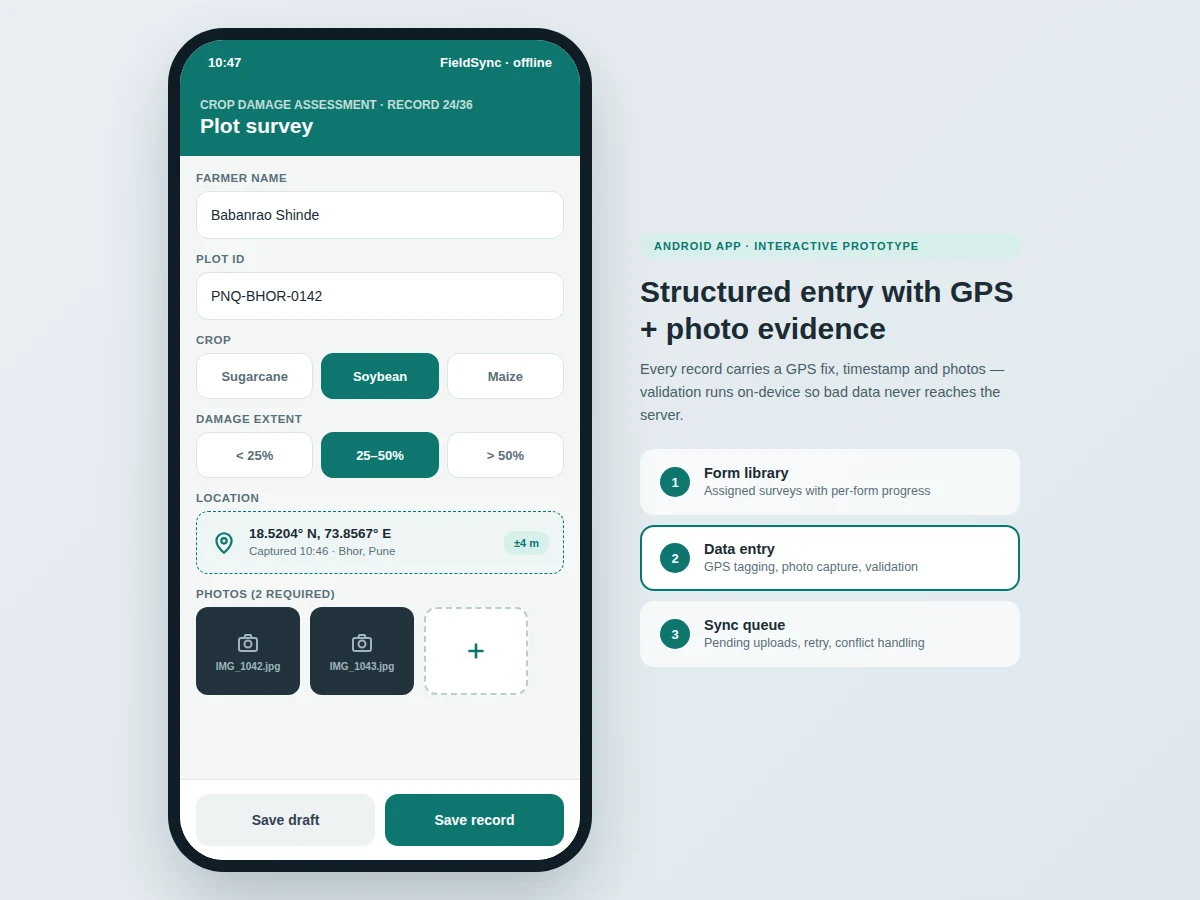
- Each record captures a GPS fix (with accuracy), timestamp and photos alongside the answers.
- Validation runs on save: required fields, numeric ranges and formats are checked before the record is queued.
- WorkManager monitors connectivity and uploads queued records in order when a network appears, with retry and resume.
- The server acknowledges each upload; records the server has changed meanwhile are flagged as conflicts for review.
- The supervisor view shows per-form progress, sync states and flagged conflicts across the team.
Tech stack:
- Kotlin (Android app)
- Room (on-device SQLite database)
- WorkManager (background sync scheduling)
- CameraX (photo capture)
- Fused Location Provider (GPS fixes)
- Retrofit with OkHttp (API sync client)
- Django REST backend (reference server)
- Material 3 UI components
| Parameter | Value |
|---|---|
| Offline operation | Full data entry with zero connectivity (design) |
| Queue durability | Records persist across app restarts (Room/SQLite) |
| GPS accuracy | Typically ±3–5 m open sky (expected; device-dependent) |
| Photo compression | On-device JPEG, configurable quality (design target ~200 KB) |
| Sync retry | Exponential backoff, resume on interruption |
| Conflict policy | Flag for human review, never silent overwrite |
| Min Android version | Android 8.0 (API 26, design target) |
Project features
- [Form library with progress] Assigned surveys list with field counts, per-form completion percentages and resume-from-last-record.
- [Structured data entry] Text, numeric, single/multi-select, date and GPS field types with skip logic between questions.
- [GPS tagging with accuracy] Every record captures latitude, longitude, accuracy radius and timestamp from the fused location provider.
- [Photo capture] Required/optional photo fields with on-device compression; photos are linked to records and survive restarts.
- [On-device validation] Required fields, ranges and formats are validated before save, so bad data never reaches the server.
- [Sync queue with retry] WorkManager uploads records in order with exponential backoff; interrupted uploads resume instead of restarting.
- [Conflict flagging] If the server holds a newer version of a record, the app flags it for human review rather than overwriting either copy.
What is included
- Complete Android app source (Kotlin) with form engine
- Sync engine with queue, retry and conflict handling
- Reference Django REST backend for the viva demo
- Form-definition format documentation and sample surveys
- Supervisor progress views
- Project report PDF (background, offline-first design, sync protocol, methodology)
- PPT presentation for final review
- Viva Q&A preparation document (Room, WorkManager, location APIs, conflict resolution)
Limitations & prerequisites
- GPS accuracy degrades indoors and under dense cover; the app records the accuracy radius honestly with every fix.
- Very large photo sets can fill device storage; the app warns at configurable thresholds.
- Conflict resolution is manual review — no automatic merge of conflicting records.
- The reference backend is a demo server; production needs the buyer's own hosting.
- Background sync is subject to Android battery-optimization policies on some OEM skins.
Frequently Asked Questions
How does it work with no network at all?
Everything — forms, entry, GPS, photos, validation — runs against the on-device database. Uploads simply wait in the queue until connectivity returns.
What happens if the app is killed mid-upload?
Uploads are chunked and acknowledged; WorkManager resumes from the last acknowledged point instead of restarting the record.
How are conflicts handled?
If the server version of a record is newer than the queued one, both are kept and the record is flagged in the queue for a human to review — nothing is silently overwritten.
How accurate is the GPS tagging?
Typically ±3–5 meters in open sky on modern phones; the exact accuracy radius is stored with every fix so the data is honest about its own precision.
Can the supervisor see team progress?
Yes — per-form completion counts, sync states and flagged conflicts are visible per surveyor in the supervisor view.
Is this project suitable for a final-year project?
Yes — for Computer Science, IT and Android programs. Offline-first architecture, background sync and conflict handling are genuinely hard problems done well. Suitable for B.E./B.Tech final-year projects in Computer Science, IT and Android development.
Components & software requirements
- Kotlin (Android app)
- Room (on-device SQLite database)
- WorkManager (background sync scheduling)
- CameraX (photo capture)
- Fused Location Provider (GPS fixes)
- Retrofit with OkHttp (API sync client)
- Django REST backend (reference server)
- Material 3 UI components
Delivery information
Built-to-order project. Delivery timeline is shared after order confirmation based on current queue.
Support terms
Complete documentation, setup guide, and viva preparation included. Support for setup and explanation provided.