
More project photos (2)
The problem
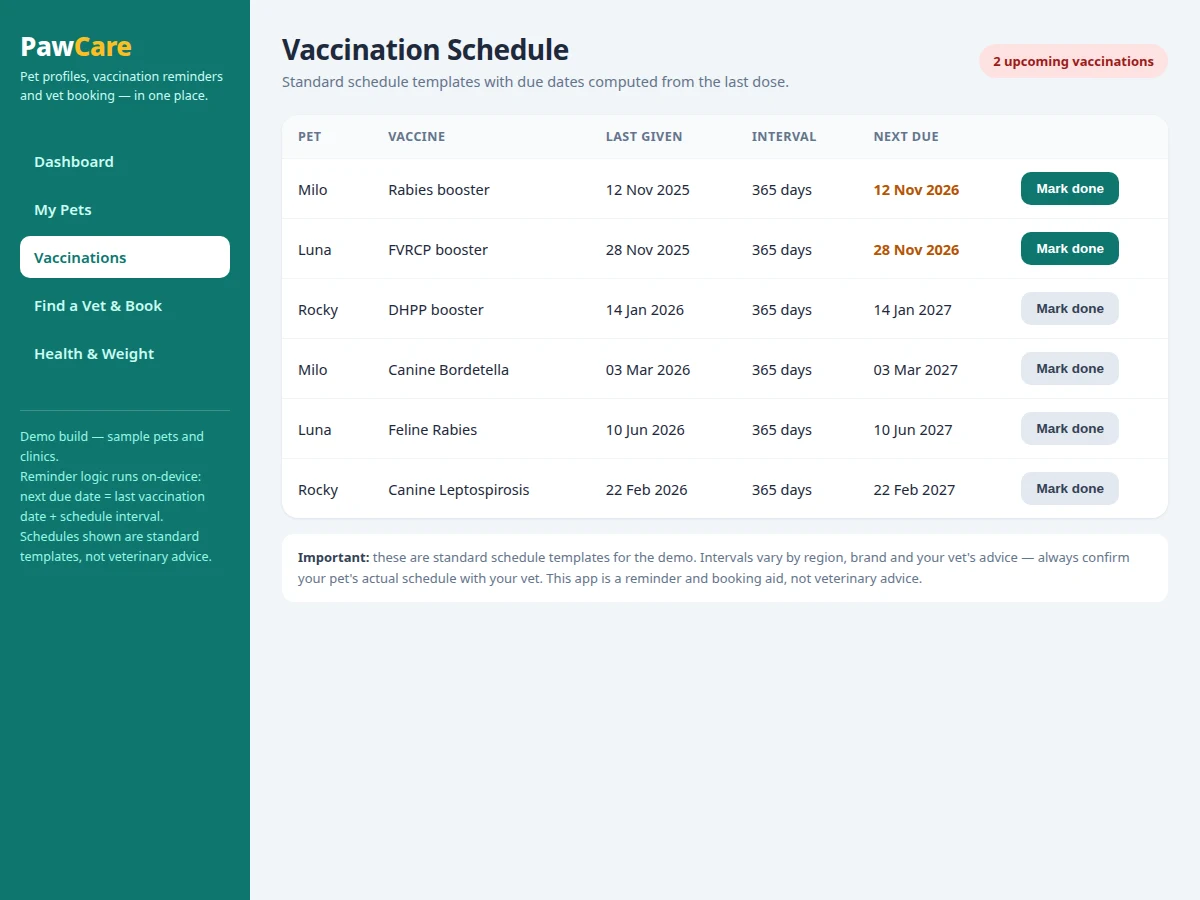
Pet owners miss vaccinations and vet visits not because they do not care, but because the dates live in scattered places: a paper card at home, a message thread with the clinic, and memory. This app keeps all of that in one place, so nothing depends on remembering a date months ahead. Owners record each pet once, with species, breed, age and weight, and the app tracks that pet's vaccination schedule from templates. Each template carries an interval in days, and the app adds that interval to the last vaccination date to produce the next due date, then reminds the owner 3 days before it (design target). When a visit is needed, the owner picks a clinic from the vet directory and books a time slot. Health notes and weight entries sit beside the same pet record, so the owner and the vet see one continuous history.
This is a built-to-order software project: the Android app, demo build with sample pets and clinics, and the complete viva kit (report, PPT, Q&A) are prepared fresh for you.
The Problem
A missed booster is rarely a deliberate choice: immunity lapses quietly, a puppy's second round slips past its window, and a vet visit gets postponed because booking meant finding the clinic's number, calling during working hours, and hoping a slot was free. The Pet Care Android App with Vaccination Reminders and Vet Appointment Booking answers that gap by turning scattered dates into one managed routine. Each pet's vaccination schedule is computed from its last vaccination date plus a template interval, a reminder fires 3 days before the due date (design target), and the same record that holds the pet's species, breed, age and weight also carries the clinic booking that closes the loop. Without that loop, owners juggle paper cards, clinic messages and memory — and the pet, which cannot remind anyone itself, is the one left unprotected when a date slips.
Creates a pet profile and books vet visits.
Follow the working sequence
How it works
The app works end to end in one loop: pet profile, schedule, reminder, booking. First the owner creates a pet profile with species, breed, age and weight, and the app stores it as one record in the on-device database. Next the owner attaches vaccination templates to that pet — for example a rabies template with a 365-day interval — and the app computes each next due date by adding the interval to the last vaccination date. As a due date approaches, the app raises a reminder 3 days before it (design target), so the owner has time to act rather than discovering a missed booster. The owner then opens the vet directory, picks a clinic, and books an available slot for that pet. After the visit, the owner marks the vaccination done, which recomputes the next due date, and adds a health note or weight entry to the same pet record. The loop then repeats for the next due date.
- The owner creates a pet profile with species, breed, age and weight; it is saved as one Room database record.
- The owner attaches vaccination templates to that pet; each template carries an interval in days (for example 365 days for rabies in the demo).
- The app computes each next due date as last vaccination date plus the template interval, and schedules a reminder 3 days before it (design target).
- The reminder fires on-device, and the dashboard surfaces the due vaccination under upcoming care.
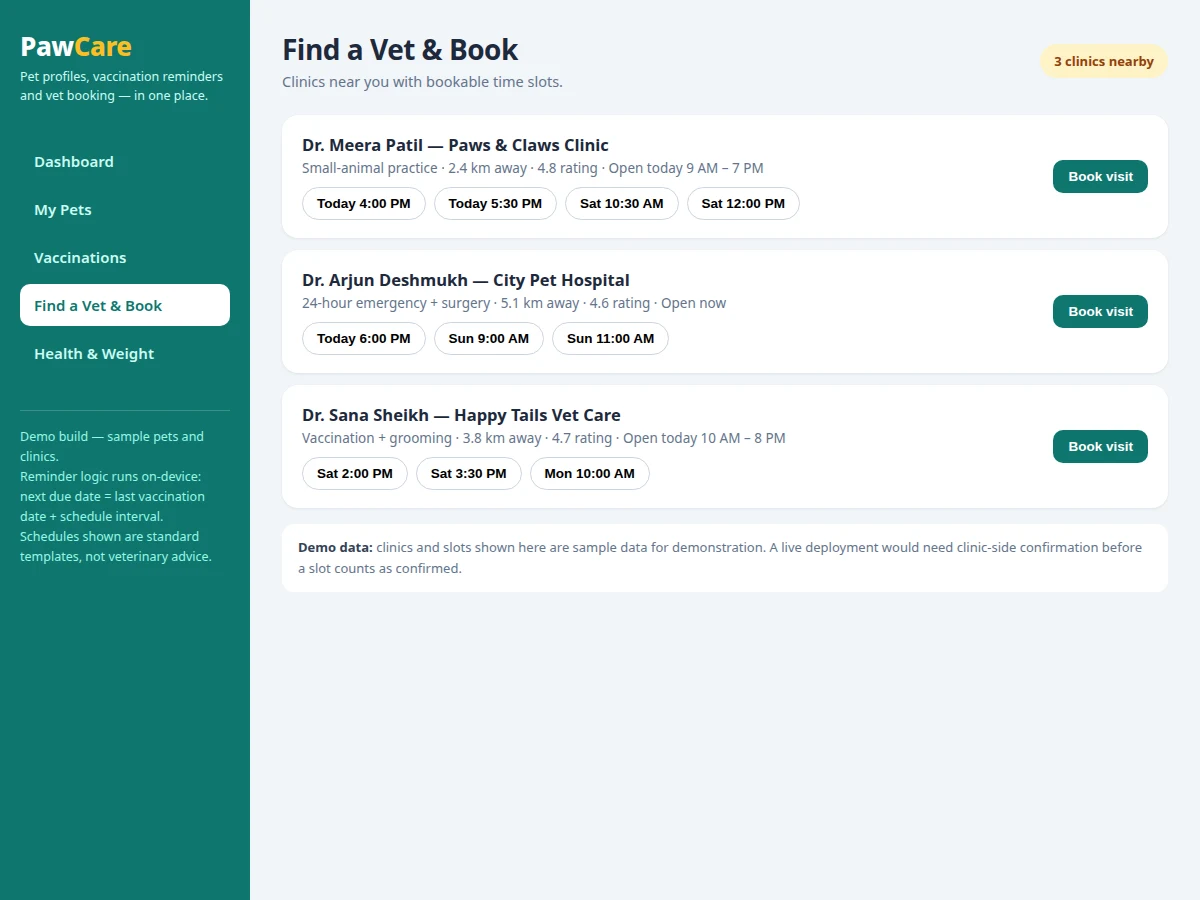
- The owner opens the vet directory, compares clinics by distance and hours, and books an available slot for that pet.
- The booking appears under upcoming care with clinic, date and time.
- After the visit, the owner marks the vaccination done; the app recomputes the next due date from the new date.
- The owner adds a health note or a weight entry in kilograms to the same pet record, closing the loop until the next due date.
Tech stack:
- Kotlin
- Jetpack Compose
- Room · SQLite
- WorkManager · AlarmManager
- Material Design 3
- Android Studio · Gradle
- Kotlin Coroutines · Flow
- JUnit · Espresso
| Parameter | Value |
|---|---|
| Platform | Android 8.0 or later (design target: minimum SDK 26) |
| Demo screens | 5 screens (counted in the demo build) |
| Demo seed data | 3 pets · 6 vaccination templates · 3 clinics (demo seed counts) |
| Reminder lead time | 3 days before due date (design target) |
| Rabies template interval | 365 days (template value in the demo) |
| Weight unit | Kilograms (kg) |
| Local storage | Room database (SQLite) on the device |
| Booking slots in demo | Sample slots (demo data; live confirmation needed in deployment) |
| Reminder scheduling | WorkManager · AlarmManager on-device (design target) |
Project features
The app's strongest capabilities are its pet profiles, its vaccination reminders, its vet booking, and its health record. Pet profiles hold species, breed, age and weight for each animal, so every reminder, appointment and weight entry belongs to the right pet. Vaccination reminders are computed, not typed in: each standard schedule template carries an interval in days, the app adds it to the last vaccination date, and a reminder fires 3 days before the due date (design target). Vet booking turns a directory of clinics into action — the owner sees distance, hours and open slots, then books a time without a phone call. Health records and the weight log sit alongside these, giving each pet a simple history of notes and weight entries in kilograms. Together these four capabilities cover the daily reality of pet care: know the pet, know the next date, book the visit, and keep the record.
- [Pet Profiles — Implemented] One profile per pet with species, breed, age and weight, plus the last vet visit date. Every vaccination, appointment and weight entry points at the same pet record.
- [Vaccination Schedule Templates — Implemented] Standard schedule templates (for example rabies, DHPP and FVRCP) attach to a pet, each carrying an interval in days. Templates are starting points for the owner to confirm with their vet, not veterinary advice.
- [Due-Date Reminders — Implemented] The next due date is computed as last vaccination date plus the template interval in days, and a reminder is scheduled 3 days before it (design target) using on-device scheduling.
- [Vet Directory and Slot Booking — Implemented] Clinics are listed with distance, hours and bookable time slots; the owner selects a slot and books it for a chosen pet, and the booking appears under upcoming care.
- [Upcoming-Care Dashboard — Implemented] One screen shows pets, upcoming vaccinations and the next appointment together, so the owner sees what needs attention without opening four screens.
- [Health Records and Weight Log — Implemented] Dated health notes and weight entries in kilograms are kept per pet, with a simple weight trend over the logged months.
- [Appointment Management — Implemented] Booked appointments are listed with clinic, date and time, and can be viewed alongside upcoming vaccinations for the same pet.
- [Offline-First Local Storage — Implemented] All pet, vaccination, appointment and health records live in the on-device Room database, so core screens work without a network connection.
Optional customizations (not in the base build): cloud backup and sync across devices, a clinic-side panel for managing slots, multi-owner sharing for one pet, and extra pet fields such as microchip number. Future scope (not in the base build): medication reminders, a vet-side appointment confirmation flow, and weight-trend insights such as steady gain or loss alerts.
What is included
- Complete Android source code (Kotlin, Jetpack Compose, Room database)
- Working demo build with 3 sample pets, 6 vaccination templates and 3 sample clinics (demo seed counts)
- Setup instructions for building and installing the app
- Project report PDF (background, problem, methodology, data model, reminder computation, booking flow)
- PPT presentation for final review
- Viva Q&A preparation document (Room persistence, Compose state, on-device scheduling, booking flow)
Limitations & prerequisites
- Vaccination schedules shown are standard schedule templates for the demo, not veterinary advice; intervals vary by region, vaccine brand and the pet's own vet, and must be confirmed with that vet.
- The app is a reminder and booking aid only: it does not diagnose, treat or advise on any animal's health, and it is not a replacement for professional veterinary care.
- Booking slots in the demo are sample data, not live clinic availability; a deployed version needs clinic-side confirmation before a slot counts as confirmed.
- Reminders depend on the device's notification permission and battery-optimization settings, so exact delivery timing is not guaranteed on every device.
- Weight entries are typed in by the owner in kilograms with no connected scale, so the trend is only as regular as the entries.
- The base build stores records on one device only with no cloud sync; records are lost if app data is cleared without a backup, and sync is an optional customization.
Frequently Asked Questions
Is this project suitable for a final-year project?
Yes. This project suits Computer Science, IT and Mobile Application Development students because it covers a complete Android build: a Room data model, Compose screens, on-device reminder scheduling, and a booking flow. It also gives a clear demonstration story — one pet record flowing through profiles, reminders and booking — that is easy to explain and extend. The report documents each layer separately, so viva questions on persistence, UI state and scheduling each have a concrete answer in the student's own build.
Are the vaccination schedules veterinary advice?
No. The vaccination schedules in this app are standard schedule templates for demonstration, and the app is a reminder and booking aid, not veterinary advice. Intervals vary by region, vaccine brand and your vet's judgement, so every schedule must be confirmed with the pet's own vet before it is relied on. The app and the demo build both carry this disclaimer on the vaccination screen itself.
Does the app work without internet?
Mostly yes. Pet profiles, vaccination schedules, reminders, health notes and the weight log all run from the on-device Room database, so they work without a network connection. Only a live clinic directory and real-time slot confirmation would need connectivity in a deployed version, since the demo's clinics and slots are sample data. A student demonstrating the app offline can show every core screen end to end.
How are due-date reminders computed?
Each template carries an interval in days — 365 days for the rabies template in the demo — and the app adds that interval to the last vaccination date to get the next due date. A reminder is then scheduled 3 days before that date (design target). In the demo build, marking a vaccination done recomputes the next due date from the new date. Builder note from the actual demo build: the reminder rule is a single arithmetic step (last date + interval days) with no server call, which is why it keeps working fully offline.
Can this project be customized?
Yes, within realistic limits. Optional additions include cloud backup and sync across devices, a clinic-side panel for managing slots, multi-owner sharing for one pet, and extra pet fields such as microchip number. These are optional customizations, not part of the base build, and are quoted separately. UI changes such as colours, pet fields and additional vaccine templates are straightforward because each pet's data lives in one database record.
What will I receive with the project?
You receive the complete Android source code, the demo build with sample pets and clinics, setup instructions, the project report, presentation slides and viva preparation material. The report documents the data model, the reminder computation and the booking flow exactly as built, so the submission matches the working app. The demo build is the same build shown in the listing images, with 3 sample pets and 6 vaccination templates.
Components & software requirements
- Kotlin
- Jetpack Compose
- Room · SQLite
- WorkManager · AlarmManager
- Material Design 3
- Android Studio · Gradle
- Kotlin Coroutines · Flow
- JUnit · Espresso
Delivery information
Built-to-order project. Delivery timeline is shared after order confirmation based on current queue.
Support terms
Complete documentation, setup guide, and viva preparation included. Support for setup and explanation provided.
Download free synopsis (PDF)
Enter your name and WhatsApp number — the synopsis PDF downloads immediately. We may send occasional project updates on WhatsApp; no spam.