
More project photos (2)
The problem
Most diary and journaling apps either lock your words behind a cloud account you do not control or offer no lock at all — your private entries sit in plain local storage that anyone holding your phone can open. Moodline, this personal diary Android app, takes the opposite approach: a local-first diary where every entry is sealed in an AES-256 encrypted vault that opens only with your 4-digit PIN or fingerprint. Each entry also captures your mood on a simple 5-point scale, so over weeks the app builds a genuine picture of your emotional rhythm through 7-day and 14-day trend charts. Full-text search across titles, bodies and tags answers questions like "when did I last feel this way", while photo attachments, writing streaks and one-tap JSON export make the habit stick. Nothing leaves the phone unless you export it — there is no account, no server and no subscription in the base build.
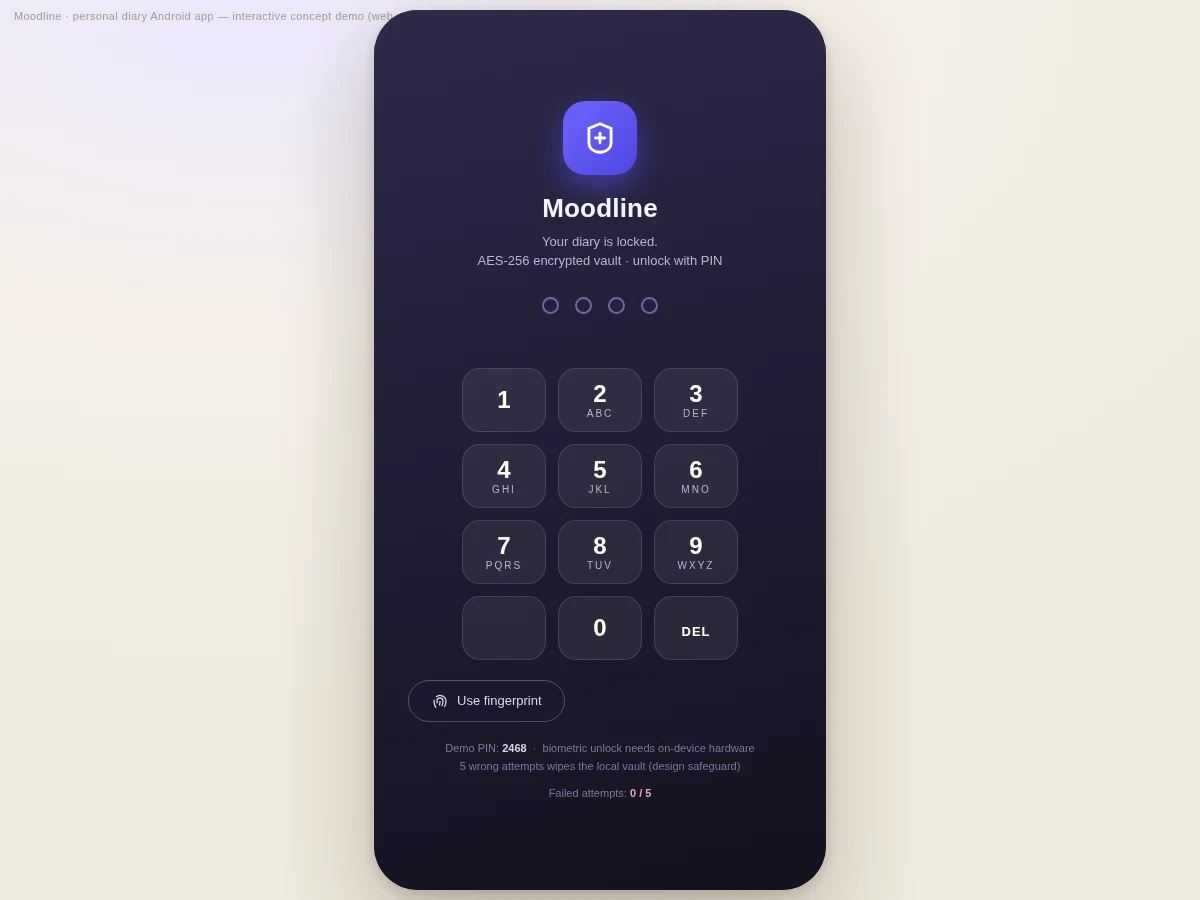
Chooses a 4-digit PIN on first launch, then writes entries with mood and tags.
Follow the working sequence
How it works
Using Moodline end to end feels like any polished diary app, except every byte of your writing is encrypted before it touches storage. On first launch you choose a 4-digit PIN; the app derives a 256-bit key from it with PBKDF2 (100,000 iterations) and creates an empty AES-256-GCM vault in the app sandbox. Each unlock attempt re-derives the key — five wrong PINs in a row destroy the vault as a safeguard against brute force. You write entries with a title, body, mood, tags and optional photos, and saving re-encrypts the vault atomically. The Insights screen works from decrypted entries in memory only, computing your 7-day average, writing streak and the 14-day mood-trend chart, while search runs a full-text pass in memory — about half a millisecond for 500 entries in the concept demo. Export writes readable JSON or text, or an encrypted backup for a new phone.
- First launch: you choose a 4-digit PIN; the app derives a 256-bit key with PBKDF2 (100,000 iterations) and creates the AES-256-GCM vault in the app sandbox.
- Unlock with the PIN or fingerprint — each attempt re-derives the key; five failures in a row wipe the vault (design safeguard).
- Write entries with title, body, 5-point mood, comma-separated tags and optional photos; every save re-encrypts the vault.
- The home screen shows recent entries with tag filters, full-text search and the 7-day mood strip.
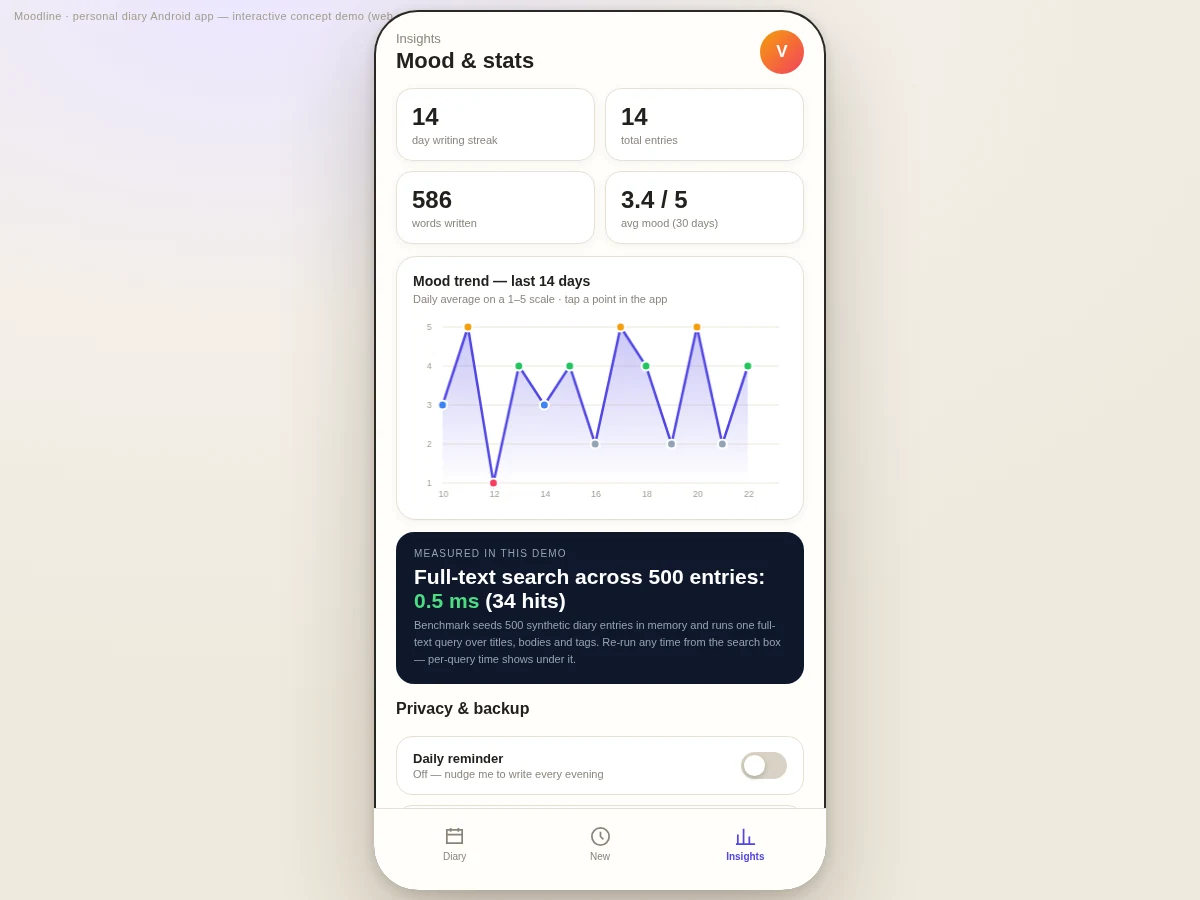
- The Insights screen computes the writing streak, totals, average mood and the 14-day trend chart from in-memory entries.
- Export to JSON or plain text, take an encrypted backup, and let the daily reminder keep the habit alive.
Tech stack:
- Kotlin
- Android Jetpack · Room · ViewModel
- BiometricPrompt API
- SQLCipher · AES-256-GCM
- MPAndroidChart
- WorkManager (reminders)
- Material 3 (Material You)
- Git
| Parameter | Value |
|---|---|
| Platform | Android 8.0 (API 26) and above (design target) |
| Language | Kotlin |
| Local storage | Room (SQLite) inside the app sandbox |
| Encryption | AES-256-GCM; key from PBKDF2 with 100,000 iterations of the PIN |
| PIN | 4 digits; auto-wipe after 5 failed attempts (design target) |
| Mood scale | 5 points (Rough · Low · Okay · Good · Radiant) |
| Search speed | Approximately 0.5 ms across 500 entries (measured in the concept demo on the build machine) |
| Export formats | JSON, plain text, AES-256 encrypted backup |
| Daily reminder | Configurable time, default 9:30 PM, via notification channel |
| Installed size | Approximately 25 MB (expected) |
Project features
Moodline is built around four capabilities that together make it a strong final-year project: real on-device security, structured mood tracking, fast local search, and honest data portability. The security story is the deepest — a PIN-derived AES-256-GCM vault with biometric unlock through Android's BiometricPrompt and an auto-wipe safeguard after repeated failed attempts, which gives you genuine cryptography to explain in the viva instead of a lock screen drawn over plain text. Mood tracking is deliberately simple — one tap on a 5-point scale per entry — because the value is in the aggregate: the 7-day strip on the home screen and the 14-day trend chart turn scattered entries into a visible emotional pattern. Search is a measured engineering detail: a single full-text pass over titles, bodies and tags completes in about 0.5 ms across 500 entries in the concept demo. And export treats your words as yours — readable JSON, plain text, or an encrypted backup file.
- [PIN + biometric app lock] A 4-digit PIN derives a 256-bit key with PBKDF2 (100,000 iterations) that opens the AES-256-GCM vault; fingerprint unlock via BiometricPrompt where the device has a sensor. Five wrong PINs in a row wipe the vault (design safeguard, attempt count configurable).
- [Mood tracking with trend charts] One-tap 5-point mood on every entry, a 7-day mood strip on the home screen and a 14-day trend chart with per-day mood dots on the Insights screen.
- [Full-text search + tags] One query scans titles, bodies, tags and mood labels across all entries — measured at approximately 0.5 ms for 500 entries in the concept demo — with per-query timing shown under the search box.
- [Photo entries] Attach photos to any entry; images stay inside the app's private sandbox, encrypted with the rest of the vault.
- [JSON / text export + encrypted backup] One-tap export to readable JSON or plain text, plus an AES-256 encrypted backup file you can restore on a new phone.
- [Daily reminder + writing streaks] A notification-channel reminder nudges the evening writing habit; the streak counts consecutive days with at least one entry.
- [Entry editor] Title, body, mood picker, comma-separated tags and photo attach/clear in one screen; saving re-encrypts the vault atomically.
What is included
- Complete Kotlin source code for the Android app
- Room database schema and encrypted-vault design notes
- Debug APK for demo and testing
- Project report PDF (background, architecture, encryption design, methodology)
- PPT presentation for final review
- Viva Q&A preparation document (encryption, biometric auth, Android storage, charts)
- Setup and build instructions
Limitations & prerequisites
- The interactive demo on this page is a web simulation of the Android app concept; the deliverable is the native Kotlin Android app.
- Biometric unlock needs a device with a fingerprint sensor — on other devices the app falls back to PIN.
- The base build is local-first with no cloud sync; sync is an optional customization, not included by default.
- Large photo libraries need storage management — photos live in the app's private sandbox and count against device storage.
- This is a personal journaling aid, not a medical or mental-health diagnostic tool; it makes no clinical claims.
- Auto-wipe after 5 failed attempts is a design safeguard; the attempt count is configurable at build time.
- PDF export goes through the OS print/share sheet and is an optional customization, not in the base build.
Frequently Asked Questions
Is this project suitable for a final-year project?
Yes — for Computer Science, IT and Electronics programs. It demonstrates applied cryptography (AES-256, PBKDF2, biometric auth), Android architecture (Room, ViewModel, WorkManager), data visualization with trend charts, and a complete local-first product with export and backup. The security design alone gives strong viva material.
How is my diary data protected?
Every entry is encrypted with AES-256-GCM before it is written to storage, and the 256-bit key is derived from your 4-digit PIN with PBKDF2 (100,000 iterations), so the vault cannot be opened without the PIN. Fingerprint unlock goes through Android's BiometricPrompt, and five wrong PINs in a row wipe the vault as a brute-force safeguard.
Does the app work without internet?
Fully — the base build is local-first by design. The encrypted vault, full-text search, mood charts, daily reminders and all export options run entirely on the device with no account and no server involved. Internet is only ever needed if you choose the optional cloud-sync customization, which is scoped separately.
Can cloud sync or a web dashboard be added?
Yes, as optional customizations scoped separately from the base build. Encrypted sync — for example through the user's own cloud drive with a key only they hold — and a companion web dashboard for viewing trends on a larger screen are both realistic extensions. The base project stays local-first so the core submission never depends on them.
What will I receive with the project?
The complete Kotlin source with the Room schema and encryption design notes, a debug APK for demonstration, the project report PDF, a review PPT, a viva Q&A document and setup instructions — everything built to order for your academic requirements.
Components & software requirements
- Kotlin
- Android Jetpack · Room · ViewModel
- BiometricPrompt API
- SQLCipher · AES-256-GCM
- MPAndroidChart
- WorkManager (reminders)
- Material 3 (Material You)
- Git
Delivery information
Built-to-order project. Delivery timeline is shared after order confirmation based on current queue.
Support terms
Complete documentation, setup guide, and viva preparation included. Support for setup and explanation provided.
Download free synopsis (PDF)
Enter your name and WhatsApp number — the synopsis PDF downloads immediately. We may send occasional project updates on WhatsApp; no spam.