
More project photos (2)
The problem
A small firm that tracks pay in a spreadsheet faces the same failure every month: one edited formula, one copied cell, and a salary slip goes out wrong. This project answers that problem with a desktop Payroll Management System built in Python with a Tkinter graphical interface and a local SQLite database, demonstrated on a 6-employee firm's October 2026 pay run. The application stores employee records, leave balances and salary structures in a single payroll.db file on the PC, computes each month's pay run from those records — gross pay from basic, HRA and special allowance, minus provident fund, a configurable income-tax estimate, loss of pay and professional tax — and prints a salary slip for every employee whose numbers match the pay-run table exactly. It runs entirely offline, needs no web server, no browser and no internet connection, and the demo shows the whole flow: add an employee, record leave, run the month, print the slip.
| Approach | Where it runs | Data storage | Needs internet | Use case |
|---|---|---|---|---|
| Spreadsheet payroll | Any PC with a spreadsheet | Formula cells in a file | No | One-off calculations |
| This desktop app (Tkinter + SQLite) | One Windows or Linux PC, native windows | Local SQLite file (payroll.db) | No | A small firm, or a student demo that must run offline |
| Web payroll app (Flask) | Web server plus browser | Server database | Yes, on the local network or hosted | Multi-user access from several PCs |
Related built-to-order projects on this site: the Flask web payroll system (https://projectech.in/projects/payroll-management-system-salary-slips-leave-tax/), the hospital management system in Python (https://projectech.in/projects/hospital-management-system-python-patient-records-billing-pharmacy/) and the gym management system (https://projectech.in/projects/gym-management-system-membership-billing-trainer-scheduling/).
How it works
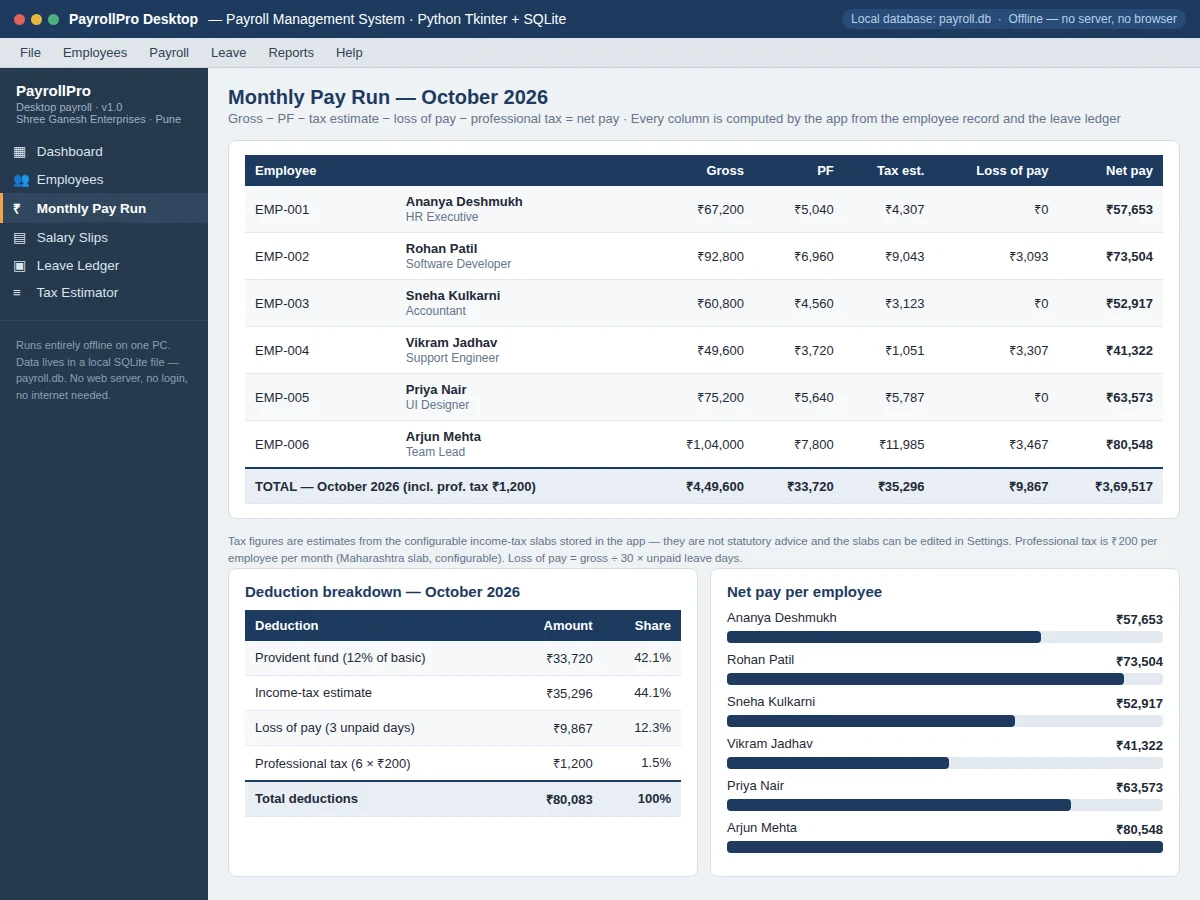
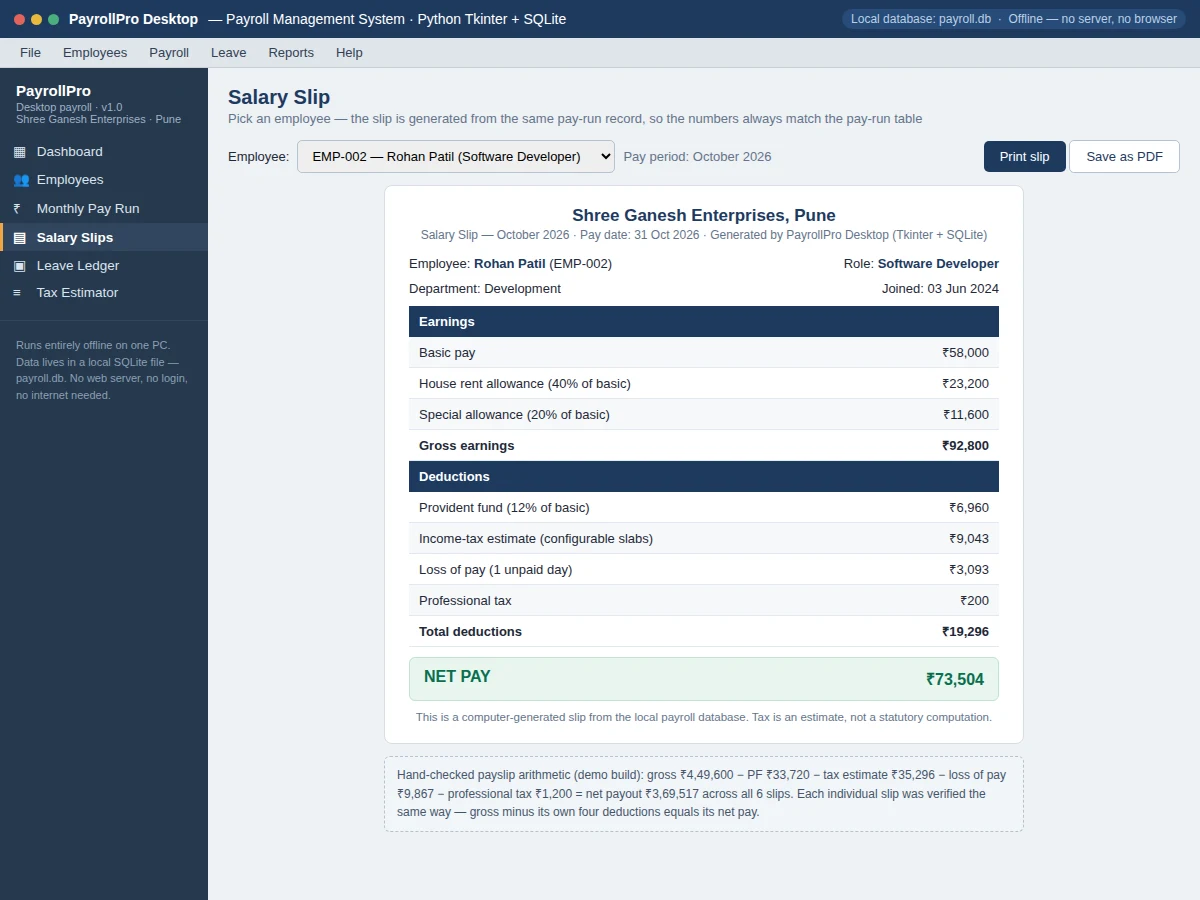
The flow runs end to end inside one desktop window, from an employee record to a printed slip, with every figure traceable to a stored value. An employee record holds the basic pay and the salary structure; the leave ledger holds the balances and the month's approved and unpaid days. When the pay run starts, the application reads each record, builds gross pay from basic, HRA and special allowance, then subtracts provident fund at 12% of basic, the income-tax estimate from the configurable slabs, loss of pay for unpaid days, and professional tax of ₹200. The results land in the pay-run table with a totals row, and each salary slip is generated from the same record, so the slip total and the table total always agree. The demo's October 2026 run proves the arithmetic: gross ₹4,49,600 minus the four deductions leaves a net payout of ₹3,69,517, and each slip was hand-checked against that total.
- The admin adds an employee in the Employees window: ID, name, role, department, date of joining, basic pay, bank account and PAN are saved to the local SQLite database.
- Leave is recorded in the Leave Ledger: approved casual, sick or privilege leave reduces the balance, and a day taken with no balance left is marked unpaid.
- At month end the admin opens the Monthly Pay Run and runs the month; the application reads every active employee record and the leave ledger together.
- For each employee it computes gross pay (basic + HRA at 40% of basic + special allowance at 20% of basic) and the four deductions: PF at 12% of basic, tax estimate from the configurable slabs, loss of pay at gross divided by 30 per unpaid day, and professional tax of ₹200.
- Net pay is gross minus the four deductions; the pay-run table shows every employee plus a totals row, and the deduction breakdown shows each deduction's share of the month.
- The admin opens Salary Slips, picks an employee and prints or saves the slip as PDF; the slip is generated from the same pay-run record, so its figures match the table exactly.
Tech stack:
- Python 3
- Tkinter · ttk widgets
- SQLite 3 · sqlite3 module
- csv module · payroll export
- datetime · calendar for pay periods
- reportlab · salary-slip PDF export
- PyInstaller · Windows executable packaging
| Parameter | Value |
|---|---|
| Application type | Desktop app · native Tkinter windows · no web server · no browser |
| Employees in demo data | 6 (design figure) |
| Database | Single local SQLite file · payroll.db · under 1 MB for 6 employees (expected) |
| Salary structure | Basic + HRA 40% of basic + special allowance 20% of basic (configurable) |
| Provident fund | 12% of basic per month (configurable) |
| Professional tax | ₹200 per employee per month · Maharashtra slab (configurable) |
| Loss of pay | Gross ÷ 30 × unpaid leave days |
| Income-tax estimate | Configurable slabs · nil to ₹2,50,000 · 5% to ₹5,00,000 · 20% to ₹10,00,000 · 30% above (estimate only) |
| October 2026 demo pay run | Gross ₹4,49,600 · net payout ₹3,69,517 · hand-checked in the demo build |
| Deductions in demo pay run | PF ₹33,720 · tax estimate ₹35,296 · loss of pay ₹9,867 · professional tax ₹1,200 |
| Pay-run time | Under 1 second for 6 employees on a standard laptop (design target) |
| Platform | Windows 10 or later · Linux with Python 3 (expected) |
Project features
The strongest parts of this build are the pay-run engine, the printable salary slips, the leave ledger and the tax estimator. The pay-run engine computes every employee's gross, deductions and net pay from one set of stored records, so the slip and the summary table can never disagree. The salary-slip view prints the full earnings and deductions breakdown for any employee from the same pay-run record. The leave ledger tracks casual, sick and privilege balances and turns unpaid days into loss of pay automatically. The tax estimator applies configurable income-tax slabs to annualised pay and shows the working, so a reviewer can follow every figure on the slip. Finally, the whole application runs offline and exports its data to CSV, so the month's figures can be checked in a spreadsheet without touching the database.
- [Employee records in SQLite] Add, edit and deactivate employees with ID, name, role, department, date of joining, basic pay, bank account and PAN, all stored in a single local payroll.db file with no server involved.
- [Monthly pay-run engine] One click computes the whole month: gross from basic plus HRA (40% of basic) plus special allowance (20% of basic), minus PF, tax estimate, loss of pay and professional tax, with a totals row for the month.
- [Printable salary slips] Every employee gets a slip showing each earning and each deduction, generated from the same pay-run record as the summary table, ready to print or save as PDF.
- [Leave ledger with loss-of-pay link] Casual (12 days), sick (8 days) and privilege (15 days) balances per year; approved leave reduces the balance, and days taken beyond balance are marked unpaid and deducted as gross divided by 30 per day.
- [Income-tax estimator] Applies configurable slabs (nil to ₹2,50,000, 5% to ₹5,00,000, 20% to ₹10,00,000, 30% above) to annualised pay after standard deduction and PF, and shows the taxable income and monthly estimate — labelled as an estimate, never as statutory tax.
- [Deduction breakdown and summaries] The pay-run view shows each deduction's share of the month's total (PF 42.1%, tax estimate 44.1%, loss of pay 12.3%, professional tax 1.5% in the October 2026 demo) plus a net-pay bar chart per employee.
- [Offline desktop operation and CSV export] The application runs entirely offline on one PC and exports employee and pay-run data to CSV for records or for a spreadsheet check.
Implemented in the base build: all seven features above, including the pay-run engine, slips, leave ledger, tax estimator and CSV export. Optional customisation on request: attendance import, bank transfer file export, email delivery of slips, extra roles or departments, and a different salary structure. Future scope, not included: multi-user access, a web version, biometric attendance and statutory filing — the Flask web payroll app listed separately on this site covers the multi-user case.
What is included
- Complete Python source code with Tkinter GUI and SQLite database layer
- payroll.db database file with 6-employee demo data and the October 2026 pay run
- Setup instructions and user guide for running the desktop app and packaging it with PyInstaller
- Project report (background, salary-structure design, pay-run logic, tax-estimate method, testing, limitations)
- PPT presentation for final review
- Viva Q&A preparation document (Tkinter event handling, SQLite design, payroll arithmetic, desktop vs web trade-offs)
- Project abstract PDF
- To get this payroll system built for you as a desktop application with your college's requirements and delivery timeline, message Projectech on WhatsApp for a quotation — the build covers the full desktop payroll app (employee records, leave ledger, pay run, salary slips and tax estimate) as a built-to-order project.
Limitations & prerequisites
- Single-user desktop application: one PC, one user at a time, with no multi-user or web access — that is the Flask web payroll app listed separately on this site.
- Tax figures are estimates from configurable slabs, not statutory computations; the user must update the slabs when tax rules change.
- Demo data covers 6 employees; behaviour beyond approximately 200 employees is untested and stated as a design target, not a measured result.
- No bank integration: the app produces the pay run and the slips, and salary transfer to bank accounts is done manually outside the app.
- No biometric or automated attendance: leave and attendance are entered manually in the ledger.
- PF and professional-tax rates are configurable defaults, not legal advice, and must be checked against current rules before real use.
- Slips are printed or saved as PDF from the desktop app; email delivery of slips is not built in and is listed as optional customisation.
Frequently Asked Questions
Is this project suitable for a final-year project?
Yes — for Computer Science and Information Technology degree programmes. It demonstrates desktop GUI development with Tkinter, relational database design with SQLite, business-rule implementation in payroll arithmetic, and a complete testable workflow from employee record to printed salary slip, with the desktop-versus-web trade-off as a strong discussion point.
How is this different from the Flask payroll app already on this site?
This build is a desktop application and the Flask one is a web application. This app opens in native desktop windows, stores data in a local SQLite file and runs fully offline on one PC with no server and no browser, while the Flask app needs a web server and a browser and serves several users — same payroll domain, different platform and different deliverable.
Does this project need the internet?
No — the desktop application, its SQLite database and the salary-slip generation all run offline on one PC, so the demo works with no network connection at all and a viva demonstration never depends on college Wi-Fi or a server being up.
How are the tax figures calculated, and can they be trusted?
The app annualises monthly gross pay, subtracts the standard deduction and PF, then applies configurable income-tax slabs and divides the result by 12 for a monthly estimate. The figures are estimates from those slabs, shown with their working on screen, and they are not statutory tax computations — the slabs can be edited in Settings when rules change.
Can this project be customised?
Yes — realistic additions include attendance import from a CSV file, a bank transfer file for salary payments, email delivery of slips, extra employee roles or departments, a different salary structure and a monthly report export, each scoped and priced separately from the base build.
What will I receive with the project?
The complete Python source code with the Tkinter interface, the SQLite database with demo data, setup and user-guide documents, the project report, presentation, viva Q&A document and the abstract PDF — everything needed to install, run and present the desktop application.
Components & software requirements
- Python 3
- Tkinter · ttk widgets
- SQLite 3 · sqlite3 module
- csv module · payroll export
- datetime · calendar for pay periods
- reportlab · salary-slip PDF export
- PyInstaller · Windows executable packaging
Delivery information
Built-to-order project. Delivery timeline is shared after order confirmation based on current queue.
Support terms
Complete documentation, setup guide, and viva preparation included. Support for setup and explanation provided.
Download free synopsis (PDF)
Enter your name and WhatsApp number — the synopsis PDF downloads immediately. We may send occasional project updates on WhatsApp; no spam.