
More project photos (2)
The problem
A desktop resume builder with templates and PDF export, built in Python with Tkinter, is a desktop application that turns typed resume details into a finished, print-ready PDF without opening a browser or uploading anything. The student fills in a guided form — personal details, education, skills, projects and experience — chooses one of three built-in templates, watches the resume take shape in a live preview, and exports a one-page A4 PDF with a single click. Students write resumes in word processors, fight with margins and fonts, and end up with inconsistent layouts every time they update a detail. This builder separates content from layout, so the same entries can be restyled in seconds by switching templates, and every resume is stored as a local file the student owns. Because the app runs entirely offline, it suits students on shared lab machines and slow connections, and it teaches GUI programming, file handling and PDF generation.
Desktop builder vs the nearest alternatives
| Aspect | This project: desktop Python builder | Web resume builder | Desktop PDF annotator |
|---|---|---|---|
| Platform | Desktop app (Python · Tkinter) | Browser web app | Desktop app (Electron) |
| Main job | Creates new resumes from form input | Creates resumes in the browser | Marks up existing PDF files |
| PDF export | Yes — reportlab, written locally | Yes — browser print to PDF | Yes — exports the annotated PDF |
| Works offline | Yes — fully offline | Needs an internet connection | Yes |
| Data storage | Local JSON files · optional SQLite | Browser or account storage | Local SQLite |
| ATS score checker | Not included | Rule-based checker included | Not applicable |
Types personal details, education, skills and experience into the guided form.
Follow the working sequence
How it works
The app works as a short pipeline from typed details to a finished PDF, with the resume data passing through four stages and never leaving the computer. The form editor collects each section into a plain Python dictionary — name, contact, education, skills, projects and experience — and checks the entries before anything is rendered. The template engine then maps every field to a named frame on the A4 canvas: a header band for name and contact, a single-column body for the sections, and a footer for the page count, so switching templates only swaps frame coordinates, fonts and rules while the data stays untouched. The preview pane renders that layout live with Tkinter, and the export step hands the same frame map to reportlab, which writes the PDF to the local folder. Saving is separate from exporting: the dictionary is written to a JSON file, so a resume can be reopened, edited and re-exported months later.
- The student opens the app and either starts a new resume or loads a saved JSON file from the local resumes folder.
- Each section is filled in the guided form — personal details, education, skills, projects and experience — with email and phone checked as they are typed.
- A template is picked from the toolbar (Classic, Modern or Minimal); the preview pane redraws the resume in the new layout immediately.
- The student reviews the live A4 preview, adjusts section order or trims long entries until the resume fits one page.
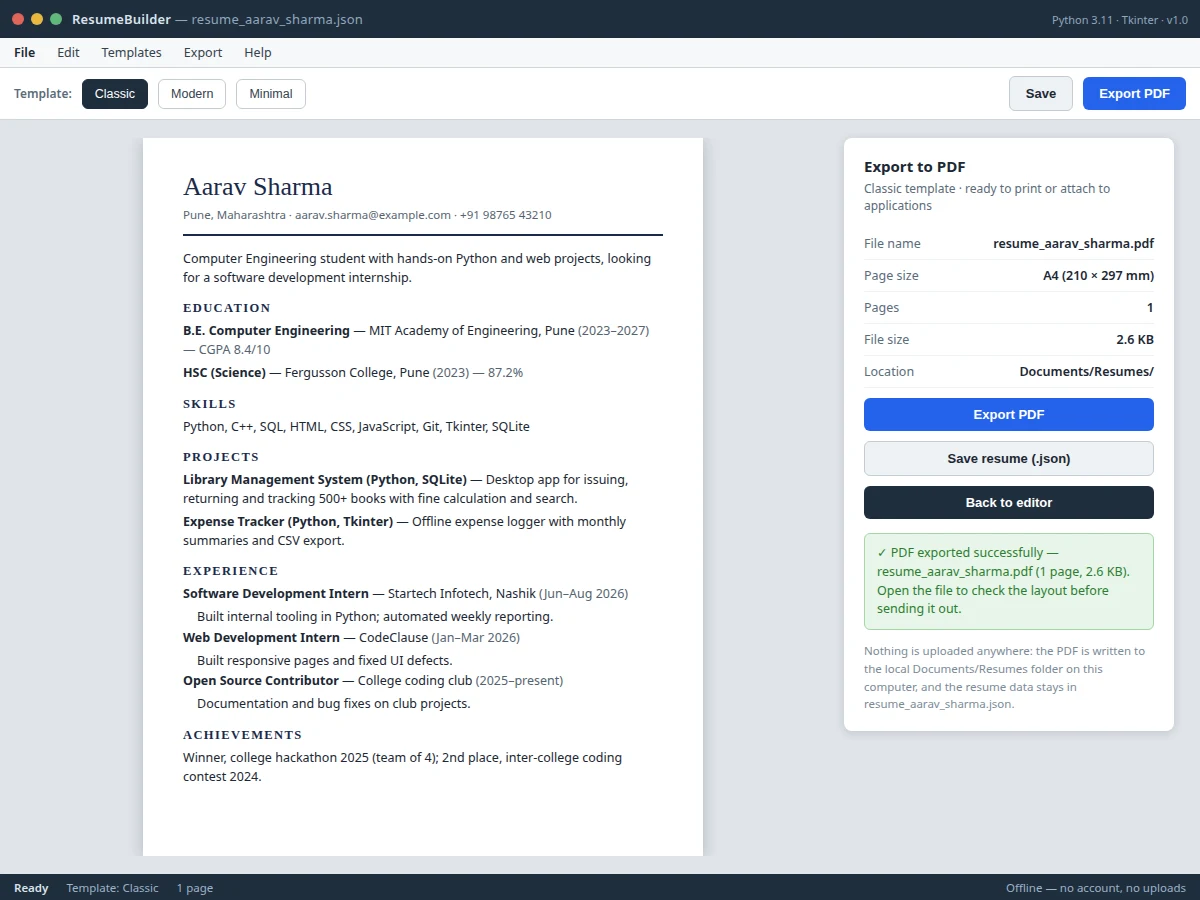
- Export PDF writes the resume through reportlab to Documents/Resumes as a named PDF file, and confirms the file name, page count and size.
- Save stores the resume data as a JSON file (with an optional SQLite record), so the same resume can be reopened, edited and exported again later.
Tech stack:
- Python 3
- Tkinter
- Tkinter ttk widgets
- reportlab
- SQLite
- JSON file storage
- PyInstaller
| Parameter | Value |
|---|---|
| Platform | Windows · macOS · Linux desktop (Python 3.11) |
| Interface | Tkinter desktop GUI with ttk themed widgets |
| Templates included | Three built-in templates (Classic · Modern · Minimal) |
| Page size | A4 — 210 × 297 mm (ISO 216) |
| Sample export | 1 page · 2.6 KB (measured from the demo build) |
| Export time | Under 1 second per page (design target) |
| Local storage | JSON file per resume · optional SQLite store |
| Resume fields | Approximately 20 fields across 5 sections (design target) |
| Memory while running | Approximately 120 MB RAM (expected) |
| Packaged installer size | Approximately 35 MB (design target) |
| Offline use | Fully offline — no account and no uploads |
Project features
The builder is organised around four capabilities that carry the whole build: a guided form editor that collects every resume section without free-form formatting, three built-in templates that restyle the same data in seconds, a live preview that shows the finished A4 page as the user types, and a one-click PDF export that writes the file locally. Around those four sit the supporting pieces — local save and load, a template switcher, and a clean separation between resume data and layout — so the app stays simple to explain and easy to extend. Every feature below is part of the base build: nothing listed here depends on an internet connection, a paid service or a future update, and the optional additions are kept separate under Customization Available. The sections below describe each one in turn.
- [Guided form editor] Sectioned inputs for personal details, education, skills, projects and experience, with checks for email and phone so incomplete entries are flagged before export.
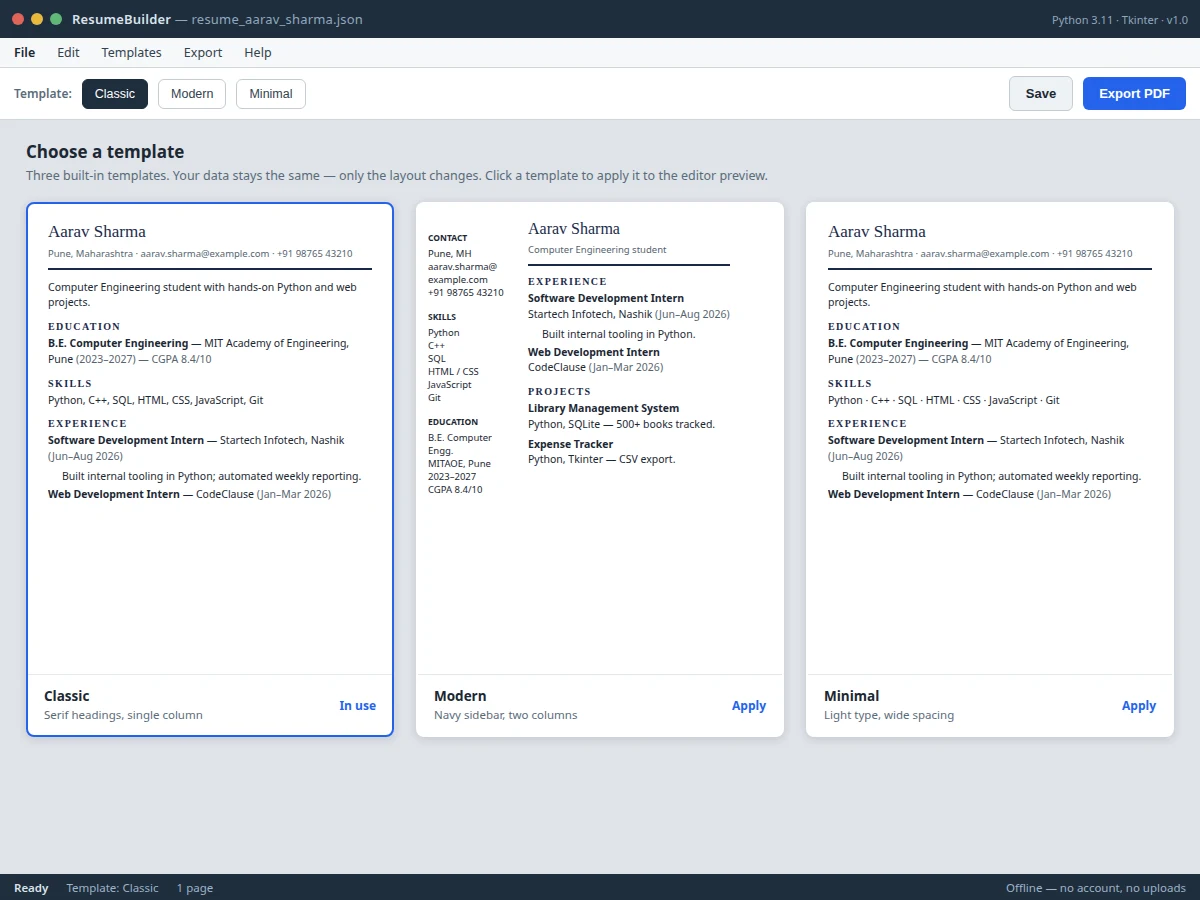
- [Three built-in templates] Classic (serif, single column), Modern (navy sidebar, two columns) and Minimal (light type, wide spacing); switching templates restyles the same resume data instantly.
- [Live A4 preview] The formatted resume renders beside the form and updates as the user types, so layout problems are visible before anything is exported.
- [One-click PDF export] reportlab writes a print-ready A4 PDF (210 × 297 mm) to the local Documents/Resumes folder; the demo build's sample export was 1 page and 2.6 KB.
- [Local save and load] Each resume is stored as a JSON file on the computer, with an optional SQLite store for managing several resumes; no account and no uploads.
- [Template field mapping] Each form field maps to a named frame on the A4 canvas — header band, body, footer — so a new template only changes frame coordinates, fonts and rules, never the data.
- [Print-ready output] The exported PDF uses fixed margins and standard fonts, so it prints identically on lab printers and reads cleanly on screen.
What is included
- Complete Python source code (Tkinter GUI, template engine, reportlab export, JSON/SQLite storage)
- Three built-in templates (Classic, Modern, Minimal) with the frame-map documentation
- Working desktop demo with the sample resume preloaded
- Project report PDF (background, GUI design, template engine, methodology, results)
- PPT presentation for final review
- Viva Q&A preparation document (Tkinter, event handling, reportlab, file handling)
Limitations & prerequisites
- The base build ships three templates; a fourth custom template needs a new frame map, listed under customisation.
- Long resumes can spill onto a second page; the preview shows the overflow, but the app does not auto-shrink text to force one page.
- The builder creates new resumes from form input; it cannot import or edit an existing PDF resume, and it does not parse Word documents.
- No spelling or grammar checking is built in; the student must proofread entries before export.
- The app is a single-user desktop program with local files; there is no cloud sync, no sharing link and no multi-user login.
- Export quality depends on the fonts installed on the machine; a missing font falls back to the default, which can shift spacing slightly.
- The sample export figures quoted (1 page, 2.6 KB) come from the demo build's sample resume; a longer resume produces a larger file.
Frequently Asked Questions
Is this project suitable for a final-year project?
Yes — for Computer Science and IT programmes, because it demonstrates desktop GUI programming with Tkinter, a template engine that maps form fields onto an A4 layout, local file handling with JSON and SQLite, and PDF generation with reportlab, all in one working application a student can demonstrate live and explain section by section. The report documents the GUI design, the frame-map mechanism and the export pipeline, so the build is defensible in a review without relying on any external service.
How is this different from a web resume builder?
It is a desktop program, not a website: it runs from the student's own computer in Python and Tkinter, stores resumes as local files, and works with no browser, no account and no uploads, while a web builder needs hosting and an internet connection. It also differs from a PDF annotator, which marks up existing PDF files; this builder creates new resumes from form input and exports them as PDFs.
Does the app need the internet?
No — the application works fully offline: the form editor, the template preview, local save and load, and the PDF export all run on the student's own machine, with no account, no server and no data leaving the computer at any point. That makes it usable on shared lab machines and slow connections, and the exported PDF can be carried on a pen drive.
Can I add my own template?
Yes — a new template is added by writing a frame map that assigns each form field to a position on the A4 canvas, plus the fonts and rules for that layout, and registering the template name in the template switcher. The guide documents the frame-map format, and a college-specific template (crest, department header) can be built the same way as a customisation.
What is the main technology used?
Python 3 with Tkinter for the desktop interface, reportlab for writing the PDF export, and JSON files with an optional SQLite store for saving resumes locally on the student's own computer, and PyInstaller packages the finished program into a standalone executable for machines without Python installed. Tkinter ships with standard Python, so the base build needs no separate GUI framework, and reportlab is a mature, well-documented PDF library.
Can I use the exported PDF for job applications?
Yes — the export is a standard A4 PDF with fixed margins and ordinary fonts, so it opens in any PDF reader, prints identically on lab and office printers, and attaches to job portals and emails exactly like any other resume file. Students should still proofread the exported file before sending it, since the app does not check spelling or grammar.
Components & software requirements
- Python 3
- Tkinter
- Tkinter ttk widgets
- reportlab
- SQLite
- JSON file storage
- PyInstaller
Delivery information
Built-to-order project. Delivery timeline is shared after order confirmation based on current queue.
Support terms
Complete documentation, setup guide, and viva preparation included. Support for setup and explanation provided.
Download free synopsis (PDF)
Enter your name and WhatsApp number — the synopsis PDF downloads immediately. We may send occasional project updates on WhatsApp; no spam.