
More project photos (2)
The problem
A hospital management system in Python with patient records, billing and pharmacy brings the daily work of a small hospital into one desktop application. Today that work lives in separate places: a paper register for patients, a diary for doctor appointments, a whiteboard for beds, a billing book at the counter and a medicine cupboard nobody counts. When a patient is admitted, their name is written three times in three places, a bed is promised by memory, and the final bill is added up by hand from scattered slips. This system replaces that with one MySQL database behind a Tkinter desktop app: reception registers the patient once, books the appointment, assigns a bed, and every later charge — consultation, lab test, medicine or bed day — lands on the same bill, so discharge takes minutes instead of an afternoon of reconciling paper.
| Aspect | This hospital management system | Pharmacy-only system | OPD queue-token system |
|---|---|---|---|
| Scope | Whole hospital: patients, doctors, appointments, beds, billing, pharmacy, lab reports | One medical store: GST billing, batch inventory, expiry alerts | One OPD counter: queue tokens and a live counter display |
| Main users | Reception, doctors, nurses, billing staff | Pharmacist and cashier | Reception and waiting patients |
| Core records | Patients, appointments, beds, invoices, lab reports, medicine stock | Medicine batches, invoices, suppliers | Tokens and the live queue |
| Pharmacy role | One module inside the hospital system, dispensing to admitted and OPD patients | The entire product | None |
| Technology | Python desktop app (Tkinter) with MySQL | PHP web app with MySQL | Web app with live counter |
Related built-to-order projects on this site: the web-based hospital OPD queue token system with live counter (https://projectech.in/projects/web-based-hospital-opd-queue-token-system-live-counter/), which covers only the OPD queue; the online hospital bed availability search web app with ward-wise live status (https://projectech.in/projects/online-hospital-bed-availability-search-web-app-ward-wise-live-status/), which only searches bed availability; and the pharmacy management system with GST billing, inventory and expiry alerts (https://projectech.in/projects/pharmacy-management-system-billing-inventory-expiry-alerts/), which is a single-store pharmacy biller — this project is the hospital-wide system that contains appointments, beds, billing and a pharmacy module together.
Arrives at reception for a visit or an admission.
Follow the working sequence
How it works
A patient enters the hospital once and their record carries them through every department. Reception registers the patient and books an appointment against a doctor's schedule; the doctor sees the patient, orders lab tests or prescribes medicines, and the nurse assigns a bed if admission is needed. Each of those events writes to the same MySQL database: the appointment row, the bed assignment, the lab order and the pharmacy issue all reference the one patient ID. Charges accumulate on the patient's invoice as they happen — consultation at the visit, lab tests when ordered, medicines when dispensed, bed charges per day — and at discharge the receptionist opens the invoice, checks the total against the lines, subtracts the advance paid at admission, and prints the final bill. Because every screen reads the same tables, the dashboard always shows the true state: how many beds are free, which medicines are low, and how much is still outstanding.
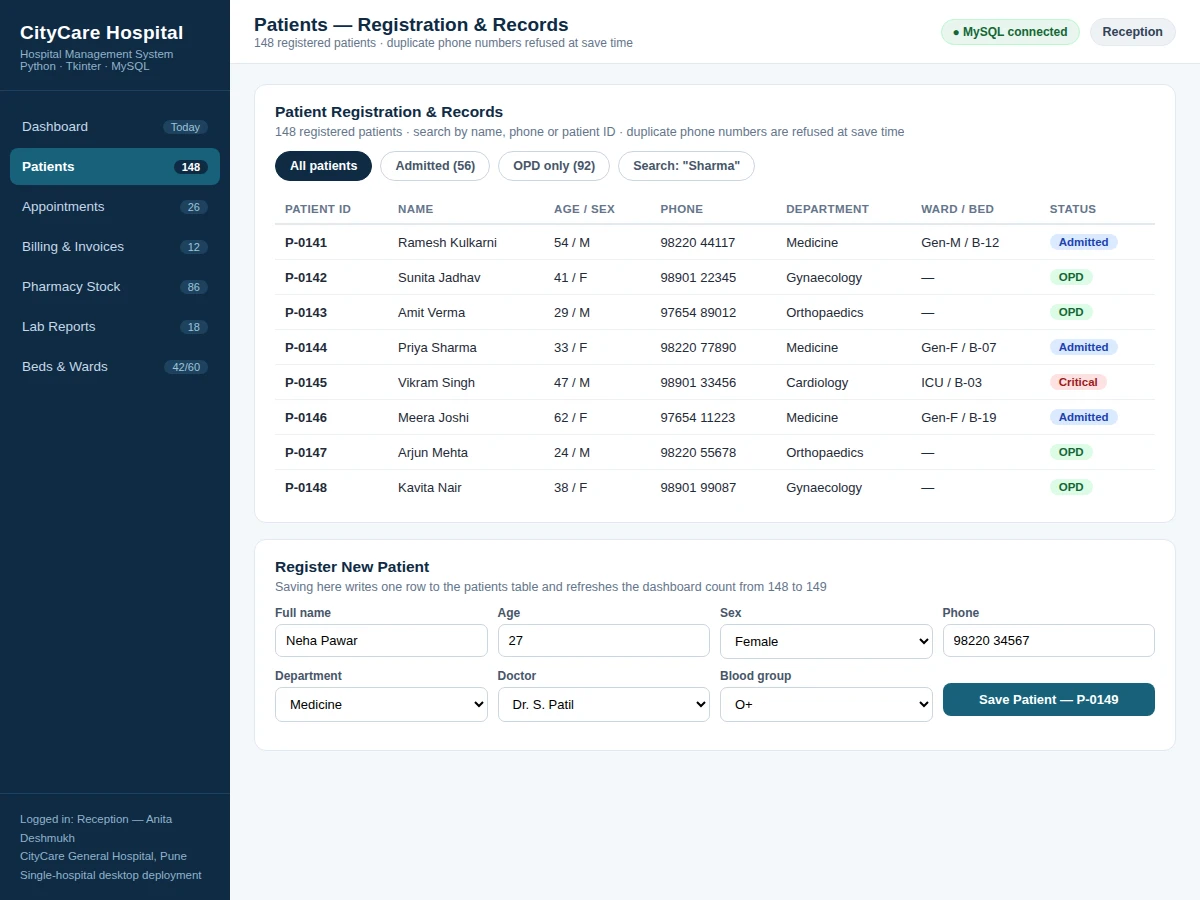
- Reception registers the patient through the Tkinter form with name, age, sex, phone, blood group, department and doctor; the system checks the phone number to prevent duplicate records and assigns a patient ID.
- Reception books an appointment by picking the doctor and a free slot from that doctor's daily schedule; the system issues the next OPD token and marks the slot booked so no second patient can take it.
- The doctor opens their appointment list, records the consultation, and orders lab tests or prescribes medicines; lab orders and prescriptions are stored against the patient's ID.
- If the patient is admitted, the nurse assigns a free bed from the ward list — General Male, General Female or ICU — and the bed is locked to that patient until discharge is confirmed.
- The pharmacy dispenses prescribed medicines from in-house stock; each issue decrements the stock count and adds the medicine charge to the patient's invoice in the same transaction.
- Lab staff enter test results against the patient's record; the report appears on the doctor's screen beside the patient's next appointment.
- At discharge, reception opens the invoice, which already carries consultation, lab, medicine and bed charges; the system verifies the lines add up to the total, subtracts the advance, and prints the final bill with the balance payable.
Tech stack:
- Python 3.12
- Tkinter · ttk Treeview
- MySQL 8
- mysql-connector-python
- HTML5 · CSS3 · JavaScript
- reportlab
- Git
| Parameter | Value |
|---|---|
| Modules in the base build | 7 modules: patients · appointments · beds · billing · pharmacy · lab reports · dashboard |
| User roles | 4 roles: admin · reception · doctor · billing staff |
| Registered patients in demo data | 148 patients (sample data set) |
| Appointments per day in demo data | 26 appointments (sample data set) |
| Total beds | 60 beds: 24 General Male · 28 General Female · 8 ICU |
| Beds occupied in demo data | 42 beds occupied · 18 beds free (sample data set) |
| Medicines in demo pharmacy stock | 86 medicines (sample data set) |
| Lab reports per day in demo data | 18 reports (sample data set) |
| Money storage | MySQL DECIMAL(10,2) — exact fixed-point values (MySQL documentation) |
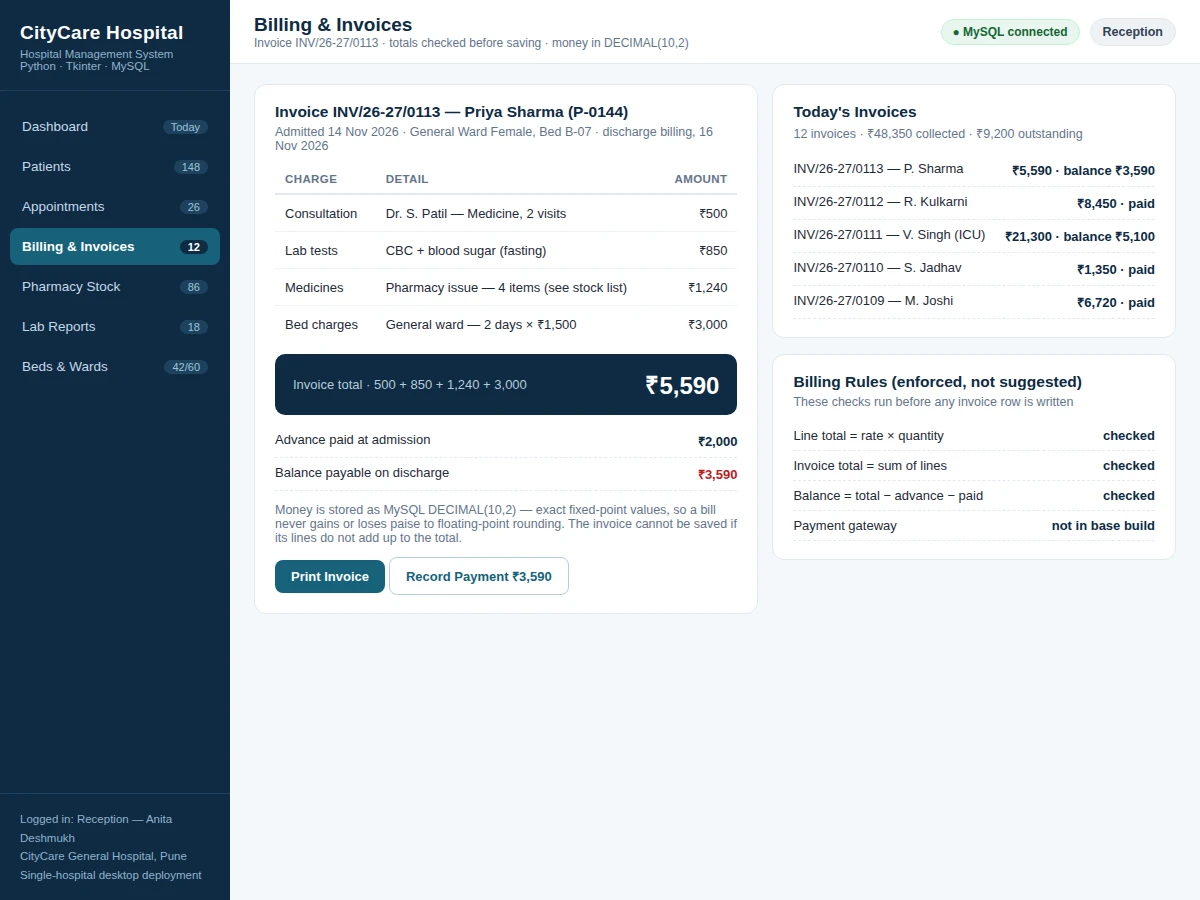
| Worked invoice in demo | ₹5,590 total · ₹2,000 advance · ₹3,590 balance (verified in demo) |
| Invoice check | Line total = rate × quantity · invoice total = sum of lines (enforced before save) |
| Deployment | Single hospital · desktop app on LAN with MySQL server (expected) |
| Page response | Design target: under 2 seconds per screen on local hosting |
Project features
The Hospital Management System is built around four capabilities that work as one flow: patient registration with a single permanent record, appointment booking against real doctor schedules, bed and ward management that never assigns one bed twice, and billing that adds consultation, lab, medicine and bed charges onto one invoice. Around those four sit an in-house pharmacy module that dispenses to the hospital's own patients, lab report storage linked to each patient, a dashboard that shows today's appointments, free beds and collections at a glance, and role-based screens for reception, doctors and billing staff. The pharmacy module and lab reports sit on the same patient record, so a medicine issued or a test ordered is never a separate piece of paper. Everything listed below is implemented in the base project; online appointment booking for patients and a payment gateway are optional customisations, and multi-hospital support is future scope.
- [Patient registration and records] Every patient is registered once with name, age, sex, phone, blood group, department and doctor, and gets a permanent patient ID. The record follows the patient from OPD visit to admission to discharge, and a duplicate phone number is refused at save time so the same person is never registered twice.
- [Appointment booking with doctor schedules] Each doctor has a daily schedule of slots; reception books a patient into a free slot and the system issues the next OPD token. A slot already taken is shown as booked and cannot be double-booked — the check runs before the appointment row is written.
- [Bed and ward management] Beds are tracked by ward — General Male, General Female and ICU — with live occupied and free counts. A bed is assigned at admission, stays linked to that patient, and is freed only when discharge is confirmed, so the same bed can never be assigned to two patients.
- [Billing with checked arithmetic] Consultation, lab tests, medicines and bed charges land on one invoice, and the total is verified before saving: line total equals rate times quantity, invoice total equals the sum of lines, and balance equals total minus advance minus paid. Money is stored as MySQL DECIMAL(10,2), an exact fixed-point type for monetary data, so a bill never gains or loses paise to floating-point rounding. Builder note: in the demo, the worked invoice for Priya Sharma (P-0144) adds up to ₹5,590 — ₹500 consultation, ₹850 lab tests, ₹1,240 medicines and ₹3,000 for 2 bed days — with a ₹2,000 advance leaving a ₹3,590 balance, verified on the demo's billing screen rather than assumed.
- [In-house pharmacy module] The dispensary stocks medicines for the hospital's own admitted and OPD patients, with batch, stock level and expiry per item. Issuing medicines decrements stock at the same moment the charge is added to the patient's bill, so stock and bills can never drift apart; expired batches are blocked from issue and items below their reorder level are flagged.
- [Lab reports linked to patients] Lab results are entered by lab staff against the patient's record and the doctor who ordered the test, so pending reports appear beside the patient's next appointment. The system stores and prints reports exactly as entered; it does not interpret results.
- [Dashboard and role-based screens] The dashboard shows registered patients, today's appointments, occupied beds and collections at a glance, with alerts for low pharmacy stock and medicines near expiry. Reception, doctors and billing staff see different screens, so billing staff cannot edit patient records and doctors see only their own appointments and reports.
What is included
- Complete source code (Python + Tkinter desktop app, MySQL database schema, sample data)
- Database schema with patient, appointment, doctor, bed, invoice, pharmacy stock and lab report tables plus sample data (148 patients, 26 appointments, 60 beds, 86 medicines)
- Working demo of the full flow: register patient, book appointment, assign bed, issue medicines, view lab reports, print invoice
- Project report PDF (background, system design, database design, methodology, testing, limitations)
- PPT presentation for final review
- Viva Q&A preparation document (database design, DECIMAL money storage, bed-assignment guard, billing checks)
- Setup guide for Python, MySQL and the desktop app on Windows
To get this project built for you with your hospital name, departments and bed counts, message Projectech on WhatsApp with "Hospital Management System in Python — quotation" and mention your patient, doctor and ward numbers; you will receive a quotation for the built-to-order project with the full source code, database and viva kit.
Limitations & prerequisites
- The system is designed for a single hospital; multi-hospital or multi-branch support is future scope, not in the base build.
- No online appointment booking for patients is included in the base build — bookings are made by reception staff at the hospital desk, and a patient-facing web booking page is an optional customisation.
- No payment gateway is integrated in the base build; payments are recorded as cash or UPI transfers entered by billing staff, and gateway integration is an optional customisation.
- The system is an academic prototype and is not certified medical software; it stores and prints lab results exactly as entered and does not interpret them or support clinical decisions.
- The desktop app needs a MySQL server reachable on the hospital LAN and Python 3.12 installed on each terminal; it does not run in a browser and is not hosted online in the base build.
- The demo data (148 patients, 26 appointments, 60 beds, 86 medicines) is realistic sample data for demonstration; the delivered system ships with an empty database and the same sample data as an optional import.
- Bed charges are per day as entered by the hospital; the system does not set prices and does not include GST or tax filing — tax treatment is the hospital's responsibility.
Frequently Asked Questions
How is this different from a pharmacy management system?
This is a hospital-wide system, while a pharmacy management system covers one medical store only. A pharmacy system bills walk-in customers, tracks medicine batches and prints GST invoices for a retail shop, whereas this system registers patients, books doctor appointments, manages beds and wards, stores lab reports and bills the whole hospital stay — with pharmacy as just one module dispensing to the hospital's own patients.
The two share a medicine stock list but solve different problems, for different users, on a different stack.
How does the system stop two patients getting the same bed or appointment slot?
Both guards run before any row is written to the database. When a bed is assigned, the system checks that the bed is currently free and locks it to that patient until discharge is confirmed; when an appointment is booked, it checks that the doctor's slot is still free and marks it booked in the same step.
Because the check and the write happen together, two receptionists booking at the same time cannot take the same bed or slot.
How are bills calculated, and can they go wrong?
Every bill is built from lines, and the arithmetic is checked before the invoice is saved: each line total equals rate times quantity, the invoice total equals the sum of its lines, and the balance equals the total minus the advance and any payments already recorded. Money is stored as MySQL DECIMAL(10,2), an exact fixed-point type, so totals never drift by paise the way floating-point money can.
In the demo, the worked invoice for Priya Sharma adds up to ₹5,590 with a ₹3,590 balance after a ₹2,000 advance.
Does the system work without internet?
Yes — the desktop app talks to a MySQL server on the hospital's local network, so registration, appointments, beds, billing and pharmacy all work with no internet connection. Internet is only needed for optional extras such as SMS reminders or online patient booking, neither of which is in the base build.
The trade-off is that the app runs on hospital computers, not in a browser, and needs MySQL running on the LAN.
Can more departments, doctors or wards be added?
Yes — doctors, departments and wards are data, not code, so a new doctor with a daily schedule or a new ward with its beds can be added through the admin screens without changing the program. Adding a whole new module, such as an ambulance register or an insurance desk, is a customisation that can be built on request.
The delivered setup guide shows how to add doctors, departments and wards.
Is this project suitable for a final-year project?
Yes — for Computer Science, IT and Computer Engineering programs. It demonstrates relational database design across seven linked tables, desktop GUI development with Tkinter and ttk.Treeview, business rules such as the bed-assignment and billing guards, and a complete real-world workflow from registration to discharge billing.
The demo data makes the whole flow testable in a viva, and the report documents every design decision.
Components & software requirements
- Python 3.12
- Tkinter · ttk Treeview
- MySQL 8
- mysql-connector-python
- HTML5 · CSS3 · JavaScript
- reportlab
- Git
Delivery information
Built-to-order project. Delivery timeline is shared after order confirmation based on current queue.
Support terms
Complete documentation, setup guide, and viva preparation included. Support for setup and explanation provided.
Download free synopsis (PDF)
Enter your name and WhatsApp number — the synopsis PDF downloads immediately. We may send occasional project updates on WhatsApp; no spam.