
More project photos (3)
The problem
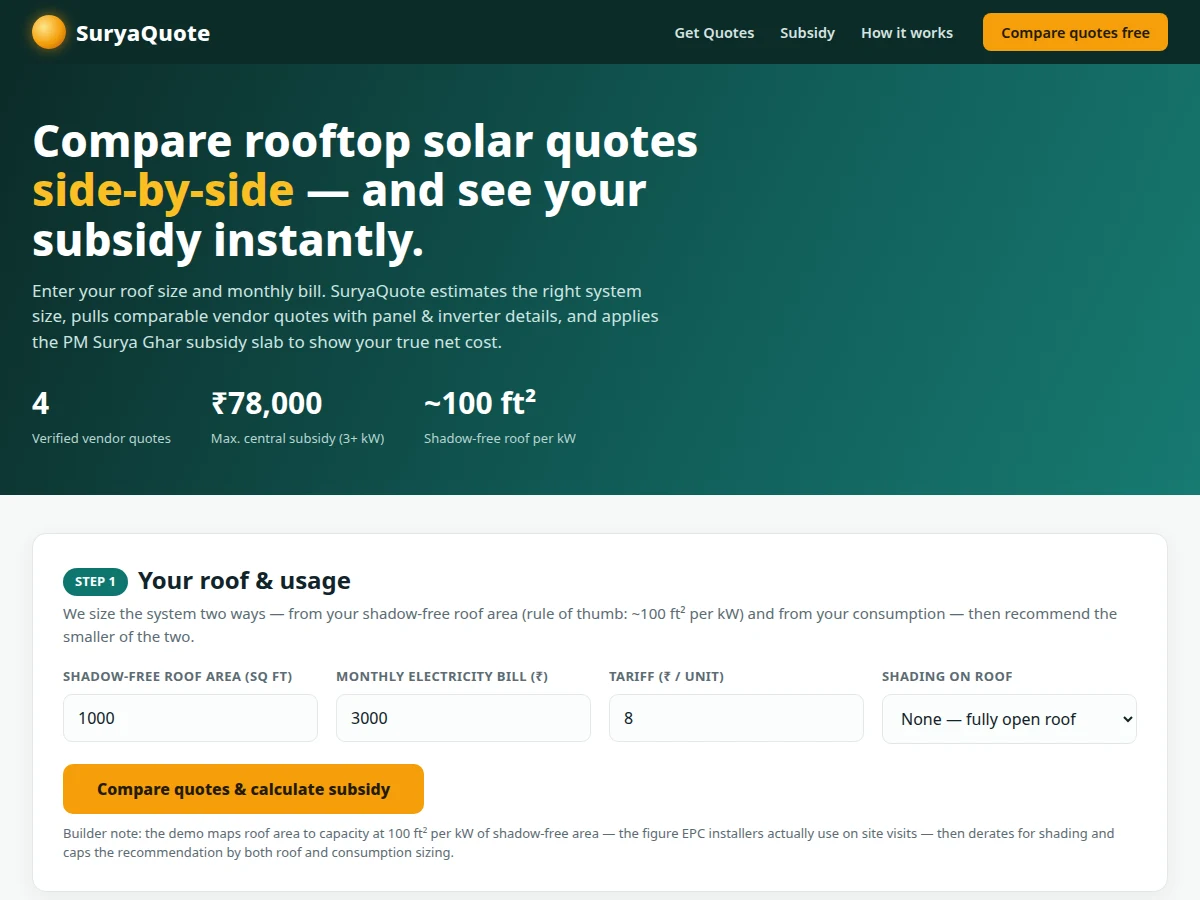
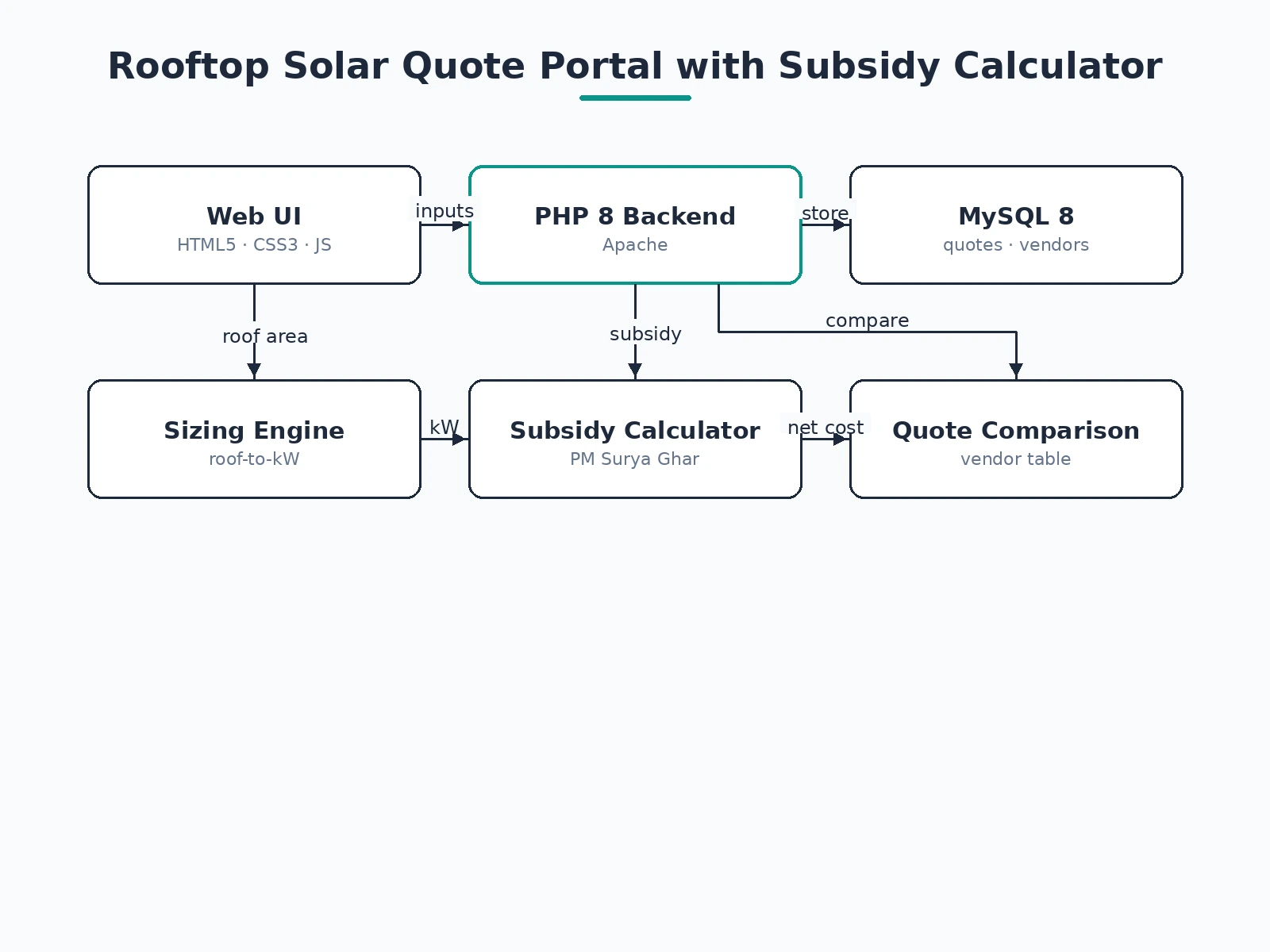
Homeowners shopping for rooftop solar face a confusing market: vendor quotes differ in per-kW rates, panel brands, inverter models and warranty terms, and most buyers cannot tell whether a 3 kW quote at ₹62,000 per kW is genuinely better than a 2 kW quote at ₹55,000. Separately, the PM Surya Ghar subsidy — the single biggest lever on affordability — is usually explained verbally by salespeople rather than computed transparently. This project builds a web portal that fixes both gaps in one flow: the homeowner enters shadow-free roof area, monthly electricity bill and tariff, and the portal recommends a system size, renders comparable vendor quotes side-by-side with hardware and warranty details, and applies the central subsidy slab to produce a net-cost and payback figure the homeowner can actually trust. It is a classic full-stack web project with a real domain rule engine behind it, and every number on the page is traceable to either a vendor record or the published subsidy slab.
How it works
- The homeowner enters shadow-free roof area (sq ft), monthly electricity bill (₹), tariff (₹/unit) and a shading level (none, partial or heavy).
- The sizing engine computes roof-based capacity as floor(usable area ÷ 100) kW and consumption-based capacity as ceil(monthly units ÷ 120), then recommends the smaller of the two, capped at 10 kW.
- The portal renders four seeded vendor quotes side-by-side — per-kW price, panel brand, inverter, warranty and rating — with the lowest ₹/kW row highlighted.
- The homeowner selects a vendor; the gross installed cost is computed as recommended kW × that vendor's per-kW rate.
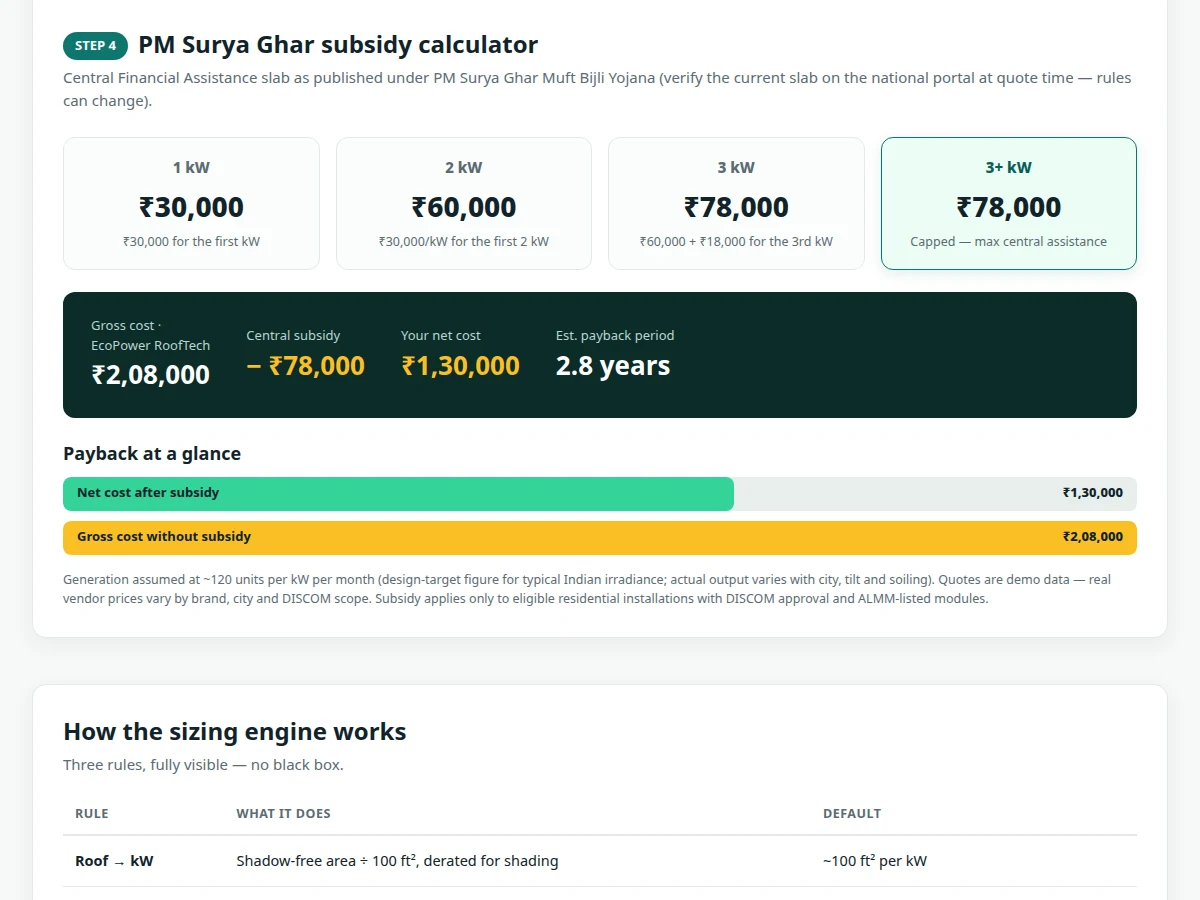
- The subsidy calculator applies the PM Surya Ghar slab (₹30,000 / ₹60,000 / ₹78,000 capped at 3+ kW) to produce the central subsidy amount.
- Net cost = gross cost − subsidy; estimated payback = net cost ÷ (kW × 120 units × tariff × 12), displayed alongside a net-vs-gross cost bar comparison.
- Every figure is labeled as vendor data, a design-target generation figure, or the published subsidy slab — with a disclaimer to re-verify slabs and prices at quote time.
Tech stack:
- PHP 8 (server-side logic, subsidy engine)
- MySQL 8 (vendor profiles, quote records, slab config)
- HTML5 · CSS3 · JavaScript (single-page front end)
- Apache HTTP Server
- Google Charts-compatible data output (payback visuals)
- phpMyAdmin (database administration)
- Git (version control)
- XAMPP local development stack
| Parameter | Value |
|---|---|
| Application type | Single-page web portal (desktop + mobile browsers) |
| Backend | PHP 8 with MySQL 8 database |
| Sizing rule | Approximately 100 sq ft of shadow-free roof per kW (installer rule of thumb) |
| Shading derate | 0% / 15% / 30% selectable (design choices, adjustable) |
| Generation assumption | Approximately 120 units per kW per month (design-target figure) |
| Subsidy slab | ₹30,000 (1 kW) · ₹60,000 (2 kW) · ₹78,000 (3+ kW, capped) — as per the scheme's published slab |
| Vendor records | 4 seeded profiles (demo data, replaceable) |
| System size cap | 10 kW (configurable) |
| External dependencies | None for core flow (fully offline-capable demo) |
Project features
- [Roof-to-kW sizing engine] Converts shadow-free roof area to maximum installable capacity using the installer's rule of thumb of approximately 100 sq ft per kW, applies a 15% or 30% derate for partial or heavy shading, and cross-checks against consumption-based sizing so the recommendation is the smaller of the two.
- [Side-by-side vendor quote table] Four seeded vendor profiles with per-kW installed price, panel brand and wattage, inverter brand and rating, workmanship and panel-performance warranty terms, ratings and install counts — sortable with the lowest ₹/kW quote highlighted.
- [PM Surya Ghar subsidy calculator] Applies the published central slab (₹30,000 for 1 kW, ₹60,000 for 2 kW, ₹78,000 for 3 kW and above, capped) to the selected vendor quote and shows gross cost, subsidy, net cost and estimated payback in one panel, with a note to re-verify the slab at quote time.
- [Selectable vendor lock-in] Clicking any vendor re-computes the subsidy and payback math against that vendor's per-kW rate instantly, so the homeowner sees how brand and rate choices move the final number.
- [Payback visualization] Bar comparison of net cost after subsidy versus gross cost without subsidy, with payback in years derived from estimated generation (design-target figure of approximately 120 units per kW per month) multiplied by the homeowner's tariff.
- [Transparent rule table] A "how the sizing engine works" section lists every rule and default openly — roof-to-kW, bill-to-kW and the subsidy slab — so there is no black box for the viva.
- [Responsive single-page flow] Step-by-step guided flow (roof and usage → system size → quotes → subsidy) that works on desktop and mobile browsers with no build step or external dependencies.
What is included
- Complete portal source code (PHP backend, MySQL schema, front end)
- Seeded vendor and subsidy-slab data with an admin-editable slab config table
- Setup instructions (XAMPP/localhost and shared-hosting deployment)
- Project report PDF (background, requirement analysis, system design, sizing-engine logic, subsidy-slab research, testing)
- PPT presentation for final review
- Viva Q&A preparation document (PHP/MySQL concepts, sizing math, subsidy slab, limitations)
Limitations & prerequisites
- Vendor quotes are seeded demo data — real deployments need genuine vendor onboarding or an admin quote-entry panel.
- The ~100 sq ft per kW rule and ~120 units per kW per month figure are design-target approximations; actual installable capacity and generation vary with roof geometry, tilt, orientation, soiling and city irradiance.
- Subsidy figures follow the PM Surya Ghar published slab as of 2026 — slabs and eligibility rules can change and must be re-verified on the national portal at quote time.
- The calculator covers residential on-grid systems only; commercial, hybrid and off-grid configurations are out of scope.
- No payment gateway or booking workflow is included in the base build — it is a comparison and estimation portal, not a transaction platform.
- Payback math assumes a constant tariff; real tariffs change with slabs, fuel surcharges and time-of-day rates.
Frequently Asked Questions
Is this project suitable for a final-year project?
Yes — for Computer Science and IT programs. It demonstrates full-stack web development (PHP/MySQL/JavaScript), database design, a genuine domain rule engine (the sizing and subsidy math), and honest handling of external facts like government slabs — all strong viva material.
How does the subsidy calculator handle slab changes?
The slab values live in a config table, not hard-coded, so a new slab (for example a revised central amount) is a one-row update. The portal also carries a visible note to re-verify the current slab on the national portal before any real quote.
Where does the ~100 sq ft per kW figure come from?
It is the rule of thumb EPC installers use during site visits for shadow-free roof area with standard 540–550 Wp panels. The builder note in the demo documents this, and the value is a single configurable constant if a site survey suggests otherwise.
Can vendors add or update their own quotes?
Not in the base build — quotes are seeded by the admin. A vendor login with quote submission and an admin approval queue is listed as a customization and future scope in the report.
Does the portal book installations or take payments?
No. It is deliberately a comparison and estimation tool. Booking, payment and site-visit scheduling can be added as custom modules since the vendor and sizing data models already exist.
Components & software requirements
- PHP 8 (server-side logic, subsidy engine)
- MySQL 8 (vendor profiles, quote records, slab config)
- HTML5 · CSS3 · JavaScript (single-page front end)
- Apache HTTP Server
- Google Charts-compatible data output (payback visuals)
- phpMyAdmin (database administration)
- Git (version control)
- XAMPP local development stack
Delivery information
Built-to-order project. Delivery timeline is shared after order confirmation based on current queue.
Support terms
Complete documentation, setup guide, and viva preparation included. Support for setup and explanation provided.
Download free synopsis (PDF)
Enter your name and WhatsApp number — the synopsis PDF downloads immediately. We may send occasional project updates on WhatsApp; no spam.