
More project photos (2)
The problem
In most colleges, student leave still runs on paper: a student fills a form, hunts down the class in-charge for a signature, then the HOD, and the approved slip sits in a register nobody can search. Forms get lost, balances are tracked from memory, and at the end of the term nobody can answer simple questions like how many leaves a student actually took. This project replaces that chain with a single web portal. Students apply for leave online against visible per-type balances (casual, sick, earned, duty); each application flows through a defined approval chain — Class In-charge, then HOD, with automatic escalation to the Dean for leaves above five days. Approvers act in a queue with remarks, rejections require a reason, and every decision is timestamped. An admin dashboard aggregates everything into KPIs, a leave calendar and exportable registers. The build demonstrates the core of real-world workflow software: authentication, role-based access, state machines, audit trails and reporting.
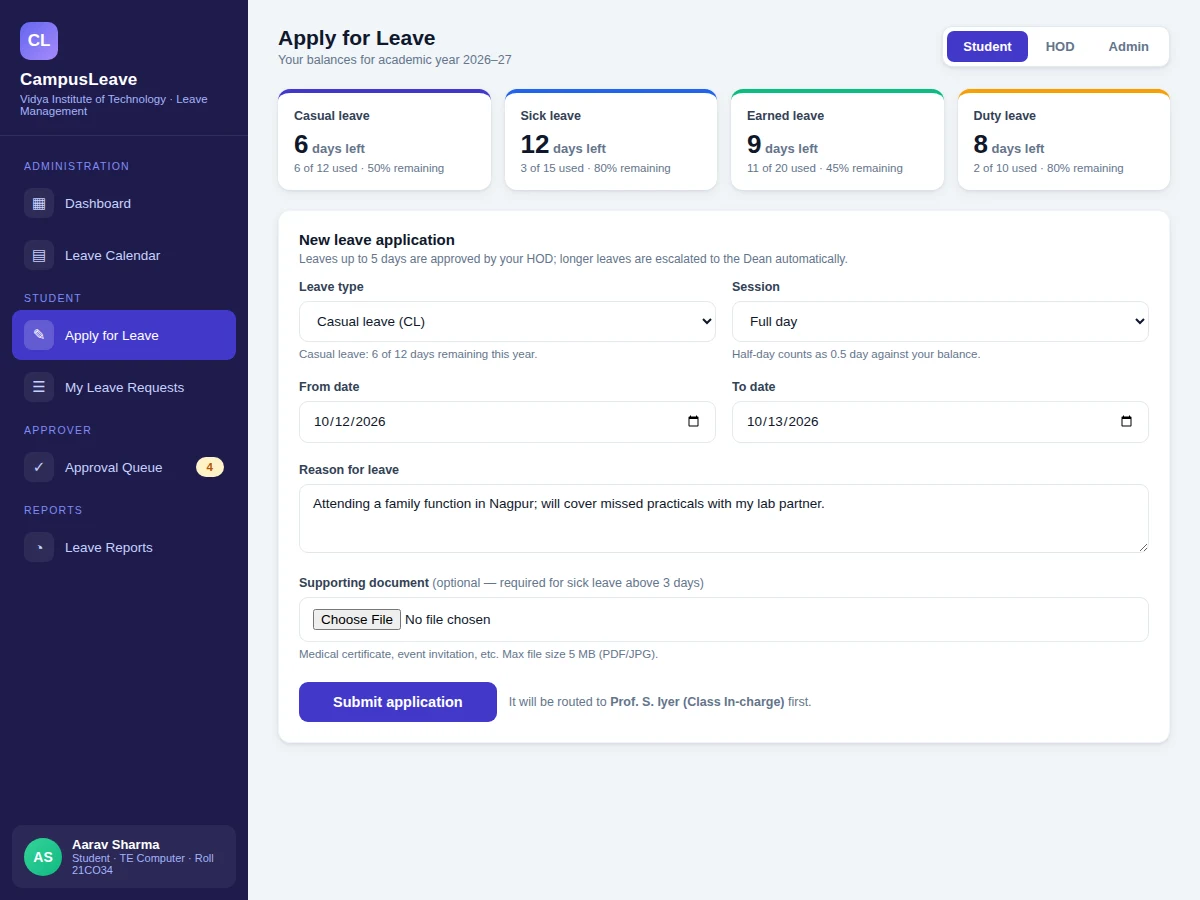
Applies for leave with a date range, written reason and one supporting file.
Follow the working sequence
How it works
- The student signs in; the session loads their role and their leave balances for the academic year (casual, sick, earned, duty).
- The application form checks the date range, requires a written reason, accepts one supporting file (max 5 MB, PDF/JPG/PNG), and blocks submission if the requested days exceed the remaining balance.
- The request enters the approval chain: it first appears in the Class In-charge's queue, then the HOD's; applications above 5 days are escalated to the Dean automatically after HOD approval.
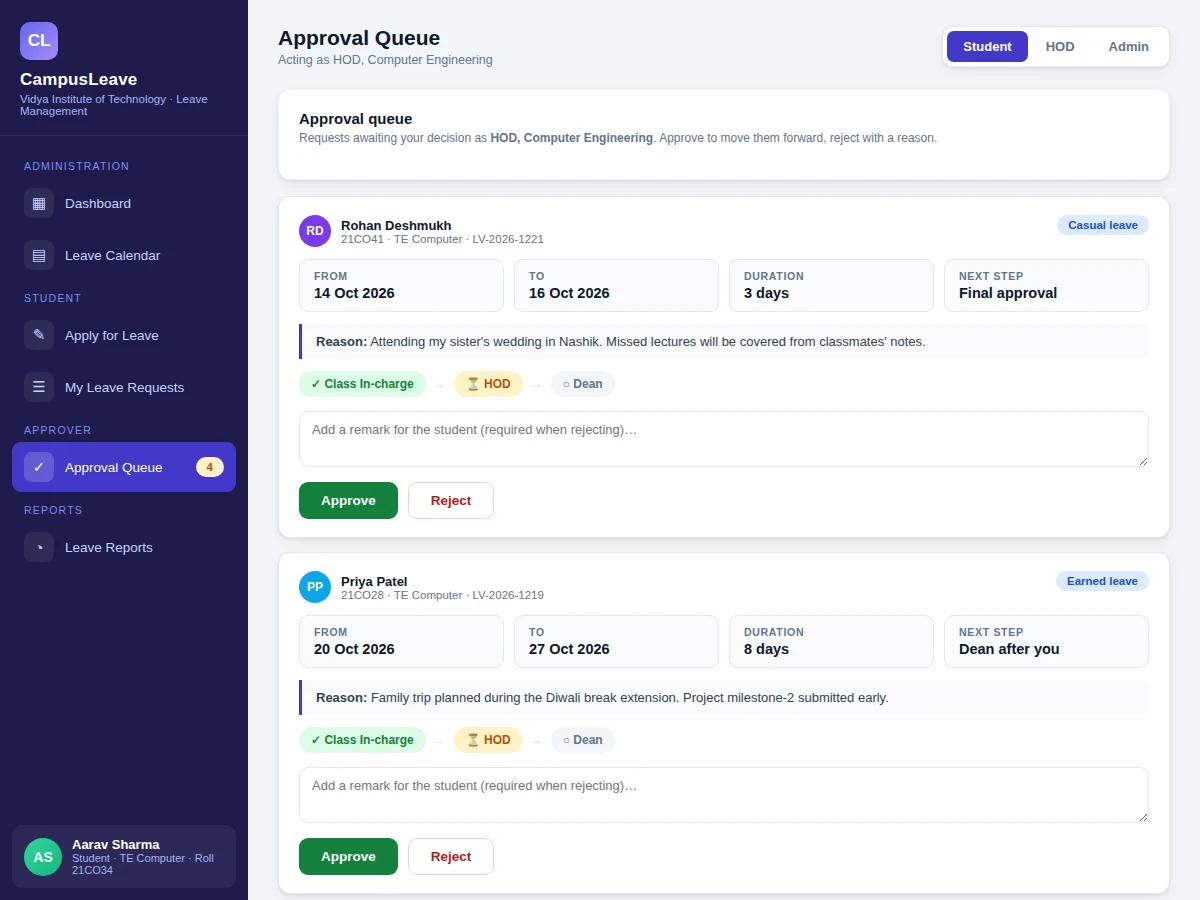
- Each approver acts from the queue — approve moves the request to the next stage, reject sends it back with a mandatory written reason visible to the student.
- On final approval the balance ledger is decremented (half-day = 0.5), the request history is updated, and the leave calendar marks the dates.
- The admin dashboard aggregates every decision into KPIs, charts and the activity feed, and can export the monthly leave register as PDF or the department summary as CSV.
Tech stack:
- PHP 8 · Laravel 11
- MySQL 8 (InnoDB)
- Blade templates · Tailwind CSS
- JavaScript (Fetch API)
- Laravel authentication (session-based)
- Dompdf (PDF register export)
- Laravel Excel (CSV export)
- Apache / Nginx shared hosting
| Parameter | Value |
|---|---|
| User roles | 4: Student, Class In-charge, HOD, Admin — the Admin role handles Dean-level escalations (configurable, design target) |
| Approval chain | Up to 3 levels: Class In-charge → HOD → Dean, handled by the Admin role at the Dean step (configurable) |
| Leave types | 4 defaults: Casual, Sick, Earned, Duty (configurable) |
| Dean escalation rule | Automatic for applications above 5 days (configurable threshold) |
| Document upload | Max 5 MB per file; PDF/JPG/PNG (design target) |
| Half-day accounting | 0.5 day per half-day application |
| Report exports | Monthly register (PDF), department summary (CSV) — expected |
| Notifications | In-app only in base build; email/SMS are optional customizations |
| Hosting | Shared hosting with PHP 8 + MySQL (expected); runs on XAMPP locally |
| Concurrent users | Approximately 200 on basic shared hosting (expected, design target) |
Project features
- [Online leave application] Students apply with leave type, date range, full/half-day session, reason and an optional supporting document (up to 5 MB); the form validates the date range and available balance before anything is submitted.
- [Leave balance ledger] Per-type yearly balances (casual, sick, earned, duty) are shown upfront and auto-decremented on approval; a half-day application counts as 0.5 day.
- [Multi-level approval workflow] Every request moves Class In-charge → HOD → Dean, with leaves above 5 days escalated to the Dean automatically after HOD approval; each stage records the decision, remark and timestamp.
- [Approver queue with mandatory rejection reasons] Approvers see pending requests with dates, duration and reason, and can approve or reject in one click — a rejection cannot be submitted without a written reason.
- [Leave calendar] A month view marks approved and pending leave days so class in-charges can see at a glance who is out on any date.
- [Admin dashboard and reports] KPIs (students on rolls, pending approvals, on leave today), a 6-month applications chart, leave mix by type, department-wise summaries and one-click PDF/CSV exports.
- [Role-based access control] Four roles — Student, Class In-charge, HOD, Admin — each with its own views and permissions; the approver chain and the Dean-escalation threshold are configurable settings, not hard-coded.
- Optional customizations (not in the base build): email/SMS notifications, biometric attendance sync, a mobile app, and multi-college support.
What is included
- Complete Laravel application source code (controllers, models, migrations, Blade views)
- MySQL database schema with seed data (departments, roles, sample users and leave types)
- Setup and deployment guide (XAMPP walkthrough + shared-hosting steps)
- Project report PDF (problem, methodology, ER diagram, workflow design, screenshots, testing)
- PPT presentation for the final review
- Viva Q&A preparation document (MVC, authentication, RBAC, workflow state machine, migrations)
- Demo guidance: sample logins for all four roles and a scripted walkthrough
Limitations & prerequisites
- Email and SMS alerts are not part of the base build — notifications are in-app only; adding them is an optional customization.
- No biometric or HRMS integration in the base build; attendance data is not pulled automatically.
- The holiday/academic calendar is maintained manually by the admin — public-holiday sync is not included.
- Designed for a single college deployment; multi-college or university-level rollouts need configuration changes.
- The PDF register uses a fixed template; custom report formats are a customization.
- The concurrent-user figure is a design target, not a load-tested measurement.
Frequently Asked Questions
Does this project have an admin panel?
Yes. The admin gets a dashboard with KPIs (students on rolls, pending approvals, on leave today), a 6-month applications chart, leave mix by type, a leave calendar, department-wise summaries and one-click PDF/CSV exports.
Can the approval chain be changed for my college?
Yes. The approver roles, their order and the Dean-escalation day threshold are configurable settings, so the chain can match your college's actual hierarchy instead of the default Class In-charge → HOD → Dean.
Is the database included?
Yes. You get the full MySQL schema as Laravel migrations plus seed data — departments, roles, leave types and sample student/approver accounts — so the system runs with realistic data from the first login.
Can it be hosted online?
Yes. It is a standard PHP 8 + MySQL application that deploys on ordinary shared hosting (Hostinger-style plans work), and it also runs locally on XAMPP for development and the viva demo.
Are email or SMS notifications included?
Not in the base build — approvers and students are notified inside the portal. Email via Laravel Mail and SMS-gateway alerts can be added as optional customizations.
Is this project suitable for a final-year project?
Yes — for Computer Engineering, IT and MCA programs. It demonstrates authentication, role-based access control, a multi-stage workflow state machine, database design and reporting — all strong viva material.
Components & software requirements
- PHP 8 · Laravel 11
- MySQL 8 (InnoDB)
- Blade templates · Tailwind CSS
- JavaScript (Fetch API)
- Laravel authentication (session-based)
- Dompdf (PDF register export)
- Laravel Excel (CSV export)
- Apache / Nginx shared hosting
Delivery information
Built-to-order project. Delivery timeline is shared after order confirmation based on current queue.
Support terms
Complete documentation, setup guide, and viva preparation included. Support for setup and explanation provided.
Download free synopsis (PDF)
Enter your name and email — the synopsis PDF downloads immediately. We may send occasional project updates; no spam, unsubscribe anytime.