
More project photos (2)
The problem
Examination cells still prepare seating charts by hand: staff copy roll numbers from spreadsheets into bench grids, trying to keep students of the same class apart so neighbours cannot copy. For a few hundred students across several halls this takes hours, is error-prone, and must be redone entirely whenever a hall becomes unavailable or a student list changes. A seating arrangement generator turns this chore into a repeatable, rule-driven computation. Given hall layouts (rows × columns of benches) and roll-number ranges per branch, the system expands every range into concrete roll numbers, allocates each student to a numbered seat under configurable malpractice-prevention rules, and outputs the complete package — visual grids, utilisation statistics, a roll-number lookup and printable charts — in seconds.
Defines halls and batches, picks the allocation rule and prints the charts.
Follow the working sequence
How it works
- Hall layouts are defined as name plus bench rows × columns; capacity is computed as rows × columns.
- Student batches are entered as branch prefix and count; each is expanded into zero-padded roll numbers with a deterministic pseudo-random name per roll for realistic demo data.
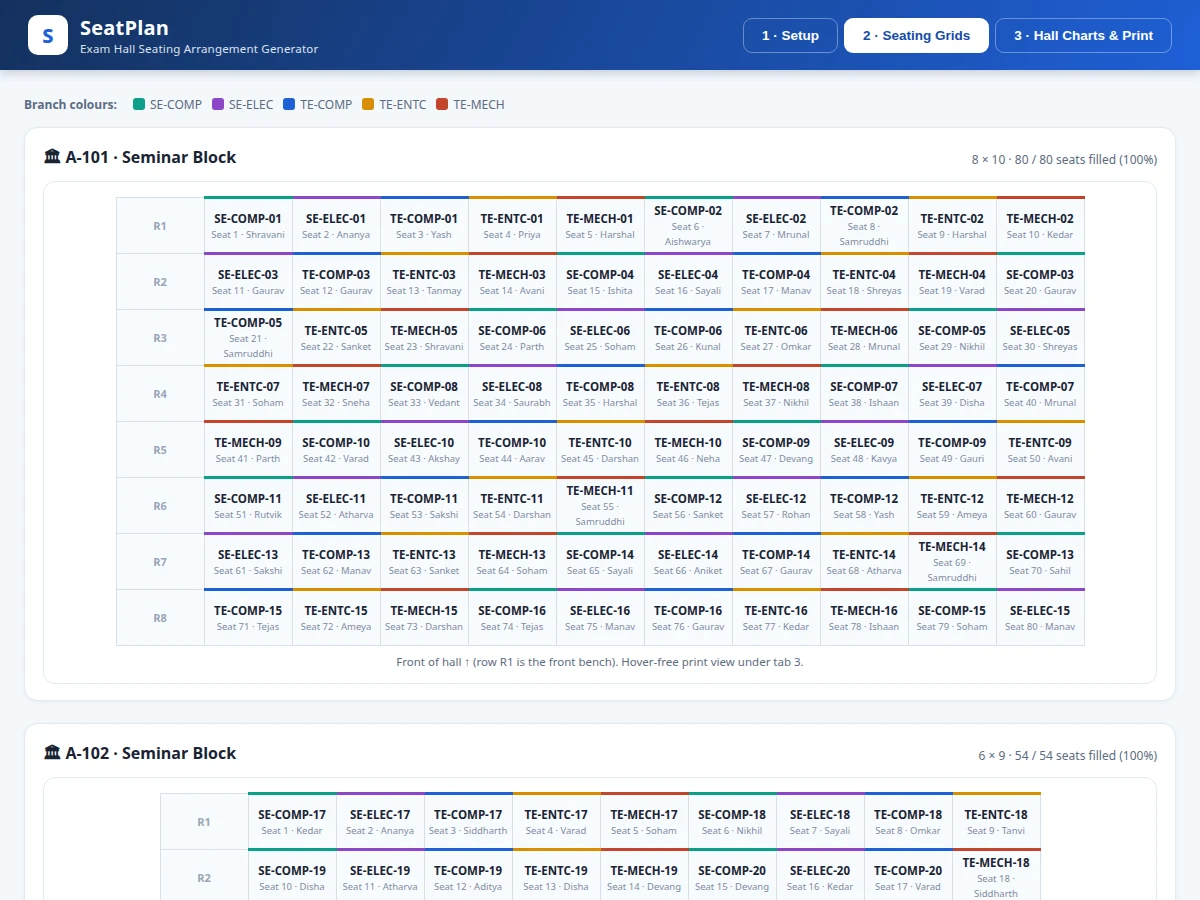
- The allocation engine distributes students across halls in capacity order, then fills each grid: the cheat-proof mode interleaves branches seat by seat and rotates the branch order every row so columns mix too.
- Grouped modes lay branches in contiguous blocks, inserting a fully empty spacer row at each branch transition when enabled.
- Every seat gets a per-hall seat number following the chosen numbering pattern; a roll-number index maps each student to hall, seat and bench coordinates.
- The dashboard renders grids, utilisation bars and the lookup; the print view compiles the official per-hall charts with a clean print stylesheet for PDF export.
Tech stack:
- PHP 8, Laravel 11 (application & admin panel)
- MySQL 8 (halls, batches, allocations)
- Blade templates + HTML5/CSS3
- Vanilla JavaScript seating-grid renderer
- Dompdf (chart PDF export)
- Print CSS for official seating charts
| Parameter | Value |
|---|---|
| Input | Hall layouts (rows × columns), batch prefix + count per branch |
| Roll format | Zero-padded, e.g. TE-COMP-01 … TE-COMP-62 |
| Allocation rules | 4 (seat-by-seat mix, row-wise mix, column-band, snake) |
| Numbering patterns | 3 (row-major, column-major, snake) |
| Output | Per-hall grids, utilisation stats, seat lookup, print charts |
| Capacity check | Up-front shortfall warning before generation |
| Demo data | 238 students, 5 branches, 3 halls (260 seats) |
| Delivery | Built-to-order web app with admin panel |
Project features
- [Automatic roll-number allocation] Enter halls (name, bench rows × columns) and batches as prefix/count pairs (e.g. TE-COMP, 62); the engine expands them into concrete rolls (TE-COMP-01 … TE-COMP-62) and seats every student automatically.
- [Cheat-proof branch mixing] Seat-by-seat alternation with per-row branch rotation, so no two neighbours — horizontal or vertical — share a branch; plus row-wise mixing, column-band and snake-pattern rules.
- [Visual seating grids] Per-hall bench grids with branch colour coding, seat numbers and student names, exactly as an invigilator reads them.
- [Roll-number seat lookup] Type any roll number to instantly find the hall, seat number and bench position — built for the exam-venue help desk.
- [Hall utilisation dashboard] Total students, seats, occupancy percentage and per-hall fill bars, with an up-front shortfall warning when seats are insufficient.
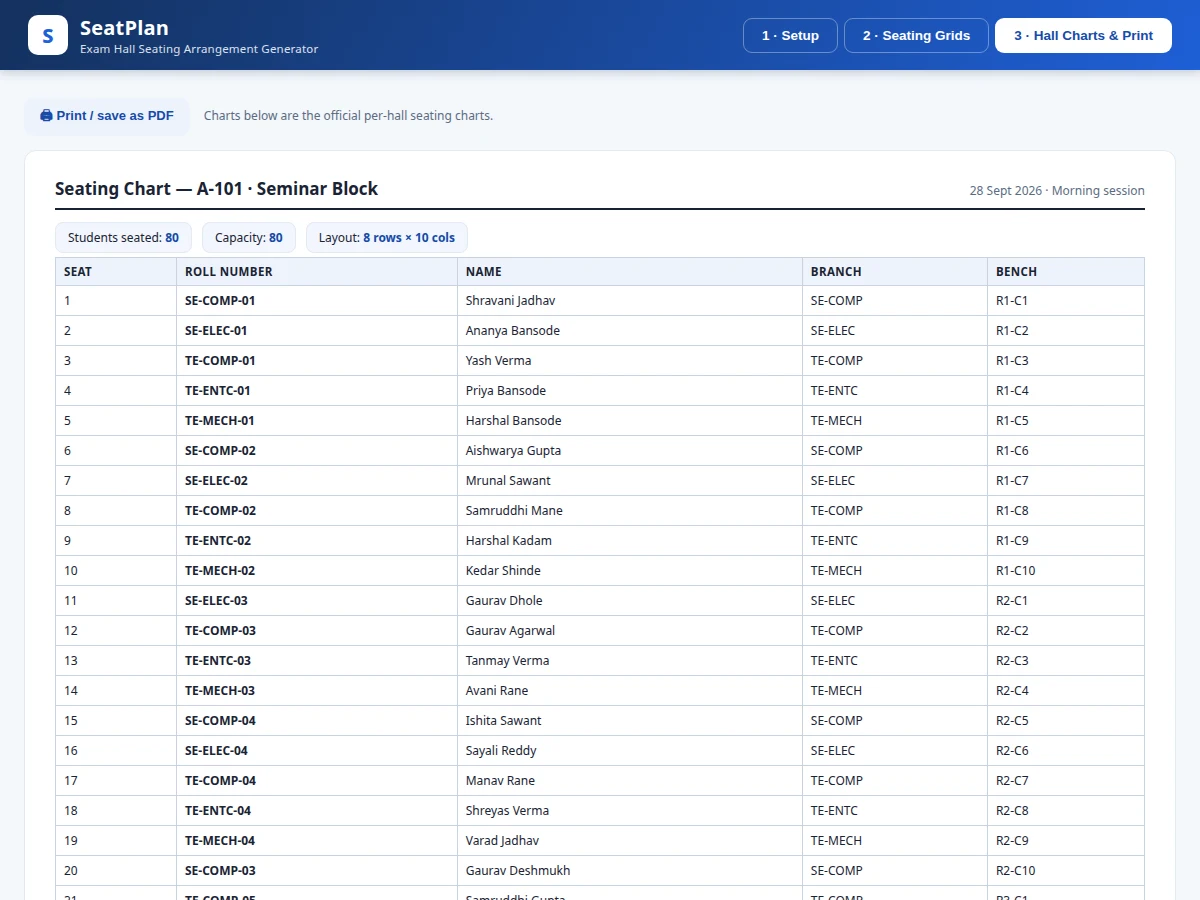
- [Print-ready seating charts] Official per-hall charts (seat, roll number, name, branch, bench position) with a print stylesheet for PDF export and physical pin-up.
- [Configurable rules] Allocation rule, seat-numbering pattern (row-major, column-major, snake) and empty spacer rows between branches are all selectable before generation.
What is included
- Complete web application source code (Laravel + MySQL)
- Documented allocation engine (mixing rules, numbering patterns, spacer rows)
- Working single-file demo with realistic sample data
- Database schema and seed data
- Project report PDF (background, design, methodology, results)
- PPT presentation for final review
- Viva Q&A preparation document (allocation logic, rule trade-offs, edge cases)
Limitations & prerequisites
- Seat numbering restarts per hall — a single global seat sequence across halls is not implemented.
- The demo's student names are deterministic pseudo-random placeholders; the built-to-order version imports real lists from CSV.
- Very large venues (thousands of students) may need pagination in the grid view; the engine itself has no such limit.
- Special constraints (reserved accessible seats, keeping specific students apart) are future scope, not in the base build.
- The print charts assume standard bench layouts; unusual hall geometries (L-shaped rooms) are approximated as rectangles.
Frequently Asked Questions
How does the cheat-proof mixing actually work?
The engine interleaves branches seat by seat — TE-COMP, SE-COMP, TE-ENTC and so on — and then rotates the branch order at the start of every row. This means the student to your left, right, front and behind is always from a different branch, which is exactly the malpractice-prevention property examination cells try to achieve by hand.
What inputs does the system need?
Two things: hall definitions (a name plus bench rows × columns, so capacity is computed automatically) and student batches as a branch prefix with a count, e.g. TE-COMP with 62 students. The system expands these into concrete roll numbers like TE-COMP-01 through TE-COMP-62 and allocates every student to a numbered seat.
What happens if there are more students than seats?
The engine checks total capacity against the student count before generating and reports the shortfall instead of silently dropping students. During grouped-mode generation, any student who genuinely cannot be placed (for example after spacer rows consume seats) is listed as unseated so the operator can add rows or halls.
What do the printable charts look like?
Each hall gets an official seating chart table with seat number, roll number, student name, branch and bench position (R3-C5 style), plus header KPIs showing students seated, capacity and layout. A print stylesheet strips the app chrome so the browser's print-to-PDF produces a clean document for pinning at hall entrances.
Can the rules be changed for different exam policies?
Yes — the allocation rule (four modes), the seat-numbering pattern (row-major, column-major, snake) and the empty spacer row between branches are all selected before each generation. The viva Q&A documents the trade-off of each rule so the student can defend the choice.
Is this project suitable for a final-year project?
Yes — for Computer Science, IT and Web Development programs. It is a genuine applied-software build: input parsing, a rule-based allocation engine with verifiable correctness properties, data visualisation and print output — all demonstrable live in the viva, with real code the student can walk through. Suitable for B.E./B.Tech final-year projects in Computer Science, IT and Web Development.
Components & software requirements
- PHP 8, Laravel 11 (application & admin panel)
- MySQL 8 (halls, batches, allocations)
- Blade templates + HTML5/CSS3
- Vanilla JavaScript seating-grid renderer
- Dompdf (chart PDF export)
- Print CSS for official seating charts
Delivery information
Built-to-order project. Delivery timeline is shared after order confirmation based on current queue.
Support terms
Complete documentation, setup guide, and viva preparation included. Support for setup and explanation provided.
Download free synopsis (PDF)
Enter your name and email — the synopsis PDF downloads immediately. We may send occasional project updates; no spam, unsubscribe anytime.