
More project photos (2)
The problem
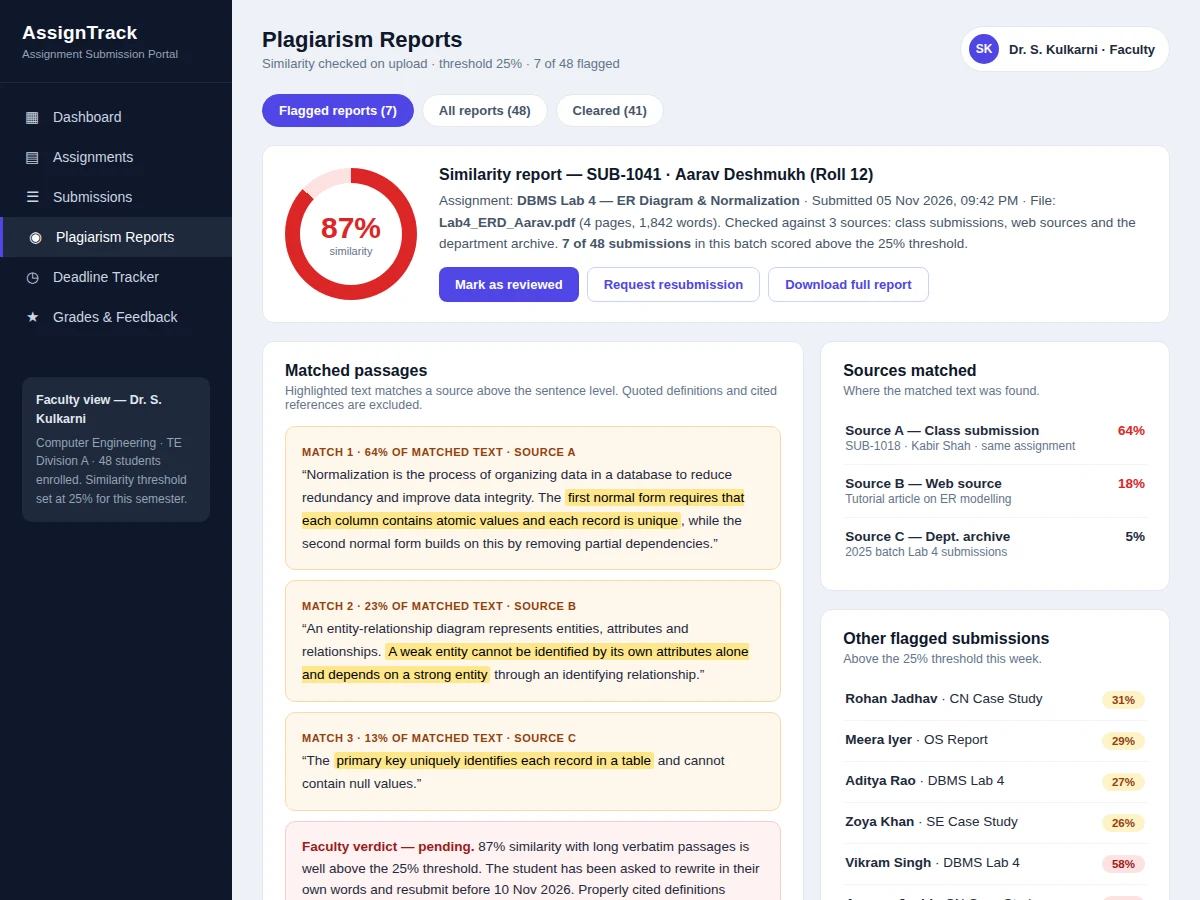
An online assignment submission portal with plagiarism check and deadline tracking is a web application where faculty publish assignments with fixed deadlines, students upload their work before the cut-off, and every submission is automatically compared against other submissions, web sources and past work for copied text. In most colleges this workflow still runs on email and messaging apps, so faculty chase late files in scattered inboxes, deadlines are announced but never enforced by the system, and copied work is spotted only when a teacher happens to recognise it. This portal replaces that scatter with one timestamped record per submission: upload closes at the deadline, a similarity report is generated on upload, reminders go out before the cut-off, and late work is accepted only inside a published penalty window. In the demo build, the similarity scan flags 7 of the 48 seeded submissions above the 25% threshold, showing how the check surfaces copied work instead of leaving it to chance.
Student uploads the assignment file before the deadline.
Follow the working sequence
How it works
A faculty member creates an assignment with a title, instructions, allowed file formats and a deadline, and the portal publishes it to the class dashboard with a countdown. Students upload their file before the cut-off; the portal stores it with a server timestamp, extracts the text, and runs the similarity check against the three comparison sources, saving a report alongside the submission. As the deadline approaches, the reminder job notifies students who have not submitted, and after the deadline the portal either locks uploads or accepts them with the configured penalty. Faculty then open each submission, read the similarity report, enter marks and feedback, and publish the grades, after which students see their result and the annotated report in their own dashboard. Every step leaves a timestamped record, so a dispute about a late or missing submission is settled from the portal log rather than from memory.
- Faculty create an assignment with instructions, file-format rules and a deadline; it appears on the student dashboard with a live countdown.
- Students upload PDF, DOCX or ZIP files; the portal records the server timestamp and stores the file against the assignment and the student.
- The uploaded file is converted to plain text and compared against class submissions, web sources and the department archive using TF-IDF and cosine similarity.
- A similarity report is generated with an overall percentage, matched passages and the source of each match; submissions above the 25% threshold (configurable) are flagged for review.
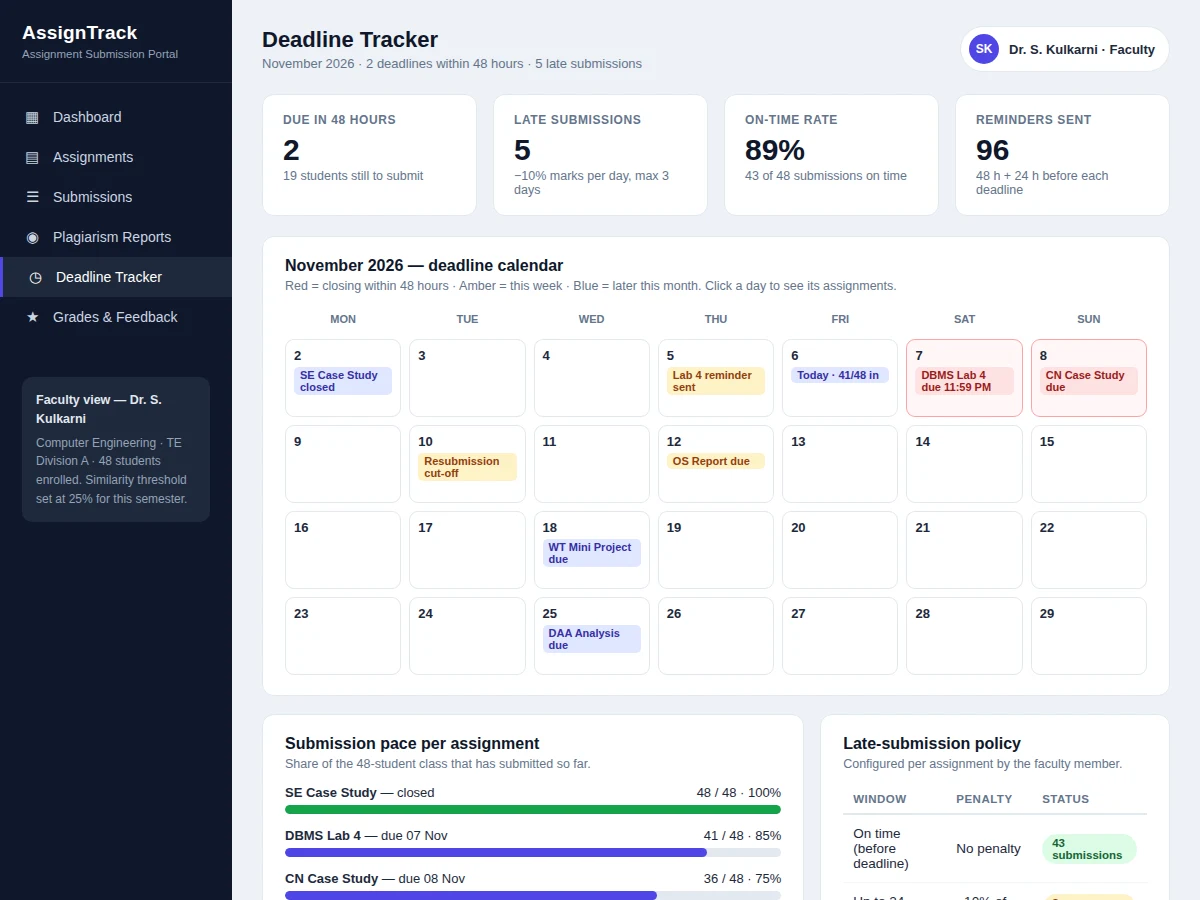
- The reminder job sends notifications 48 hours and 24 hours before each deadline to students who have not yet submitted.
- After the deadline, the portal applies the configured late penalty automatically and locks uploads once the final cut-off passes.
- Faculty grade each submission in the portal, add written feedback, and publish the results; students see their marks and the similarity report in their dashboard.
Assignment portal vs email submission
| Aspect | This portal | Email and messaging apps |
|---|---|---|
| Deadline enforcement | Upload closes at the deadline; late work only inside a penalty window | Deadlines announced, never enforced by the system |
| Similarity check | Automatic on every upload, with a matched-passage report | Copied work spotted only if a teacher happens to recognise it |
| Submission record | One timestamped record per submission | Files scattered across inboxes |
| Late penalty | 10% of marks per day, up to 3 days, applied automatically | Negotiated case by case, with no system record |
| Grading | Online marks and feedback inside the portal | Mark sheets passed around on paper |
Tech stack:
- HTML5 · CSS3 · JavaScript
- Node.js · Express
- MySQL
- PDF text extraction (pdf-parse)
- Similarity matching (TF-IDF · cosine)
- JWT authentication
- Nodemailer reminders
- Git
| Parameter | Value |
|---|---|
| Platform | Web application, runs in a modern browser |
| User roles | 3 roles: student, faculty and admin |
| File formats accepted | PDF, DOCX and ZIP |
| Maximum file size | 10 MB per file (design limit) |
| Similarity threshold | 25% by default (configurable by faculty) |
| Comparison sources | 3 sources: class submissions, web sources, department archive |
| Reminders per deadline | 2 reminders: 48 hours and 24 hours before the deadline |
| Late penalty | 10% of marks per day, maximum 3 days (configurable) |
| Demo data | 6 assignments and 48 submissions in the seeded demo class |
| Dashboard load | Approximately 2 seconds on a local network (expected) |
Project features
The portal is built around four capabilities that carry the whole assignment cycle: an automatic similarity check that runs on every upload, a deadline tracker that counts down to each cut-off and sends reminders before it, a role-based workflow that keeps student, faculty and admin views separate, and online grading with written feedback. Around those four, the portal adds late-submission penalties that the faculty member configures per assignment, a full submission history so no file is ever lost or disputed, and a plagiarism report that shows the matched passages and their sources instead of a single unexplained percentage. Together these make the portal a complete replacement for email-based submission rather than a file-upload form with a calendar attached. The demo class behind the screenshots shows all of this working together: six assignments, forty-eight submissions and seven flagged reports, so a reviewer can see the workflow end to end rather than reading about it.
- [Automatic similarity check on upload] Every uploaded file is converted to text and compared against class submissions, web sources and the department archive, producing a similarity percentage and a report with the matched passages highlighted.
- [Deadline tracker with reminders] Each assignment shows a live countdown, and the portal sends reminders 48 hours and 24 hours before the deadline, so students cannot claim they did not know the cut-off.
- [Role-based dashboards] Students see their own assignments, deadlines and grades; faculty see the whole class, submission progress and flagged reports; an admin manages users, courses and the similarity threshold.
- [Late-submission penalty rules] Faculty set the penalty per assignment — 10% of marks per day for up to 3 days in the default configuration — and the portal applies it automatically and locks uploads after the final cut-off.
- [Online grading and feedback] Faculty grade inside the portal, attach marks per submission and write feedback that the student sees immediately, replacing mark sheets passed around on paper.
- [Plagiarism report with sources] Flagged submissions open a report showing the overall similarity score, each matched passage, the source it matches and the share of matched text from that source.
- [Submission history and audit trail] Every upload, resubmission, reminder and grade is timestamped and stored, so a dispute about whether work was submitted on time is settled from the record, not from memory.
What is included
- Complete portal source code (frontend, backend and database schema)
- Automatic similarity checker with matched-passage reports
- Deadline tracker with countdowns, reminders and late-penalty rules
- Role-based dashboards for student, faculty and admin
- Seeded demo class with 6 assignments and 48 submissions for the viva demonstration
- Project report PDF (background, design, database schema, similarity method, testing)
- PPT presentation for final review
- Viva Q&A preparation document (authentication, similarity matching, deadline enforcement, database design)
- Setup guidance for installation and first-run configuration
- Typical build timeline: approximately 3–4 weeks from requirements confirmation to delivery (expected)
- To get this project, message Projectech on WhatsApp with the project name, your branch and your deadline — you receive a written quotation stating the exact scope, the price and the delivery date before any payment.
Limitations & prerequisites
- The similarity check compares text only — it cannot detect copied diagrams, images or hand-drawn work inside a submission.
- Web-source comparison depends on the configured external search source; without internet access only class submissions and the archive are compared.
- The 25% threshold is a configurable default, not a proven plagiarism verdict — every flagged submission still needs faculty review before any action.
- Paraphrased copying can score below the threshold, so the check catches verbatim and near-verbatim copying, not every form of academic misconduct.
- File conversion supports PDF, DOCX and ZIP only; scanned image-only PDFs need OCR, which is not included in the base build.
- Reminder delivery depends on the configured email service; if the mail credentials are invalid, reminders fail silently and the portal logs the failure.
- The portal is a teaching build for a single department, not a university-wide system — it is not load-tested beyond approximately 100 concurrent users (design target).
Frequently Asked Questions
How does the plagiarism check work?
When a student uploads a file, the portal extracts its text and compares it against three sources — other submissions in the class, web sources and the department archive — using TF-IDF weighting and cosine similarity, then produces a report with an overall percentage and the matched passages highlighted. Submissions above the 25% threshold are flagged for faculty review.
What happens if a student submits late?
The portal records the exact server timestamp of every upload, applies the faculty-configured late penalty automatically — 10% of marks per day for up to 3 days in the default configuration — and locks the assignment once the final cut-off passes, without any manual step. Students see the penalty and the remaining window on their dashboard before they upload, so the rule is visible in advance rather than applied afterwards.
Is the database included, and can the portal be hosted online?
Yes, on both counts: the MySQL schema and seed data are part of the deliverables, and the portal is a standard Node.js and MySQL application that runs on any shared host or VPS with Node.js support, so no special infrastructure is needed. The demo runs locally without hosting, and the setup guide covers the production configuration, including environment variables and the mail service for reminders.
Can more roles or modules be added?
Yes. The role system is designed for extension, so a department head or reviewer role can be added without rewriting the existing dashboards, and common additions are a question-bank module, a viva-scheduling module and an analytics page showing class submission trends. Each addition is scoped separately, since it changes the database schema and the dashboards, and the base build ships with the student, faculty and admin roles only.
What does the similarity percentage actually mean?
The percentage is the share of the submitted text that matches text in the comparison sources, weighted by TF-IDF so that common words count for less than distinctive phrases. A low score means little overlap was found, while a high score means long passages match a source. The number is a signal for review, not a verdict — the faculty member reads the matched passages before deciding anything.
Is this project suitable for a final-year project?
Yes — for Computer Science, IT and Web Development programs, because it demonstrates full-stack development, database design, authentication, file processing, text similarity and scheduled background jobs in one working system. The similarity checker and the deadline engine give the viva discussion two genuinely technical components to explain, beyond the usual create-read-update-delete screens.
Components & software requirements
- HTML5 · CSS3 · JavaScript
- Node.js · Express
- MySQL
- PDF text extraction (pdf-parse)
- Similarity matching (TF-IDF · cosine)
- JWT authentication
- Nodemailer reminders
- Git
Delivery information
Built-to-order project. Delivery timeline is shared after order confirmation based on current queue.
Support terms
Complete documentation, setup guide, and viva preparation included. Support for setup and explanation provided.
Download free synopsis (PDF)
Enter your name and WhatsApp number — the synopsis PDF downloads immediately. We may send occasional project updates on WhatsApp; no spam.