
More project photos (2)
The problem
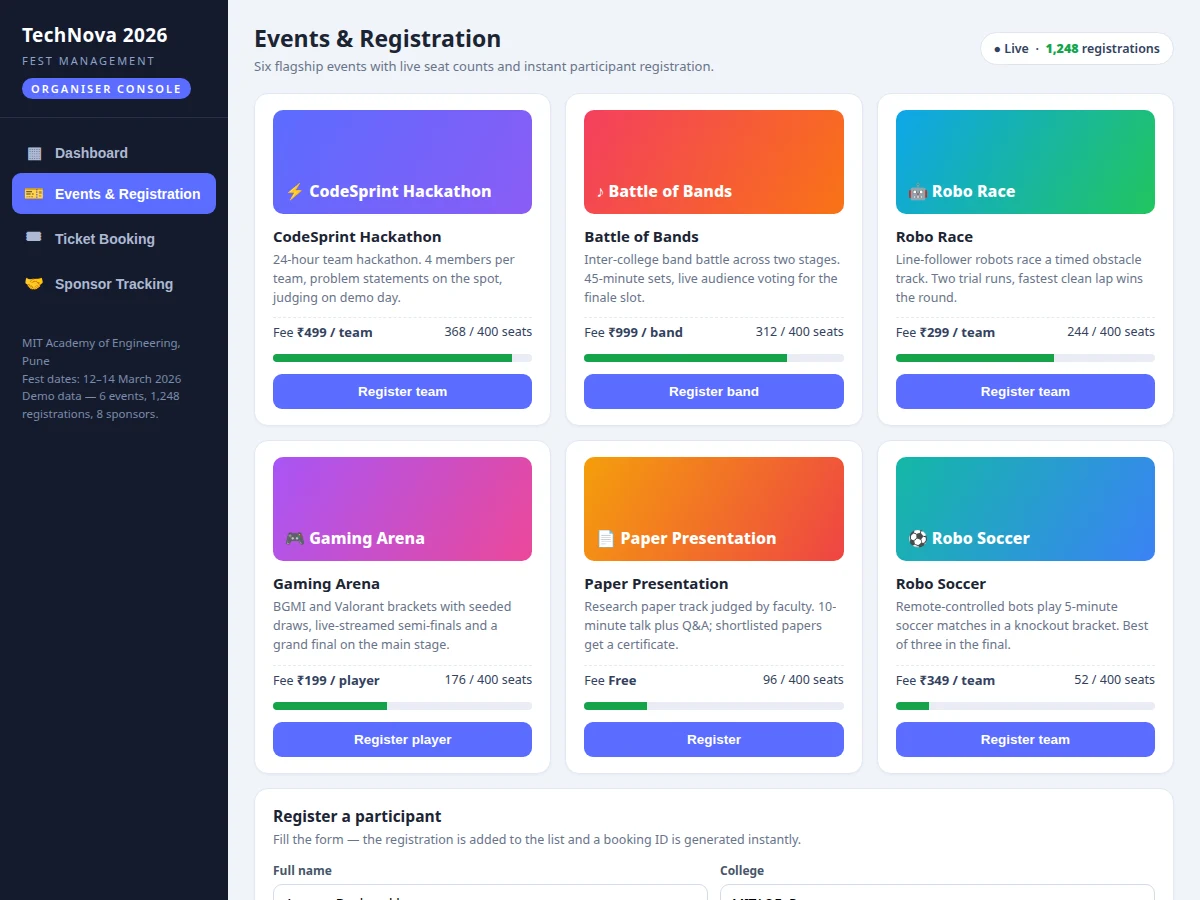
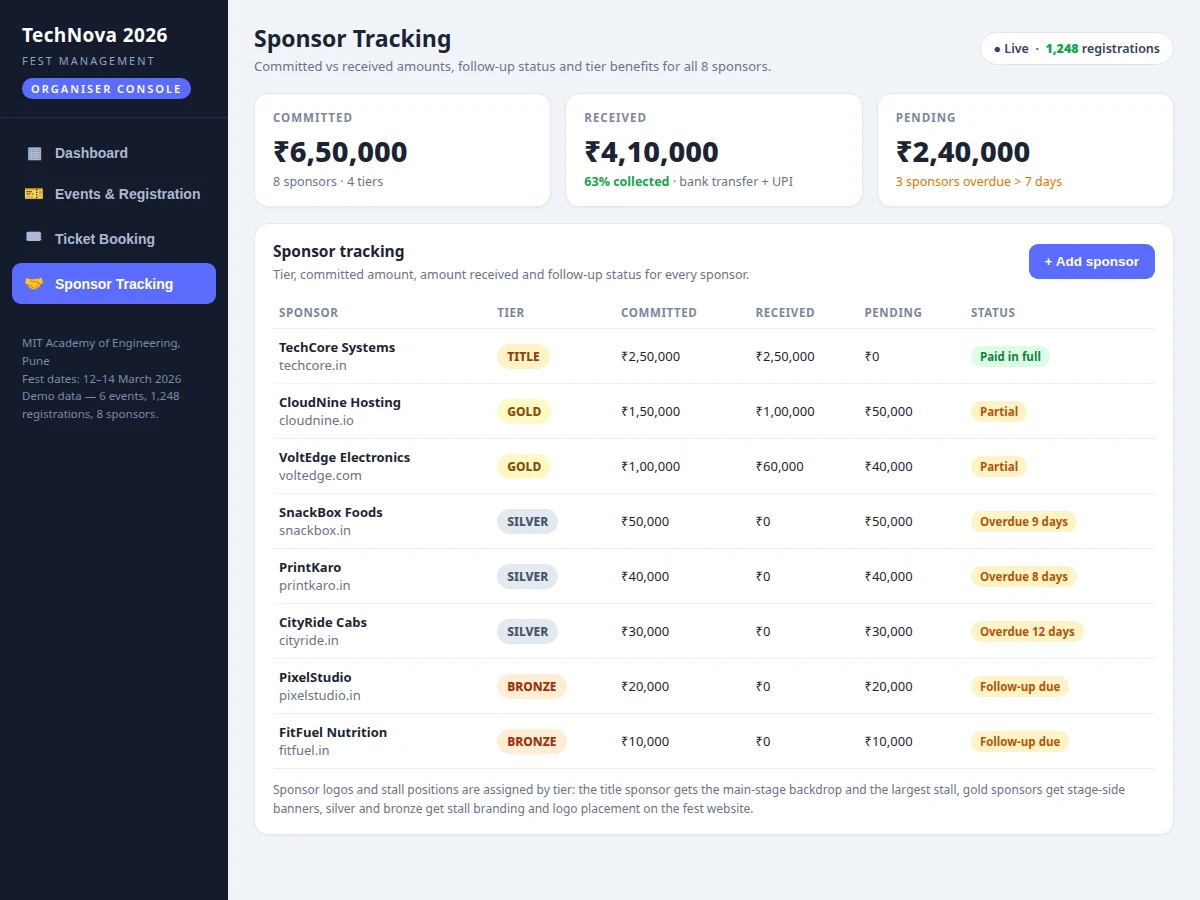
College fests run on spreadsheets, group chats and paper lists, and that is where the chaos starts. A college fest management system with event registration, ticket booking and sponsor tracking replaces that patchwork with one web application for creating events, publishing ticket tiers, confirming registrations and tracking sponsorship money live. Participants browse events, register as individuals or teams, and receive a tiered ticket with a unique booking ID and a QR code for gate check-in. Sponsors are recorded by tier — title, gold, silver or bronze — with committed, received and pending amounts, so follow-ups stop depending on one person's memory. The demo build renders 6 events, 1,248 seeded registrations and 8 sponsors, and booking a ticket issues a booking ID in the TN26-88xx series with a 12 × 12 module QR-style code drawn on a canvas. It suits any college running a multi-day fest with paid events and sponsors.
Creates the fest, publishes events with fees and seat limits, and sets ticket tiers.
Follow the working sequence
How it works
The system is a full-stack web application: a browser front end, a Node.js and Express back end, and a MySQL database holding events, registrations, tickets and sponsors. An organiser signs in, creates the fest with its dates, and publishes events with a fee, a seat limit and a team size; each event gets general, VIP or team-pass tiers. Participants browse the published events, fill in a registration form and pick a ticket tier, and the back end creates a registration row, a booking with a unique ID, and a QR code that the participant shows at the gate. Gate volunteers scan the code, the booking is marked checked in exactly once, and duplicate scans are rejected. Sponsors are entered by tier with a committed amount, and every payment received is logged against that sponsor until the balance reaches zero. The dashboard reads the same tables to show registrations per event, tickets per tier, revenue collected and sponsorships still pending.
- The organiser signs in and creates the fest with dates, events, ticket tiers and seat limits.
- Events go live on the fest site; participants browse them and register as individuals or teams.
- The participant picks a ticket tier and the back end creates a registration, a booking with a unique ID and a QR code.
- Payment status is recorded against the booking — paid, pending or cancelled — and the dashboard totals update.
- At the gate, a volunteer scans the QR code; the booking is marked checked in exactly once and duplicate scans are rejected.
- Sponsors are entered by tier with a committed amount, and each payment received is logged against the sponsor until the balance is zero.
- The organiser dashboard shows registrations per event, tickets per tier, revenue collected and sponsorships still pending.
Tech stack:
- HTML5 · CSS3 · JavaScript (frontend)
- Node.js · Express (backend)
- MySQL (database)
- JWT authentication
- QR code ticket generation
- REST APIs (JSON)
- bcrypt password hashing
- Git
| Parameter | Value |
|---|---|
| Events in demo build | 6 events (demo seed data) |
| Seeded registrations in demo | 1,248 registrations (demo seed data) |
| Sponsors in demo build | 8 sponsors (demo seed data) |
| Ticket tiers | 3 tiers (General, VIP, Team Pass) |
| QR code | 12 × 12 modules (demo build, measured) |
| Seat limit per event | 400 seats (design target) |
| Total fest capacity | 1,250 seats (design target) |
| Ticket prices in demo | ₹199–₹1,499 per ticket (demo seed data) |
| User roles | 3 roles (organiser, volunteer, participant) |
| Database tables | 6 core tables (design target) |
| Page-load target | Under 2 seconds per page (design target) |
| Platform | Web application, runs in a modern browser |
Project features
The college fest management system is built around four capabilities that carry the whole fest: event registration, tiered ticket booking, sponsor tracking and a live organiser dashboard. Event registration lets organisers publish events with fees, seat limits and team sizes, and lets participants register as individuals or teams without a spreadsheet in sight. Ticket booking sells general, VIP and team passes, issues a unique booking ID with a QR code for every order, and blocks duplicate gate check-ins. Sponsor tracking records every sponsor by tier with committed, received and pending amounts, and flags payments overdue by more than 7 days so follow-ups happen on time. The dashboard pulls it together with registrations per event, tickets sold per tier and the sponsorship pipeline in one view. Role-based access keeps organisers, gate volunteers and participants in separate lanes, and every list exports to CSV for the fest committee.
- [Event creation and registration] Organisers publish events with a fee, seat limit and team size; participants register as individuals or teams and receive a booking ID immediately.
- [Tiered ticket booking with QR codes] General, VIP and team-pass tiers with live totals; every confirmed booking issues a unique booking ID and a QR code for gate check-in.
- [Sponsor tracking by tier] Title, gold, silver and bronze sponsors recorded with committed amount, received amount, pending balance and follow-up status.
- [Organiser dashboard and reports] Registrations per event, tickets sold per tier, revenue collected and the sponsorship pipeline shown live in one view.
- [Role-based access] Separate organiser, gate-volunteer and participant roles, so volunteers can scan tickets at the gate without reaching organiser settings.
- [Registration and payment status tracking] Every registration carries a paid, pending or cancelled status, so the committee always knows who has actually paid.
- [Duplicate-scan protection] A booking ID can be checked in only once at the gate, so a shared ticket screenshot cannot admit two people.
- [CSV exports] Participant lists, booking lists and sponsor reports export to CSV for the fest committee and the college office.
What is included
- Complete source code for the web application (frontend + backend)
- MySQL database schema with seed data for 6 events and 8 sponsors
- QR-code ticket generation and gate check-in flow
- Sponsor tracking module with tier, committed and received amounts
- Organiser dashboard with registrations, tickets and revenue views
- Setup instructions and deployment guide
- Project report PDF (background, methodology, architecture, outcomes)
- PPT presentation for final review
- Viva Q&A preparation document
Limitations & prerequisites
- A live payment gateway is optional, not in the base build — the base build records payment status and a UPI or bank reference, and gateway integration is available as a customization.
- QR codes are generated in the demo build and scanned with a camera device at the gate; the gate check-in needs a phone or laptop with a camera.
- No refund or cancellation workflow is included in the base build.
- Email and SMS confirmations need a valid mail or SMS provider account, which is not part of the software.
- Seat limits are design targets per event; real capacity depends on the venue.
- The demo uses seeded data; a live fest starts with zero registrations until events are published.
Frequently Asked Questions
Is this project suitable for a final-year project?
Yes — for Computer Science, IT and Web Development students. It demonstrates full-stack development end to end: database design with 6 core tables, REST APIs, JWT authentication, QR-code generation, role-based access and a reporting dashboard, all in one system that a college fest committee can actually use.
How does ticket booking with QR codes work?
The participant picks an event and a ticket tier, and the system creates a booking with a unique ID in the TN26-88xx series and draws a QR code for it. At the gate a volunteer scans the code, the booking is marked checked in exactly once, and any duplicate scan is rejected, so one ticket cannot admit two people.
Is a payment gateway included?
No, not in the base build. The base build records payment status — paid, pending or cancelled — along with a UPI or bank reference for each booking. A live payment gateway such as Razorpay or Stripe can be integrated as a customization, and it needs a merchant account from the gateway provider.
Can it handle team registrations?
Yes. Events carry a team size, and a team registers under one team name with a single booking. The hackathon in the demo takes teams of 4 members, while solo events such as the paper presentation take individual registrations, and the seat count tracks teams or individuals as the event requires.
How does sponsor tracking work?
Each sponsor is recorded with a tier — title, gold, silver or bronze — plus the amount committed and the amount received so far. The dashboard shows the pending balance per sponsor and flags payments overdue by more than 7 days, so the sponsorship team knows exactly who to follow up with and for how much.
Can it be hosted online?
Yes. The application is a standard Node.js and MySQL web app, so it runs on any shared or VPS hosting that supports Node.js, or on a free tier for the demo. The setup guide covers the database import, environment variables and the steps to publish it under a domain.
Components & software requirements
- HTML5 · CSS3 · JavaScript (frontend)
- Node.js · Express (backend)
- MySQL (database)
- JWT authentication
- QR code ticket generation
- REST APIs (JSON)
- bcrypt password hashing
- Git
Delivery information
Built-to-order project. Delivery timeline is shared after order confirmation based on current queue.
Support terms
Complete documentation, setup guide, and viva preparation included. Support for setup and explanation provided.
Download free synopsis (PDF)
Enter your name and WhatsApp number — the synopsis PDF downloads immediately. We may send occasional project updates on WhatsApp; no spam.