
More project photos (2)
The problem
The Offline Mind Map Desktop App with PDF Export and Presentation Mode is a desktop application that lets a student build a mind map on their computer, without an internet connection or an account. Each idea becomes a node on a branching canvas, and ideas connect as parent and child branches, so a revision plan, a project outline, or a study topic can be seen as one structure instead of a list of notes. Many students plan in scattered documents, where relationships between ideas are buried in paragraphs and hard to rearrange, while online mind-map tools add accounts, subscriptions, and a connection requirement to a simple thinking aid. This app keeps each map as a local file: nodes can be added, renamed, deleted, dragged to new positions, and collapsed when a branch is not needed, and the map can be walked through in presentation mode or printed to a PDF for submission or review.
The student opens a blank map or an existing local map file.
Follow the working sequence
How it works
The Offline Mind Map Desktop App with PDF Export and Presentation Mode works entirely on the student's computer, from the first node to the finished PDF, with no server in between. A map is a tree: every node except the central topic has exactly one parent, so collapsing a branch hides a whole subtree without deleting it, and presentation order is simply a depth-first walk of the visible tree. The student opens or creates a local map file, adds the central topic and its branches, arranges nodes by dragging, collapses branches that are not needed, and then either steps through the map in presentation mode or prints the current view to PDF. Every edit is written back to the same local file, so the map survives closing and reopening the app unchanged.
- The student launches the desktop app and opens an existing map file or creates a new blank map with a single central topic.
- Child and sibling nodes are added to build branches, with each node carrying a title, a short note, and a branch colour chosen from the side panel.
- Nodes are dragged to clear positions on the canvas; each dragged node's offset is stored on that node so the layout survives zoom changes.
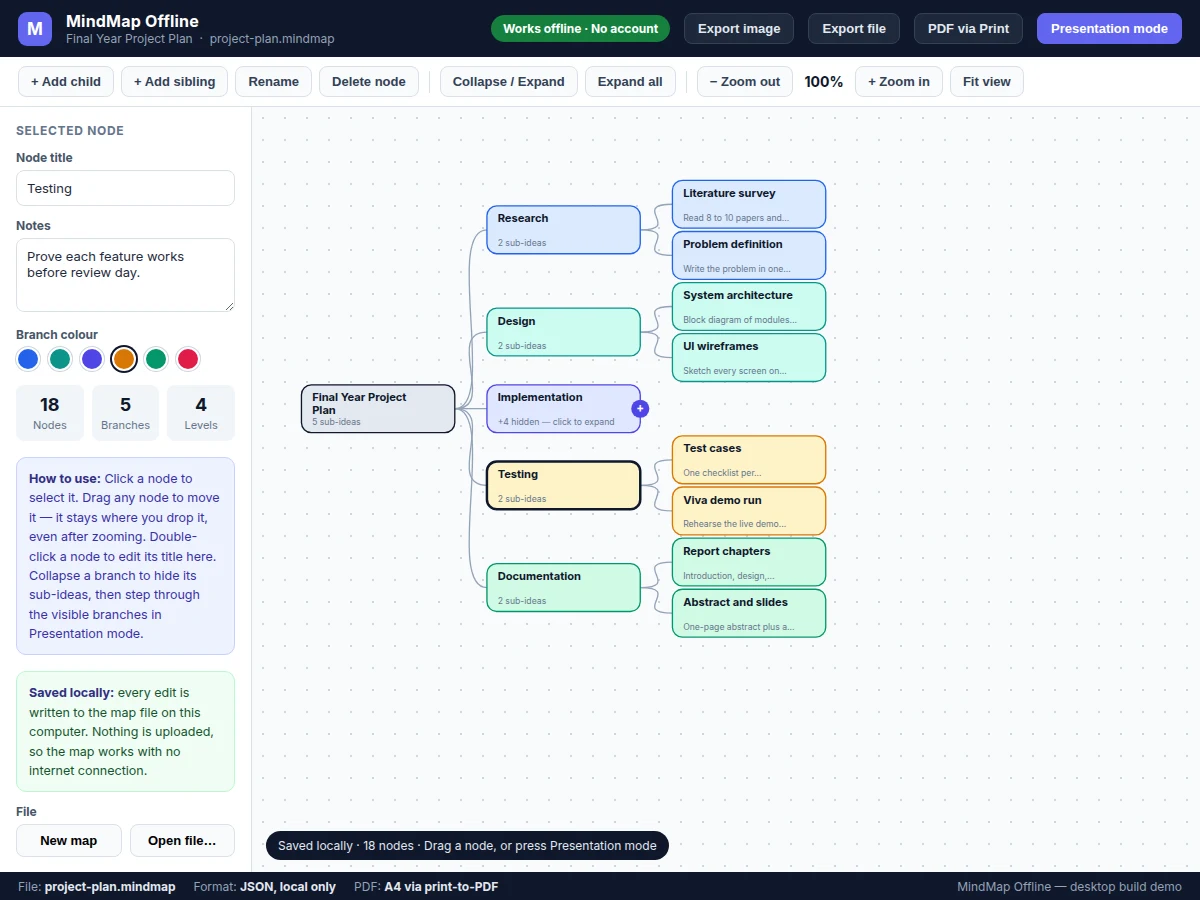
- Branches that are not currently needed are collapsed behind a marker showing the hidden idea count, and expanded again when the detail is wanted.
- The zoom controls narrow the view to one branch or pull back to the whole map, and the fit control restores the full-map view.
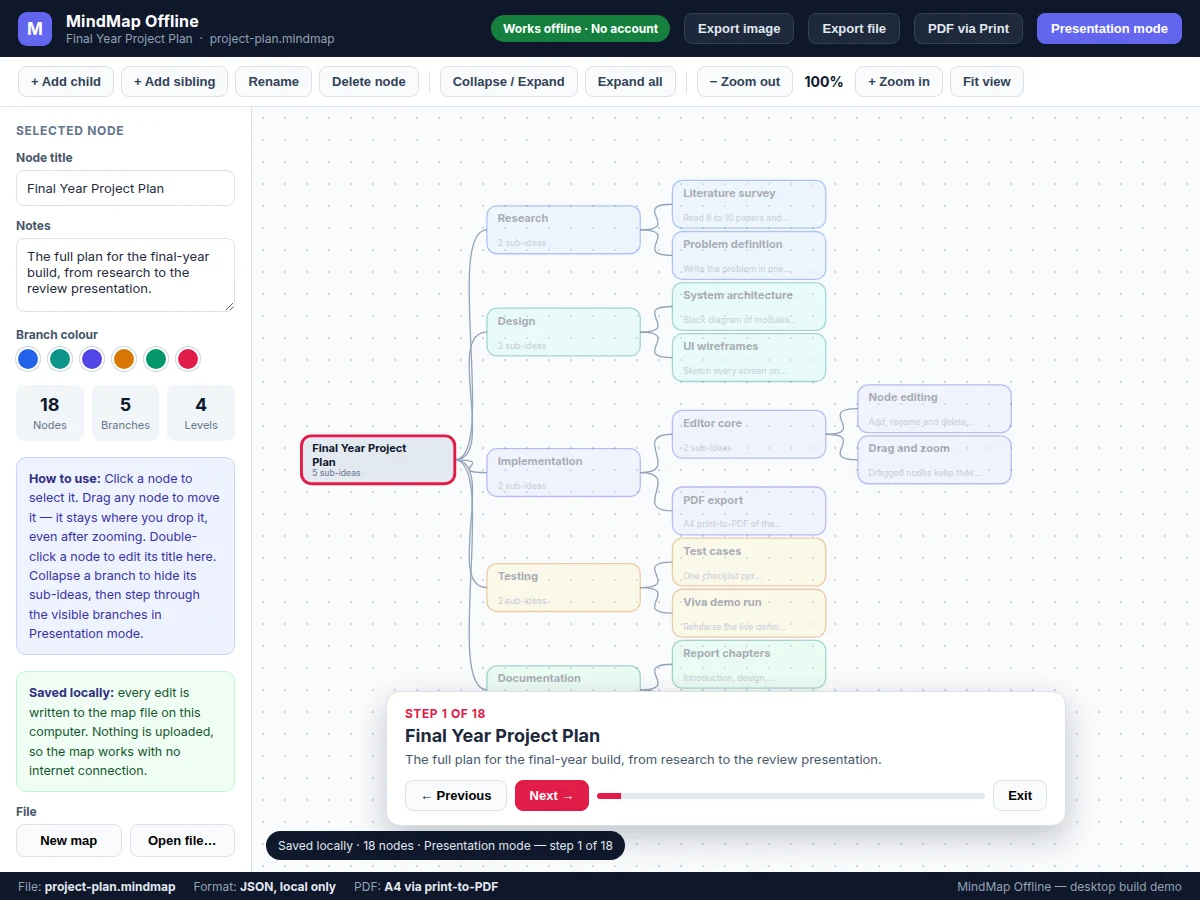
- Presentation mode steps through the visible nodes in depth-first reading order, highlighting each node and showing its notes until the last node is reached.
- The finished map is printed to PDF through the Chromium print-to-PDF path, or exported as a JSON file or an image of the current view, with the original file staying on the student's computer.
Tech stack:
- Electron desktop shell
- HTML · CSS · JavaScript
- SVG node canvas
- JSON local file format
- Chromium print-to-PDF
- Node.js local file access
- Git version control
| Parameter | Value |
|---|---|
| Platform | Windows · macOS · Linux desktop builds (Electron shell) |
| Map format | Single JSON file with .mindmap extension (local only) |
| Sample map | 18 nodes · 17 branches (demo build count) |
| Sample export size | 4,255 bytes of JSON for the 18-node sample map (measured from the demo build) |
| PDF export | A4 page · 210 × 297 mm (page standard) via Chromium print-to-PDF |
| Zoom range | 50%–200% (design target) |
| Presentation steps | 1 step per visible node · 18 steps in the sample map (demo build count) |
| Autosave | On every edit to the local file (design behaviour) |
| Top-level branches | 5 branches in the sample map (demo build count) |
| Builder note | In the demo build, a dragged node's offset is stored on that node and divided by the current zoom while dragging, so the node stays where it was dropped after the zoom level changes; collapsed branches keep their hidden children in the same file and restore them on expand. A map is a tree: every node except the centre has exactly one parent, so collapsing a branch hides a whole subtree without deleting it. |
Project features
The Offline Mind Map Desktop App with PDF Export and Presentation Mode combines four capabilities that cover the whole life of a study map. First, visual node editing lets the student add child and sibling nodes, rename titles, write short notes, and delete ideas that no longer fit. Second, drag positioning moves any node freely on the canvas, with each dragged node keeping its new position after zooming. Third, branch collapsing hides a whole subtree behind a single marker, and zoom controls help the student focus on one branch or see the full map. Fourth, presentation mode steps through the visible nodes one at a time with notes on screen, and PDF export prints the current view to standard A4 pages for submission or review. A single local file holds the whole map, so the work stays portable without any account.
- [Visual node editing] Add a child or sibling node to any selected node, rename titles in the side panel, attach a short note to each idea, and delete a node together with its subtree when it no longer fits the map.
- [Drag to reposition] Drag any node to a new position on the canvas; the offset is stored on that node, so it stays where it was dropped even after the zoom level changes.
- [Collapse and expand branches] Collapse a branch to hide its whole subtree behind a marker showing how many ideas are hidden, then expand it again to restore the full branch without losing any node.
- [Zoom and fit view] Zoom the canvas from 50% to 200% (design target) to inspect one branch closely or pull back for the whole map, with a fit control that returns the view to the full map.
- [Presentation mode] Step through the visible nodes one at a time in reading order, with the current node highlighted and its notes shown on screen; move forward or back, track progress, and exit with the Escape key.
- [Local file save and JSON export] Save the map as a single local JSON file with a .mindmap extension and export it for sharing; the demo build's 18-node sample map exports to a 4,255-byte JSON file (measured from the demo build).
- [PDF export] Print the current map view to PDF through the Chromium print-to-PDF path, producing standard A4 pages of 210 × 297 mm (page standard) with no server upload or conversion service involved.
All seven features above are implemented in the base build. Cloud sync, real-time collaboration, and a mobile app are not included; they are listed as future scope in the abstract, not as current features.
What is included
- Complete desktop app source code (Electron shell plus HTML, CSS, and JavaScript front end)
- Working demo build with the 18-node sample map (research, design, implementation, testing, and documentation branches)
- Setup and packaging instructions for Windows, macOS, and Linux builds
- User guide covering editing, dragging, collapse, zoom, presentation mode, and export
- Project report PDF (background, tree-structure design, methodology, results)
- PPT presentation for final review
- Viva Q&A preparation document (tree data structures, SVG rendering, Electron architecture, local file handling, print-to-PDF)
Limitations & prerequisites
- No cloud sync or real-time collaboration in the base build; a map is a single local file, and sharing means sending that file to another computer.
- No mobile app in the base build; the app is built for desktop operating systems only.
- No multi-step undo in the base build; a deleted branch must be rebuilt or restored from a saved copy of the file.
- Performance beyond the 18-node sample map is a design expectation, not a measured result; maps with several hundred nodes have not been benchmarked in this build.
- PDF export renders the current view through print-to-PDF, so a very wide map paginates across several A4 pages unless the fit view is used first for a single-page overview.
- The packaged desktop build is required for native file dialogs; the browser demo saves through downloads instead.
- Notes are plain text with no spell checking or grammar checking included in the base build.
Frequently Asked Questions
Is this project suitable for a final-year project?
Yes, for Computer Science and Information Technology programmes. The app demonstrates desktop development with Electron, tree data structures for the node hierarchy, SVG rendering for the canvas, local JSON file handling, and interface design for editing, navigation, and presentation in a single working product. A reviewer can operate every feature live: add and drag nodes, collapse a branch, step through presentation mode, and export a PDF, which gives concrete material for questions on data structures, rendering, and file formats.
What is the main technology used?
The core stack is Electron for the desktop shell with HTML, CSS, and JavaScript for the interface, plus an SVG canvas that draws nodes and curved connectors. Node data is kept as a tree in memory and written to a single local JSON file, while PDF output uses the Chromium print-to-PDF path built into Electron. No server code, database server, or online account is involved, which keeps the architecture explainable: one desktop process, one file format, and one rendering path.
Does this project need internet?
No, the app works fully offline. Editing, dragging, collapsing, zooming, presentation mode, local saving, and PDF export all run on the student's own computer, so a missing or unreliable connection never blocks studying, planning, or presenting a map at home, in class, or while travelling. The only step that needs anything outside the app is sharing the file itself, which is done by sending the saved map file to another computer.
How does PDF export work?
PDF export uses the Chromium print-to-PDF path inside Electron, rendering the current map view onto standard A4 pages measuring 210 by 297 millimetres. The student opens the print view, checks the preview, and saves the PDF locally, with no server upload or conversion service in between. Very wide maps paginate across several A4 pages, so the fit-view control is used first when a single-page overview is wanted.
Can this project be customized?
Yes, realistic customizations include new colour themes and node styles, keyboard shortcuts for common edits, image attachments on nodes, and import from common outline formats. Larger changes such as cloud sync or a mobile companion app are possible as separate development work, not as part of the base build. Any customization is scoped from the base features so the delivered app stays explainable and the added work stays testable.
What will I receive with the project?
The delivery includes the complete desktop app source code, the working demo build with its 18-node sample map, setup and packaging instructions, a user guide, the project report, presentation slides, and a viva question-and-answer document. Everything is prepared for the student's own build and review. Source code, documents, and the demo stay consistent: the same features, stack, and file format appear in the app, the report, and the abstract.
Components & software requirements
- Electron desktop shell
- HTML · CSS · JavaScript
- SVG node canvas
- JSON local file format
- Chromium print-to-PDF
- Node.js local file access
- Git version control
Delivery information
Built-to-order project. Delivery timeline is shared after order confirmation based on current queue.
Support terms
Complete documentation, setup guide, and viva preparation included. Support for setup and explanation provided.
Download free synopsis (PDF)
Enter your name and WhatsApp number — the synopsis PDF downloads immediately. We may send occasional project updates on WhatsApp; no spam.