
More project photos (2)

The problem
Engineering students write an enormous amount of Markdown-shaped text — project reports, synopses, weekly logs, viva notes, README files — usually in a plain text editor with no idea how the rendered document will look, or in a heavyweight word processor that fights them on formatting. Markdown hits the sweet spot: plain-text source that plays well with version control, with clean rendered output. This project builds a desktop editor around that workflow. The source pane offers syntax highlighting and a toolbar that inserts bold, headings, lists, code blocks, quotes, tables and images at the cursor. The preview pane re-renders on every keystroke through a Markdown-to-AST-to-HTML pipeline. The snippet library stores reusable report templates, and the export module turns the same document into PDF, single-file HTML or DOCX without leaving the app.
How it works
- The user opens a document folder; the sidebar lists every Markdown file with its size.
- Editing happens in the source pane with syntax highlighting; the preview pane re-renders the HTML on each keystroke (debounced).
- The toolbar inserts markup at the cursor — select text and hit Bold, or click Table to drop in a template.
- Snippets insert full report or table skeletons for repeated structures like weekly logs.
- The status bar tracks word and character counts against report requirements, with save state always visible.
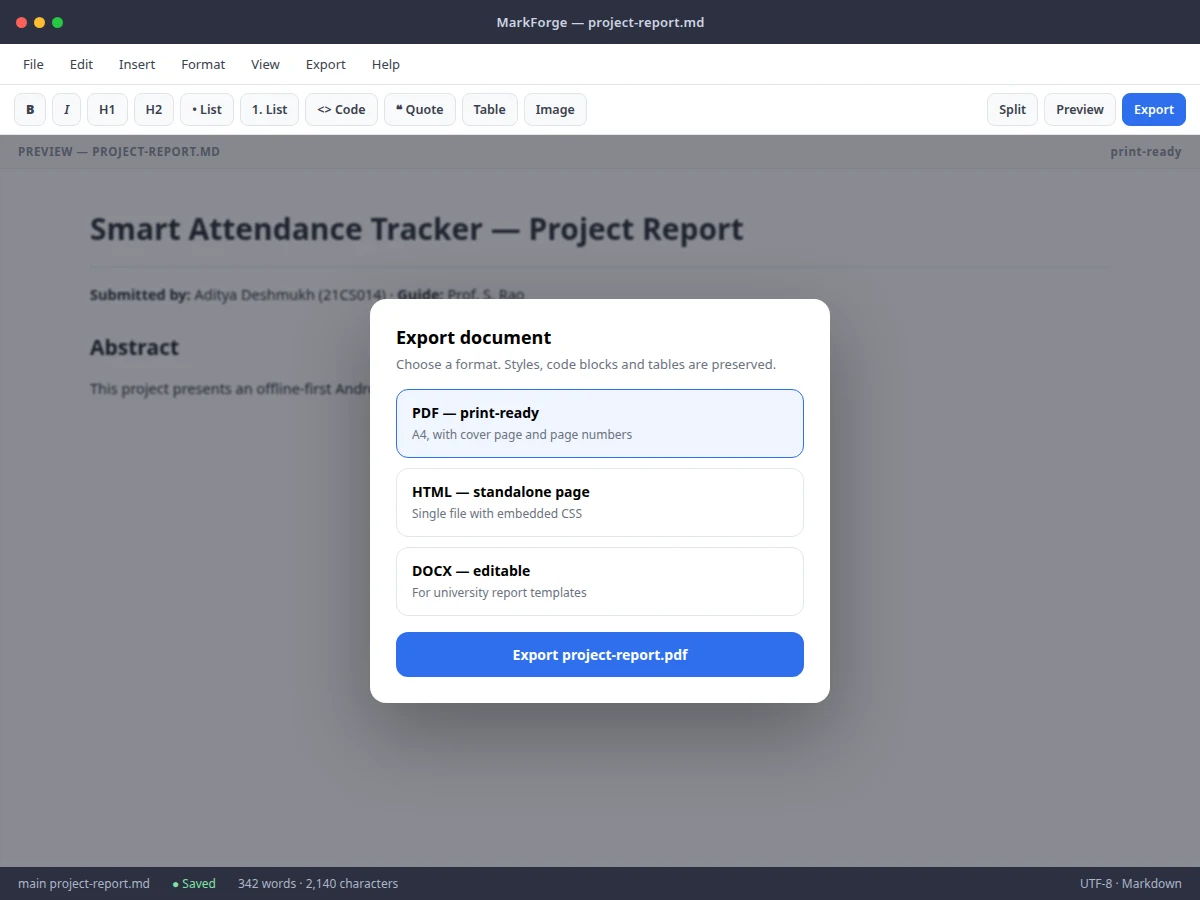
- When the document is done, one click exports it to PDF, standalone HTML or DOCX for submission.
Tech stack:
- Electron or Tauri desktop shell (web technologies)
- Markdown parser (AST-based) with HTML sanitizer
- Syntax-highlighted code editor component
- Headless PDF rendering engine
- DOCX generation library
- CSS print stylesheets for PDF output
| Parameter | Value |
|---|---|
| Render pipeline | Markdown source to AST to HTML preview (debounced re-render) |
| Export formats | PDF (print-ready), standalone HTML, DOCX (editable) |
| Preview latency | Re-render on keystroke with ~300 ms debounce (design target) |
| File format | Plain .md files on disk; git-friendly |
| Tables/code/quotes | Rendered in preview; preserved across all export formats |
| Connectivity | Fully offline; no account needed |
| Platform | Windows, macOS and Linux desktops (expected) |
Project features
- [Live preview] The rendered preview updates as you type through a debounced Markdown-to-HTML pipeline, so the document always shows its true final form.
- [File sidebar] Manage a folder of documents — project-report.md, synopsis.md, weekly-log.md — with one-click switching and file sizes at a glance.
- [Formatting toolbar] Bold, italic, headings, lists, code, quote, table and image buttons insert correct markup at the cursor or around the selection.
- [Snippet library] One-click insertion of report templates, table skeletons and code blocks for repeated document structures.
- [Triple export] One-click export to print-ready PDF, standalone HTML with embedded CSS, and editable DOCX for university templates.
- [Syntax highlighting] The source pane highlights headings, emphasis, lists and code distinctly from body text for scannable editing.
- [Live word counts] The status bar shows word and character counts plus save state — useful for report length requirements.
- [Plain .md files] Documents are ordinary Markdown files on disk, so the whole folder works with git and any other editor.
What is included
- Complete desktop app source code (editor, preview pipeline, export module)
- Parser-pipeline documentation (source to AST to HTML/DOCX/PDF)
- Snippet library with report, table and code templates
- Sample documents (project report, synopsis, weekly log) for demonstration
- Setup guide (install, build, export configuration)
- Project report PDF (background, parsing pipeline, methodology)
- PPT presentation for final review
- Viva Q&A preparation document (parsing, ASTs, desktop app architecture)
Limitations & prerequisites
- Export fidelity depends on the complexity of the Markdown used; deeply nested custom HTML may render differently across PDF and DOCX.
- PDF export renders through a print stylesheet — pixel-perfect parity with the on-screen preview is a design target, not guaranteed for every construct.
- Very large documents (tens of thousands of lines) can make live preview re-renders perceptible despite debouncing.
- DOCX export maps standard Markdown constructs; university templates with exotic styles may need manual touch-up after export.
- There is no real-time collaboration; the editor is single-user and file-based.
Frequently Asked Questions
How does the live preview work?
Typed Markdown is parsed into an abstract syntax tree and rendered to sanitized HTML in the preview pane. Re-renders are debounced at roughly 300 ms so typing stays smooth even in long documents.
What can I export to?
Three formats: print-ready PDF with cover page and page numbers, standalone HTML with embedded CSS, and editable DOCX for university report templates. All three come from the same parsed document.
Do I need internet to use it?
No. The editor, preview and all exports run locally with no account and no network calls.
Can I use my own report template?
Yes. Snippets are plain Markdown files you can edit, and the PDF print stylesheet can be customized — the setup guide documents both.
Will it open my existing Markdown files?
Yes. Documents are ordinary .md files, so any existing Markdown opens directly and the folder works with git.
Is this project suitable for a final-year project?
Yes — for Computer Science, Information Technology and related branches. It demonstrates parsing pipelines, abstract syntax trees, desktop app architecture and document generation. Suitable for B.E./B.Tech final-year projects in Computer Science, Information Technology and related branches.
Components & software requirements
- Electron or Tauri desktop shell (web technologies)
- Markdown parser (AST-based) with HTML sanitizer
- Syntax-highlighted code editor component
- Headless PDF rendering engine
- DOCX generation library
- CSS print stylesheets for PDF output
Delivery information
Built-to-order project. Delivery timeline is shared after order confirmation based on current queue.
Support terms
Complete documentation, setup guide, and viva preparation included. Support for setup and explanation provided.