
More project photos (2)
The problem
Learning guitar on your own usually means juggling three separate tools: a chord book or website for fingerings, a notebook or habit app for practice, and a metronome for strumming. The chord reference needs internet, the practice log lives somewhere else, and nothing connects the chord being learned to the time actually spent on it, so practice drifts and beginners stall on the same few chords. The Offline Guitar Chord Library Android App with Practice Tracker and Strumming Patterns brings all three jobs into one offline app. It stores a library of essential guitar chords with fretboard diagrams and fingerings on the device, logs each practice session with its focus and duration, keeps a visible day streak, and plays strumming patterns with a beat indicator and tempo control. Because everything runs on the phone with no account and no connection, a student can practise anywhere and still see measurable progress week to week.
A chord voicing is simply which frets are held on which strings — move one finger and the same shape becomes a different chord, which is why the library stores fingerings as data rather than pictures. Builder note from the demo build: all 12 fretboard diagrams in the working demo are drawn from one fingering table, so adding a chord means adding one line of data, not drawing a new image.
The learner opens the app on the phone with no sign-in and no internet connection.
Follow the working sequence
How it works
The app works entirely on the device, from first open to every logged session. Opening the app loads the chord library from on-device storage with no sign-in and no network call. Choosing a chord draws its fretboard diagram from stored fingering data: each string shows its fret number, an open marker or a muted marker, and barre chords show the barred fret. In the practice tracker, the user logs a session with a focus area and a duration, and the app updates the day streak and the weekly minutes chart. In the strumming player, a pattern is split into 8 eighth-note steps; pressing play advances a beat light per step at the chosen tempo while the device generates a click for each sounded stroke. All logs and settings stay in the on-device database.
- The user opens the app; the chord library loads from on-device storage with no sign-in and no network call.
- Selecting a chord draws its fretboard diagram from the stored fingering, showing fret numbers, open strings, muted strings and any barre.
- The detail view adds the chord's difficulty rating, a playing tip and the chords it pairs well with for practice progressions.
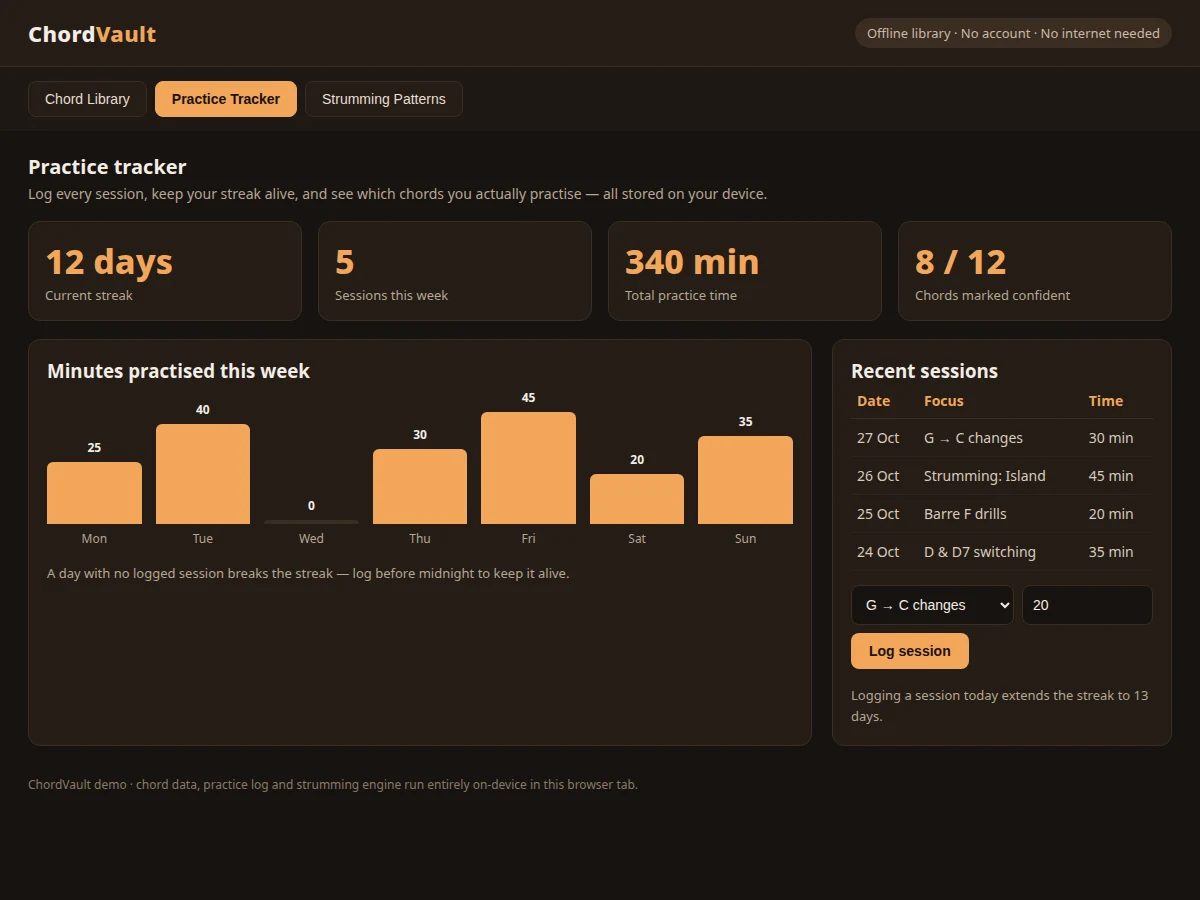
- In the practice tracker, the user logs a session by choosing a focus area and entering a duration in minutes.
- The app updates the day streak, total practice time and the weekly minutes chart from the stored session log.
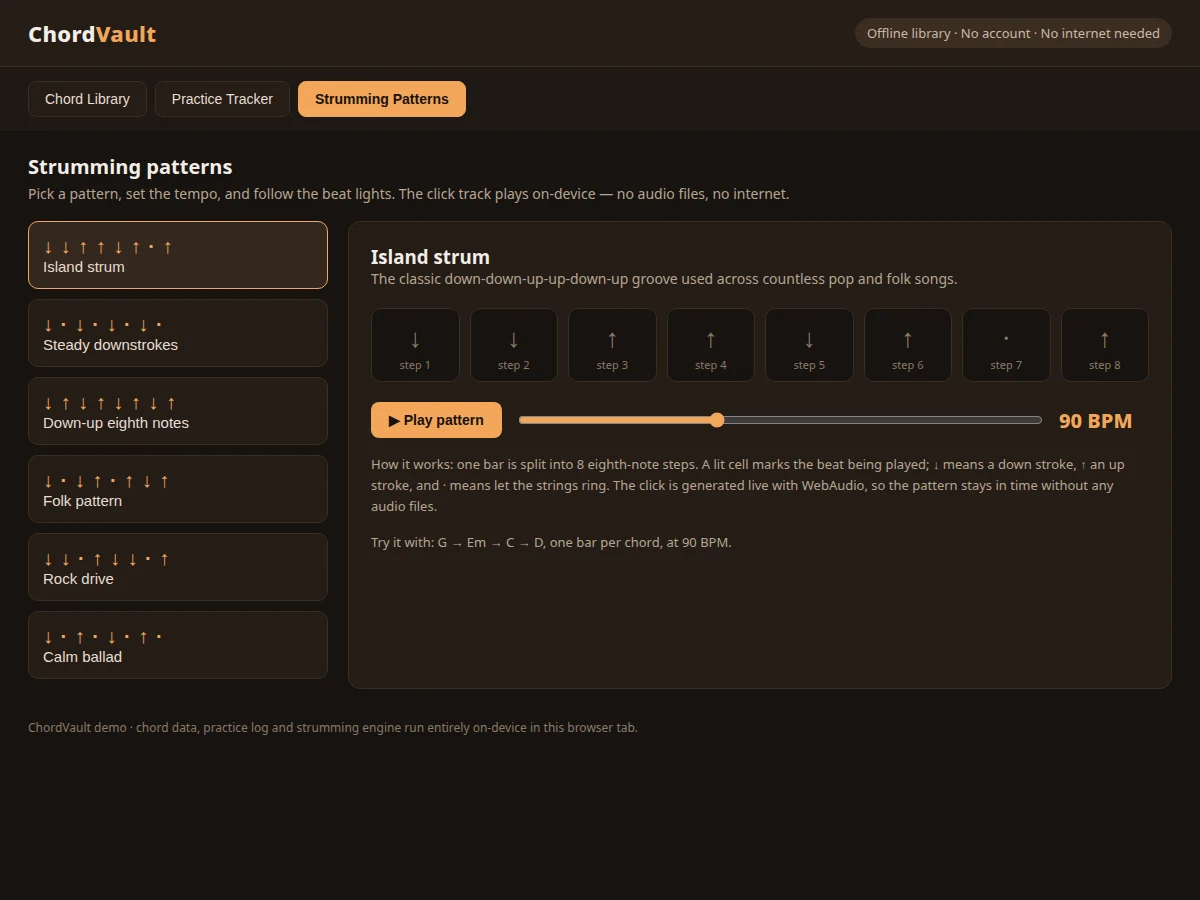
- In the strumming player, the user picks one of 6 patterns and sets a tempo between 60 BPM and 140 BPM.
- Pressing play advances a beat light through the 8 eighth-note steps of each bar while the device generates a click for each sounded stroke.
Tech stack:
- Kotlin (Android, native)
- Android Jetpack (Room database, ViewModel)
- Android Studio
- Material Design components
- WebAudio-style on-device click synthesis
- HTML/CSS/JavaScript (demo preview)
- Git
| Parameter | Value |
|---|---|
| Platform | Android (native app; demo preview is a single-file web build of the same screens) |
| Chord library | 12 chords (count: 10 open shapes, 2 barre shapes) |
| Fretboard diagrams | 5-fret diagrams (design) |
| Strumming patterns | 6 patterns (count) |
| Beat grid | 8 eighth-note steps per bar (design) |
| Tempo range | 60 BPM to 140 BPM (design range) |
| Data storage | On-device Room database; no server account (design) |
| Internet requirement | None for core use (design) |
| Session log fields | Date, focus area, duration in minutes (design) |
Project features
The app is built around three capabilities that cover a complete practice session. The chord library holds 12 essential open and barre chords, each shown as a fretboard diagram drawn from fingering data, with a difficulty rating and a playing tip. The practice tracker logs sessions by focus area and minutes, maintains a day streak, and charts minutes practised across the week, all stored on the device. The strumming player offers 6 patterns, each split into 8 eighth-note steps with beat lights and a tempo control from 60 BPM to 140 BPM, plus an on-device click track generated live rather than streamed. Together these give a learner the reference, the routine and the rhythm in one place, without an account, a subscription or an internet connection. Each area works on its own, and together they turn scattered, unmeasured practice into a visible weekly routine the learner can actually stick to.
- [Offline chord library] 12 essential chords — G, C, D, Em, Am, E, A, Dm, F, Bm, D7 and G7 — browseable without any network connection, each with its full name, type and common musical use.
- [Data-driven fretboard diagrams] Each diagram is drawn from stored fingering data showing fret numbers, open strings and muted strings, with a barre indicator on F and Bm, so fingerings stay consistent and easy to extend.
- [Practice tracker with streaks] Log a session with a focus area and a duration in minutes; the app keeps a running day streak and a total practice time, stored in the on-device database.
- [Weekly practice chart] Minutes practised are charted day by day across the week, making missed days visible at a glance instead of hidden inside a total.
- [Strumming-pattern player] 6 patterns including the Island strum and steady downstrokes, each shown as 8 eighth-note steps with a beat light marking the step being played.
- [Tempo control with live click] Tempo adjusts from 60 BPM to 140 BPM, and the click track is generated on the device with WebAudio-style synthesis, so timing stays steady with no audio files to download.
- [Focus-based session logging] Sessions are tagged by what was practised — chord changes, barre drills, strumming or a new chord — so the log shows where practice time actually goes.
What is included
- Complete Android source code (Kotlin) with the chord library, practice tracker and strumming player
- Chord dataset with fingerings for 12 chords, including barre indicators
- Working demo preview (single-file web build of the three main screens)
- Project report (background, offline-first design, database schema, methodology, limitations)
- PPT presentation for final review
- Viva Q&A preparation document (offline storage, audio scheduling, Android architecture)
Limitations & prerequisites
- The app does not listen to the guitar or verify finger placement — it is a reference and practice log, not a tutor that hears mistakes.
- No tuner is included in the base build; a tuner can be added as a customization.
- Practice progress is stored on one device only — the base build has no cloud sync, so changing phones means exporting the log first.
- The strumming click is a timing aid, not a backing track; it does not play chord audio or full songs.
- The demo preview is a web build of the same screens; the delivered app is the Android build, and the two are not the same binary.
- Chord coverage is limited to 12 essential chords in the base build; genre-specific or jazz voicings are added through customization.
Frequently Asked Questions
Is this project suitable for a final-year project?
Yes, for Computer Science, IT and Electronics & Telecommunication programs. It demonstrates offline-first mobile architecture, local database design, data-driven UI rendering and on-device audio scheduling in one complete, demonstrable app with a clear report, a review deck and viva preparation material included.
Does it really work without internet?
Yes. The chord library, practice log and strumming engine all run on the device. No account, no server and no connection are needed for any core feature, so the app is fully usable in a classroom demo with the phone in airplane mode.
What is the main technology used?
Kotlin with Android Jetpack: Room stores chords and practice sessions locally, ViewModel holds screen state, and the strumming click is synthesized on-device. The demo preview is a single-file HTML build of the same three screens for quick review before delivery.
Can this project be customized?
Yes. Realistic additions include more chords and voicings, a tuner, cloud backup of the practice log, a metronome-only mode, and practice reminders. Each addition is scoped separately from the base build, so the core app stays exactly as described here.
Does the app listen to my guitar or check my playing?
No. It does not use the microphone to judge playing. It is a chord reference, a practice log and a rhythm trainer; accuracy of playing is judged by the player's own ear, which the limitations section states plainly for full honesty.
What will I receive with the project?
The full Android source code, the 12-chord fingering dataset, a working demo preview, the project report, a review PPT and a viva Q&A document. Setup instructions cover building the app in Android Studio and running it on a phone or emulator.
Components & software requirements
- Kotlin (Android, native)
- Android Jetpack (Room database, ViewModel)
- Android Studio
- Material Design components
- WebAudio-style on-device click synthesis
- HTML/CSS/JavaScript (demo preview)
- Git
Delivery information
Built-to-order project. Delivery timeline is shared after order confirmation based on current queue.
Support terms
Complete documentation, setup guide, and viva preparation included. Support for setup and explanation provided.
Download free synopsis (PDF)
Enter your name and WhatsApp number — the synopsis PDF downloads immediately. We may send occasional project updates on WhatsApp; no spam.