
More project photos (2)
The problem
Students, teachers and small offices constantly need clean digital copies of notes, bills, certificates and forms, but flatbed scanners are rarely at hand and most free "scanner" apps upload every page to a cloud account before returning a PDF. That means private documents leave the device, the app stops working without internet, and subscriptions gate basic features like multi-page export. A phone camera is already a capable scanner — what is missing is the software that finds the page, flattens the perspective and produces a proper PDF without sending anything anywhere. This project builds exactly that: a native Android app that detects the document edges live in the camera preview using OpenCV, lets the user fine-tune the crop with draggable corners, rectifies the perspective into a flat page, applies clean-up filters and merges pages into a standard PDF — every step on-device. Because the whole pipeline is implemented in the open with Kotlin, CameraX and OpenCV, the student can explain and demonstrate each stage in the viva instead of hiding behind a black-box SDK.
User photographing documents and adjusting crop corners.
Follow the working sequence
How it works
- The CameraX preview streams frames to the OpenCV pipeline: grayscale conversion, Gaussian blur, Canny edge detection and contour extraction.
- The largest quadrilateral contour is approximated and drawn as the live crop overlay on the preview.
- The user taps the shutter — or auto-capture fires when the quad stays steady — and the full-resolution frame is grabbed.
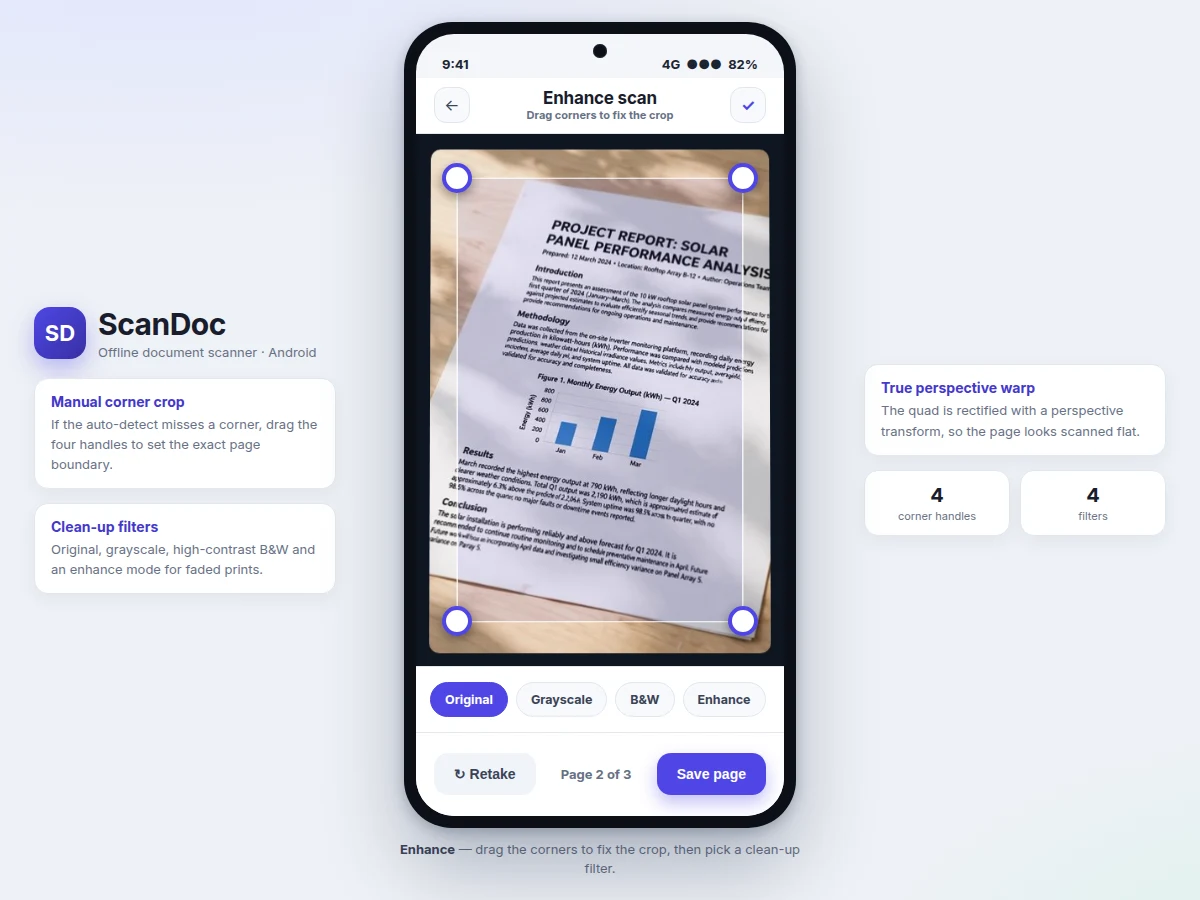
- The crop quad is mapped to full resolution and the user can drag any corner to correct the boundary.
- A perspective transform warps the selected quad into a rectangular, flat-looking page image.
- The chosen enhancement filter (grayscale, B&W or enhance) is applied to clean up the page.
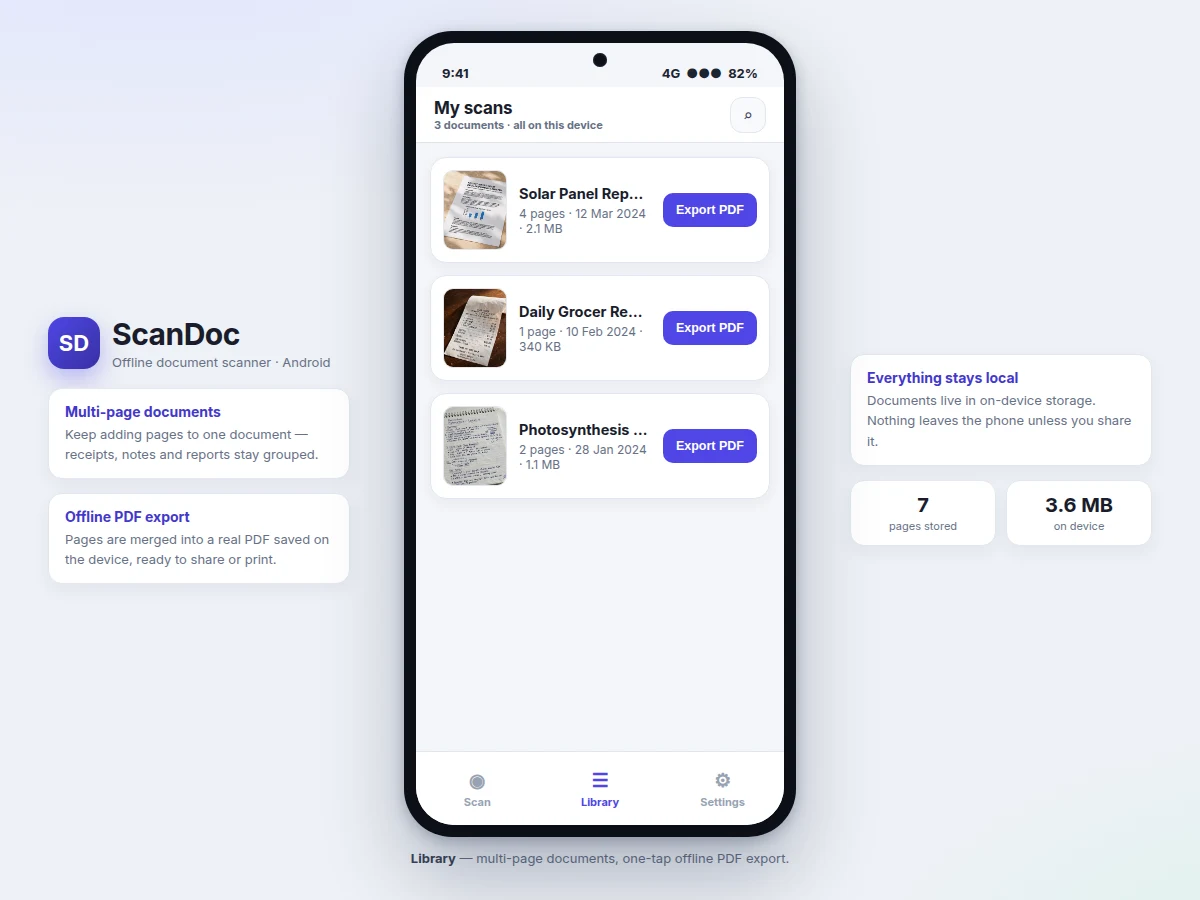
- The page is saved into the current multi-page document using on-device storage (Room database plus image files).
- Export merges the document's pages into a PDF with Android's PdfDocument APIs and hands it to the system share sheet.
Tech stack:
- Kotlin
- Android SDK · CameraX
- OpenCV for Android
- Android PdfDocument APIs
- Room database
- Material Design 3
- Gradle
- Android Studio
| Parameter | Value |
|---|---|
| Platform | Native Android app (Kotlin) |
| Minimum SDK | API 26, Android 8.0 (design target) |
| Camera | Rear camera; autofocus recommended, fixed-focus falls back to manual capture |
| Edge detection | OpenCV Canny + contour approximation, fully on-device |
| PDF output | Multi-page PDF via Android PdfDocument APIs; A4 and Letter page sizes |
| Storage | On-device only; approximately 300 KB–2 MB per exported page (expected, content-dependent) |
| Export speed | Approximately 1–2 seconds for a 5-page document on a mid-range device (expected) |
| Internet | Not required for any feature |
Project features
- [Automatic edge detection] An OpenCV pipeline (grayscale, blur, Canny edges, contour detection) finds the document outline in the live camera preview and draws the crop quad in real time; when no clear quadrilateral is found the app falls back gracefully to a manual crop.
- [Manual corner adjustment] Four draggable handles let the user fine-tune the crop boundary after capture, so slightly misdetected corners never ruin a scan.
- [Perspective correction] The selected quad is warped with a perspective transform into a flat, straight-on page image, removing the skew of angled handheld photos.
- [Enhancement filters] Original, grayscale, high-contrast black-and-white and an enhance mode that lifts faded prints and evens out uneven lighting.
- [Multi-page documents] Pages keep stacking into one document with rename and reorder, so a 4-page report or a long bill stays grouped correctly.
- [Offline PDF export] The document's pages are merged into a standard multi-page PDF saved to device storage, ready to share, print or submit.
- [On-device document library] All scans live in local storage with search; nothing leaves the phone unless the user explicitly shares it.
- [Auto-capture mode] Configurable: the app snaps automatically once the detected page outline stays steady for a moment.
What is included
- Complete Android source code in Kotlin with Gradle build files
- OpenCV integration module: edge detection, corner handling and perspective warp
- PDF export module with multi-page document assembly
- Room database schema and storage layer for the document library
- Material Design 3 UI: capture, enhance and library screens
- Setup instructions (Android Studio, SDK versions, OpenCV Android SDK steps)
- Project report PDF (background, vision-pipeline explanation, methodology, results)
- PPT presentation for final review
- Viva Q&A preparation document (CameraX, OpenCV pipeline, perspective transform, PDF generation)
Limitations & prerequisites
- Edge detection needs reasonable lighting and contrast — glossy, shadowed or low-contrast pages may need manual corner adjustment.
- The perspective transform assumes a roughly flat page; curved book pages and crumpled receipts rectify imperfectly.
- The base build has no OCR: the PDF contains page images, not searchable text. Text recognition can be added as an optional customization.
- Very long documents (50+ pages) increase export time and storage use; the tested scope is typical student-sized documents.
- Output sharpness follows the phone's camera — a low-end fixed-focus camera yields softer scans than a mid-range autofocus one.
- This is an academic build demonstrating a real pipeline, not a certified archival-digitization product.
Frequently Asked Questions
Does it really work fully offline?
Yes. Edge detection, cropping, perspective correction, filters and PDF export all run on the device with OpenCV and Android APIs. No account, no server and no internet connection are needed for any feature.
Is this project suitable for a final-year project?
Yes — for Computer Engineering, Information Technology and mobile-computing programs. It demonstrates native Android development, CameraX camera pipelines, classical computer vision with OpenCV, local databases and PDF generation, all in one coherent, demonstrable app.
Does it include OCR (text recognition)?
Not in the base build — the exported PDF contains clean page images rather than searchable text. OCR can be added as an optional customization using on-device libraries, and the report lists it under future scope.
Which Android versions are supported?
The design target is API 26 (Android 8.0) and above, covering the large majority of devices in use. CameraX and the PdfDocument APIs used are stable across this range.
Can it scan books, or only flat sheets?
Flat sheets, receipts, ID cards, certificates and whiteboards work well. Curved book pages are a known limitation of the flat-page transform and are disclosed honestly in the report.
What will I receive with the project?
The complete Kotlin source code, the OpenCV scanning module, the PDF export module, setup instructions, the project report PDF, a review PPT and a viva Q&A document. Suitable for B.E./B.Tech final-year projects in Computer Engineering and Information Technology.
Components & software requirements
- Kotlin
- Android SDK · CameraX
- OpenCV for Android
- Android PdfDocument APIs
- Room database
- Material Design 3
- Gradle
- Android Studio
Delivery information
Built-to-order project. Delivery timeline is shared after order confirmation based on current queue.
Support terms
Complete documentation, setup guide, and viva preparation included. Support for setup and explanation provided.
Download free synopsis (PDF)
Enter your name and email — the synopsis PDF downloads immediately. We may send occasional project updates; no spam, unsubscribe anytime.