
More project photos (2)

The problem
What problem does a rural bus passenger face?
The Offline Bus Timetable and Route Tracking Android App for Rural Routes with Stop Alerts is built for a passenger who cannot check a rural bus time online before leaving home. The problem is not that rural buses have no timetable at all, but that the timetable is rarely where the passenger is when the decision is made. Printed sheets stay at the stand and enquiry numbers go unanswered, so a passenger guesses the departure and waits through a long gap between buses. On the bus, stops are not always announced, landmarks look alike after dark, and a first-time passenger can ride straight past the stop they needed. An app that only shows a timetable online does not solve either half, because the moments that matter are the moments when a connection is weakest. The app treats offline access as the core requirement, and pairs a saved timetable with a stop alert that works from the phone's position.
On many rural routes, the timetable lives on a printed sheet at a bus stand, in a driver's memory, or not anywhere a passenger can check from home. A passenger who misses one bus may wait for hours for the next, and a passenger travelling an unfamiliar route may miss a stop simply because nobody announced it. This app moves the timetable onto the passenger's phone and keeps it there, so the information is available at home, at the stop, and on the bus, even where mobile data is weak or absent.
Operator route data: stop names in order, minute offsets, departure times and stop coordinates, stored on the phone.
Follow the working sequence
How it works
Tech stack:
- Kotlin · Android application
- Android Room database · local timetable storage
- Android GPS location · journey position matching
- Android notifications · stop alerts
- Material Design components · app interface
- JSON timetable bundle · operator data import
- Git · version control
| Parameter | Value |
|---|---|
| Platform | Android version 8.0 or later (minimum supported version) |
| App type | Offline-first Android application (implemented feature) |
| Storage | Local Room database on the phone (implemented feature) |
| Demo bundle routes | 4 routes (counted from the demo build) |
| Demo bundle stops | 22 stops across 4 routes (counted from the demo build) |
| Demo bundle departures | 20 departures in total, 5 departures per route per day (counted from the demo build) |
| Demo file size | Approximately 8.7 KB for the single-file demo (measured from the demo build) |
| Alert rule | Alert sounds 2 stops before the chosen stop (design rule) |
| Alert repeat | Alert sounds again at the stop before the chosen stop (design rule) |
| Arrival computation | Departure time plus stop minute offset (design rule) |
| Journey matching | Phone GPS position matched to saved stop coordinates in route order (implemented feature) |
| Longest demo route | 62 minutes end to end for Route 31 (counted from the demo build) |
| Shortest demo route | 44 minutes end to end for Route 23 (counted from the demo build) |
| App size | Approximately 15 MB installed size (expected) |
| Timetable updates | Update file import when briefly online (optional extension) |
| Ticket booking | Not included in the base app (excluded feature) |
| Live bus tracking | Not included in the base app (future scope) |
Project features
What can this app actually do for a passenger?
The Offline Bus Timetable and Route Tracking Android App for Rural Routes with Stop Alerts is built around four capabilities a passenger can use on a real journey: a timetable saved on the phone that needs no connection, a next-departure answer for the route being checked, a stop alert that warns before the passenger's stop, and a journey view that shows where the bus is along the route. Around those four capabilities, the app adds route search and saved favourite routes, so a daily commuter reaches a familiar route quickly, and an operator-side timetable editor, so saved times can be corrected without rebuilding the app. Every feature below is part of the base app unless marked optional or future scope, and a demonstration can show an offline timetable, a next departure, a set alert, and a journey moving stop by stop, all without mobile data.
- [Offline timetable bundle] The full timetable for each route, including stop names, stop order, and departure times, is stored on the phone when the app is installed, so routes, timetables, and arrival times open with no mobile data and no waiting for a server. Implemented in the base app.
- [Next-departure lookup] The app compares the current time on the phone with the saved departures for the chosen route and shows the next bus, plus the first bus and last bus of the day, so a passenger can decide at a glance whether to hurry or wait. Implemented in the base app.
- [Stop alerts] A passenger taps the bell beside a stop, and the app sounds an alert 2 stops before that stop and again at the stop before it, giving time to gather luggage and move towards the door instead of a last-second rush. Implemented in the base app.
- [Journey progress view] During a journey the app shows the current stop, the next stop, and progress along the route, so a passenger can see how far along the route the bus has travelled without asking fellow passengers. Implemented in the base app.
- [Route search and favourite routes] Passengers search by village, town, or route number, and star a route to save it as a favourite, so a daily route opens from the favourites list instead of a fresh search each morning. Implemented in the base app.
- [Operator timetable editor] An editor screen lets the route operator correct a departure time, add a stop, or add a route, and the change is saved to the on-phone timetable bundle, so timetable corrections do not need a new app release. Implemented in the base app.
- [Timetable update pack] When the phone is briefly online, the app can import a timetable update file supplied by the operator, replacing the old bundle with the new one, so seasonal or revised timetables reach passengers without reinstalling the app. Optional extension, not included in the base app.
- [Live bus location sharing] If buses later carry a location-sharing device, the app could show a live bus position on the route in a future version, turning the timetable view into a live tracking view. Future scope only, not implemented and not included in the base app.
How does the offline timetable and stop alert actually work?
The chain starts with timetable data saved on the phone at install time: each route carries its stop names in order, the minutes from departure to each stop, and the departure times for the day, all stored in the app's local database. When a passenger opens a route, the app computes arrival times by adding each stop's minute offset to the chosen departure time, and it finds the next departure by comparing the phone clock with the saved departure list. During a journey, the phone's GPS position is matched against the saved stop coordinates in route order, and the app advances its current-stop marker as the bus passes each stop. When the current stop is 2 stops before the passenger's alert stop, the app sounds the first alert, and it sounds again at the stop before, so the warning follows the bus's position rather than a clock estimate that a delayed bus would break.
- The operator's route data, including stop names, stop order, minute offsets, departure times, and stop coordinates, is stored in the app's local database at install time.
- The passenger searches by village, town, or route number, or opens a saved favourite route, and the app loads that route's saved timetable from local storage.
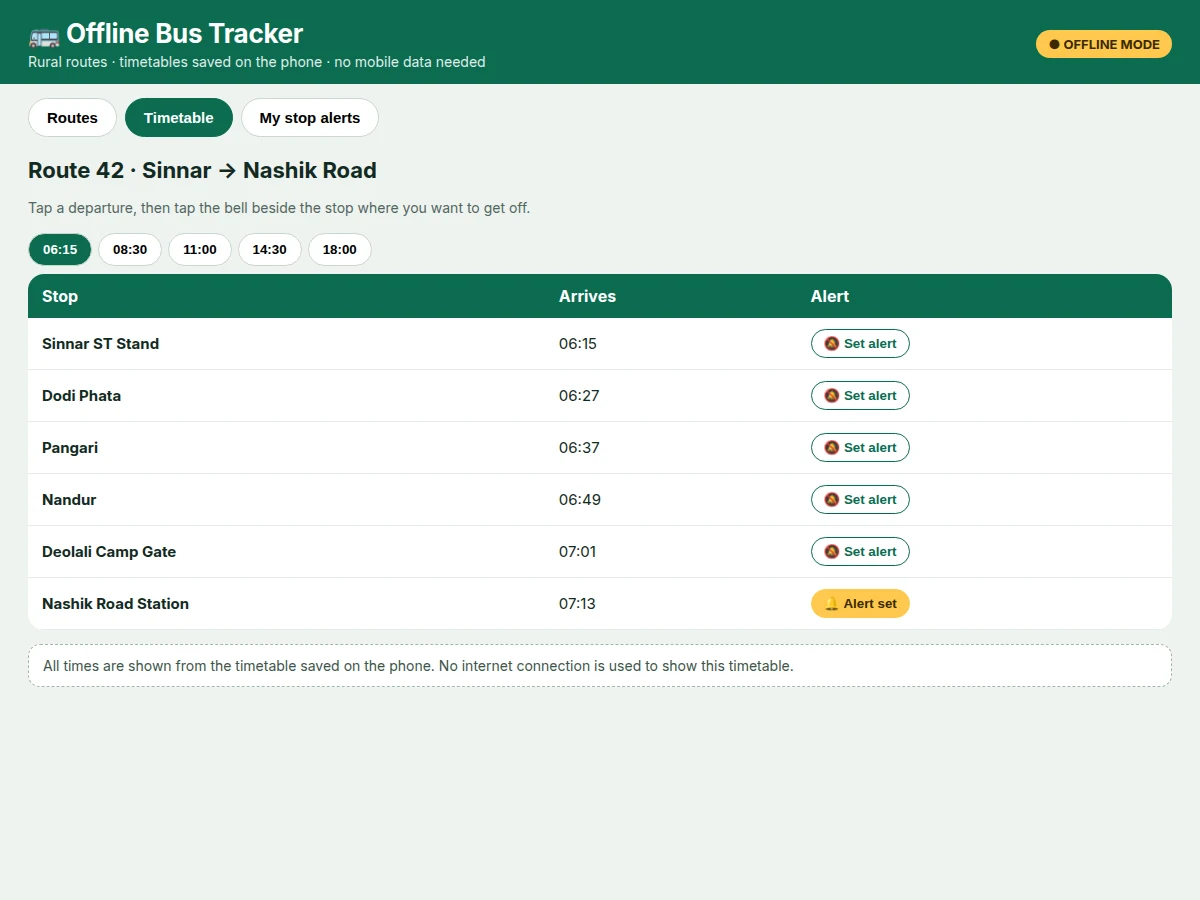
- The passenger picks a departure, and the app computes each stop's arrival time by adding the stop's minute offset to that departure time.
- The passenger taps the bell beside a stop, and the app saves that stop as an alert stop for the journey.
- During the journey, the phone's GPS position is matched in route order against the saved stop coordinates, and the journey view advances stop by stop.
- When the current stop is 2 stops before the alert stop, the app sounds the first alert, and it sounds again at the stop before the alert stop.
- At the end of the journey the passenger can clear the alert, keep the route as a favourite, or set a new alert for the return journey.
The Concept
The concept is deliberately simple: a timetable is only useful if it is present at the moment of decision, and a stop alert is only useful if it is tied to where the bus actually is. The app therefore pairs a saved timetable with position-based stop counting, so neither part depends on a mobile data connection during the journey.
What is included
- Android app source code in Kotlin, with route list, timetable view, next-departure lookup, stop alerts, journey progress view, favourites, and operator timetable editor
- Sample timetable bundle with 4 routes, 22 stops, and 20 departures, ready to replace with the operator's real route data
- Single-file working web demo of the app interface, showing the route list, timetable view, and stop-alert journey view
- User manual for passengers and a separate operator guide for editing timetables and preparing an update file
- Project report PDF (background, system design, local database design, alert logic, limitations)
- PPT presentation for final review
- Viva Q&A preparation document (offline storage, GPS matching, alert logic, timetable editing, limitations)
- Builder note: the alert logic in this build counts stops, not minutes, so a delayed bus still alerts at the right stop, and that choice was settled during the demo build rather than assumed afterwards — the demo journey advances stop by stop, the alert fires 2 stops before the chosen stop, and the same counting rule drives the delivered Android app, with GPS matching replacing the demo's tap-to-advance simulation. The demo bundle as built contains 4 routes, 22 stops, and 20 departures in a single file of approximately 8.7 KB, which is why the whole timetable opens instantly with no connection.
Requirements
- An Android phone running Android version 8.0 or later, with GPS switched on during a journey for position-based alerts
- Approximately 15 MB of free storage space on the phone for the installed app (expected)
- Route data from the operator before release: route numbers, stop names in order, departure times, minute offsets between stops, and stop coordinates
- A computer with Android Studio for building the app from source, and a phone or emulator for testing the journey view
- No mobile data connection is needed during a journey; a brief connection is needed only for the optional timetable update pack
Timeline
- Week 1 covers route data design, the local database schema, and the route list and timetable screens
- Week 2 covers next-departure lookup, favourites, search, and the operator timetable editor
- Week 3 covers GPS journey matching, the journey progress view, and the stop-alert logic
- Week 4 covers the sample timetable bundle, the web demo, and end-to-end testing on a phone
- Week 5 covers the report, PPT, user manual, operator guide, and viva Q&A document
- Week 6 covers final testing, fixes, and delivery of the source code and documents
Support
- 30 days of bug-fix support after delivery for faults in the delivered app source, counted from the delivery date
- Guidance on replacing the sample timetable bundle with the operator's real route data during the support period
- One round of timetable-data corrections in the sample bundle during the support period, if the operator supplies corrected times
Limitations & prerequisites
- The bundled timetable is sample data for demonstration: it is not an official timetable, and the operator must replace it with verified route data before passengers rely on it.
- Stop alerts depend on the phone's GPS position and battery: if GPS is switched off, or battery optimisation silences the app, alerts may be delayed or missed, and the passenger should still watch for the stop.
- Phone GPS accuracy is typically within 10 metres in open sky (typical value, not a guarantee), and accuracy worsens inside a covered bus stand, a tunnel, or a deep valley, which can delay the current-stop update.
- The app shows saved timetables and position-based alerts: it does not track a live bus, because no location device is fitted to the bus in the base app, so a delayed or cancelled bus is not shown live.
- Timetable changes reach the app only through an operator edit or an update pack: the app does not fetch timetable changes by itself while offline.
- The demo journey advances by tapping to the next stop, as a simulation: the delivered Android app replaces that tap with GPS matching, so the demo is an interface demonstration, not a GPS test.
- The app does not sell tickets, reserve seats, or take payments: it is a timetable and alert app only.
Frequently Asked Questions
How do I use the app when I have no mobile data?
The timetables are saved on the phone when the app is installed, so routes, departure times, and stop lists open without any connection at all. A passenger opens the app, picks a route, and reads the timetable exactly as it would appear online, except that nothing is fetched during the journey. GPS position still works without mobile data, because the phone's GPS receiver does not need a data connection to fix a position, so stop alerts keep working on a journey with no signal.
How does the stop alert know when my stop is coming?
The app matches the phone's GPS position against the saved stop coordinates, and it counts stops rather than minutes, so the alert is tied to where the bus is. When the bus reaches the stop that is 2 stops before the passenger's chosen stop, the app sounds the first alert, and it sounds again at the stop before, giving time to gather luggage and move towards the door. Because the alert counts stops, a bus running late still triggers the alert at the right place instead of at a guessed clock time.
Is the timetable in the app the real official timetable?
The timetable bundled with the delivered app is sample data that demonstrates the app, and it must be replaced with the operator's verified route data before passengers rely on it. The sample bundle covers 4 routes, 22 stops, and 20 departures, which is enough to test every screen and every alert, but the times are illustrative rather than official. The operator guide explains how to replace the bundle, and the timetable editor lets the operator correct times without rebuilding the app.
What happens if my bus is delayed or cancelled?
A delayed bus still triggers the stop alert at the right stop, because the alert counts stops from the phone's GPS position rather than following a clock estimate. A cancelled bus is not shown as cancelled, however, because the base app has no live connection to the bus and no location device on the bus itself. The passenger sees the saved timetable as before, so a cancellation must be learned from the operator's own announcements, and live bus tracking is listed as future scope for a later version.
Can the app work for routes in my own area?
The app is built for any set of routes, because routes, stops, departure times, and stop coordinates are data rather than fixed code in the app. An operator or student supplies the local route list, the stops in order, the minute offsets between stops, and the departure times, and the same screens then serve those routes. The sample bundle uses Nashik-area route names for demonstration, but the screens, the alert logic, and the editor do not depend on those particular places.
Is this project suitable for a final-year project?
Yes, for Computer Science, IT, and Android application development programmes, because it combines offline local storage, GPS-based position matching, notification design, and a complete user-facing app. A student can demonstrate the offline timetable, the next-departure answer, a set alert, and a journey moving stop by stop in one short demonstration without mobile data. The report documents the database design, the alert logic, and the limitations honestly, including the sample-data limit and the absence of live tracking.
Components & software requirements
- Kotlin · Android application
- Android Room database · local timetable storage
- Android GPS location · journey position matching
- Android notifications · stop alerts
- Material Design components · app interface
- JSON timetable bundle · operator data import
- Git · version control
Delivery information
Built-to-order project. Delivery timeline is shared after order confirmation based on current queue.
Support terms
Complete documentation, setup guide, and viva preparation included. Support for setup and explanation provided.
Download free synopsis (PDF)
Enter your name and WhatsApp number — the synopsis PDF downloads immediately. We may send occasional project updates on WhatsApp; no spam.