
More project photos (2)
The problem
Modern cars constantly monitor themselves through the OBD-II port, yet most car owners — and most students — never see that data. Workshops charge for a simple fault-code scan that takes minutes, and drivers have no way to watch what their engine is actually doing: how the coolant behaves in traffic, how throttle maps to RPM, or what a misfire code really means. This project closes that gap with a native Android app that talks to the car's ECU through a low-cost ELM327 Bluetooth adapter. The app streams standard OBD-II parameter IDs (PIDs), draws them as live gauges and scrolling graphs, reads and clears genuine diagnostic trouble codes with freeze-frame snapshots, records trips and exports everything as CSV. It is both a genuinely useful car tool and a strong demonstration of Bluetooth serial communication, real-time data visualization and local data persistence on Android.
Exposes OBD-II PIDs and stored fault codes.
Follow the working sequence
How it works
- The ELM327 adapter is plugged into the car's OBD-II port (under the dashboard); the app scans for it and pairs over Bluetooth Classic SPP, the transport every ELM327 clone and genuine adapter supports.
- On connect the app sends the ELM327 init string (ATZ, ATE0, ATL0, ATSP0) and auto-detects the vehicle's protocol — typically ISO 15765-4 CAN at 500 kbps on modern cars — then reads the VIN via Mode 09 PID 02.
- The app polls standard Mode 01 PIDs on a loop: 010C (RPM), 010D (speed), 0105 (coolant), 0111 (throttle), 0110 (MAF), 010F (intake air temp) and 012F (fuel level).
- Each raw hex reply is decoded per SAE J1979 — for example,
41 0C 2E F8decodes to (0x2E×256 + 0xF8)/4 = 3006 rpm — and pushed into the gauge renderers and the 60-second graph buffers. - The Fault Codes screen issues Mode 03 to read stored DTCs and Mode 02 for freeze frames; each code is matched against a built-in table of standard P0xxx definitions with plain-language explanations.
- Clear codes issues Mode 04, which erases stored codes and freeze frames and switches the MIL off; the app records the clear event in the session log.
- Trips accumulate in the Room database from the live stream; the Export screen generates CSV files (sensor log, trip log) and the diagnostic report through Android's FileProvider share flow.
Tech stack:
- Kotlin, Android SDK (minSdk 26)
- Bluetooth Classic SPP (RFCOMM)
- ELM327 · SAE J1979 PIDs
- MPAndroidChart · Canvas gauges
- Room persistence library
- Kotlin Coroutines · Flow
- CSV export · FileProvider
| Parameter | Value |
|---|---|
| Platform | Android 8.0 (API 26) or newer (design target) |
| Adapter link | Bluetooth Classic SPP (RFCOMM); ELM327 v1.5 / v2.1-class adapters (expected) |
| OBD-II protocols | ISO 15765-4 CAN (11-bit and 29-bit), ISO 9141-2, SAE J1850 PWM/VPW (vehicle-dependent) |
| Standard PIDs | 010C RPM, 010D speed, 0105 coolant temp, 0111 throttle, 0110 MAF, 010F intake temp, 012F fuel level (SAE J1979) |
| Polling rate | Approximately 2–4 PIDs per second over Bluetooth SPP (expected, adapter-dependent) |
| Graph window | Rolling 60 seconds of samples (design target) |
| Fault codes | Mode 03 stored codes, Mode 02 freeze frames, Mode 04 clear (standard P0xxx definitions) |
| Trip storage | On-device Room database; no account, no cloud (design target) |
| Exports | CSV sensor log, CSV trip log, TXT diagnostic report |
| Demo build | Simulated PID stream matching SAE J1979 behaviour; no car or adapter needed to demo |
Project features
- [Bluetooth ELM327 pairing] Pairs with ELM327-class adapters over Bluetooth Classic (SPP/RFCOMM) with a guided flow — adapter scan, RFCOMM connect, then automatic protocol detection across CAN 11/29-bit, ISO 9141-2 and SAE J1850.
- [Live sensor gauges] RPM, speed, coolant temperature and throttle position rendered as animated canvas gauges updating from real PID polls, with correct SAE J1979 decode formulas (e.g. RPM = ((A × 256) + B) / 4).
- [Scrolling sensor graphs] RPM, speed, coolant, throttle and MAF drawn as live line charts over a rolling 60-second window, so trends like warm-up curves and throttle transients are visible at a glance.
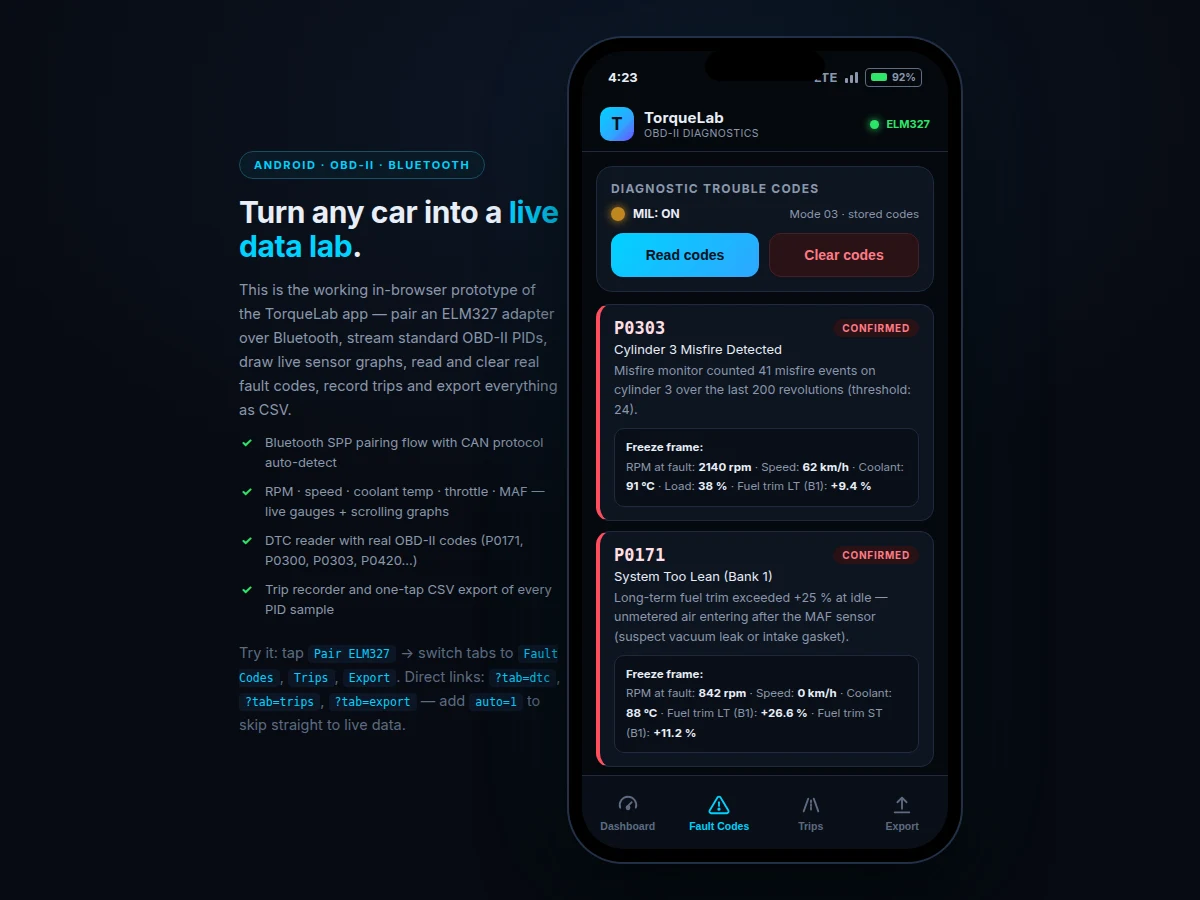
- [DTC fault-code reader] Reads stored trouble codes (Mode 03) with plain-language descriptions for real codes such as P0171, P0300, P0303 and P0420, plus confirmed/pending status and the check-engine (MIL) lamp state.
- [Freeze-frame data] Each code carries the snapshot the ECU stored when the fault set — RPM, speed, coolant, load and fuel trims at the moment of failure — displayed alongside the code.
- [Clear codes (Mode 04)] Clears stored codes and turns the MIL off, with an explicit in-app warning that clearing does not repair the underlying fault and the code will return if the problem persists.
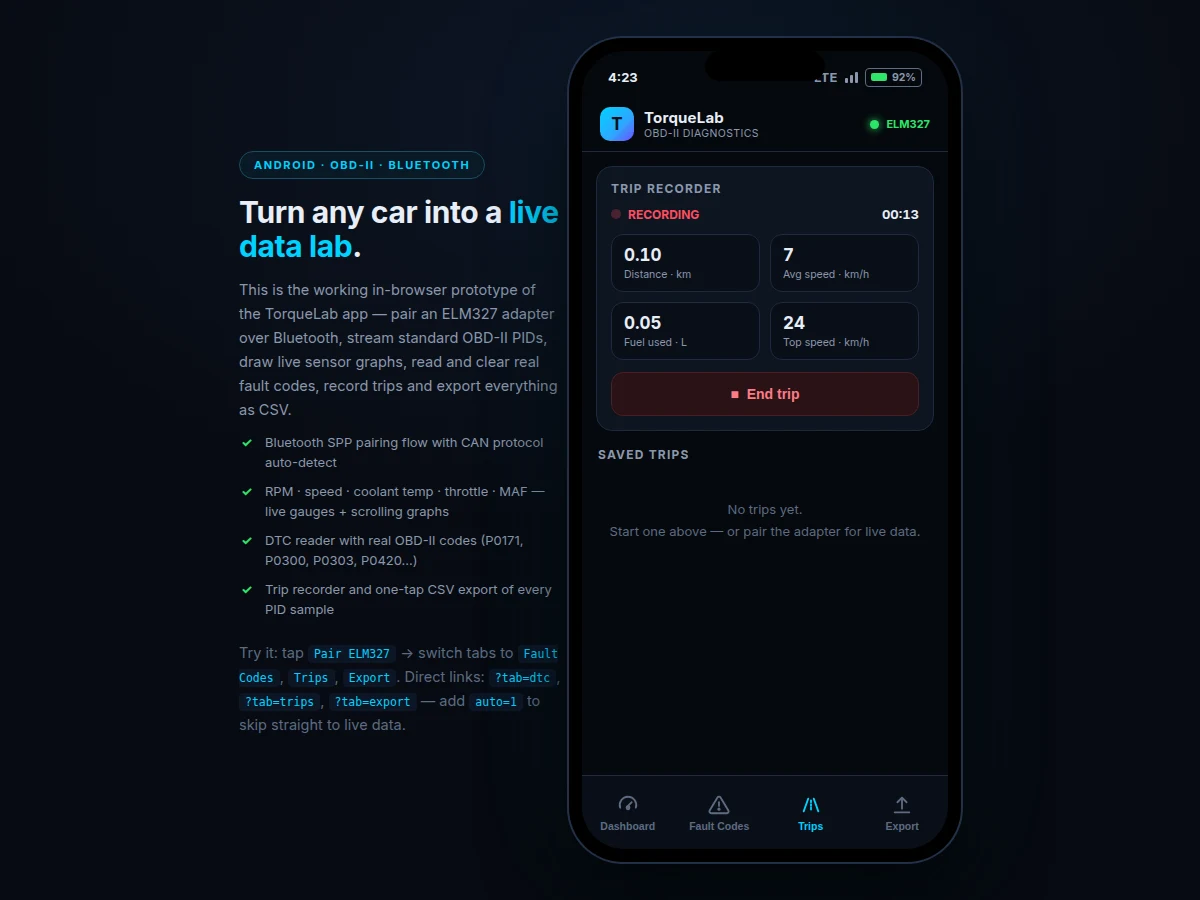
- [Trip recorder] Logs speed, RPM and fuel every second into a local Room database, producing per-trip distance, average speed, fuel used and top speed — no account, no cloud, fully offline.
- [CSV and report export] One-tap export of the full sensor log (every PID sample), the trip log, and a plain-text diagnostic report with VIN, protocol, codes and freeze frames.
What is included
- Complete TorqueLab Android source code (Kotlin) with Bluetooth SPP layer, PID decoder, gauges, graphs, DTC module, trip recorder and export
- Debug APK installable on any Android 8.0+ phone
- Simulated-data demo build that runs the full UI with realistic OBD-II behaviour — no car or adapter needed for the viva demo
- Project report PDF (OBD-II background, ELM327 protocol, PID decoding, app architecture, testing)
- Abstract PDF (10-section)
- PPT presentation for final review
- Viva Q&A preparation document (Bluetooth SPP vs BLE, SAE J1979, CAN vs K-line, DTC structure, Room schema)
Limitations & prerequisites
- Adapter quality varies: cheap ELM327 clones can misreport the protocol or drop frames; a genuine v1.5/v2.1-class adapter is expected for reliable polling.
- Only standardised Mode 01 PIDs are guaranteed; manufacturer-enhanced PIDs (transmission temperature, ABS, airbag, DPF data) use proprietary protocols and are out of scope.
- Clearing codes (Mode 04) erases the code and switches the MIL off but does not repair the fault — if the problem persists, the code and the lamp return.
- This app is a reader, not a tuner: it never writes ECU maps, changes parameters or performs coding/programming functions.
- Polling over Bluetooth SPP yields approximately 2–4 PIDs per second (expected); it is not a substitute for a lab-grade high-rate data logger.
- Requires an OBD-II-compliant vehicle (most Indian cars from the BS-IV era, approximately 2010+, expose OBD-II); pre-OBD vehicles are unsupported.
- Sensor values in the demo build are simulated to SAE J1979 behaviour; live values require the adapter connected to a real vehicle.
Frequently Asked Questions
Is this project suitable for a final-year project?
Yes — for Computer Science, IT and Electronics programs. It demonstrates Bluetooth serial (SPP) communication, a real automotive protocol stack (ELM327 AT commands, SAE J1979 PID decoding, CAN), real-time charting, Room persistence and CSV export — a complete hardware-adjacent Android pipeline.
Do I need a real car and ELM327 adapter to demonstrate it?
No. The delivered demo build simulates the full PID stream with SAE J1979-correct behaviour, so every screen — gauges, graphs, fault codes, trips, export — works on a desk with no car. The real adapter path is identical code; you only need hardware for live-car testing.
Which fault codes can it read?
All standardised powertrain codes (P0xxx) the ECU reports via Mode 03 — for example P0171 (system too lean), P0300/P0303 (misfires), P0420 (catalyst efficiency) and P0442 (EVAP leak) — with plain-language descriptions, confirmed/pending status and freeze-frame data.
Does clearing codes permanently fix the check-engine light?
No, and the app says so explicitly. Mode 04 clears the stored code and turns the MIL off, but if the underlying fault remains, the ECU will set the code again on the next drive cycle and the lamp returns.
Can it remap the ECU or unlock hidden features?
No. The app is strictly a diagnostic reader: it polls standard PIDs and reads/clears codes. It performs no ECU flashing, parameter writes or manufacturer-proprietary functions — that boundary is a deliberate, defensible design decision.
What will I receive with the project?
The full Kotlin source, debug APK, simulated-data demo build, report PDF, abstract PDF, PPT and viva Q&A — the complete built-to-order kit listed under "What's included".
Components & software requirements
- Kotlin, Android SDK (minSdk 26)
- Bluetooth Classic SPP (RFCOMM)
- ELM327 · SAE J1979 PIDs
- MPAndroidChart · Canvas gauges
- Room persistence library
- Kotlin Coroutines · Flow
- CSV export · FileProvider
Delivery information
Built-to-order project. Delivery timeline is shared after order confirmation based on current queue.
Support terms
Complete documentation, setup guide, and viva preparation included. Support for setup and explanation provided.
Download free synopsis (PDF)
Enter your name and WhatsApp number — the synopsis PDF downloads immediately. We may send occasional project updates on WhatsApp; no spam.