
More project photos (2)
The problem
Students living in hostels order food from nearby eateries over phone calls or WhatsApp chats, which means no written order record, no bill breakup and no way to know when the food will arrive. Small restaurants take these orders on paper slips or in chat threads, so items get missed during rush hours and there is no clean record of the day's sales. This project replaces that informal loop with a proper three-sided system: an Android customer app with restaurant menus, a cart and checkout; live tracking that shows the order moving from confirmed to delivered; and a restaurant dashboard that receives each order the moment it is placed, tracks preparation status and toggles dish availability. Everything runs on Firebase, so the realtime sync, phone-OTP login and push notifications work without the student having to set up or pay for a backend server.
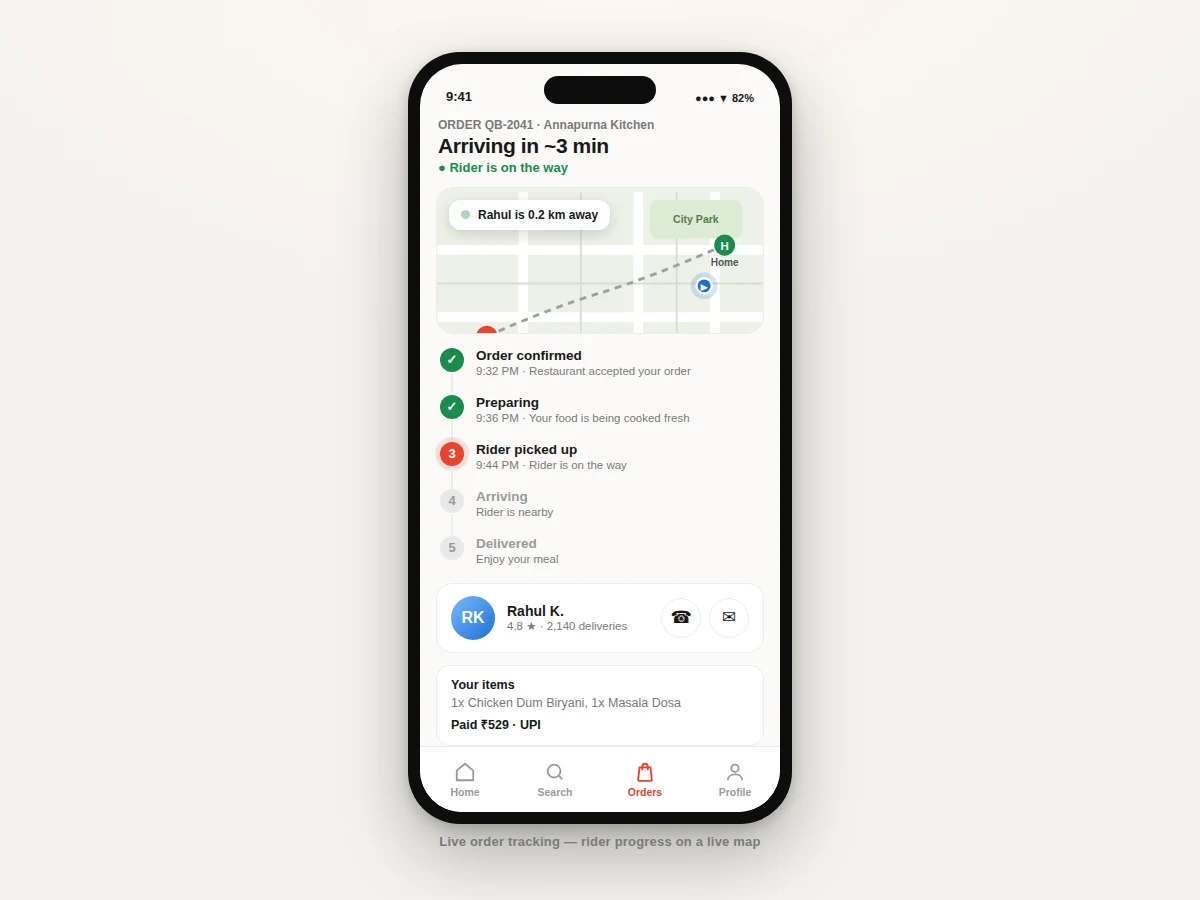
Places orders and watches the rider move live on the in-app map.
Follow the working sequence
How it works
- The customer signs in with phone-number OTP through Firebase Authentication; the home screen loads the restaurant list from a Firestore collection, cached offline for repeat visits.
- Opening a restaurant fetches its menu subcollection; the cart is kept in a local Room database and merged with the user's Firestore profile on sign-in.
- Tapping "Place order" writes an order document with status "placed"; a Cloud Function (or direct write) triggers an FCM push that lights up the restaurant dashboard, typically within 2 seconds on a stable connection (expected).
- The restaurant partner accepts the order and advances it through preparing, ready and picked-up stages; every status write fans out to the customer's timeline and sends a push notification.
- In rider mode, the delivery phone streams GPS coordinates to the order's tracking subcollection every 10 seconds (configurable); the customer map listens to the same document and moves the rider marker live.
- Handover is confirmed on the app; the order moves to history, the customer is prompted to rate, and the dashboard's daily totals update.
Tech stack:
- Kotlin, Android SDK (Jetpack)
- Firebase Authentication (phone OTP), Cloud Firestore
- Firebase Cloud Messaging
- Google Maps SDK for Android
- Room (local cart and menu cache)
- Retrofit (REST calls, used by the optional payment module)
- Material Design 3
| Parameter | Value |
|---|---|
| Customer app | Native Android in Kotlin, minSdk 26 (Android 8.0 and above) |
| Backend | Firebase: Authentication + Firestore + Cloud Messaging (free Spark-plan quotas apply) |
| Order alert latency | Typically under 2 seconds from placement to dashboard on a stable connection (expected, not measured) |
| Rider location interval | Every 10 seconds while an order is active (configurable) |
| GPS accuracy | Approximately 5–10 m outdoors (standard GPS grade); weak indoors |
| Map | Google Maps SDK; usage follows current Google Maps Platform pricing (design target stays within free monthly quota for demo and viva use) |
| Local storage | Room database for cart persistence and offline menu cache |
| Notifications | FCM data messages on all five order-status transitions |
| Roles | 3: customer, restaurant partner, rider mode |
| Demo seed data | 4 restaurants, 14 menu items with photos (demo content) |
| Deliverable binary | Signed debug APK; release AAB on request |
Project features
- [Restaurant discovery and menus] Browse nearby restaurants with photos, ratings, delivery times and offer banners; each menu shows veg/non-veg marks, prices and dish descriptions. Search filters the list instantly.
- [Cart and checkout] Quantity steppers, a bill with item total, delivery fee and GST, saved delivery address and one-tap order placement. The cart persists locally, so it survives app restarts.
- [Live order tracking] A five-stage timeline (confirmed, preparing, picked up, arriving, delivered) plus a map showing the rider's position updating from Firestore in realtime, with the rider's name, rating and call/chat buttons.
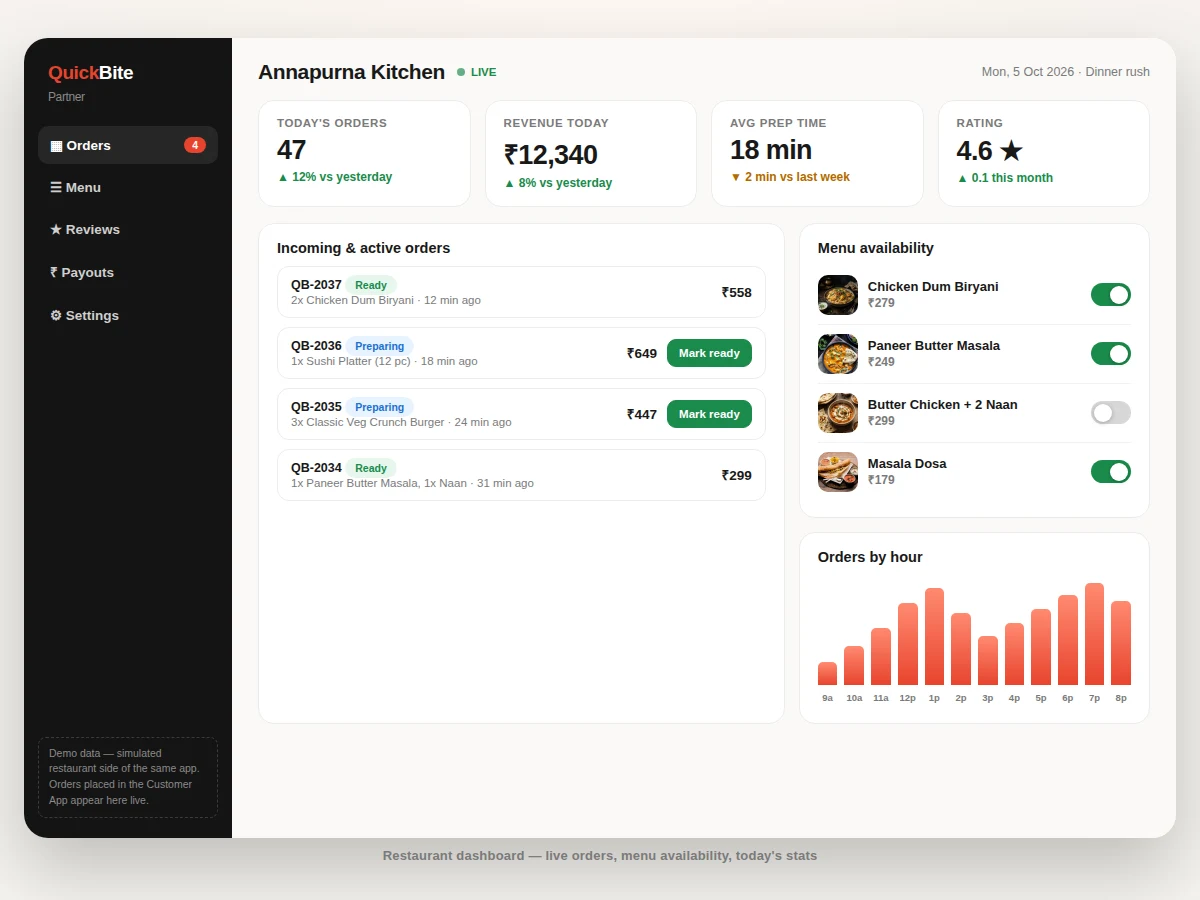
- [Restaurant partner dashboard] Incoming orders appear the moment they are placed; the partner accepts or rejects, moves orders through preparation stages, toggles dish availability and sees today's orders, revenue, average preparation time and rating.
- [Push notifications] Firebase Cloud Messaging alerts the customer on every status change and pings the restaurant the instant a new order arrives.
- [Order history and ratings] Past orders are archived per user with reorder shortcuts, and customers can rate each delivery.
- [Offer engine (configurable)] Percentage and flat discount rules are stored in Firestore, so offer banners and coupon logic can be changed without rebuilding the app.
- [Online payments (optional)] The base build records orders with a UPI payment reference; full Razorpay gateway integration is available as an optional customization, not part of the base project.
What is included
- Complete Kotlin source code for the customer app, restaurant dashboard and rider mode
- Firebase project setup guide: Authentication, Firestore collections and security rules, FCM configuration
- Google Maps SDK integration with API-key setup steps
- Demo seed data: 4 restaurants and 14 menu items with photos
- Signed APK ready to install and demonstrate
- Project report PDF (architecture, database design, module breakdown, screenshots)
- PPT presentation for the final review
- Viva Q&A preparation document (Firebase, realtime listeners, FCM, location APIs, app architecture)
Advantages
- Customer app: restaurant discovery with photos, ratings, delivery times and offer banners; menus with veg/non-veg marks, prices and descriptions; cart with quantity steppers, bill breakup (item total, delivery fee, GST), saved delivery address and one-tap order placement; cart persists locally in Room, surviving app restarts.
- Live order tracking: five-stage timeline (confirmed, preparing, picked up, arriving, delivered) plus a map showing the rider's position updating from Firestore in realtime, with rider name, rating and call/chat buttons.
- Restaurant partner dashboard: incoming orders appear the moment they are placed; the partner accepts or rejects, moves orders through preparation stages, toggles dish availability, and sees today's orders, revenue, average preparation time and rating.
- Firebase Cloud Messaging alerts the customer on every status change and pings the restaurant the instant a new order arrives; order history archives per user with reorder shortcuts and delivery ratings; a configurable offer engine in Firestore lets coupon logic change without rebuilding the app. Seeded demo: 4 restaurants, 14 menu items with photos; signed APK included. Tech stack: Kotlin/Jetpack, Firebase Authentication (phone OTP), Cloud Firestore, FCM, Google Maps SDK, Room, Retrofit, Material Design 3; three roles (customer, restaurant partner, rider mode).
Disadvantages
- Live tracking needs mobile data and GPS on the rider's phone; the demo simulates rider movement - real tracking needs rider mode running with location permission.
- Push notification timing depends on Google Play services; some devices batch background pushes and may delay alerts by a few minutes.
- The Google Maps SDK needs a billing-enabled API key; the key setup must be shown honestly in the viva rather than claimed free forever.
- Online payment gateway is NOT in the base build - orders record a UPI payment reference, and full Razorpay integration is an optional extra. Firestore's free Spark plan caps reads/writes/storage: comfortable for demo and viva use, not production-scale order volume. The restaurant dashboard is an Android module, not a web panel.
Limitations & prerequisites
- Live tracking needs mobile data and GPS on the rider's phone; the demo simulates rider movement, real tracking needs the rider mode running with location permission.
- Push notification timing depends on Google Play services; some devices batch background pushes and may delay alerts by a few minutes.
- The Google Maps SDK needs a billing-enabled API key; display the key setup honestly in the viva rather than claiming it is free forever.
- Online payment gateway is NOT in the base build; orders record a UPI payment reference and full Razorpay integration is an optional extra.
- Firestore's free Spark plan caps reads, writes and storage — comfortable for demo and viva use, not for production-scale order volume.
- The restaurant dashboard is an Android module, not a web panel; a web admin panel is possible as customization.
Frequently Asked Questions
Is this project suitable for a final-year project?
Yes — for Computer Engineering, IT and MCA programs. It demonstrates native Android development in Kotlin, realtime NoSQL data modeling, push notifications, Google Maps integration and a genuine multi-role system (customer, restaurant, rider), which gives strong viva material.
Is online payment included?
Not in the base build. Orders are placed with a UPI payment reference recorded against the order. Full Razorpay/Stripe gateway integration with signature verification can be added as an optional customization.
Does order tracking work without internet?
No. Live status and the rider's map position need an active connection on both phones. Menu browsing and the cart keep working offline from the local cache and sync when the network returns.
Which Firebase services does it use, and do they cost anything?
Phone-OTP Authentication, Cloud Firestore and Cloud Messaging — all three have free tiers that comfortably cover development, demo and viva use; the report documents the quota limits honestly.
Can the project be customized for my college's requirements?
Yes. Common additions are tiffin-subscription plans, a web admin panel, multi-language menus, a delivery-slot scheduler and loyalty points — each is scoped separately from the base build.
What exactly will I receive?
The full Kotlin source for all three roles, Firebase and Maps setup guides with security rules, demo restaurant data, a signed APK, the project report PDF, presentation PPT and a viva Q&A document.
Components & software requirements
- Kotlin, Android SDK (Jetpack)
- Firebase Authentication (phone OTP), Cloud Firestore
- Firebase Cloud Messaging
- Google Maps SDK for Android
- Room (local cart and menu cache)
- Retrofit (REST calls, used by the optional payment module)
- Material Design 3
Delivery information
Built-to-order project. Delivery timeline is shared after order confirmation based on current queue.
Support terms
Complete documentation, setup guide, and viva preparation included. Support for setup and explanation provided.
Download free synopsis (PDF)
Enter your name and email — the synopsis PDF downloads immediately. We may send occasional project updates; no spam, unsubscribe anytime.