
More project photos (2)
The problem
Vehicle owners lose track of the two things that matter most: when the next service is actually due, and what the vehicle really costs to run. Service books get misplaced, fuel receipts are thrown away, and the per-kilometre running cost — the figure that should guide every maintenance and resale decision — is never computed. Existing maintenance apps tend to demand accounts, serve ads, or lock data in the cloud, while a spreadsheet cannot capture a fill-up at the pump. MotoLog is a native Android app that keeps the whole maintenance diary offline on the phone: every fill-up (date, odometer, litres, rate) automatically yields km/l, total cost and running cost/km; every service event carries a next-due target in kilometres, dates, or both; and a reminder engine turns those targets into plain statements like "Engine oil due in 1,200 km / 45 days". On-device charts track fuel spend and mileage trends per vehicle, with no account and no network required.
How it works
- The owner creates a vehicle profile (make, model, type, fuel, current odometer); each vehicle gets isolated fuel and service tables in the Room database.
- At the pump, the owner logs a fill-up: date, odometer reading, litres and rate per litre — the app validates that the odometer never goes backwards.
- The mileage engine divides kilometres driven since the previous fill-up by litres added, producing km/l, and updates lifetime spend and cost/km for the dashboard.
- At the service centre, the owner logs the service with notes and sets the next-due target — e.g. engine oil at +3,000 km or +6 months, PUC by a calendar date.
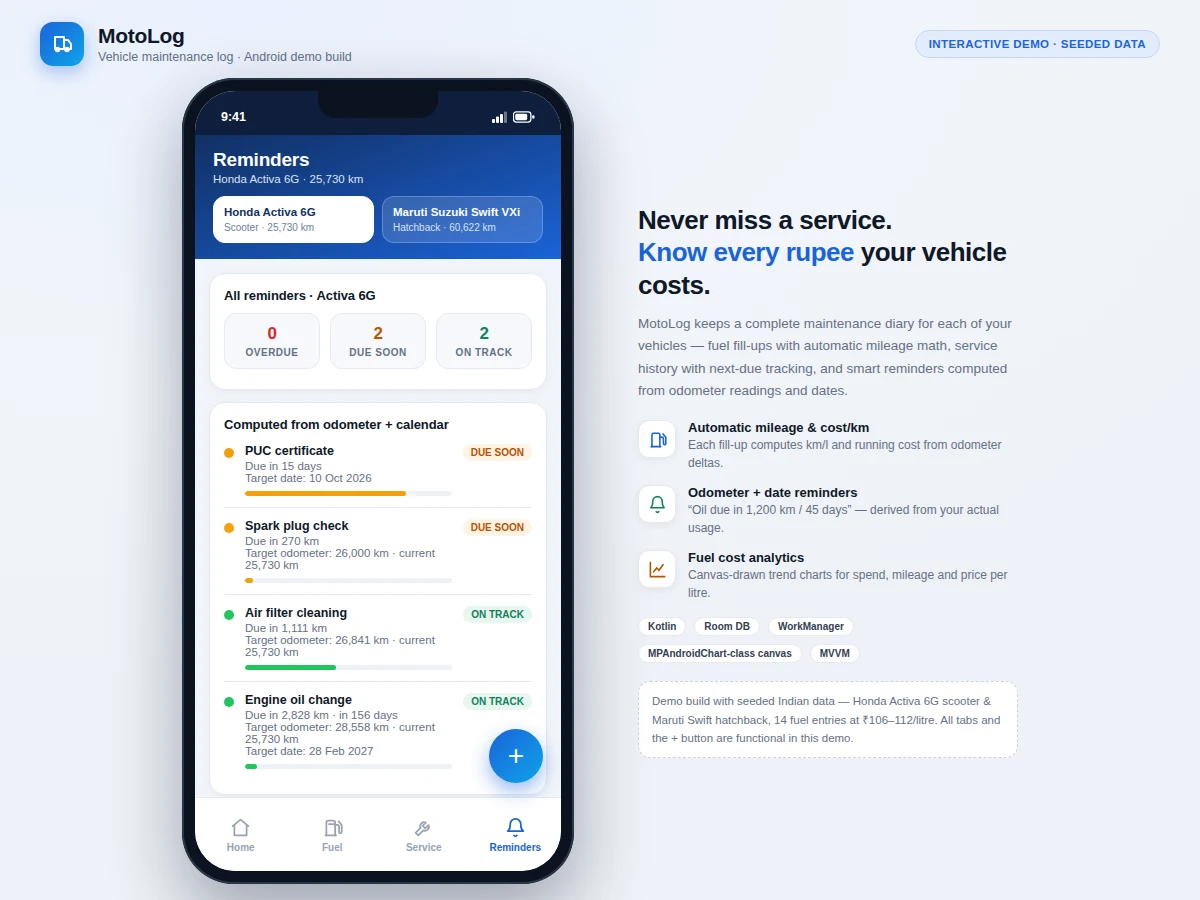
- The reminder engine subtracts the current odometer and today's date from each target, producing "due in 2,828 km · in 156 days", and classifies urgency (due-soon within 500 km or 30 days by default).
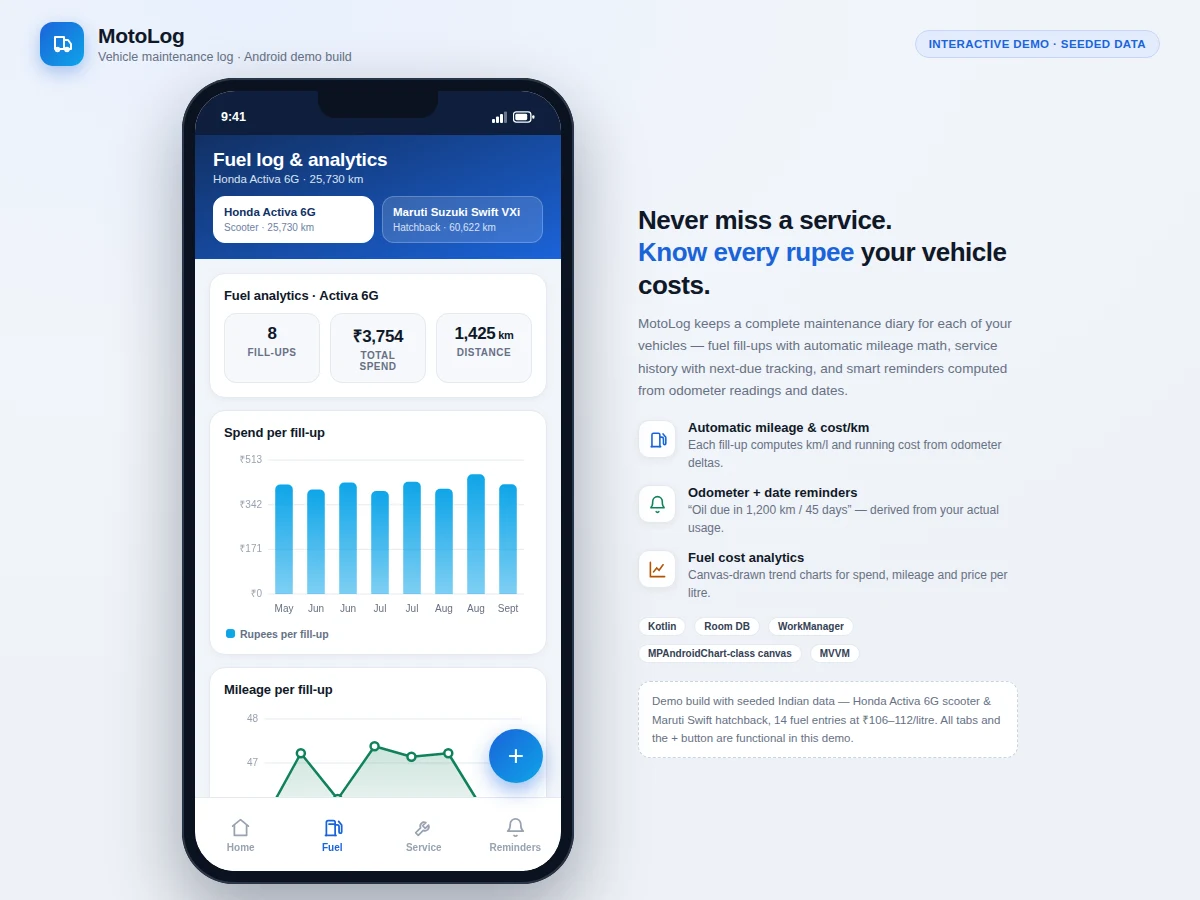
- The Fuel tab renders spend-per-fill bars and a mileage trend line from the same query results; WorkManager's daily check fires local notifications for anything due soon.
Tech stack:
- Kotlin, Android SDK (minSdk 26)
- Room persistence library
- Lifecycle ViewModel + Coroutines/Flow
- WorkManager (reminder scheduling)
- Custom Canvas chart rendering
- Material 3 UI components
- Android Studio
- Git
| Parameter | Value |
|---|---|
| Platform | Native Android app (Kotlin) |
| Minimum Android version | 8.0 (API 26) — design target |
| Storage | On-device Room database; no account or cloud sync as built |
| Data model | Vehicle, FuelEntry, ServiceEntry entities (expected schema) |
| Mileage computation | km/l from consecutive odometer deltas; cost/km from lifetime spend ÷ distance |
| Reminder thresholds | Due-soon within 500 km or 30 days (expected defaults, configurable) |
| Charts | Spend-per-fill bars + mileage-per-fill line, drawn on-device |
| Notifications | Daily WorkManager check; local alerts only |
| Demo dataset | 2 Indian vehicles, 14 seeded fuel entries |
| Debug APK size | Approximately 8–12 MB (expected) |
Project features
- [Multi-vehicle garage] Separate profiles for each vehicle (make, model, type, fuel, current odometer) with fully isolated fuel and service histories per vehicle.
- [Automatic mileage math] Every fill-up computes km/l from the odometer delta with the previous entry, plus total cost and a running cost-per-km figure — no manual calculation.
- [Service history with next-due targets] Log oil changes, filters, brakes, PUC, insurance and more, each with an optional next-due target in kilometres, a date, or both.
- [Odometer + date reminder engine] Converts next-due targets into "due in X km / in Y days" statements, classified as overdue, due soon or on track and sorted by urgency.
- [Fuel cost analytics] On-device bar chart of rupees per fill-up, line chart of km/l per fill-up, and dashboard aggregates: average mileage, cost/km, total spend.
- [Local notifications] WorkManager runs a daily check and raises on-device alerts when a reminder crosses the due-soon threshold — no server component needed.
- [Offline-first, no account] All data lives in an on-device Room database; the app works fully without internet, accounts or ads.
What is included
- Complete Kotlin source code as an Android Studio project
- Debug APK installable on any Android 8.0+ device or emulator
- Seeded demo dataset (two Indian vehicles, 14 fuel entries, service history) so every screen works on first launch
- Project report PDF (background, Room schema design, reminder-engine logic, methodology)
- PPT presentation for final review
- Viva Q&A preparation document (Room, MVVM, WorkManager, chart rendering, offline-first design)
- README with build, install and demo-walkthrough instructions
Limitations & prerequisites
- Mileage derives from odometer deltas, so a missed fill-up skews that interval's km/l; the app flags gaps in the log but cannot reconstruct the missing reading.
- Reminders depend on entered data — the app cannot read the odometer automatically; there is no OBD-II integration in this build.
- No cloud backup or sync as built: data lives on the device, and a reinstall wipes it unless the user exports first.
- Notifications are local only; there is no SMS, email or push-server component.
- Fewer than two fill-ups means no mileage can be computed yet — the charts need history to be meaningful.
- Fuel prices and service costs are entered manually; the app does not fetch live pump prices.
Frequently Asked Questions
How is mileage calculated without any hardware?
Each fill-up stores the odometer reading, and the app divides the kilometres driven since the previous fill-up by the litres added. No OBD dongle or GPS tracking is involved — the odometer the owner already reads at the pump is the single source of truth, which keeps the app honest, simple and fully offline.
How do the reminders actually work?
Every service entry can carry a next-due target in kilometres, a calendar date, or both — exactly how manufacturer schedules are written. The engine subtracts the current odometer and today's date to produce "due in X km / in Y days", then classifies each reminder as overdue, due soon (within 500 km or 30 days by default) or on track.
Does it need internet or an account?
No. Everything lives in an on-device Room database; charts and reminders compute locally and alerts are raised by WorkManager on the phone itself. The offline-first design is a deliberate talking point in the viva about privacy, reliability and architecture choice.
Can it handle both my bike and my car?
Yes — the app is built around a multi-vehicle garage. Each vehicle keeps completely separate fuel and service histories, and the dashboard, fuel analytics and reminders are all scoped to the vehicle currently selected.
Is this project suitable for a final-year project?
Yes — for Computer Science and IT programmes with a mobile-app focus. It demonstrates Android persistence with Room, MVVM architecture, background scheduling with WorkManager and custom chart rendering, applied to a genuinely useful everyday problem that is easy to defend in a viva. Suitable for B.E./B.Tech final-year projects in Computer Science, IT and mobile app development.
Components & software requirements
- Kotlin, Android SDK (minSdk 26)
- Room persistence library
- Lifecycle ViewModel + Coroutines/Flow
- WorkManager (reminder scheduling)
- Custom Canvas chart rendering
- Material 3 UI components
- Android Studio
- Git
Delivery information
Built-to-order project. Delivery timeline is shared after order confirmation based on current queue.
Support terms
Complete documentation, setup guide, and viva preparation included. Support for setup and explanation provided.