
More project photos (2)
The problem
Grocery delivery apps run on three systems students rarely see working together: a weight-unit product catalog, a delivery-slot scheduling engine, and a store inventory ledger that decrements as orders are packed. This project builds all three as a native Android app for a neighborhood grocery store. Customers browse SKUs sold in kg, g, litres and pieces — atta, rice, dals, oils, dairy and vegetables — with MRP-strike pricing, pack-size variants and percentage-off offers. They pick a 3-hour delivery window from a live slot grid, optionally convert the basket into a weekly subscription repeating every Monday, and follow the order from store packing to doorstep on a status timeline. A store-side console keeps the other half honest: stock counts, low-stock flags and slot capacities update as orders flow in. The reference demo catalog re-renders all 24 SKUs in a median of 0.3 ms per search keystroke (measured on a laptop-class CPU; design target: under 100 ms on mid-range phones).
Browses the weight-unit catalog, books a 3-hour delivery slot and places the order.
Follow the working sequence
How it works
An order flows through three cooperating halves. On the customer app, the catalog loads from Cloud Firestore as paginated collections; pack-size variant selection swaps the price document field client-side so the SKU count stays small while variants multiply. Adding items writes a local Room cart first, which syncs to a Firestore cart document when the user is signed in — the cart survives app restarts and device changes. At checkout the slot engine reads the day's slot documents, each carrying a capacity counter decremented by a Firestore transaction as orders claim windows, so two customers cannot overbook the same slot. Placing the order creates an order document with status history, decrements SKU stock on the store side when packing begins, and fires FCM pushes at each timeline stage. Subscriptions are order templates: the app schedules a weekly WorkManager job that regenerates the order every Monday morning in the customer's chosen slot until paused or skipped.
- The customer signs in with phone OTP via Firebase Authentication and sets a delivery address; the home screen loads the SKU catalog from Firestore with category filters and live search.
- Tapping a product shows its pack-size variants (5 kg, 1 L, 500 g, dozen); selecting a variant swaps the price and MRP client-side, and ADD writes the line item to a local Room cart that syncs to Firestore.
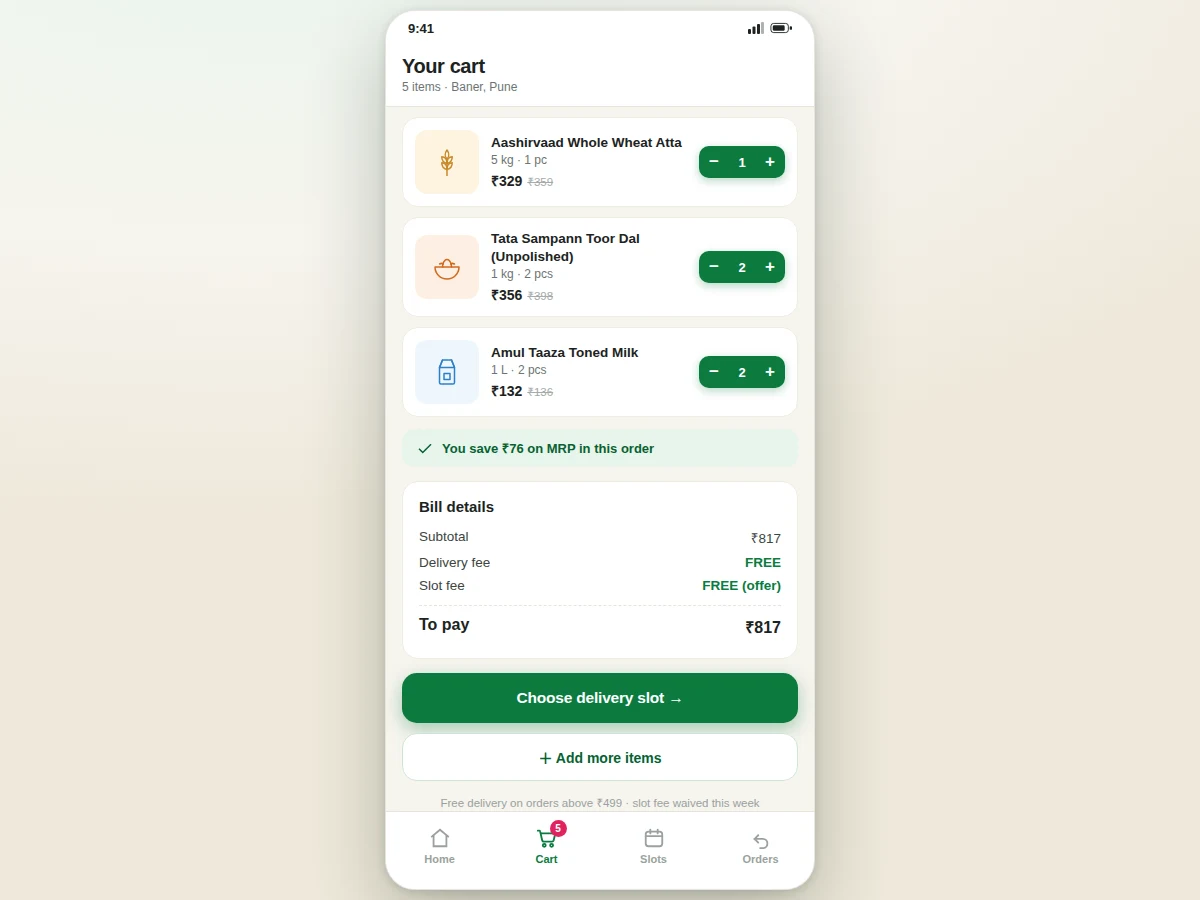
- In the cart, the MRP-discount engine totals the bill: subtotal, per-item savings versus MRP, delivery fee (free above ₹499 in the demo configuration) and any slot-fee waiver.
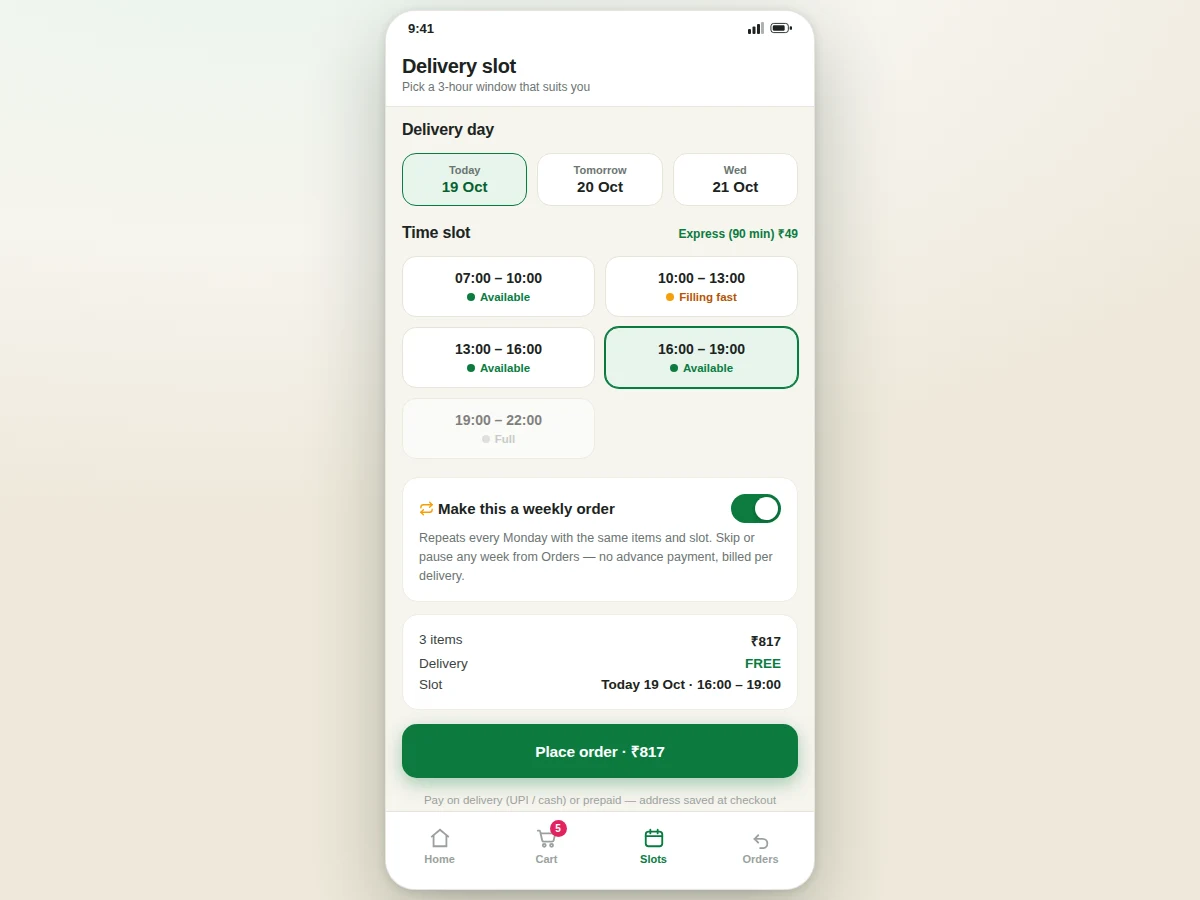
- At checkout the customer picks a delivery day and a 3-hour slot; each slot's capacity counter is decremented by a Firestore transaction, so a full slot can never be overbooked.
- Placing the order creates an order document with a five-stage status history and optionally saves it as a weekly subscription template; the store console lists it for packing and stock decrements when packing starts.
- FCM pushes notify the customer at each stage — packed, out for delivery, arriving, delivered — and the in-app tracking timeline updates as the store advances the order.
Tech stack:
- Kotlin · Android SDK (minSdk 26)
- Firebase Authentication (phone OTP)
- Cloud Firestore
- Firebase Cloud Messaging (FCM)
- Room persistence library
- Material Design 3
- WorkManager (subscription scheduling)
- Git
| Parameter | Value |
|---|---|
| Catalog size | 24 SKUs across 9 categories (demo dataset; expandable) |
| Search responsiveness | Median 0.3 ms per keystroke over 24 SKUs (measured in the reference HTML demo on a laptop-class CPU; design target: under 100 ms on mid-range phones) |
| Delivery slots | 5 windows per day, 3 hours each (configurable) |
| Slot capacity | Configurable per slot (design target: 20–40 orders per slot for a single store) |
| Tracking stages | 5 (placed → packed at store → out for delivery → arriving → delivered) |
| Minimum Android version | Android 8.0 / API 26 (design target) |
| Firestore free tier | 50,000 reads/day · 20,000 writes/day · 1 GiB storage (Firebase Spark quotas) |
| Offline behavior | Cart and catalog cached in Room; placing orders needs connectivity |
Project features
Four systems carry this build. The SKU catalog is grocery-native: every product sells in weight units — 5 kg atta bags, 1 L milk, 500 g tomatoes, a dozen bananas — with per-variant MRP, discount percentage and stock state, so pricing logic mirrors a real kirana price list rather than a generic e-commerce template. The slot engine divides each delivery day into 3-hour windows with per-slot capacities; slots show live availability, filling-fast and full states, and an express 90-minute option at a fixed fee. Subscriptions turn any basket into a weekly repeat order — same items, same slot, skippable any week, billed per delivery with no advance payment. The store console closes the loop: pickers see incoming orders, stock decrements on packing, low-stock flags fire at reorder levels, and customers watch a five-stage status timeline from order placement to doorstep.
- [Weight-unit SKU catalog] A 24-SKU Indian grocery catalog across 9 categories — atta, rice, dals, oils, dairy, vegetables, masalas and staples — each product with pack-size variants (5 kg / 10 kg, 1 L / 500 ml, dozen / pieces), per-variant MRP, discount percentage and live search.
- [Delivery-slot scheduling] Each day is split into 3-hour windows with configurable per-slot capacities; slots display available, filling-fast and full states, plus an optional 90-minute express window at a fixed fee (₹49 in the demo configuration).
- [Weekly subscription orders] Any basket converts to a weekly repeat order with the same items and slot; subscribers can skip or pause any week, and billing happens per delivery with no advance payment.
- [MRP-discount offer engine] Every price shows MRP strike-through, percentage off and cart-level savings totals; slot-fee waivers and free-delivery thresholds (₹499 in the demo configuration) are configurable rules, not hard-coded text.
- [Live order tracking timeline] A five-stage status timeline — placed, packed at store, out for delivery, arriving, delivered — pushed to the customer app via FCM as the store updates each stage.
- [Store-side inventory console] Store staff see incoming orders, stock decrements automatically when packing starts, and low-stock flags fire at configurable reorder levels so the catalog never sells what the shelf lacks.
- [Firebase backend] Phone-OTP authentication, Cloud Firestore for catalog, orders and slots, and FCM for slot reminders and status pushes — sized to fit the Firebase Spark free tier (50,000 reads/day, 20,000 writes/day, 1 GiB storage).
What is included
- Complete Kotlin source code (customer app + store-side console)
- Firebase project setup guide (Authentication, Firestore schema, FCM topics)
- Slot-engine and subscription scheduling logic with a documented capacity model
- Working reference demo with the 24-SKU Indian grocery dataset
- Project report PDF (architecture, Firestore schema, slot transaction design, test cases)
- PPT presentation for final review
- Viva Q&A preparation document (Firestore transactions, FCM, Room caching, WorkManager)
Limitations & prerequisites
- Payments are out of scope in the base build — checkout records pay-on-delivery (UPI/cash) only; a payment gateway is an optional add-on.
- Slot capacities and the 3-hour window layout are configured per store; multi-store routing is not implemented.
- Vegetable prices in the demo are static — a production store needs a daily price-update flow from the store console (listed as future scope).
- The subscription scheduler runs on the customer's device via WorkManager; a server-side scheduler is an optional upgrade.
- Firestore free-tier quotas (50,000 reads/day, 20,000 writes/day) bound the demo backend; a live store would move to the Blaze plan.
- FCM delivery needs Google Play services and network connectivity on the device.
- The demo catalog ships 24 SKUs; scaling to thousands of SKUs needs pagination tuning and composite indexes (documented in the report).
Frequently Asked Questions
How is this different from a food-ordering app?
It is a different vertical entirely. The catalog is grocery SKUs sold in kg, g, litres and pieces with pack-size variants, the scheduling unit is a 3-hour delivery slot with capacities, repeat purchase runs on subscriptions, and the store side is an inventory ledger that decrements as orders are packed — none of the menu-and-order-now patterns of food apps. Slot scheduling, weight-unit pricing and subscription logic are grocery-specific engineering problems.
Does it handle weight-based pricing?
Yes — that is the core of the catalog design. Every SKU carries pack-size variants such as 5 kg / 10 kg atta, 1 L / 500 ml milk or dozen / 6-piece bananas, each with its own price and MRP, and the discount engine computes percentage-off per variant and total savings at cart level.
How do delivery slots avoid overbooking?
Each slot document in Firestore carries a capacity counter. When a customer claims a slot, a Firestore transaction decrements the counter atomically, so two customers checking out at the same second cannot exceed capacity; full slots render a disabled "Full" state in the slot grid.
Can the store manage stock and orders?
Yes. The store-side console lists incoming orders per slot, marks packing stages that push FCM updates to customers, decrements SKU stock when packing starts, and raises low-stock flags at configurable reorder levels so unavailable items stop selling. Staff can also adjust slot capacities for festival-rush days.
Is this project suitable for a final-year project?
Yes — for Computer Engineering, IT and mobile-application programs. It demonstrates a weight-unit catalog data model, transactional slot booking, background subscription scheduling with WorkManager, FCM push architecture and a two-sided (customer + store) Firebase design, all of which give strong viva material.
Components & software requirements
- Kotlin · Android SDK (minSdk 26)
- Firebase Authentication (phone OTP)
- Cloud Firestore
- Firebase Cloud Messaging (FCM)
- Room persistence library
- Material Design 3
- WorkManager (subscription scheduling)
- Git
Delivery information
Built-to-order project. Delivery timeline is shared after order confirmation based on current queue.
Support terms
Complete documentation, setup guide, and viva preparation included. Support for setup and explanation provided.
Download free synopsis (PDF)
Enter your name and WhatsApp number — the synopsis PDF downloads immediately. We may send occasional project updates on WhatsApp; no spam.