
More project photos (2)
The problem
IoT coursework usually teaches the pieces in isolation: one lab flashes an ESP32, another plots a chart, a third mentions MQTT. When students then try to build a real sensor network, the pieces don't meet — readings stay trapped in serial monitors, there is no shared dashboard, no alerting, and no history to analyze. Cloud platforms solve this but add accounts, subscriptions and an internet dependency that complicates college demos. Node-RED, the open-source flow-based programming tool from the OpenJS Foundation, offers a middle path: a visual wiring canvas where MQTT messages flow into processing nodes, dashboard widgets, alert nodes and log files, all running on a local Raspberry Pi. This project builds that complete stack — sensor nodes, broker, flows, dashboard, alerts and historian — so the student demonstrates a genuine end-to-end IoT system, not a single sensor blinking on a breadboard.
How it works
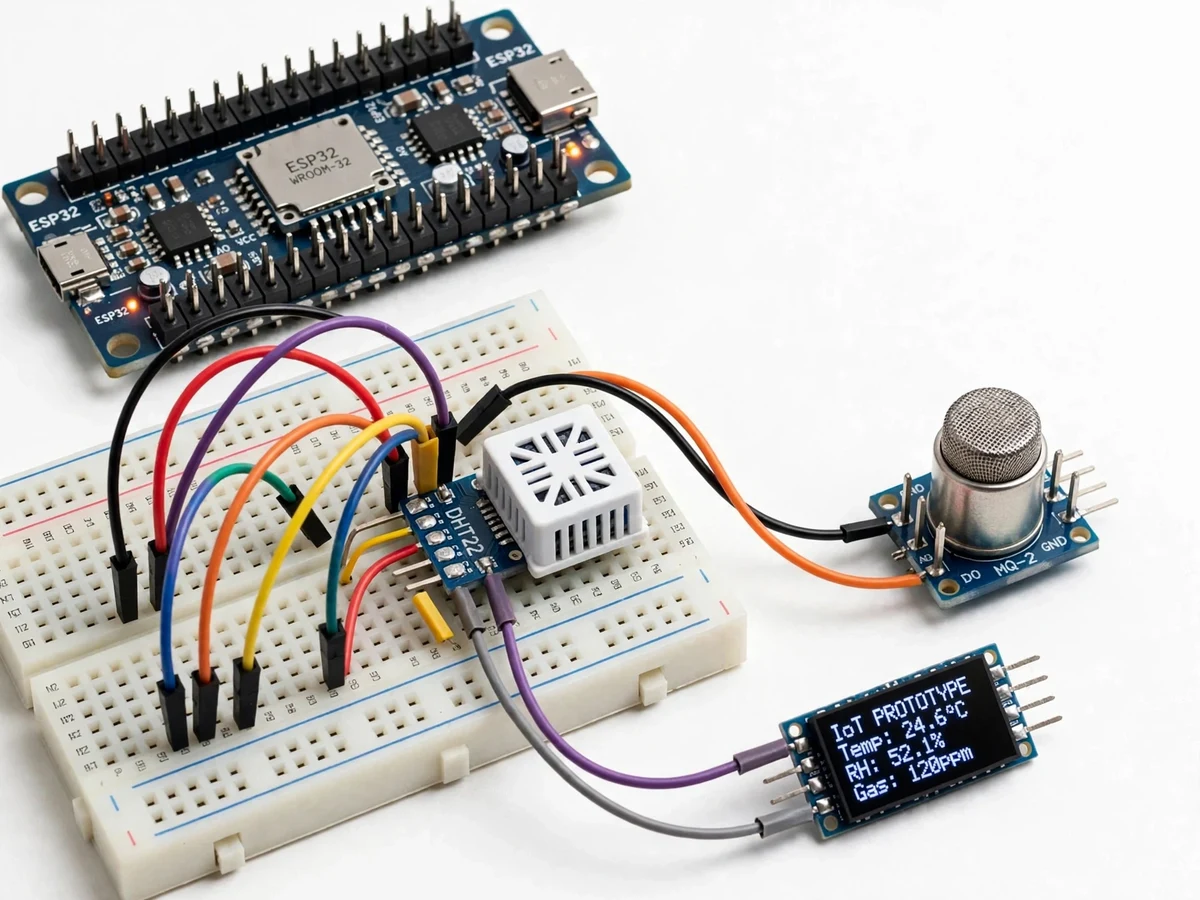
- Each ESP32 sensor node reads its sensors (DHT22, MQ-series gas, BH1750 light, capacitive soil moisture) and publishes a JSON payload to its MQTT topic every configured interval.
- The Eclipse Mosquitto broker on the Raspberry Pi receives the messages over Wi-Fi.
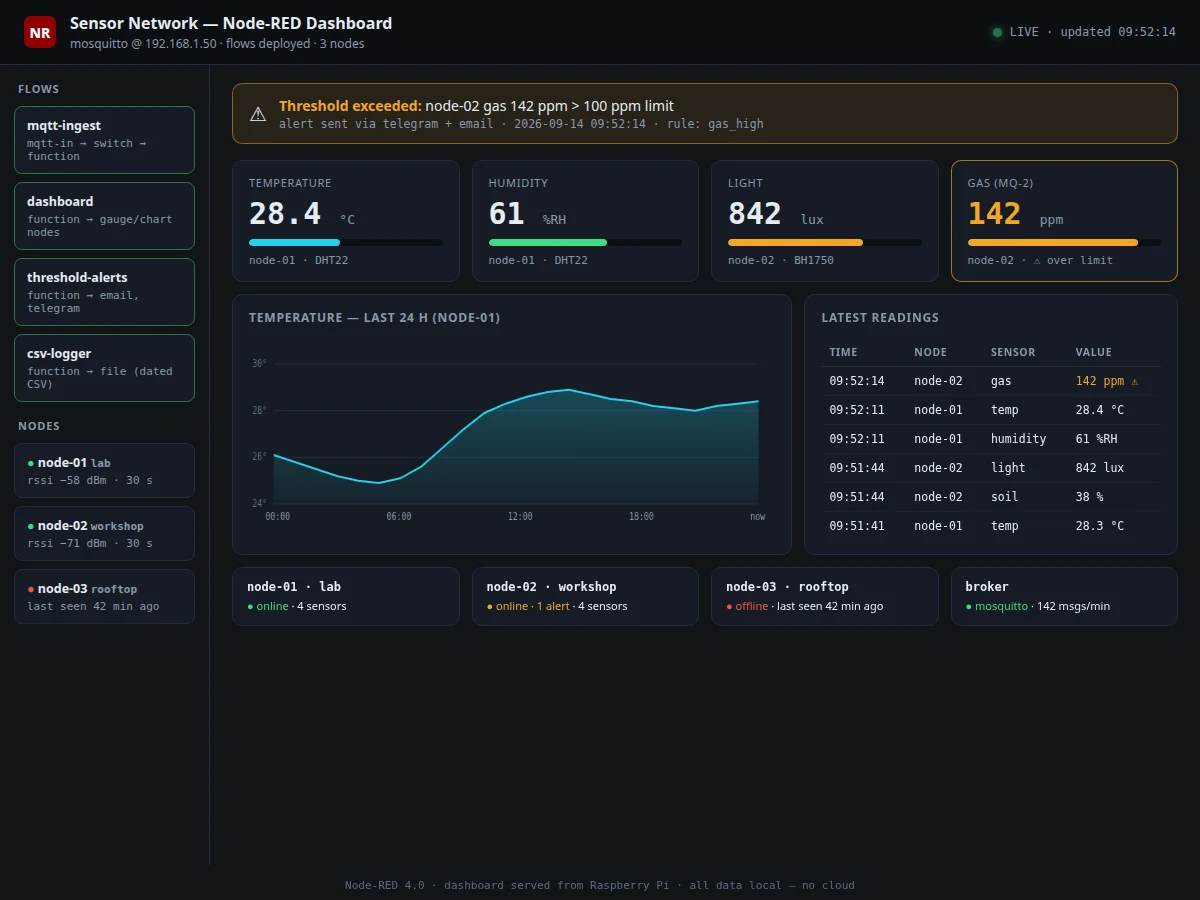
- Node-RED subscribes to the topic tree; switch and function nodes route readings by node and sensor type.
- Dashboard nodes render gauges, charts and status tiles in the browser at the Pi's address.
- Threshold function nodes evaluate limits; on violation, email and Telegram nodes send alerts with the node ID, value and timestamp.
- A file node appends every reading to dated CSV logs; chart nodes read them back for historical views.
Tech stack:
- Node-RED on Node.js (flow-based integration runtime)
- Eclipse Mosquitto MQTT broker (MQTT 3.1.1)
- node-red-dashboard widgets (gauges, charts, status tiles)
- ESP32-WROOM-32 sensor nodes (Arduino framework, template firmware)
- DHT22 temperature/humidity, MQ-series gas, BH1750 light sensors
- CSV historian (InfluxDB as documented option)
- Email + Telegram bot alert nodes
- Raspberry Pi 4 (deployment host)
| Parameter | Value |
|---|---|
| Integration platform | Node-RED (Node.js), browser flow editor and dashboard |
| Message broker | Eclipse Mosquitto, MQTT 3.1.1, running locally on Raspberry Pi |
| Sensor nodes | ESP32-WROOM-32, Wi-Fi, template firmware with node-ID topics |
| Sensors | DHT22 (±0.5 °C, ±2–5 %RH per datasheet), MQ-series gas (indicative), BH1750 light, capacitive soil moisture |
| Dashboard | node-red-dashboard: gauges, line charts, status tiles, site view |
| Alerting | Email and Telegram bot nodes on configurable thresholds |
| Historian | Dated CSV logs; InfluxDB as a documented configuration option |
| Deployment | Raspberry Pi 4 or any laptop; no internet required for core operation |
Project features
- [Flow-based integration] Sensors, processing, dashboard and alerts are wired as Node-RED flows on a visual canvas — changes deploy in seconds with no firmware recompile for the integration logic.
- [MQTT sensor network] A template ESP32 firmware publishes JSON readings (temperature, humidity, gas, light) to a topic tree; extra nodes join by flashing the same template with a new node ID.
- [Live dashboard] node-red-dashboard gauges, time-series charts, status tiles and a site-layout view update as readings arrive.
- [Threshold alerting] Function nodes compare readings against configurable limits and fire email and Telegram-bot alerts on violations and recovery.
- [Historical logging] Every reading is appended to dated CSV logs (InfluxDB as a documented option), and chart nodes replay history for any time window.
- [Configurable sampling] Per-node reporting intervals are set through retained MQTT configuration topics — no reflashing to change a sample rate.
- [Fully local deployment] Mosquitto and Node-RED run on a Raspberry Pi or laptop; the system works with zero internet connectivity.
What is included
- Two assembled ESP32 sensor node prototypes (sensors wired and tested)
- Node-RED flow exports (ingestion, dashboard, alerting, logging)
- Mosquitto + Node-RED setup guide for Raspberry Pi
- Template ESP32 firmware with node-ID configuration
- Project abstract PDF
- Project report (architecture, MQTT design, flow documentation, test results)
- PPT presentation and viva Q&A document
Limitations & prerequisites
- The Node-RED dashboard is a local web UI for demos, not a hardened multi-tenant cloud product; behavior under many concurrent users is untested.
- The single Mosquitto broker on the Pi is a single point of failure; the base build has no redundancy or failover.
- MQ-series gas sensors need burn-in time and give indicative readings, not calibrated gas concentrations.
- Node placement is limited by Wi-Fi coverage; dead zones need an access point, not a code change.
- Default flows ship without authentication; login and TLS hardening are documented as an optional step, not included in the base build.
Frequently Asked Questions
Is this project suitable for a final-year project?
Yes — for Electronics, IoT and Computer Engineering programs, covering embedded firmware, MQTT networking, flow-based integration, dashboards and alerting in one system.
What runs on the Raspberry Pi?
The Mosquitto MQTT broker and the Node-RED runtime with all flows; sensor nodes only publish data and need no Pi-side code changes.
Does it need internet?
No. The whole stack runs on the local network. Internet is only needed if you enable cloud-backed alerts like Telegram or email.
Can I add more sensors or nodes?
Yes — the template firmware and topic tree are designed for it: flash a new node ID, wire the sensor, and add a dashboard widget; the guide walks through it.
Why Node-RED instead of Blynk or ThingSpeak?
Node-RED runs locally with no account or subscription, and the flow canvas makes the entire data path visible and explainable — both useful in a viva. Cloud platforms are listed as optional extensions.
What are the main limitations?
Local-only demo scope, a single broker, indicative gas sensing and unauthenticated default flows — detailed under Limitations. Suitable for B.E./B.Tech final-year projects in Electronics, IoT and Computer Engineering.
Components & software requirements
- Node-RED on Node.js (flow-based integration runtime)
- Eclipse Mosquitto MQTT broker (MQTT 3.1.1)
- node-red-dashboard widgets (gauges, charts, status tiles)
- ESP32-WROOM-32 sensor nodes (Arduino framework, template firmware)
- DHT22 temperature/humidity, MQ-series gas, BH1750 light sensors
- CSV historian (InfluxDB as documented option)
- Email + Telegram bot alert nodes
- Raspberry Pi 4 (deployment host)
Delivery information
Built-to-order project. Delivery timeline is shared after order confirmation based on current queue.
Support terms
Complete documentation, setup guide, and viva preparation included. Support for setup and explanation provided.