
More project photos (2)
The problem
Students can make an ESP32 read a sensor in an afternoon, but the moment the data has to be seen, stored, alarmed and controlled from anywhere, the project stalls on dashboard plumbing. ThingsBoard Community Edition is the real open-source answer used in industry pilots: an MQTT/HTTP/CoAP device platform with a widget dashboard builder, device attributes, server-side RPC and a rule-chain engine for alarms and processing. This project builds the complete loop on it: an ESP32 node publishing DHT22 telemetry, a ThingsBoard dashboard with gauges, timeseries charts and control widgets, RPC downlinks that switch a relay and LED from the dashboard, rule chains that raise email and Telegram alarms on threshold crossings, and CSV export of history for analysis. Everything runs on the student's own self-hosted ThingsBoard instance, so the report can document a genuine platform deployment rather than a toy chart page.
How it works
- The ESP32 reads the DHT22 and publishes temperature and humidity as MQTT telemetry to the self-hosted ThingsBoard instance using the device's access token.
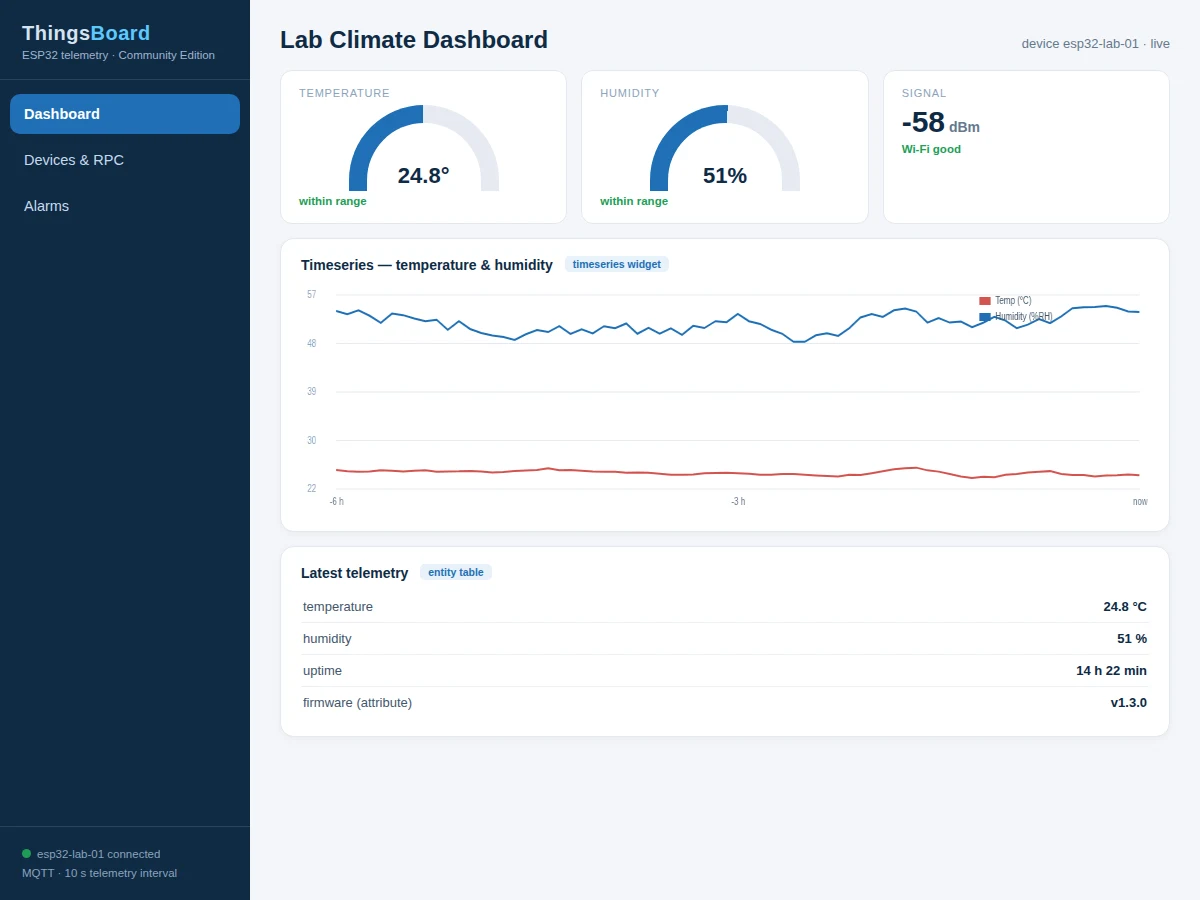
- ThingsBoard stores the timeseries and the dashboard widgets render live gauges, charts and value cards from it.
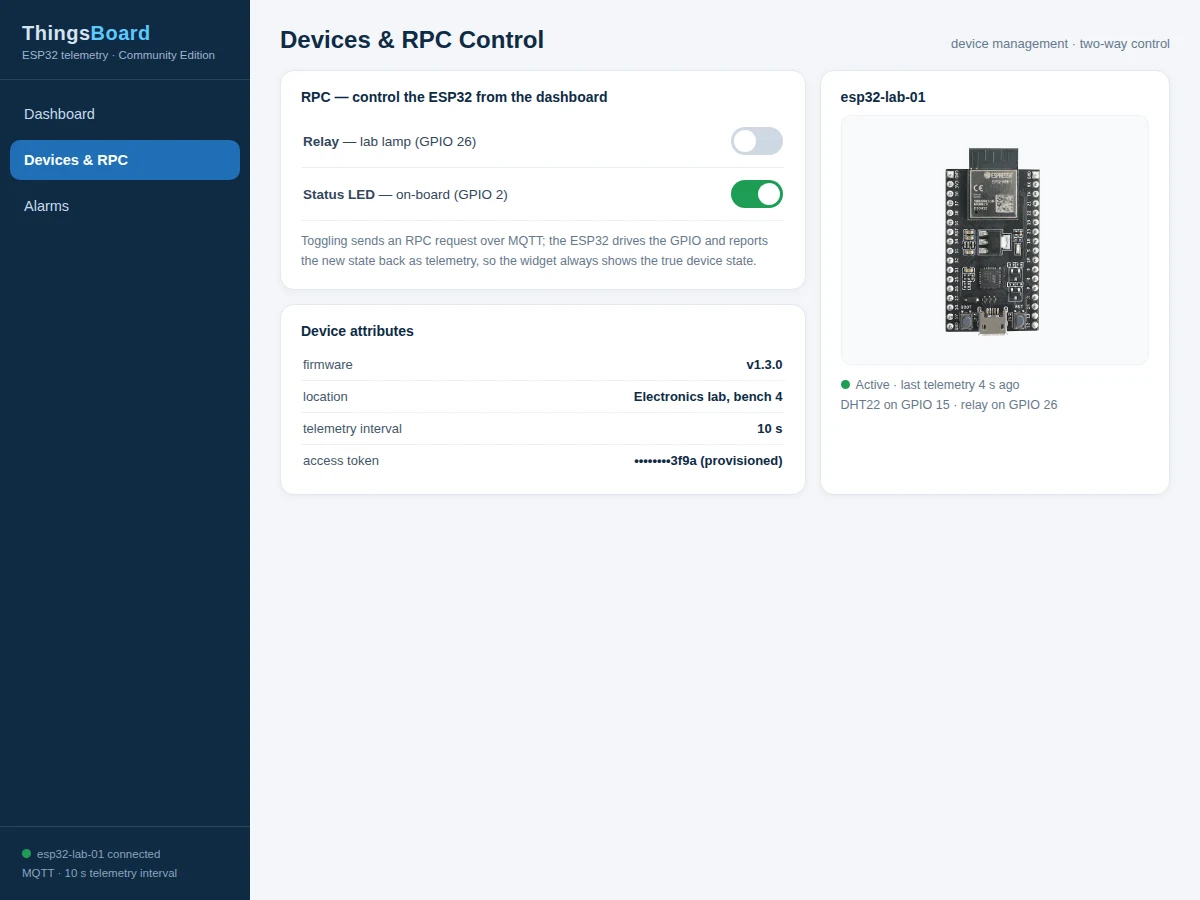
- Toggling a dashboard switch sends an RPC request down to the ESP32, which drives the relay or LED and reports the new state back as telemetry.
- The rule chain evaluates each telemetry message against configured thresholds and creates alarms on crossing, sending email and Telegram notifications.
- Alarms follow the platform's lifecycle — active, acknowledged, cleared — visible in the dashboard alarm widget.
- Device attributes carry firmware version and location, editable from the ThingsBoard device page without firmware changes.
- History is queried by time range in the dashboard and exported to CSV for the report's analysis section.
Tech stack:
- ESP32 DevKit (Arduino-core firmware, PubSubClient MQTT)
- DHT22 temperature-humidity sensor; relay module and LED for RPC control
- ThingsBoard Community Edition (self-hosted: laptop, Raspberry Pi or cloud VM)
- MQTT device transport with per-device access tokens
- ThingsBoard rule chain (threshold alarms, email and Telegram nodes)
- Dashboard JSON export for one-click dashboard import
| Parameter | Value |
|---|---|
| Controller | ESP32 DevKit, Arduino-core firmware |
| Sensor | DHT22 temperature-humidity (digital) |
| Platform | ThingsBoard Community Edition, self-hosted |
| Transport | MQTT with per-device access token |
| Dashboard | Gauges, timeseries charts, value cards, alarm widget (JSON import included) |
| Control | RPC downlink: relay + LED switching from dashboard |
| Alarms | Rule-chain threshold alarms with email and Telegram notification |
| Data | Timeseries history with range query and CSV export |
| Hosting | Laptop, Raspberry Pi or cloud VM (hosting itself not included) |
| Scope | Single device fully built; multi-device pattern documented |
Project features
- [MQTT telemetry to ThingsBoard] The ESP32 publishes temperature and humidity as ThingsBoard telemetry over MQTT with the device access token, on a configurable interval.
- [Widget dashboard] A ThingsBoard dashboard built from real widgets: radial gauges, timeseries line charts, digital value cards and an alarm widget — exported as JSON for one-click import.
- [RPC two-way control] Dashboard switch widgets send RPC commands down to the ESP32 to toggle a relay and an LED, demonstrating device control, not just monitoring.
- [Rule-chain alarms] A ThingsBoard rule chain watches incoming telemetry and raises alarms on threshold crossings, forwarding them by email and Telegram with clear and acknowledge flow.
- [Device attributes] Firmware version, location and configuration live as ThingsBoard attributes, separating slowly-changing metadata from fast telemetry the way the platform intends.
- [Historical data + CSV export] Timeseries history with range selection and CSV export, so the report's analysis charts come from the student's own deployment data.
- [Multi-device ready] The dashboard and rule chain pattern extends to additional ESP32 nodes, each provisioned with its own access token.
What is included
- Complete ESP32 firmware (DHT22, MQTT telemetry, RPC handlers for relay and LED, reconnection logic)
- ThingsBoard setup guide (Community Edition install on laptop/Raspberry Pi/VM, device provisioning, access tokens)
- Dashboard JSON for one-click import (gauges, charts, cards, alarm widget, control switches)
- Rule-chain configuration guide (threshold alarms, email and Telegram nodes, alarm lifecycle)
- CSV-export walkthrough for report analysis
- Project report PDF (background, platform architecture, rule-chain design, evaluation method)
- PPT presentation for final review
- Viva Q&A preparation document (MQTT, ThingsBoard concepts, telemetry vs attributes, RPC, rule chains)
- Setup guide (Wi-Fi provisioning, broker addresses, first telemetry verification)
Limitations & prerequisites
- ThingsBoard Community Edition must be self-hosted on a laptop, Raspberry Pi or cloud VM — the hosting itself is not part of the deliverable, and the setup guide walks through the install.
- Dashboards and rule chains run on the server: if the ThingsBoard host is off or unreachable, the ESP32 keeps sensing but nothing is stored or displayed until it returns.
- Email and Telegram alarm delivery needs valid credentials and internet on the server side; the guide documents the configuration, including where provider limits apply.
- RPC control latency depends on the MQTT round trip and network conditions — it is near-real-time on a LAN, not deterministic.
- The build provisions one device end to end; adding more nodes follows the documented pattern but each needs its own token and dashboard entity configuration.
- ThingsBoard is a large platform; the project uses its core IoT features (telemetry, dashboards, RPC, alarms) and does not claim advanced modules like white-labeling or edge deployments.
Frequently Asked Questions
What is ThingsBoard?
An open-source IoT platform (Community Edition) that collects device telemetry over MQTT/HTTP/CoAP and provides dashboards, device management, RPC control and a rule-chain engine — the real platform, self-hosted, not a demo mockup.
Where does ThingsBoard run?
On hardware you provide: a laptop, a Raspberry Pi, or a small cloud VM. The setup guide covers installation and the tradeoffs of each option.
How does the dashboard control the ESP32?
Dashboard switch widgets send RPC requests over MQTT; the ESP32 firmware handles them to switch a relay and LED, then reports the new state back as telemetry so the dashboard stays truthful.
How are alarms generated?
A ThingsBoard rule chain evaluates incoming telemetry against thresholds and raises alarms with email and Telegram notifications, following the platform's active/acknowledged/cleared lifecycle.
Can I add more sensors or devices?
Yes — extra telemetry keys flow into the same pipeline automatically, and additional ESP32 nodes are provisioned with their own access tokens following the documented pattern.
Is this project suitable for a final-year project?
Yes — for Electronics, Electrical and IoT programs. It demonstrates MQTT device integration, a production-grade IoT platform, bidirectional RPC, rule-chain alarm design and self-hosted deployment, all strong viva material. Suitable for B.E./B.Tech final-year projects in Electronics, Electrical and IoT.
Components & software requirements
- ESP32 DevKit (Arduino-core firmware, PubSubClient MQTT)
- DHT22 temperature-humidity sensor; relay module and LED for RPC control
- ThingsBoard Community Edition (self-hosted: laptop, Raspberry Pi or cloud VM)
- MQTT device transport with per-device access tokens
- ThingsBoard rule chain (threshold alarms, email and Telegram nodes)
- Dashboard JSON export for one-click dashboard import
Delivery information
Built-to-order project. Delivery timeline is shared after order confirmation based on current queue.
Support terms
Complete documentation, setup guide, and viva preparation included. Support for setup and explanation provided.