
More project photos (2)
The problem
Booking a movie ticket on a phone is a flow every student has used, which makes it an unusually strong final-year project: the reviewer already knows what "correct" looks like, so the implementation is judged against a real standard, not an invented one. This project is a complete Android app for movie ticket booking — a browsable now-showing list with search and genre filters, theater-wise show timings across selectable dates, an interactive seat map with three priced classes (Recliner, Premium, Classic) and live available/booked/selected states, a fare summary with convenience fee and GST breakup, a simulated checkout, and QR-style digital entry passes stored in a local booking history. The seat-hold timer, offline access to confirmed bookings through a local database, and a clean REST-shaped data layer give the project genuine technical depth: UI state management, local persistence and network modeling are all exercised for real, not mocked around the edges.
Browses movies, picks theater and show time, selects seats and checks out.
Follow the working sequence
How it works
- The app loads the now-showing catalogue from a bundled seed dataset structured exactly like a REST response, so every screen works out of the box and the data layer can later be swapped for a real theater API.
- Selecting a movie opens theater-wise show timings: three date tabs, four theaters, and per-show availability states computed from each show's booked-seat count.
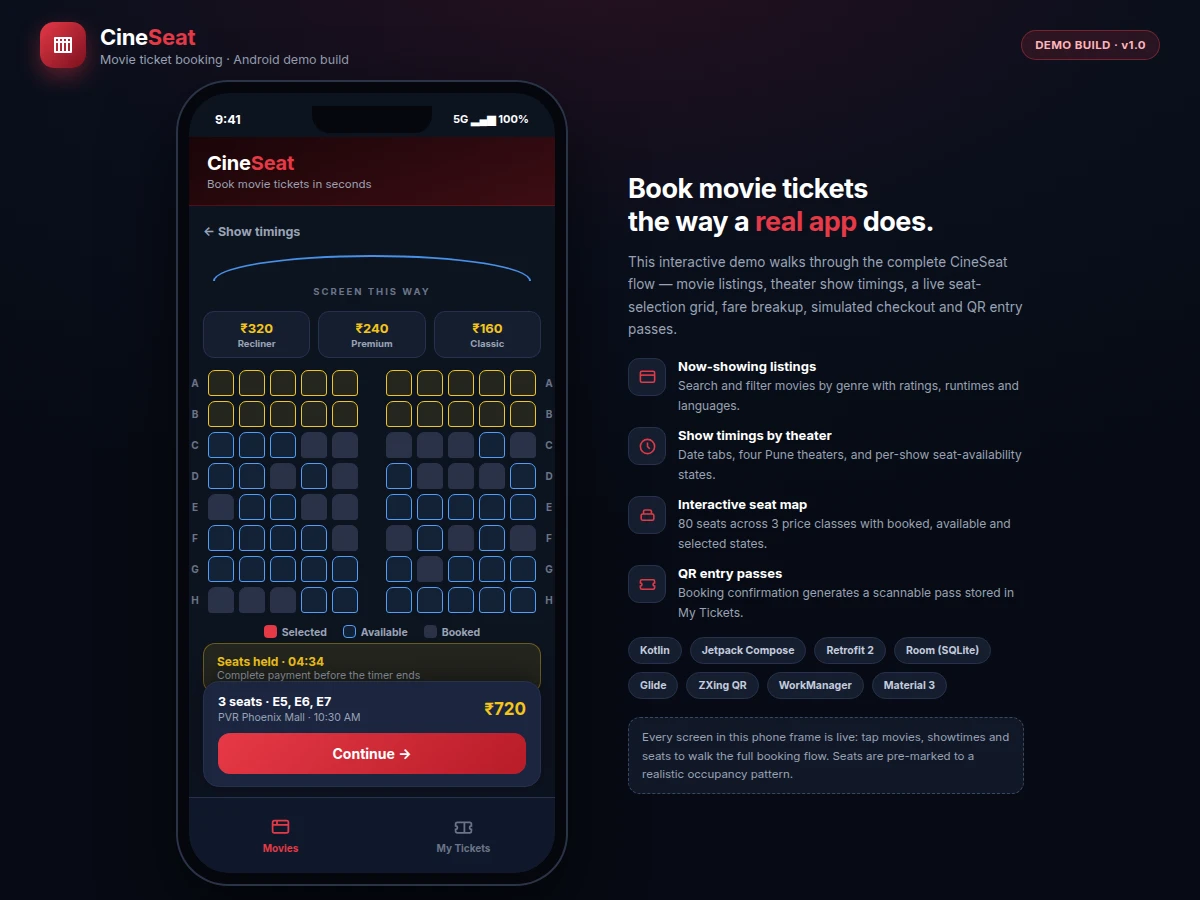
- On the seat map the app renders 8 rows × 10 seats with class-based pricing (Recliner ₹320, Premium ₹240, Classic ₹160 in the demo fares); booked seats from the show's occupancy pattern are locked, and up to 10 seats can be selected.
- Selecting seats starts the hold timer; the fare engine totals the class fares, adds the per-ticket convenience fee (₹30) and 18% GST on the fee, and presents the full breakup.
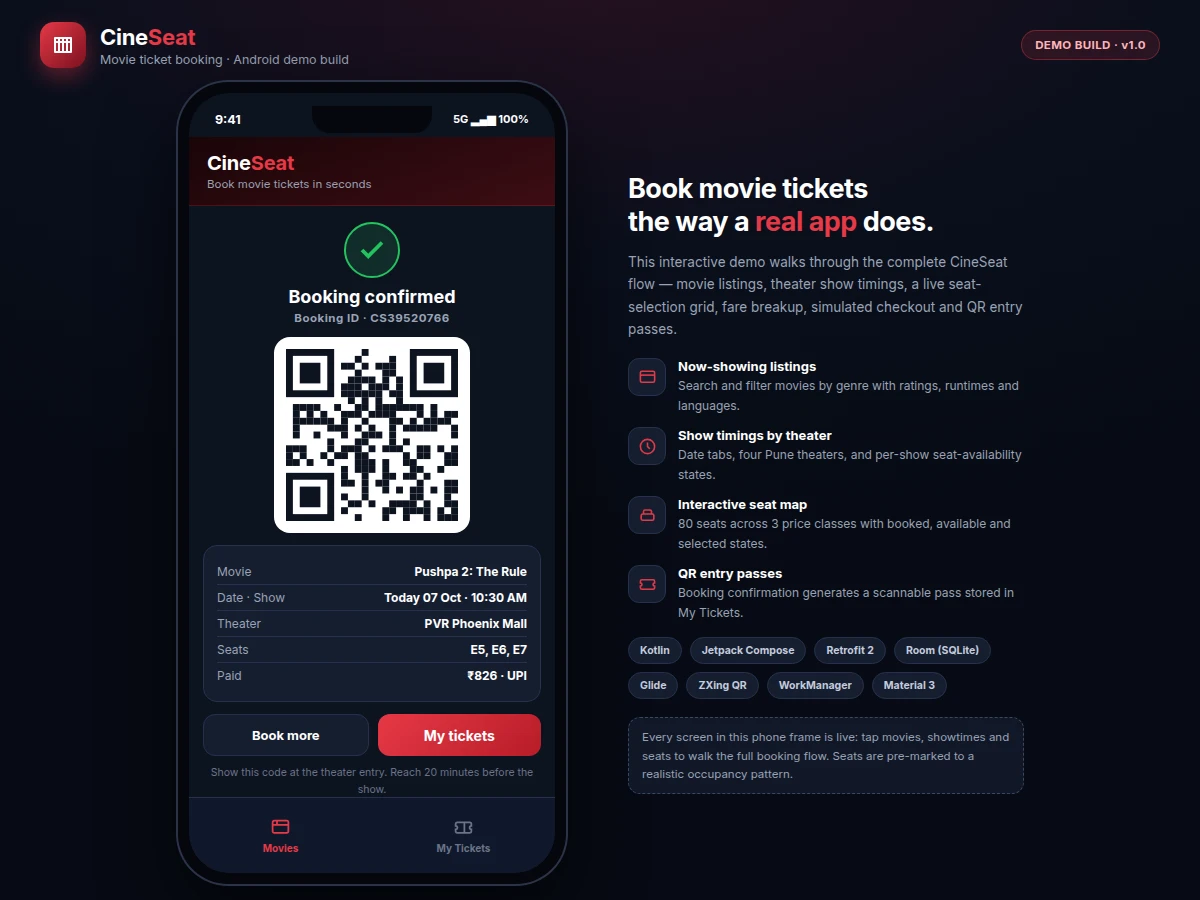
- The simulated checkout offers UPI, card and netbanking; on confirmation the app generates a booking ID and renders the QR-style entry pass via ZXing.
- The booking is saved to the local Room database and listed in My Tickets, where the pass re-opens offline for entry scanning.
Tech stack:
- Kotlin · Android SDK 24+
- Jetpack Compose · Material 3
- Retrofit 2 · OkHttp REST client
- Room (SQLite) local booking store
- Glide image loading · caching
- ZXing QR code generation
- WorkManager show reminders
- Gradle build · Git versioning
| Parameter | Value |
|---|---|
| App type | Native Android application (Kotlin) |
| Minimum Android version | API 24 (Android 7.0) and above |
| Seat map | 8 rows × 10 columns = 80 seats per screen |
| Seat classes | Recliner ₹320 · Premium ₹240 · Classic ₹160 (demo fares) |
| Maximum seats per booking | 10 |
| Convenience fee | ₹30 per ticket + 18% GST on the fee (demo values) |
| Seat-hold timer | 5 minutes countdown, releases selections on expiry (design target) |
| QR entry pass | Encodes booking ID, seats and show reference |
| Offline behavior | Saved bookings open without network; listings need connectivity |
| Build size | Approximately 25 MB or less for the release APK (design target) |
Project features
- [Now-showing listings with search and filters] Browse movies with ratings, runtimes, languages and genre chips; instant in-app search across titles filters the list as you type, so finding a film takes seconds.
- [Theater-wise show timings] Date tabs and per-theater showtime chips carry available, filling-fast and sold-out states, each derived from that show's booked-seat count — the same availability logic real booking apps use.
- [Interactive seat-selection map] Eighty seats in eight rows across three price classes; already-booked seats are locked and unselectable, chosen seats highlight with a live running total in the summary bar.
- [Fare breakup before payment] Class-wise ticket fares plus a per-ticket convenience fee and GST on the fee are itemized before checkout, so the payable total is never a surprise.
- [Simulated checkout] UPI, card and netbanking options with a processing state and booking-ID generation on success; no real money moves in the base build, which keeps the demo safe to run anywhere.
- [QR-style entry passes] Every confirmed booking generates a scannable pass code rendered with ZXing; passes live in My Tickets and open to a full booking detail view.
- [Offline booking history with seat holds] Confirmed bookings persist in a local Room database and open without network; selected seats start a 5-minute hold timer (design target) that releases them on expiry.
What is included
- Complete Android source code (Kotlin, Compose screens, seat-selection engine, fare engine, simulated checkout)
- Working demo build of the app, matching the three published screenshots
- Seeded movie/theater/show dataset shaped like a REST response, ready for API swap
- Setup and build documentation (Android Studio, SDK, Gradle steps)
- Project report PDF (domain background, architecture, methodology, testing notes)
- PPT presentation for final review
- Viva Q&A preparation document (Compose state, Room, Retrofit, QR generation, seat-hold design)
Limitations & prerequisites
- Checkout is simulated in the base build — no real payment gateway moves money; wiring Razorpay or a similar gateway is a scoped add-on, not included.
- Movies, theaters and showtimes ship as seeded demo data; a production build needs a real cinema data feed or partner API.
- The seat map assumes a fixed 80-seat single-screen layout; multi-screen or IMAX layouts need per-auditorium configuration.
- The QR pass is a demo ticket and is not accepted at real theater box offices.
- Android-only (API 24+); no iOS or web build is included in the base package.
- Listings and seat maps need an internet connection; only previously confirmed bookings are available offline.
Frequently Asked Questions
Does the app take real payments?
No. The checkout is a full simulated flow — payment-method selection, a processing state, booking-ID generation and the fare breakup — but no real money moves. A production deployment would wire a gateway such as Razorpay into the same checkout step, which is documented as a scoped add-on rather than part of the base build.
Where do the movies and show timings come from?
The base build ships with a seeded dataset of movies, theaters and showtimes shaped exactly like a REST response, so every screen works out of the box. Swapping the seed source for a real theater API is a one-layer change in the data module, and the documentation marks the exact place to do it.
How does seat booking avoid double-booking?
Each show carries its own occupancy map, and booked seats are locked before the user can select anything. Selections start a 5-minute hold timer (design target) that releases the seats on expiry. The report documents how a production backend would confirm holds server-side; the demo implements the client-side pattern faithfully.
Does it work offline?
Confirmed bookings are stored in a local Room database, so QR entry passes open with no network. The movie catalogue, show timings and seat maps need connectivity, since they model live inventory — the same trade-off real booking apps make.
Is this project suitable for a final-year project?
Yes — for Computer Engineering and Information Technology programs. It exercises modern Android development end to end: Compose UI with state management, local persistence, REST-shaped data modeling, QR generation and background scheduling, all inside a booking flow every reviewer intuitively understands.
Components & software requirements
- Kotlin · Android SDK 24+
- Jetpack Compose · Material 3
- Retrofit 2 · OkHttp REST client
- Room (SQLite) local booking store
- Glide image loading · caching
- ZXing QR code generation
- WorkManager show reminders
- Gradle build · Git versioning
Delivery information
Built-to-order project. Delivery timeline is shared after order confirmation based on current queue.
Support terms
Complete documentation, setup guide, and viva preparation included. Support for setup and explanation provided.
Download free synopsis (PDF)
Enter your name and email — the synopsis PDF downloads immediately. We may send occasional project updates; no spam, unsubscribe anytime.