
More project photos (2)
The problem
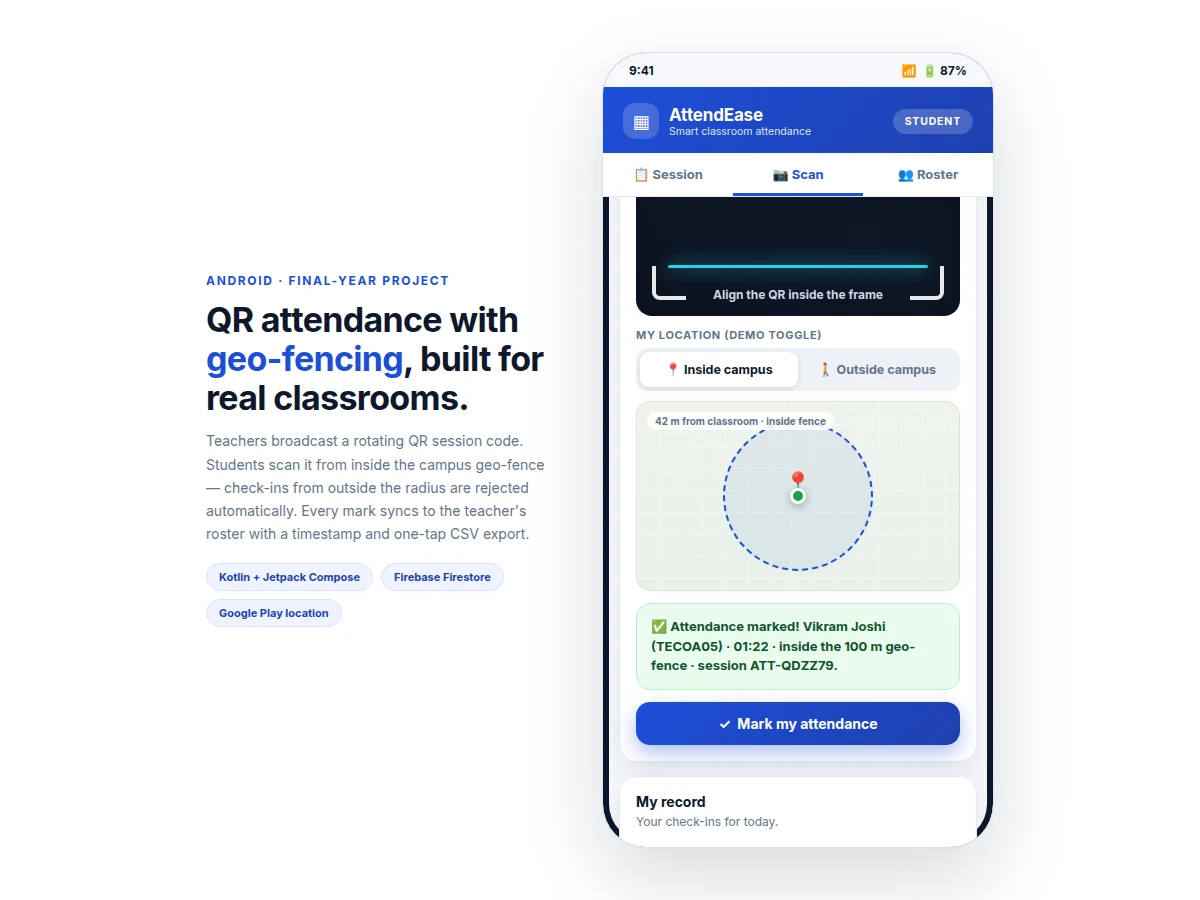
Calling out roll numbers eats several minutes of every lecture, and paper registers make proxy attendance trivially easy — one friend answers for another and the record says nothing. QR-based attendance fixes the speed problem but introduces a new one: a screenshot of the code can be forwarded to anyone, anywhere. This project closes both gaps. The teacher starts a session and the app generates a QR code that rotates to a new session code every 60 seconds, so a shared screenshot goes stale within a minute. Each scan is then checked against a GPS geo-fence centered on the classroom: the mark is accepted only if the student's location falls inside the configured radius. Accepted marks sync to Cloud Firestore with server timestamps and appear on the teacher's roster in real time, with a session history and CSV export for records. The build covers genuine Android engineering — runtime location permissions, background-aware location fixes, QR generation with zxing, Firebase security rules that prevent students from writing other students' records, and a Compose UI with separate teacher and student flows.
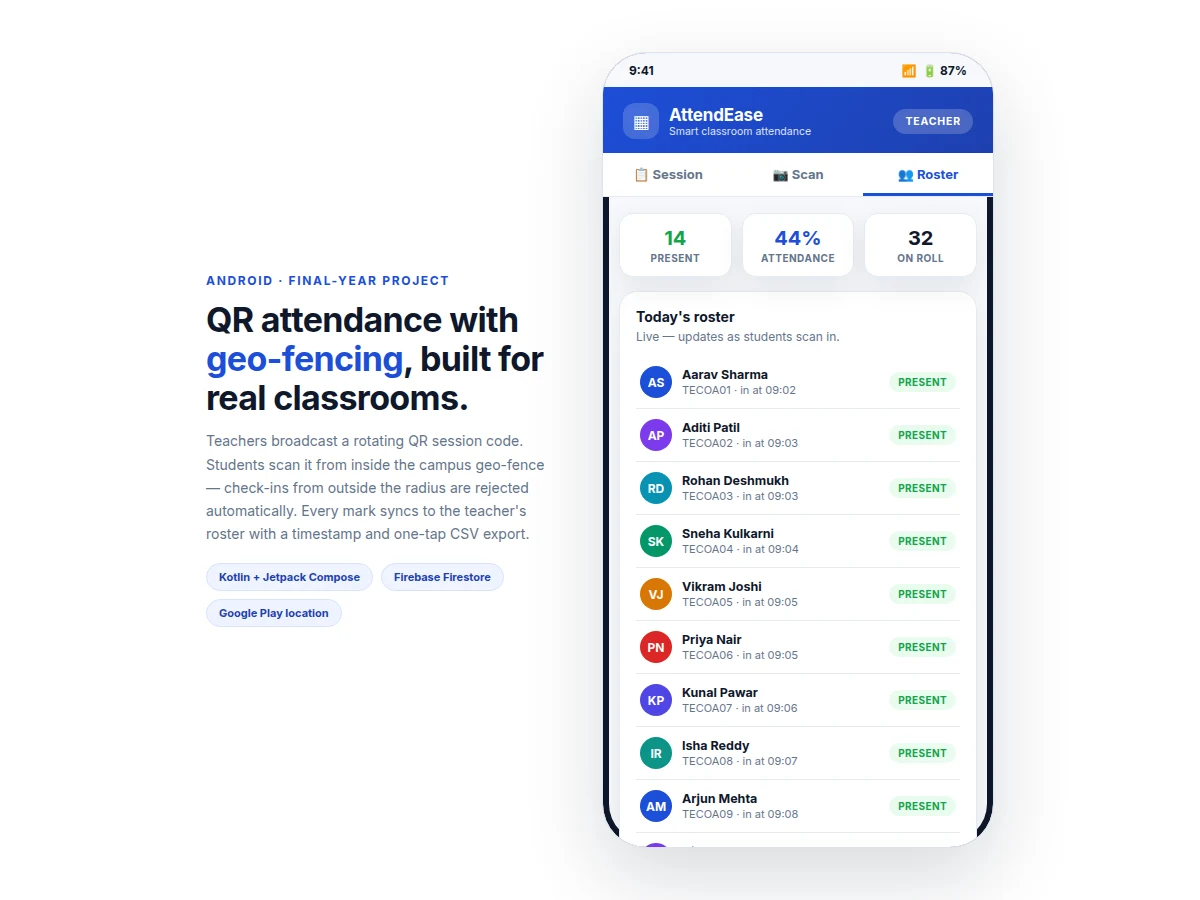
Starts the session, sets the geo-fence radius and shows the rotating QR.
Follow the working sequence
How it works
- The teacher signs in, selects a class, sets the geo-fence radius, and starts a session; the app creates a session document in Firestore with a start timestamp.
- The session screen displays a QR code encoding a signed session token that the server rotates every 60 seconds; the countdown is visible to the teacher.
- The student opens the app, grants location permission, and scans the QR with the in-app camera (zxing-based scanning).
- The app requests a fresh GPS fix via Google Play Services fused location and sends the token plus coordinates to the validation logic.
- The token's age is checked first — anything older than the rotation window is rejected as stale; then the coordinates are checked against the fence radius.
- A valid scan writes an attendance record (student ID, session ID, server timestamp, in-fence flag) to Firestore; invalid attempts are logged as rejected with the reason.
- The teacher's roster updates in real time via Firestore listeners, and the teacher ends the session when the window closes; the CSV export reads from the same records.
Tech stack:
- Kotlin, Jetpack Compose (Material 3)
- Firebase Authentication (email sign-in, teacher/student roles)
- Cloud Firestore (sessions, rosters, security rules)
- Google Play Services — fused location provider
- zxing (QR generation + camera scanning)
- Android runtime permissions (camera, fine location)
| Parameter | Value |
|---|---|
| Platform | Android 8.0 (API 26) and above (design target) |
| QR rotation interval | 60 seconds, configurable (design target) |
| Geo-fence radius | 50–300 m, teacher-configurable; 100 m default (design target) |
| Location source | Fused location provider, high-accuracy mode (expected) |
| Check-in write | One Firestore document per accepted scan (expected) |
| Roster sync | Real-time via Firestore listeners (expected) |
| Export format | CSV: roll no, name, status, check-in time (expected) |
| Offline behaviour | Local queue, sync on reconnect (design target) |
Project features
- [Rotating QR session codes] The teacher's session screen generates a QR code that expires and regenerates every 60 seconds. A photographed or forwarded code stops working within a minute, which is the primary anti-proxy mechanism.
- [GPS geo-fence validation] Each scan request carries the student's location fix; the app accepts the mark only when the fix falls inside the configured fence radius (default 100 m, adjustable 50–300 m). Out-of-fence attempts are rejected and logged.
- [Teacher dashboard] Live roster with present/absent status, check-in timestamps, per-session attendance percentage, and a session-history list across the term.
- [One-tap CSV export] The teacher exports any session's roster (roll number, name, status, check-in time) as a CSV file for college records or MIS upload.
- [Role-based access] Firebase Auth separates teacher and student accounts; Firestore security rules let students write only their own attendance record and let only the teacher's account start or end sessions.
- [Duplicate-scan protection] A student already marked present for a session cannot mark again — repeat scans return an "already marked" response instead of creating duplicate records.
- [Offline-tolerant sync] Scans are queued locally when the network drops and synced to Firestore when connectivity returns, so a weak classroom signal doesn't lose marks.
What is included
- Complete Android source code (Kotlin + Jetpack Compose), teacher and student flows
- Firebase project configuration guide: Auth setup, Firestore schema, security rules
- QR session engine (generation, 60-second rotation, stale-token rejection)
- Geo-fence validation module (fused location, radius configuration, rejection logging)
- Teacher dashboard with live roster, session history and CSV export
- Project report PDF (background, system design, Firebase schema, methodology)
- PPT presentation for final review
- Viva Q&A preparation document (QR security, GPS accuracy, Firestore rules, permissions)
Limitations & prerequisites
- GPS accuracy indoors is typically 10–30 m depending on the building and device — the fence radius must be sized with this margin, and the report explains the trade-off honestly.
- A determined student can still share a live screen-share of the rotating QR; the 60-second rotation raises the bar but does not make proxy attendance impossible.
- The app needs internet for the first sign-in and for syncing; scans queue offline but the roster only updates when connectivity returns.
- Location permission must be granted by every student device — devices with location disabled cannot be marked.
- Battery impact of high-accuracy GPS during the scan window is real; the app requests a single fix per scan rather than continuous tracking, which the report documents.
- The build is an academic prototype, not a certified identity-verification system — it validates presence inside a fence, not the student's identity beyond their signed-in account.
Frequently Asked Questions
How does the rotating QR stop proxy attendance?
Each QR encodes a session token that expires after 60 seconds and is then replaced. A screenshot forwarded to a friend goes stale within a minute, and even a live screen-share still requires the friend's phone to be inside the GPS geo-fence to be accepted.
What happens if a student is outside the geo-fence?
The scan is rejected with an explicit "outside geo-fence" message, and the rejection (with distance from the fence center) is logged so the teacher can see attempted out-of-area check-ins.
Does it work without internet?
Partially. Scans are queued on the device when offline and synced when the connection returns. Sign-in, session start and live roster updates need connectivity.
Can the teacher change the fence radius?
Yes — 50 to 300 m from the session setup screen, with 100 m as the default. The report recommends sizing the radius to the campus building plus a margin for indoor GPS error.
Which phones does it run on?
Android 8.0 (API 26) and above, which covers the large majority of student devices in use. The build is tested against the emulator and physical-device procedure documented in the report.
Is this project suitable for a final-year project?
Yes — for Computer Engineering, IT and mobile-application programs. It demonstrates Android development, Firebase backend design, location services, QR security thinking and real-time data sync. Suitable for B.E./B.Tech final-year projects in Computer Engineering, IT and Mobile Application Development.
Components & software requirements
- Kotlin, Jetpack Compose (Material 3)
- Firebase Authentication (email sign-in, teacher/student roles)
- Cloud Firestore (sessions, rosters, security rules)
- Google Play Services — fused location provider
- zxing (QR generation + camera scanning)
- Android runtime permissions (camera, fine location)
Delivery information
Built-to-order project. Delivery timeline is shared after order confirmation based on current queue.
Support terms
Complete documentation, setup guide, and viva preparation included. Support for setup and explanation provided.
Download free synopsis (PDF)
Enter your name and email — the synopsis PDF downloads immediately. We may send occasional project updates; no spam, unsubscribe anytime.