
More project photos (2)
The problem
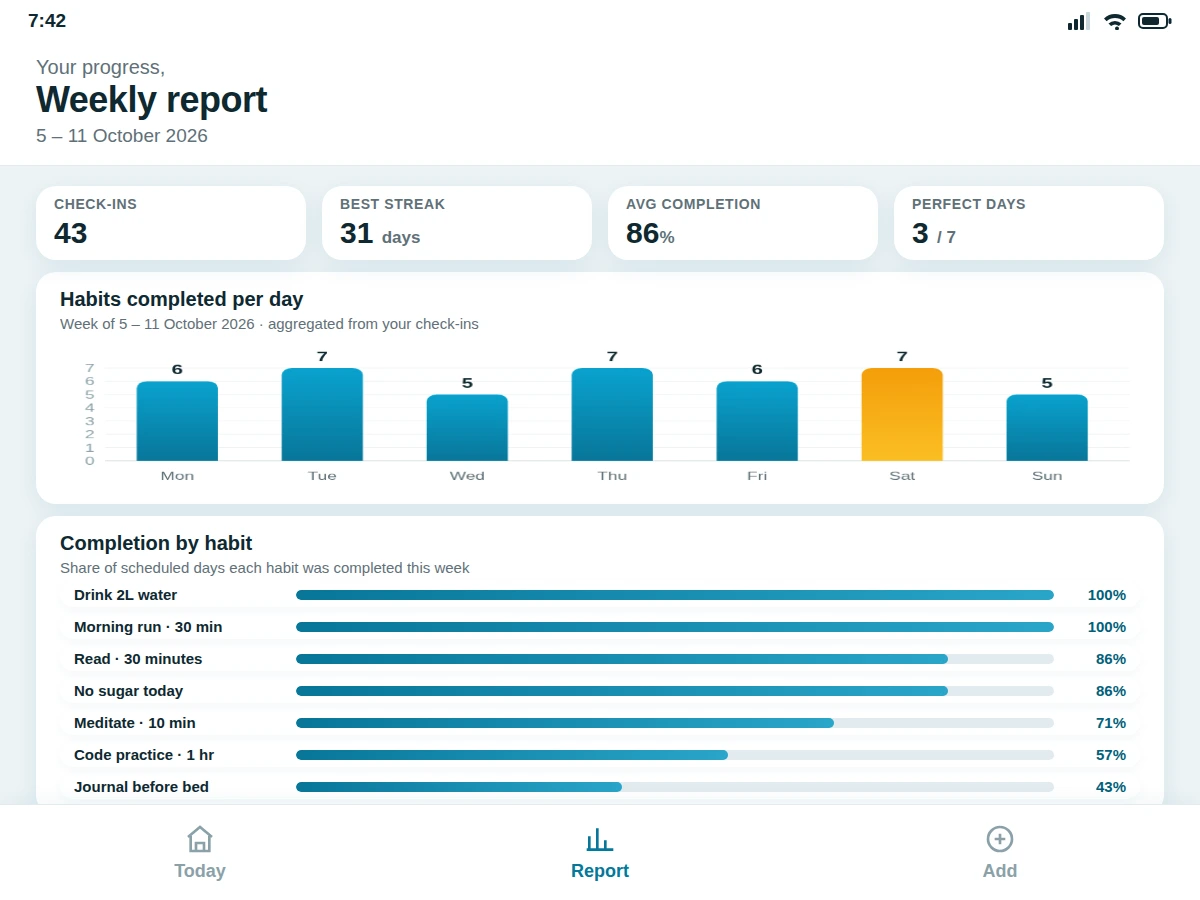
Most habit apps fail at the exact job they advertise: keeping the user consistent. They bury the streak behind menus, send generic reminders that get swiped away, or demand an account before the first check-in. This project takes the opposite approach with an Android habit tracker built around one visible loop — check in, extend the streak, watch the flame count grow. The Today screen lists every scheduled habit with its reminder time and a one-tap check control, while a progress ring shows how much of the day is already complete. Each habit carries its own streak badge computed from consecutive completed days, and each reminder is scheduled per habit at a user-chosen time through AlarmManager, with a WorkManager fallback that re-registers alarms after a reboot. At the end of the week, the Report screen aggregates check-ins into per-day bars and per-habit completion percentages, all computed on-device from a Room database. The base build is fully offline-first: no account, no server, and no network needed for the core loop.
Checks in habits daily and reads weekly reports.
Follow the working sequence
How it works
- Habits are stored as Room entities: name, icon, colour, repeat pattern, reminder time and a reminder-enabled flag; check-ins are stored as dated rows linked to each habit.
- On the Today screen the app queries which habits are scheduled for the current day and renders each with its streak badge and reminder time.
- Tapping the check control inserts a check-in row for today; the day-progress ring and the streak badge re-render from the same query result.
- The streak engine counts consecutive scheduled days with check-ins, walking backwards from today — or from yesterday if today's check-in is still pending, so an unfinished day never breaks the streak early.
- Reminders are scheduled with AlarmManager setExactAndAllowWhileIdle per habit; a WorkManager task re-registers every alarm on BOOT_COMPLETED so they survive reboots.
- The weekly report runs two aggregation queries — check-ins grouped by day, and completion ratio per habit — and draws the bar chart and progress bars from those results.
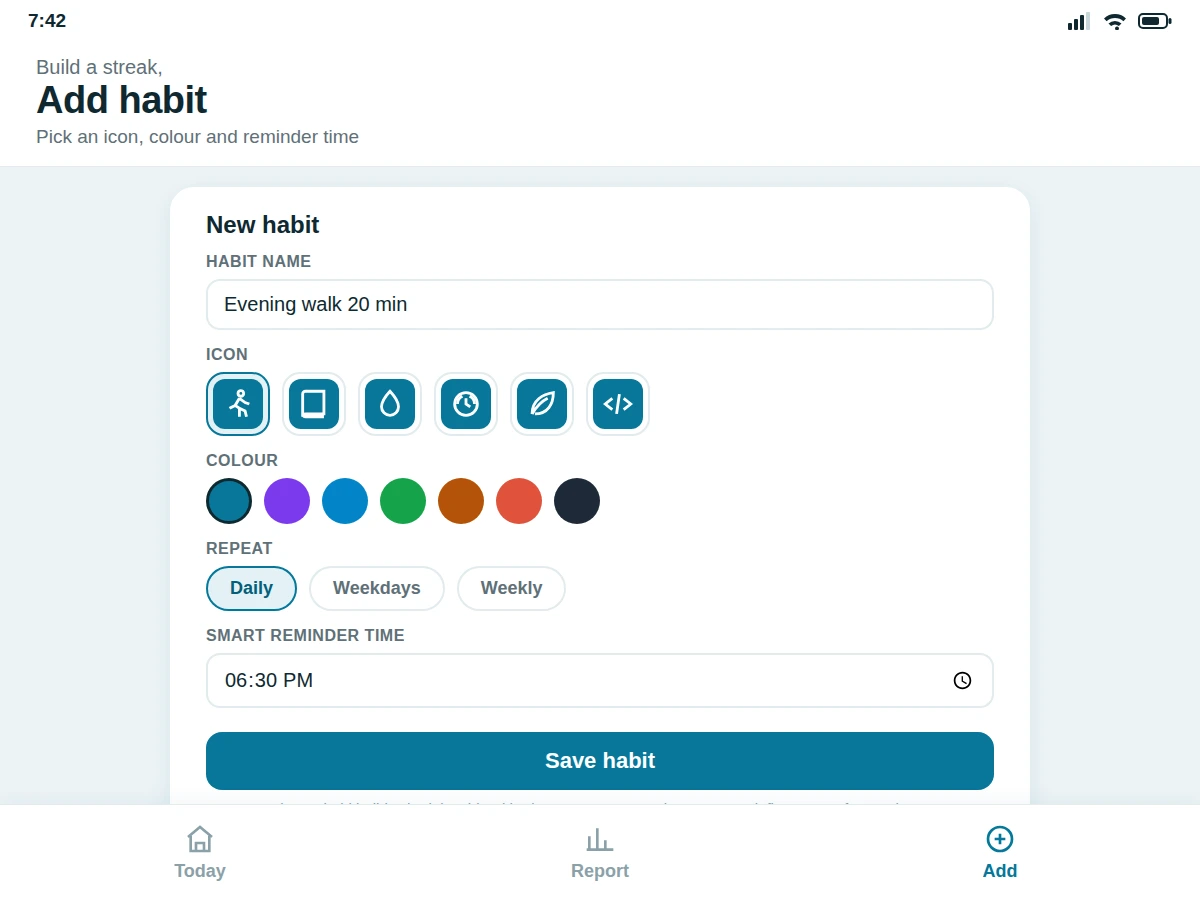
- The habit builder form writes a new habit entity and immediately schedules its reminder, so the habit appears on the Today screen the same day.
Tech stack:
- Kotlin with Jetpack Compose UI (Material 3 components)
- Room (SQLite) for habits, check-ins and streak history — offline-first
- WorkManager + AlarmManager for scheduled reminders and reboot re-registration
- MVVM architecture: ViewModel + StateFlow feeding the Compose screens
- Navigation Compose for the Today / Report / Add screens
- NotificationCompat channels for reminder notifications
- Single-module Gradle build; minimum SDK 26 (Android 8.0) as a design target
| Parameter | Value |
|---|---|
| Platform | Android 8.0 (API 26) and above (design target for the minimum SDK) |
| Language | Kotlin for 100% of app code (expected) |
| UI framework | Jetpack Compose with Material 3 components (expected) |
| Database | Room (SQLite), on-device only, no server in the base build (expected) |
| Reminders | AlarmManager exact alarms + WorkManager reboot re-registration (expected) |
| Repeat patterns | Daily, weekdays and weekly schedules (expected) |
| Report window | Rolling 7-day aggregation: per-day bars + per-habit completion percentages (expected) |
| Streak rule | Consecutive scheduled days with check-ins; 1 grace day per week, configurable (design target) |
| Accounts / backend | None — fully offline in the base build (expected); cloud sync is future scope |
| Delivery | Single-module Gradle project source + installable demo APK (expected) |
Project features
- [Streak engine with flame badges] Every habit carries a day-count streak with a flame badge. The counter advances only across consecutive scheduled days that have a check-in, and resets on a missed day — the loss-aversion loop the whole app is built around.
- [Smart per-habit reminders] Each habit gets its own reminder time, fired through AlarmManager exact alarms with a WorkManager task that re-registers them after every reboot, so nudges arrive even when the app has not been opened for days.
- [One-tap daily check-in] The Today screen lists every habit scheduled for the day; one tap logs the check-in, animates the day-progress ring and refreshes the streak badge instantly.
- [Weekly reports] The Report screen aggregates the week's check-ins into a per-day bar chart plus per-habit completion percentages, computed on-device from the Room database.
- [Custom habit builder] Users name a habit, pick an icon, colour and repeat pattern (daily, weekdays or weekly), and set a reminder time — new habits join the Today list immediately.
- [Offline-first local storage] Habits, check-ins and streak history live in a Room database on the device. The core loop works with no account, no server and no network.
- [Configurable streak rules] The grace-day allowance and week-start day are adjustable in settings. Cloud backup and multi-device sync are future scope, not part of the base build.
What is included
- Complete Android app source code (Kotlin + Jetpack Compose, single-module Gradle project)
- Room database schema with seed data: 7 sample habits and a week of check-ins for the demo
- Installable demo APK for direct testing on a physical device
- Project report PDF (background, architecture, streak-engine and reminder-scheduling design)
- PPT presentation for final review
- Viva Q&A preparation document (Room schema, AlarmManager vs WorkManager, MVVM, streak logic)
- Setup and build guide (Android Studio import, SDK requirements, APK install)
Limitations & prerequisites
- Exact alarms require the SCHEDULE_EXACT_ALARM permission, granted once in system settings on Android 12 and above; some OEM battery-saver skins can still delay or batch alarms.
- Streaks live only on the device — uninstalling the app wipes habit history, because the base build has no cloud backup (listed as future scope).
- Reminders fire at fixed user-set times; the app does not yet learn the best nudge time from behaviour — adaptive scheduling is future scope.
- The report covers the rolling last 7 days; monthly or custom date-range reports are not in the base build.
- Seed data in the demo is fictional and for UI demonstration; the buyer runs the app fresh and builds real history during evaluation.
- Play Store listing, signing keys and store submission are not part of the build — delivery is source code plus an installable APK.
Frequently Asked Questions
Does the app need internet or a user account?
No. The base build is fully offline-first: habits, check-ins and streak history live in a Room database on the device, and reminders are scheduled with on-device alarms. Nothing is uploaded anywhere, so there is nothing to log into. Cloud backup and multi-device sync are deliberately future scope — the offline design also makes the app easy to demo on any device without setup.
How does the streak engine handle a missed day?
The engine walks backwards from today through scheduled days and counts consecutive days that carry a check-in. If today's check-in is still pending it starts from yesterday, so an unfinished day never breaks the streak early. One fully missed scheduled day resets the counter, though a configurable grace rule (one skipped day per week, off by default) can soften that.
Will reminders still fire if I don't open the app for days?
Yes. Each habit's reminder is registered as an exact AlarmManager alarm, and a WorkManager task re-registers all alarms whenever the device reboots, so reminders survive idle days and restarts alike. On Android 12+ the app needs the SCHEDULE_EXACT_ALARM permission, granted once in system settings; aggressive OEM battery savers can still delay alarms.
Can the streak rules and habits be customised?
Yes. The habit builder supports daily, weekday and weekly repeat patterns with custom icons, colours and reminder times, and the grace-day count and week-start day are settings. Realistic extensions on request include monthly reports, habit categories, home-screen widgets, adaptive reminder timing and cloud sync — quoted separately, since sync changes the architecture.
Is this project suitable for a final-year project?
Yes — for Computer Science and IT programs. It demonstrates Kotlin with Jetpack Compose, Room database design, Android background scheduling with AlarmManager and WorkManager, MVVM architecture, notification channels and on-device data aggregation — a complete, genuinely usable app with clear extension paths for the viva.
Components & software requirements
- Kotlin with Jetpack Compose UI (Material 3 components)
- Room (SQLite) for habits, check-ins and streak history — offline-first
- WorkManager + AlarmManager for scheduled reminders and reboot re-registration
- MVVM architecture: ViewModel + StateFlow feeding the Compose screens
- Navigation Compose for the Today / Report / Add screens
- NotificationCompat channels for reminder notifications
- Single-module Gradle build; minimum SDK 26 (Android 8.0) as a design target
Delivery information
Built-to-order project. Delivery timeline is shared after order confirmation based on current queue.
Support terms
Complete documentation, setup guide, and viva preparation included. Support for setup and explanation provided.
Download free synopsis (PDF)
Enter your name and email — the synopsis PDF downloads immediately. We may send occasional project updates; no spam, unsubscribe anytime.