
More project photos (3)
The problem
Thousands of small kirana and general stores across India sell daily essentials on credit — "udhaar" — and track it in a paper notebook. That notebook gets lost, torn or disputed: the shopkeeper forgets who paid what, customers argue about the balance, and small dues quietly turn into defaults because nobody follows up systematically. The problem is not a lack of accounting software — it is that full accounting apps are too heavy for a small shopkeeper who needs exactly one thing: who owes how much, since when, and a nudge to collect. This project builds an Android app purpose-fit for that workflow: a per-customer credit ledger with item-level notes, running balances, an overdue aging list, and one-tap SMS reminder templates so the shopkeeper can follow up politely and consistently. It is offline-first — the app must work with no internet — using on-device storage, with scheduled local reminders and optional backup.
The shop owner who logs credit sales, collects payments, and sends reminders.
Follow the working sequence
How it works
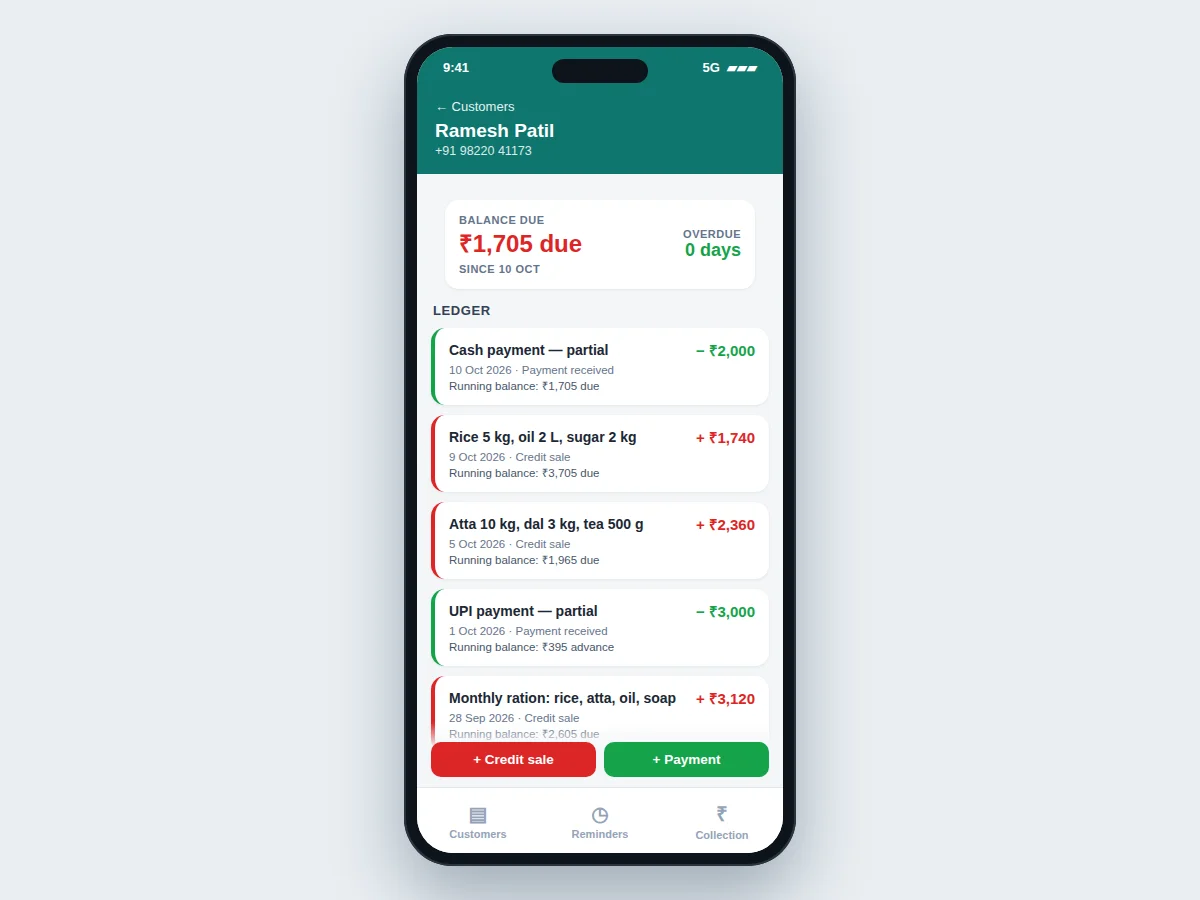
- The shopkeeper adds a customer once (name, phone number) and starts recording credit sales with item notes and amounts.
- Every entry updates the customer's running balance instantly — credits increase it, payments reduce it.
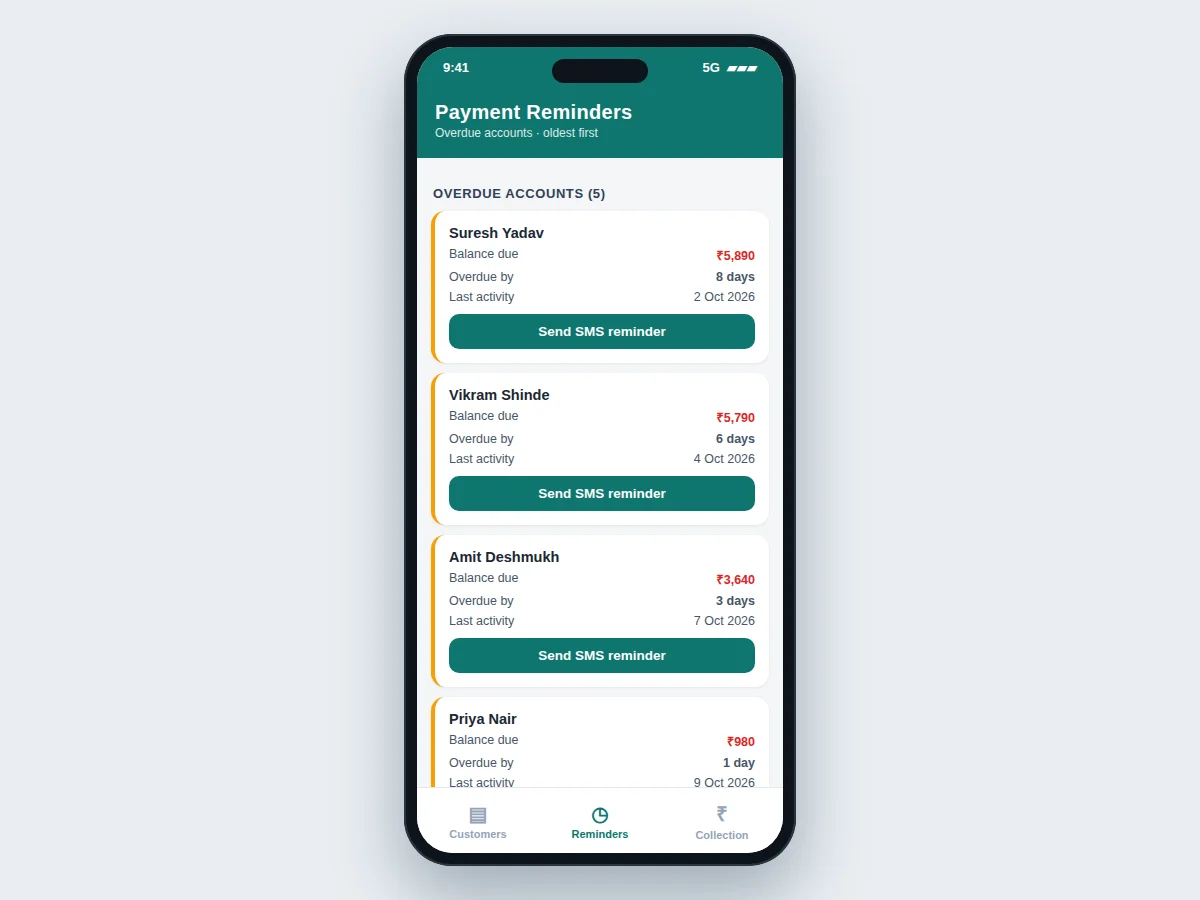
- The overdue aging logic measures days since each account's last activity and ranks debtors oldest-first on the Reminders screen.
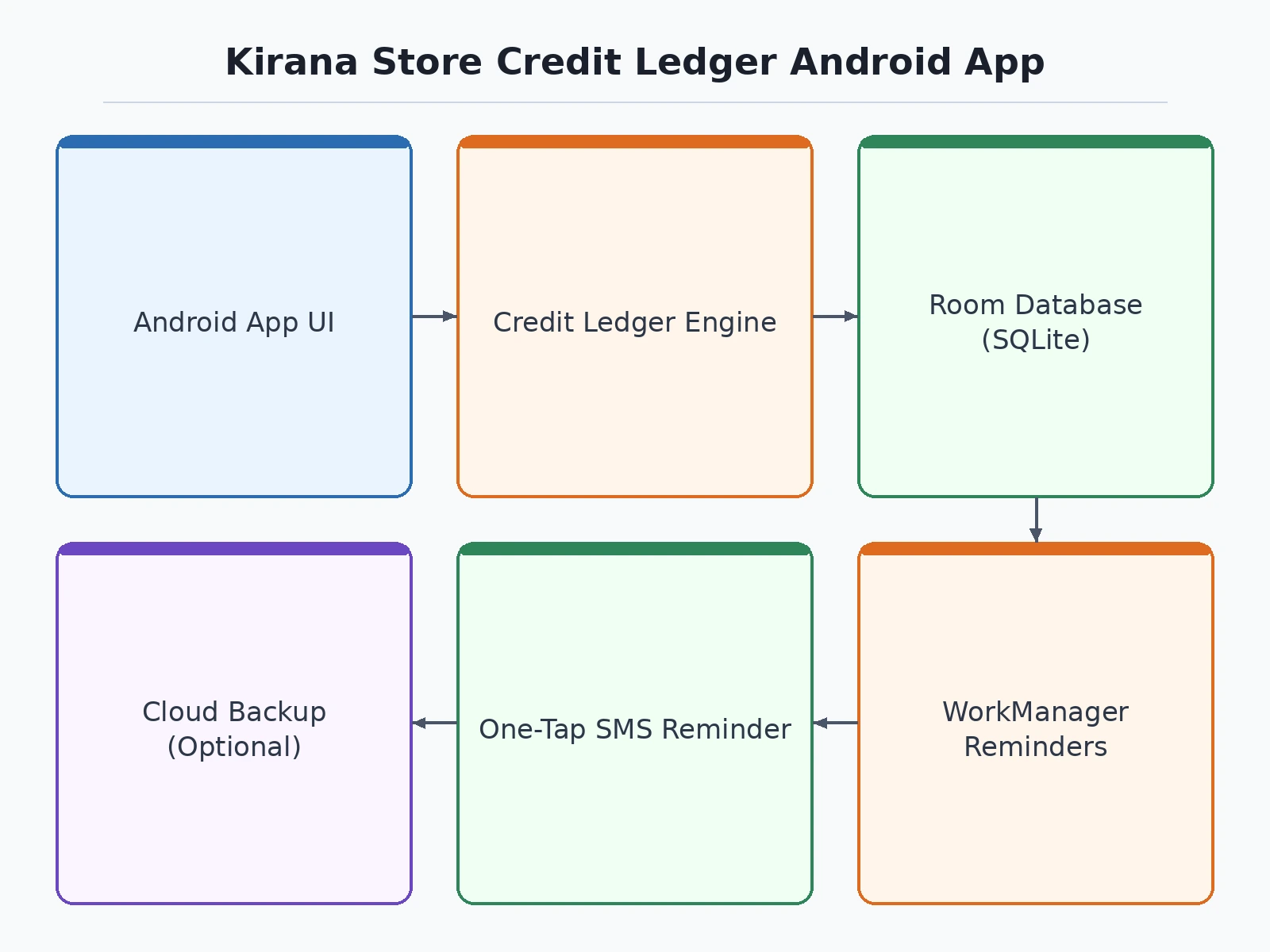
- Each morning, a scheduled WorkManager task posts a local notification summarizing accounts needing follow-up.
- The shopkeeper taps "Send SMS reminder" on an overdue account; the phone's SMS app opens with a polite pre-filled message, and the shopkeeper presses send.
- Payments are recorded against the ledger in one step; the daily collection screen tallies today's cash and the 7-day average.
- All records persist in the on-device Room database; an optional backup export can be enabled for safekeeping.
Tech stack:
- Android (Kotlin/Java)
- Room (SQLite) local database
- WorkManager (scheduled reminders)
- Material Design components
- Android SMS intent (pre-filled reminders)
- SharedPreferences (settings)
- Gradle build system
| Parameter | Value |
|---|---|
| Platform | Android 8.0 (API 26) and above (design target) |
| Database | Room over SQLite, on-device, offline-first |
| Reminder scheduling | WorkManager daily job (local notification) |
| SMS handling | Pre-filled SMS intent via the phone's SMS app (implemented); direct auto-send is optional/future scope |
| Data capacity | Handles 500+ customer accounts comfortably (design target) |
| App size | Approximately 15–25 MB installed (expected) |
| Internet requirement | None for core features (offline-first); only backup/sync needs connectivity |
| Backup | Optional local export/backup (configurable) |
Project features
- [Per-customer credit ledger] Every customer gets a running ledger: each credit sale and payment is recorded with item notes (e.g. "Rice 5 kg, oil 2 L"), date, and an automatically updated running balance.
- [Overdue aging report] The app ages every outstanding balance from the last activity date and lists overdue accounts oldest-first, so the shopkeeper sees exactly who needs a nudge.
- [One-tap SMS reminder templates] Tapping "Send SMS reminder" opens the phone's SMS app with a pre-written polite reminder (name, amount, days pending) — the shopkeeper reviews and sends it.
- [Daily collection summary] Today's collected payments, today's count, and the 7-day average collection are shown on a dedicated screen for daily cash-flow visibility.
- [Scheduled local reminders] A WorkManager-based daily schedule surfaces the overdue list every morning as a local notification, working fully offline.
- [Offline-first local database] All data lives in an on-device Room/SQLite database — the shop keeps running with no internet; optional cloud backup can be added on request.
- [Customer search] Instant name search across the customer list for shops with hundreds of credit accounts.
What is included
- Complete Android app source code (Kotlin/Java) with build instructions
- Room database schema and data-access code
- Working demo build (APK) with realistic sample data
- Single-file interactive demo for presentation
- Project report PDF (background, architecture, methodology, results)
- PPT presentation for final review
- Viva Q&A preparation document (Android components, Room, WorkManager, offline-first design)
Limitations & prerequisites
- The app does not auto-send SMS on its own — reminders open the phone's SMS app for the shopkeeper to send; true automatic SMS is an optional extension.
- There is no user authentication or multi-device sync in the base build; data lives on one device unless backup is enabled.
- No UPI or payment-gateway integration — payments are recorded as cash/UPI entries, not collected through the app.
- Overdue aging uses the last-activity date as the reference; per-item credit terms are not tracked.
- The demo APK ships with sample data; the shopkeeper's real data is entered on first use.
Frequently Asked Questions
How is this different from a normal accounting app?
Full accounting apps track GST, inventory and taxes — overkill for a kirana store. This app does exactly one job well: per-customer credit ledgers with item notes, overdue aging, and polite payment reminders, designed to be usable by a shopkeeper in minutes.
Does it really send SMS reminders automatically?
No — and that is deliberate. The app opens the phone's SMS app with a pre-written reminder (name, amount, days overdue) so the shopkeeper reviews and sends it personally. Fully automatic SMS sending is an optional extension that can be developed.
Does it work without internet?
Yes — that is a core design requirement. Every feature runs against an on-device Room/SQLite database: the ledger, the aging report, the collection summary and the daily reminder are all scheduled locally with WorkManager. An internet connection is only needed if the shopkeeper enables the optional backup feature; nothing in the daily workflow depends on connectivity.
Can the reminder message be changed?
Yes. The SMS template is configurable from the app's settings screen, so the shopkeeper can adjust the wording, greeting, and tone to suit their customers. The template auto-fills the customer's name, the pending amount and the number of days overdue, so each reminder reads personal rather than generic even though it starts from one template.
What does the student actually build and learn?
The complete Android app, end to end: Room database design with entities and migrations, RecyclerView-based ledger and customer screens, WorkManager scheduling for daily reminders, SMS intents, and offline-first data architecture. Alongside the code, the deliverables include a project report with problem analysis, a PPT and viva Q&A — the standard full final-year package.
Is this project suitable for a final-year project?
Yes — for Computer Science, IT and Electronics programs. It demonstrates mobile app architecture, local database design, background task scheduling and honest scope separation (implemented features vs optional extensions). The problem is real and easy to defend in the viva, and the app is fully demonstrable live.
Components & software requirements
- Android (Kotlin/Java)
- Room (SQLite) local database
- WorkManager (scheduled reminders)
- Material Design components
- Android SMS intent (pre-filled reminders)
- SharedPreferences (settings)
- Gradle build system
Delivery information
Built-to-order project. Delivery timeline is shared after order confirmation based on current queue.
Support terms
Complete documentation, setup guide, and viva preparation included. Support for setup and explanation provided.
Download free synopsis (PDF)
Enter your name and email — the synopsis PDF downloads immediately. We may send occasional project updates; no spam, unsubscribe anytime.