
More project photos (3)
The problem
Parents in India are expected to follow the National Immunisation Schedule — roughly two dozen dose events from birth to age 16 — but the record usually lives on a paper card that gets lost, and booster windows slip by quietly. Missed or late doses are most often a tracking failure, not a medical one: nobody computed the next due date, and nobody reminded the family. Existing reminder apps either hard-code foreign schedules or need constant internet and accounts. This project builds an Android app centred on the verified Government of India UIP schedule (MoHFW): the parent registers each child once, and the app derives every due date from the date of birth, raises local reminders as doses approach or go overdue, records each administered dose with batch number and centre, and keeps the child's own weight/height measurements on a simple growth chart. It is a tracking aid, explicitly not medical advice — dose decisions stay with the paediatrician, and the schedule screen names its official source with a "verify with your doctor" note.
Creates child profiles, logs administered doses, records measurements and visit notes, and receives due-date reminders.
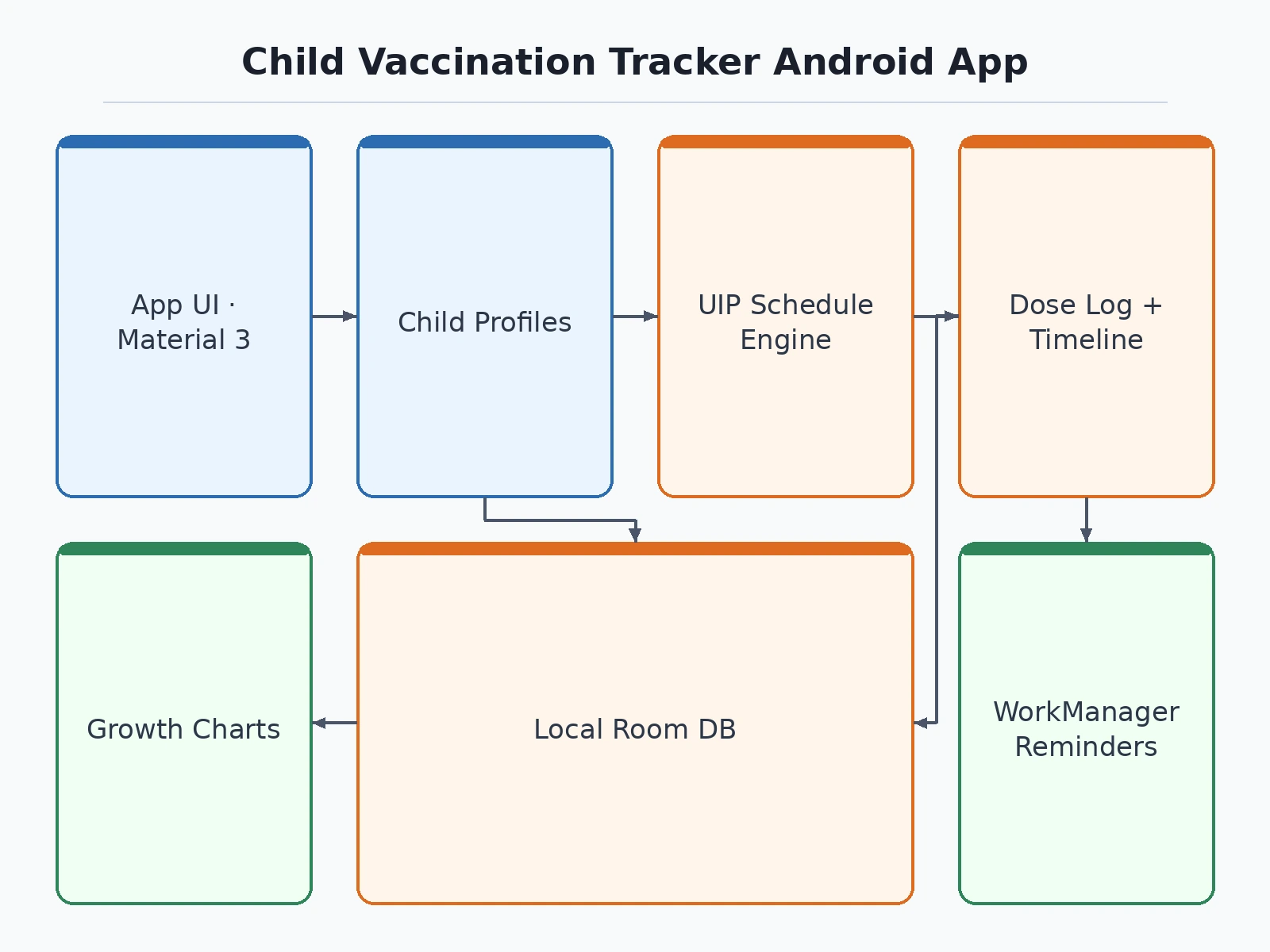
Follow the working sequence
How it works
- The parent creates a child profile (name, date of birth, optional photo); the app stores it in the local Room database.
- The schedule engine adds each UIP age-band offset (birth, 6/10/14 weeks, 9–12 months, 16–24 months, 5–6 years, 10 and 16 years) to the birth date to produce every due date.
- A background scheduler checks due dates daily and posts local notifications for doses due within the configured lead time, plus overdue alerts.
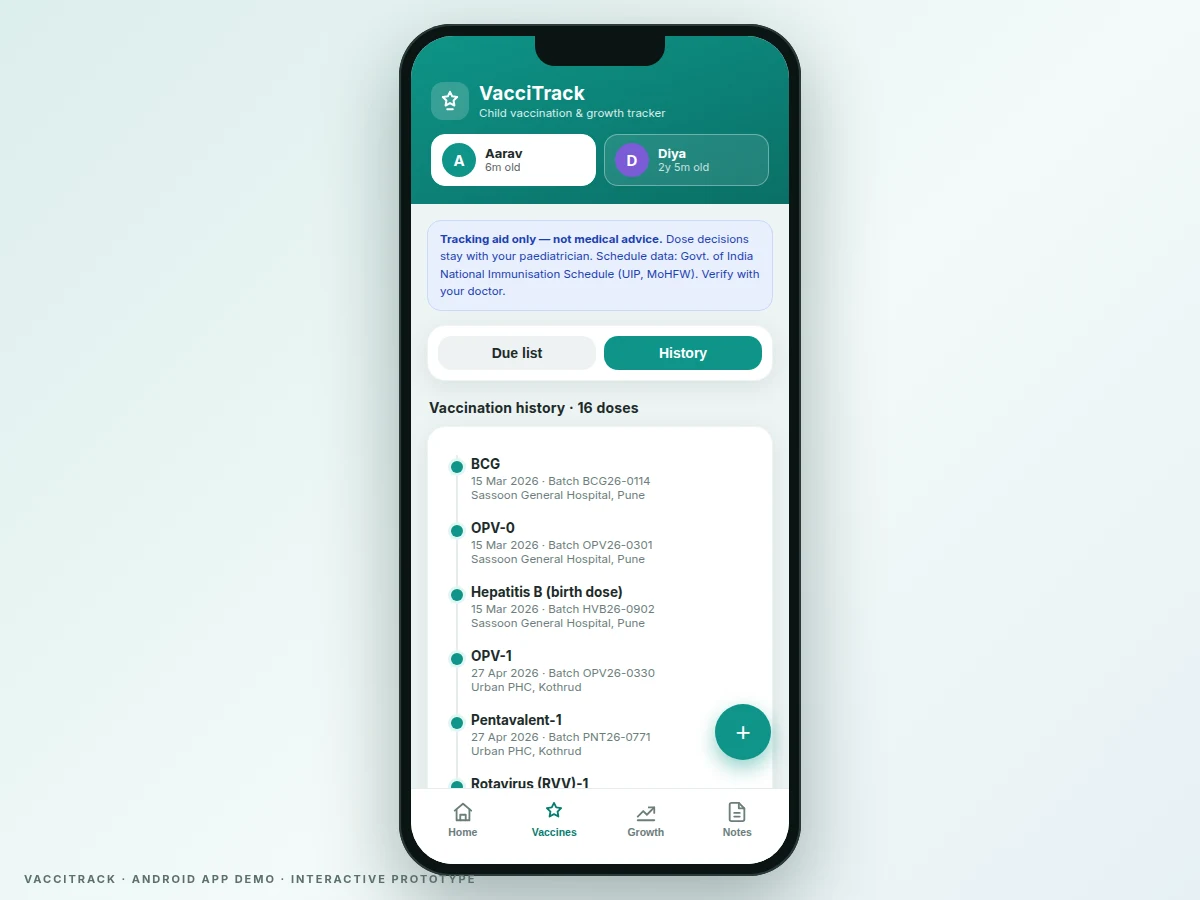
- After a clinic visit, the parent opens the dose row and logs date, batch number and centre; the dose moves from "due" to the history timeline.
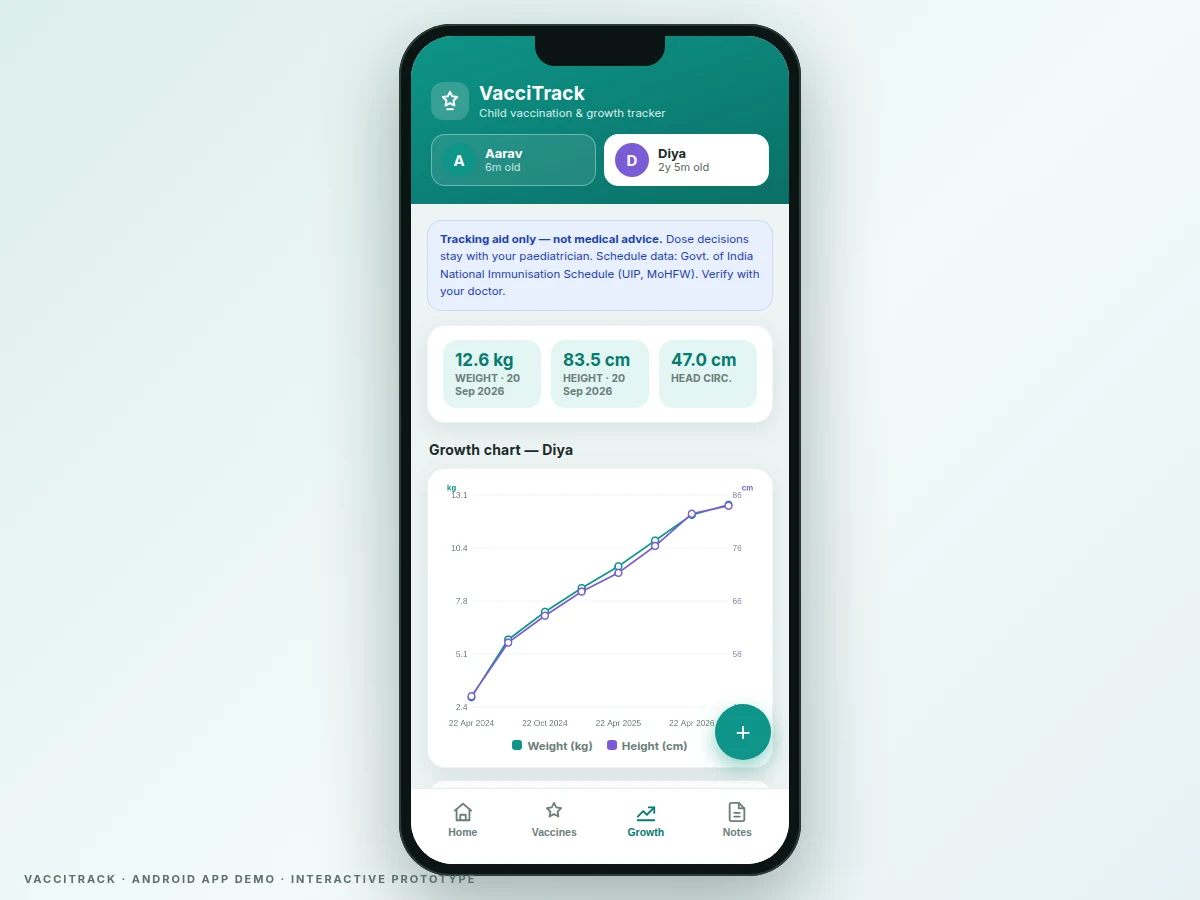
- Weight/height entries are appended from the Growth tab and re-plotted on the dual-axis chart instantly.
- Visit notes are saved per date and listed under the Notes tab, editable and deletable locally.
Tech stack:
- Kotlin, Android SDK (Material 3 UI)
- Room (SQLite) local database
- WorkManager + NotificationManager (local reminders)
- MPAndroidChart / Canvas custom charting
- CameraX (profile photo capture)
- AndroidX Navigation + ViewModel
- Gradle build
- Git version control
| Parameter | Value |
|---|---|
| Platform | Android 8.0 (API 26) minimum, target API 34 (design target) |
| Language | Kotlin (expected) |
| Local database | Room over SQLite, on-device only |
| Schedule coverage | 24 dose events across 9 age bands, per MoHFW UIP schedule |
| Reminder mechanism | Local notifications via WorkManager; no server push (implemented) |
| Offline capability | 100% of features work without internet (design target) |
| Chart data | Plots only user-recorded measurements; no percentile curves (implemented) |
| Expected APK size | Approximately 12–18 MB (expected) |
| Data export | Not included in base build (listed as customization) |
Project features
- [Multiple child profiles] Register each child with name, date of birth and photo; a one-tap switcher moves between children, and every schedule, reminder and chart is computed per child from their own birth date.
- [UIP schedule engine] Due dates are auto-derived from the verified MoHFW National Immunisation Schedule — BCG/OPV-0/Hep-B at birth, OPV/pentavalent/RVV/fIPV/PCV at 6-10-14 weeks, MR and boosters at 9–12 and 16–24 months, DPT booster-2 at 5–6 years, Td at 10 and 16 years — with JE marked optional for endemic districts only.
- [Local due-date reminders] The app raises on-device notifications for doses due soon and flags overdue doses with a warning banner; all scheduling is local, so reminders work with no internet connection.
- [Dose logging with batch & centre] Each administered dose is recorded with date given, vaccine batch number and vaccination centre, creating an auditable record that survives longer than a paper card.
- [Vaccination history timeline] Every logged dose appears on a chronological timeline showing vaccine, date, batch and centre — the digital equivalent of the immunisation card, always on the phone.
- [Growth charts from your own measurements] The app plots the child's own recorded weight, height and head-circumference entries over time on a dual-axis chart — a personal growth record, with no percentile or diagnostic interpretation claimed.
- [Paediatrician visit notes] Dated, parent-written notes per clinic visit keep advice and follow-ups in one place next to the schedule they relate to.
- [Offline-first local storage] All profiles, doses, measurements and notes live in a local Room/SQLite database — no account, no server, no connectivity required for any feature.
What is included
- Complete Kotlin Android source code with Gradle build files
- Demo APK installable on a test device
- Local Room database schema and verified UIP schedule constants
- Project report PDF (background, schedule source verification, architecture, methodology)
- PPT presentation for final review
- Viva Q&A preparation document (Android components, Room, WorkManager, schedule logic)
- Setup and demo guide
Limitations & prerequisites
- This is an academic tracking aid, not medical equipment: it gives no diagnosis, no dose advice, and no interpretation of growth data — dose decisions stay with the paediatrician.
- The bundled schedule is a snapshot of the MoHFW National Immunisation Schedule verified during development; parents are told in-app to verify with their doctor, and schedule updates need an app update.
- Reminders are local notifications: if app data is cleared or the OS aggressively kills background work on some devices, reminders can be delayed or lost.
- Growth charts plot only the measurements the parent enters; the app claims no WHO percentile comparison or medical interpretation.
- No cloud backup, family sharing or PDF export in the base build — these are listed as customizations, not included features.
- JE doses are marked optional and shown only as an endemic-district option, matching the official schedule's footnote.
Frequently Asked Questions
Where does the vaccination schedule come from?
The Government of India's National Immunisation Schedule under the Universal Immunisation Programme (Ministry of Health & Family Welfare). The dates were verified against the official MoHFW schedule page before development, the app names this source on-screen, and every schedule screen carries a "verify with your doctor" note.
Does the app give medical advice or diagnose anything?
No. It is strictly a tracking aid: it computes due dates, reminds, records doses and plots measurements the parent enters. It never recommends a dose, never interprets growth data, and the disclaimer states that all dose decisions stay with the paediatrician.
Does it work without internet?
Yes — fully offline-first. All profiles, doses, measurements and notes are stored in a local Room/SQLite database, and reminders are scheduled on-device, so every feature works with no connectivity and no account.
Can I track more than one child?
Yes. The app supports multiple child profiles, each with its own birth date, schedule computation, reminders, history and growth chart, switchable from the home screen.
Can the schedule or reminders be adjusted?
Reminder lead times are configurable, JE doses can be toggled for endemic districts, and the schedule constants are cleanly separated in code so a different national schedule pack can be added as a customization.
Is this project suitable for a final-year project?
Yes — for Computer Science, IT and mobile-application programs. It demonstrates real Android architecture (Room, WorkManager, notifications, charting), a date-arithmetic scheduling engine, and honest handling of a health-adjacent domain with proper disclaimers.
Components & software requirements
- Kotlin, Android SDK (Material 3 UI)
- Room (SQLite) local database
- WorkManager + NotificationManager (local reminders)
- MPAndroidChart / Canvas custom charting
- CameraX (profile photo capture)
- AndroidX Navigation + ViewModel
- Gradle build
- Git version control
Delivery information
Built-to-order project. Delivery timeline is shared after order confirmation based on current queue.
Support terms
Complete documentation, setup guide, and viva preparation included. Support for setup and explanation provided.
Download free synopsis (PDF)
Enter your name and email — the synopsis PDF downloads immediately. We may send occasional project updates; no spam, unsubscribe anytime.