
More project photos (2)
The problem
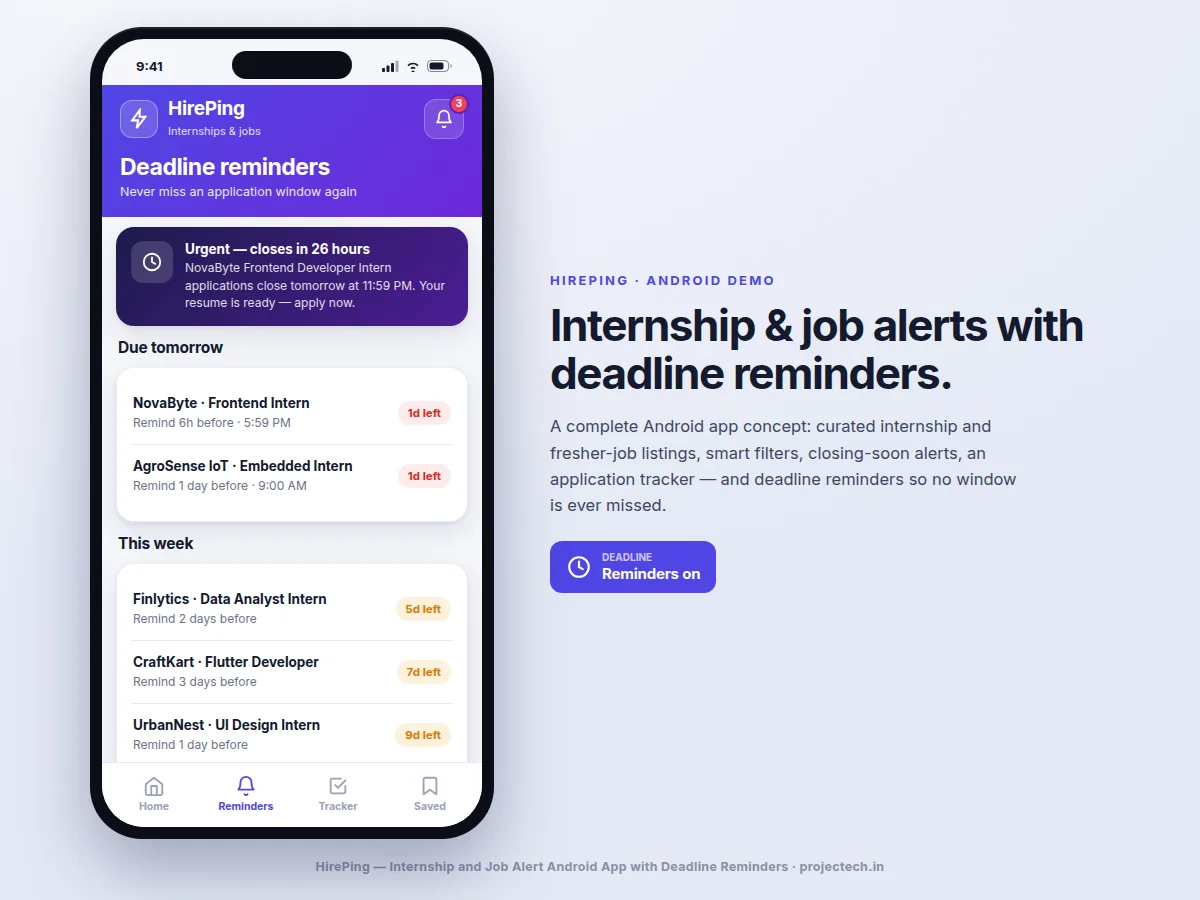
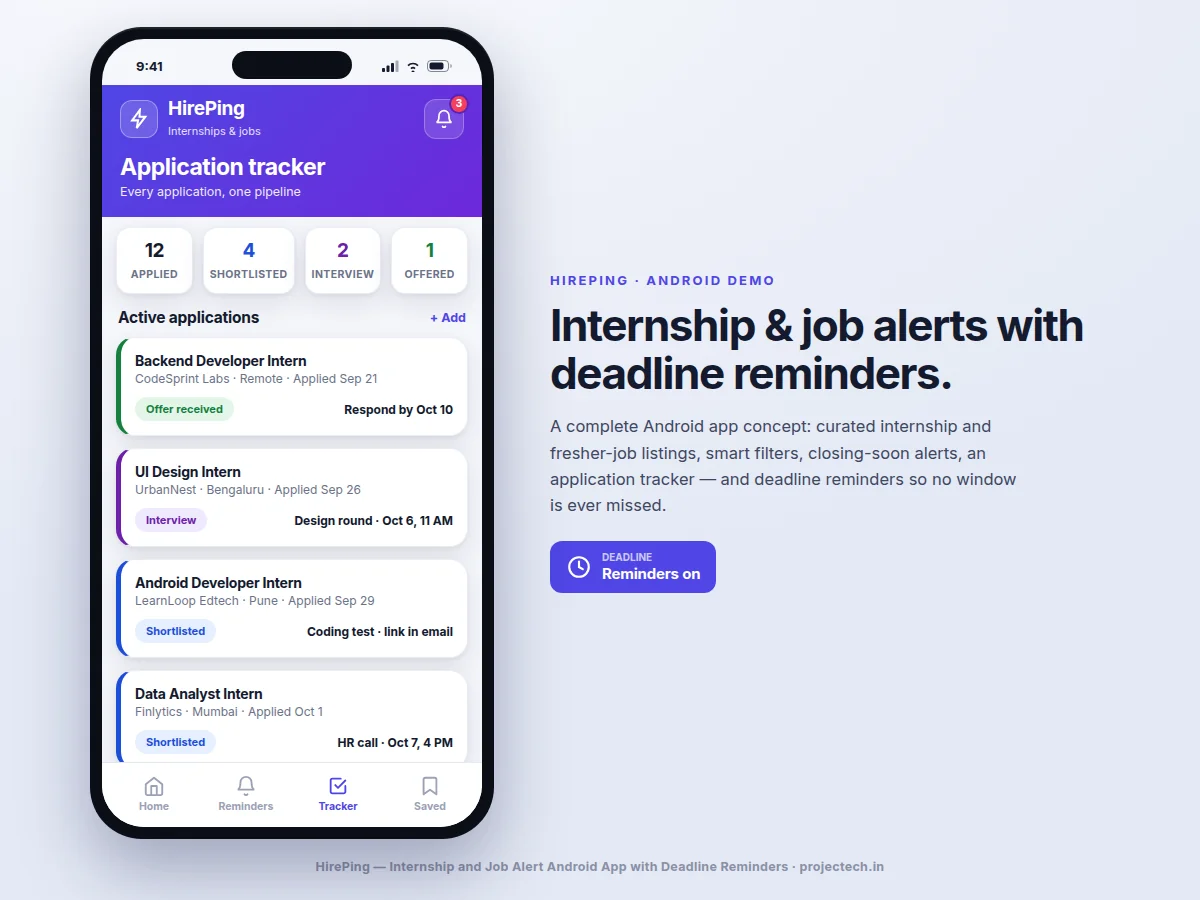
Students discover internships and fresher jobs through scattered sources — job portals, LinkedIn posts, Telegram groups, college notice boards — and each source has its own format, its own deadline, and its own way of burying the closing date. The result is predictable: a perfect-fit role is found three days after applications closed, or a deadline is remembered the night it passes. Existing job apps solve discovery but not the deadline problem; they notify about new postings, not about the windows that are about to shut. This project builds an Android app around the application deadline as the central object. Listings are aggregated into one searchable feed with filters for role, skill, location and work mode; every listing carries a visible countdown to its closing date; and a reminder engine schedules push alerts at configurable points before each deadline (for example 3 days, 1 day, and 6 hours). An application tracker records each submission and its stage — Applied, Shortlisted, Interview, Offered — with next-step notes, so the whole job hunt lives in one place.
Browses listings, applies filters and saves deadlines to track.
Follow the working sequence
How it works
- On launch the app fetches the latest internship and fresher-job listings from the aggregation backend and caches them locally for offline reading.
- The home feed renders each listing as a card with the company, role, stipend or CTC, location, skill tags and a color-coded countdown to the application deadline.
- The user applies filters — role keyword, skill, location, internship or full-time, remote or on-site — and the list re-queries instantly; the "Deadline within 7 days" chip surfaces only urgent openings.
- Tapping "Apply" opens the listing's application link and simultaneously creates a tracker entry in the Applied stage.
- The reminder engine schedules local notifications at the configured lead times (default 3 days, 1 day, 6 hours) before each saved or applied listing's deadline, and sends a daily 8:00 AM digest email.
- The tracker moves applications through stages as the user updates them, attaching next-step notes such as interview slots and coding-test links, and rolls everything up into pipeline statistics.
- The notification center keeps a permanent, timestamped record of every alert the app has issued.
Tech stack:
- Kotlin · Android SDK (minSdk 24)
- MVVM · LiveData · ViewModel
- Retrofit · REST JSON APIs
- Room · local caching
- WorkManager · scheduled reminders
- Firebase Cloud Messaging · push alerts
- Material 3 · design system
- Git · version control
| Parameter | Value |
|---|---|
| Platform | Android 7.0 (API 24) and above (design target) |
| Language | Kotlin, MVVM architecture |
| Listings feed | Paginated REST feed, cached in Room for offline reading |
| Filters | Role, skill, location, type, work mode, deadline-within-7-days |
| Reminder stages | 3 per listing by default (3 days, 1 day, 6 hours before deadline); configurable |
| Notification channels | Local push via WorkManager + FCM; daily email digest at 8:00 AM |
| Tracker stages | Applied, Shortlisted, Interview, Offered, Not selected |
| Demo data | Approximately 40 realistic listings and 12 tracker entries (seeded) |
| Deliverable | Full Android source + installable demo APK |
Project features
- [Aggregated listings feed] Internship and fresher-job postings in one scrollable feed with company, role, stipend or CTC, location, work mode and a visible countdown to each closing date.
- [Smart filters] Filter by role keyword, skill tag, location, internship versus full-time, and remote versus on-site, with a one-tap "Deadline within 7 days" view for urgent openings.
- [Deadline reminder engine] Configurable multi-stage alerts per listing — for example 3 days, 1 day and 6 hours before closing — delivered as push notifications plus an optional daily email digest.
- [Application tracker] Every application logged with its stage (Applied, Shortlisted, Interview, Offered, Not selected), next-step notes such as interview date or test link, and a pipeline summary.
- [Saved and watchlist] Bookmark roles; saved roles are automatically added to the closing-soon watchlist so their deadlines trigger reminders without extra setup.
- [Notification center] An in-app inbox of all alerts — new matching roles, closing-soon warnings, tracker updates — so nothing is lost when a push notification is swiped away.
- [Profile and preferences] Skills, preferred locations and role types drive the "new matching roles" alerts, so notifications stay relevant instead of noisy.
What is included
- Complete Android source code (Kotlin, MVVM) with the feed, filters, reminders, tracker and notification center
- Aggregation-backend integration code and API documentation for the listing feed
- Installable demo APK seeded with realistic listings and tracker data
- Reminder-engine design notes: scheduling strategy, battery-friendly WorkManager usage, notification channels
- Project report PDF (background, requirements analysis, architecture, Android concepts used, testing)
- PPT presentation for final review
- Viva Q&A preparation document (activities, fragments, RecyclerView, Room, WorkManager, FCM, REST)
Limitations & prerequisites
- Listing aggregation depends on the source APIs or feeds configured at build time; the app does not scrape sites that forbid it.
- Push notifications require the device to have Google Play services; on devices without it, only in-app and email alerts work.
- Reminder scheduling is subject to Android's battery-optimization policies — exact timing on some OEM skins may drift by minutes, and the report documents the mitigation used.
- The demo build ships with seeded sample listings; connecting live production feeds is a configuration step done with the buyer.
- The tracker is single-device local storage in the base build; cross-device sync is listed as future scope.
- One-tap "Apply" opens the employer's own application page — the app does not submit applications on the user's behalf.
Frequently Asked Questions
Where do the listings come from?
The app consumes a REST aggregation backend that normalizes postings from configured job sources into one feed format. The demo APK ships with approximately 40 realistic seeded listings; the report documents exactly how a live source is wired in, so the student can explain the data pipeline in the viva.
How do the deadline reminders actually fire?
Each saved or applied listing registers scheduled jobs with WorkManager at the configured lead times (default 3 days, 1 day, 6 hours before closing). The jobs post local notifications even if the app is closed, and Firebase Cloud Messaging handles server-pushed alerts for new matching roles.
Does it work offline?
Yes, partially. Listings already fetched are cached in a Room database and remain readable offline, and the tracker is fully local. Fresh listings and push alerts need connectivity, and the app states this clearly when offline.
Which Android concepts does this project demonstrate?
RecyclerView with view holders, MVVM with LiveData and ViewModel, Retrofit networking, Room persistence, WorkManager background scheduling, FCM push, notification channels, and Material 3 theming — a strong, examinable spread of modern Android fundamentals.
Can the filters and reminder timings be changed?
Yes. Filters are user-configurable in the app, and reminder lead times are adjustable per listing and globally in settings. The report documents the defaults and the reasoning behind them.
Is this project suitable for a final-year project?
Yes — for Computer Science, IT and mobile application programs. It is a complete, demonstrable product with real backend integration, background scheduling, local persistence and a polished UI, all examinable in a viva. Suitable for B.E./B.Tech final-year projects in Computer Science, IT and mobile application development.
Components & software requirements
- Kotlin · Android SDK (minSdk 24)
- MVVM · LiveData · ViewModel
- Retrofit · REST JSON APIs
- Room · local caching
- WorkManager · scheduled reminders
- Firebase Cloud Messaging · push alerts
- Material 3 · design system
- Git · version control
Delivery information
Built-to-order project. Delivery timeline is shared after order confirmation based on current queue.
Support terms
Complete documentation, setup guide, and viva preparation included. Support for setup and explanation provided.
Download free synopsis (PDF)
Enter your name and email — the synopsis PDF downloads immediately. We may send occasional project updates; no spam, unsubscribe anytime.