
More project photos (2)
The problem
Most universities enforce a 75% attendance criterion, and falling short means losing a term — yet students track attendance in notebooks, rough phone notes, or not at all, and only discover the shortfall when the defaulters list appears. Manual tracking also cannot answer the question students actually ask every week: "how many lectures can I bunk and still stay above 75%?" This project answers that with a native Android app: every lecture is marked present or absent in one tap, per-subject percentages update live against a visible criteria line, and a bunk calculator projects exactly how many more classes can be missed — or how many must be attended to recover. A weekly timetable drives class reminders and low-attendance warnings, and everything is stored offline in a local database, so the app works in basements, labs and dead zones. It is a complete, honest mobile-app build: local persistence, background reminders, and real arithmetic the student can defend in a viva.
Adds subjects and timetable, then taps present or absent each day.
Follow the working sequence
How it works
- The student adds subjects with codes and colours, then enters the weekly timetable (day, start/end time, room) once per semester.
- Each day the app lists "today's classes" from the timetable; the student taps present or absent per lecture.
- Every mark is written to the local Room database; per-subject and overall percentages recompute immediately.
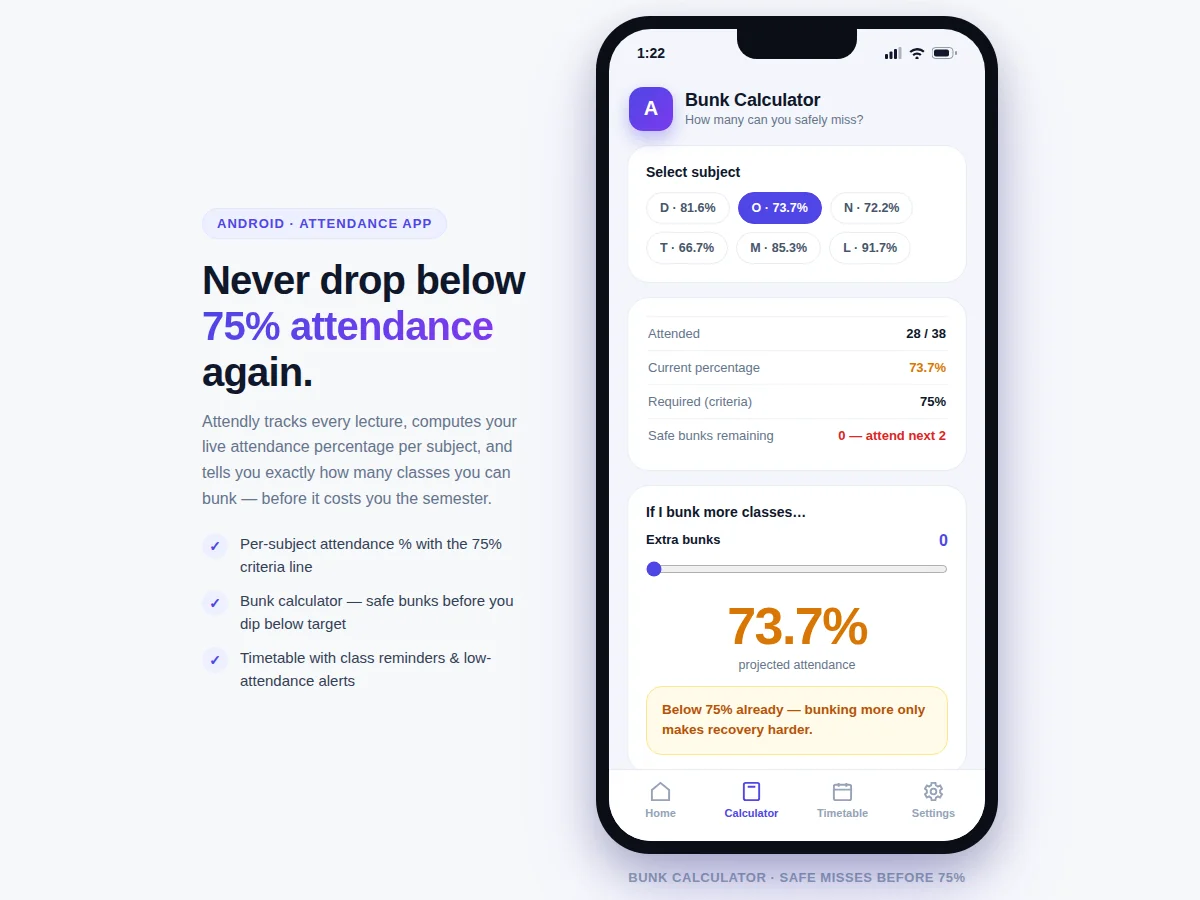
- The bunk calculator applies the projection formula projected = attended ÷ (total + bunks) against the configured criteria to derive safe bunks, and inverts it to compute the recovery count when below criteria.
- WorkManager/AlarmManager schedules a notification before each lecture and evaluates the warning rule after every mark.
- Weekly and overall summaries render from the database, and the CSV export produces the attendance tables used directly in the project report.
Tech stack:
- Kotlin · Android SDK
- Android Studio
- Room persistence library · SQLite
- Material Design 3 components
- WorkManager · AlarmManager reminders
- MVVM · LiveData architecture
- MPAndroidChart (progress visuals)
- Git version control
| Parameter | Value |
|---|---|
| Platform | Native Android (Kotlin) |
| Minimum SDK | API 26 (Android 8.0) — design target, covers ~95% of active devices per Google distribution data |
| Architecture | MVVM with Room (SQLite) local database |
| Storage | On-device only; approximately 50–100 KB per semester of attendance data (expected) |
| Reminders | WorkManager + AlarmManager; lead time configurable 5–60 min |
| Criteria range | 60–90% configurable (default 75%) |
| Export | CSV of per-subject attendance, readable in Excel/Sheets |
| App size | Approximately 15–20 MB installed (expected) |
| Internet | Not required for any core feature |
| UI language | English |
Project features
- [Live per-subject attendance %] Every subject shows attended/total classes with a progress bar and a marked 75% criteria line; percentages recompute instantly on every mark, colour-coded green/amber/red.
- [One-tap present/absent marking] Today's classes appear as a list from the timetable; a single tap records the status, and the entry can be corrected later from the subject detail screen.
- [Bunk calculator] Shows safe bunks remaining per subject, and a slider projects the attendance percentage if more classes are bunked — with a recovery count ("attend the next 2 classes") when already below criteria.
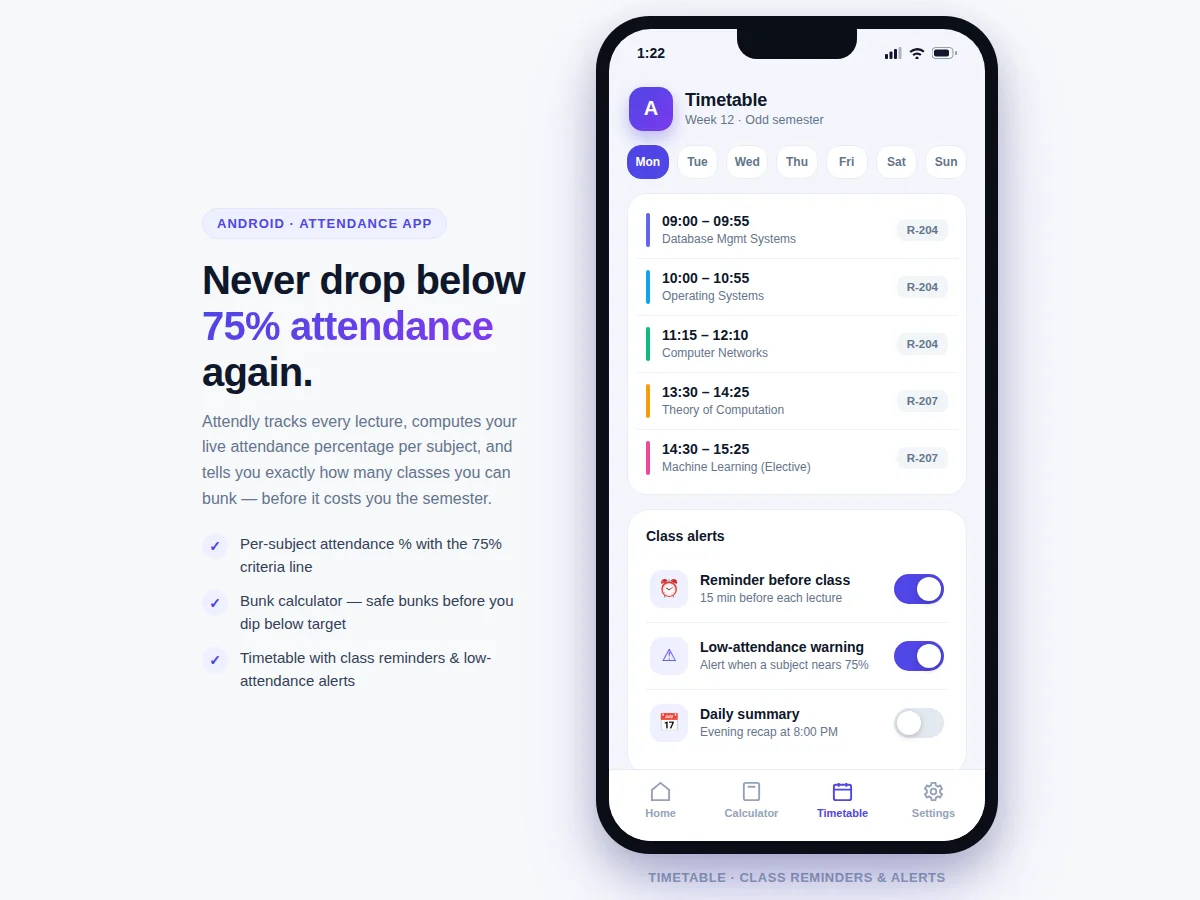
- [Weekly timetable] Day-wise lecture grid with timings, subject and room; drives both the "today" list and the reminder schedule, editable per semester.
- [Class reminders & warnings] Configurable reminder before each lecture plus an automatic warning when any subject approaches the criteria line; reminder lead time is configurable.
- [Offline-first local storage] All attendance data lives in a Room (SQLite) database on the device; the app works fully without internet, and data exports to CSV for the project report.
- [Configurable criteria] The required percentage (default 75%) is adjustable from 60–90% in settings, so the app matches the buyer's actual university rule.
What is included
- Complete Android app source code in Kotlin (MVVM, Room database, reminders)
- Debug APK installable on any Android 8.0+ device for demo and testing
- Timetable entry template and sample semester dataset
- Project report PDF (problem, design, database schema, reminder scheduling, screenshots)
- PPT presentation for final review
- Viva Q&A preparation document (Room vs SQLite, WorkManager vs AlarmManager, MVVM, the bunk-calculation math)
- User manual: setup, daily use, CSV export for the report
Advantages
- Live per-subject attendance percentage with a marked 75% criteria line, colour-coded green/amber/red and recomputed instantly on every mark; one-tap present/absent marking from the day's timetable list, correctable later from the subject detail screen.
- Bunk calculator with real math: safe-bunks-remaining per subject, a slider projecting the attendance percentage if more classes are bunked (projected = attended / (total + bunks)), and an inverted recovery count ('attend the next 2 classes') when already below criteria.
- Weekly timetable (day-wise lecture grid with timings, subject and room, editable per semester) driving configurable class reminders via WorkManager/AlarmManager (5-60 min lead) plus automatic warnings when a subject approaches the criteria line.
- Offline-first: all data in an on-device Room (SQLite) database - no account, no cloud, no internet needed; CSV export produces the attendance tables used directly in the project report. Criteria adjustable 60-90% (default 75%) to match the buyer's university rule. Tech stack: Kotlin, Android SDK, Room/SQLite, MVVM + LiveData, WorkManager/AlarmManager, MPAndroidChart, Material Design 3.
Disadvantages
- Attendance is self-marked - the app trusts the student's taps; there is no biometric, QR or location verification in the base build (QR check-in is documented future scope).
- Single-device storage with no account sync or backup in the base build, so uninstalling without a CSV export loses data; cloud backup is future scope.
- Reminders depend on the device allowing notifications and background alarms; some OEM skins need a one-time 'ignore battery optimization' exemption, covered in the user manual.
- The bunk math assumes the timetable continues as entered; cancelled or rescheduled lectures must be edited in the timetable to keep projections correct. Android only (min SDK Android 8.0).
Limitations & prerequisites
- Attendance is self-marked — the app trusts the student's taps; there is no biometric, QR or location verification in the base build (QR check-in is documented future scope).
- Single-device storage: no account sync or backup in the base build, so uninstalling without a CSV export loses data; cloud backup is future scope.
- Reminders depend on the device allowing notifications and background alarms; some OEM skins need a one-time "ignore battery optimization" exemption, covered in the user manual.
- The bunk math assumes the timetable continues as entered; cancelled or rescheduled lectures must be edited in the timetable to keep projections correct.
- Android only — no iOS version; the minimum SDK (Android 8.0) excludes very old devices.
- The 75% default is a common criterion, not universal; the student must set their university's actual figure in settings.
Frequently Asked Questions
How does the bunk calculator actually work?
It uses the projection formula projected = attended ÷ (total + bunks), evaluated against your configured criteria (default 75%). "Safe bunks" is the largest whole number of additional misses that keeps the projection at or above criteria; when you are already below, it inverts the math to tell you how many consecutive classes you must attend to recover. The report documents the formula so you can defend it in the viva.
Does the app need internet?
No. Everything — subjects, timetable, attendance records, reminders — lives in a local Room (SQLite) database on the phone. The app works fully offline; the only thing that ever leaves the device is the CSV you explicitly export.
Can it stop students from marking fake attendance?
Honestly, no — the base build trusts the user's taps, and the report states this as a limitation. Verified check-in (QR codes scanned in the classroom, or geofencing) is the documented future-scope extension and makes a strong "limitations" viva answer.
Which Android versions are supported?
Android 8.0 (API 26) and above, which covers the large majority of active devices. The reminder scheduling uses WorkManager with AlarmManager fallback so behaviour is consistent across versions and OEM skins.
Can the 75% criteria be changed?
Yes — settings allow any value from 60% to 90%. Every progress bar's criteria line, every warning and the bunk calculator all follow the configured value, so the app matches the buyer's actual university rule.
Is this project suitable for a final-year project?
Yes — for Computer Science, IT and mobile-application programs. It demonstrates Android app architecture (MVVM), local persistence with Room, background scheduling, and a genuinely useful algorithm (the bunk projection math) wrapped in a polished, demonstrable product. Suitable for B.E./B.Tech final-year projects in Computer Science, IT and Mobile Application Development.
Components & software requirements
- Kotlin · Android SDK
- Android Studio
- Room persistence library · SQLite
- Material Design 3 components
- WorkManager · AlarmManager reminders
- MVVM · LiveData architecture
- MPAndroidChart (progress visuals)
- Git version control
Delivery information
Built-to-order project. Delivery timeline is shared after order confirmation based on current queue.
Support terms
Complete documentation, setup guide, and viva preparation included. Support for setup and explanation provided.
Download free synopsis (PDF)
Enter your name and email — the synopsis PDF downloads immediately. We may send occasional project updates; no spam, unsubscribe anytime.