
More project photos (2)
The problem
Every engineering college lab issues instruments daily — oscilloscopes, function generators, Arduino kits, multimeters, soldering stations — and in most colleges this is recorded in a paper register. The register has no search, no reminders and no accountability: nobody can see at a glance which oscilloscopes are free, overdue returns are chased from memory, and fines are rarely collected because nobody tracks the dates. When an instrument comes back damaged, there is no reliable record of who held it. The honest engineering answer is a digital ledger with the workflow built around the fastest possible capture — a QR scan. This project builds that as a complete Android app: each instrument gets a laminated QR tag, scanning it pulls up the live record, issuing takes a short form (student name, roll number, duration), and every issue becomes a timestamped database entry with a computed due date. Returns are one tap; the app flags overdue items and computes the fine automatically, so the lab in-charge finally sees the true state of the lab on a dashboard instead of flipping register pages.
Scans tags, enters issue details and marks returns in the app.
Follow the working sequence
How it works
- Each instrument is registered in the app's equipment table (ID, name, specification, location, quantity) and a QR tag encoding its equipment ID is generated and laminated onto it.
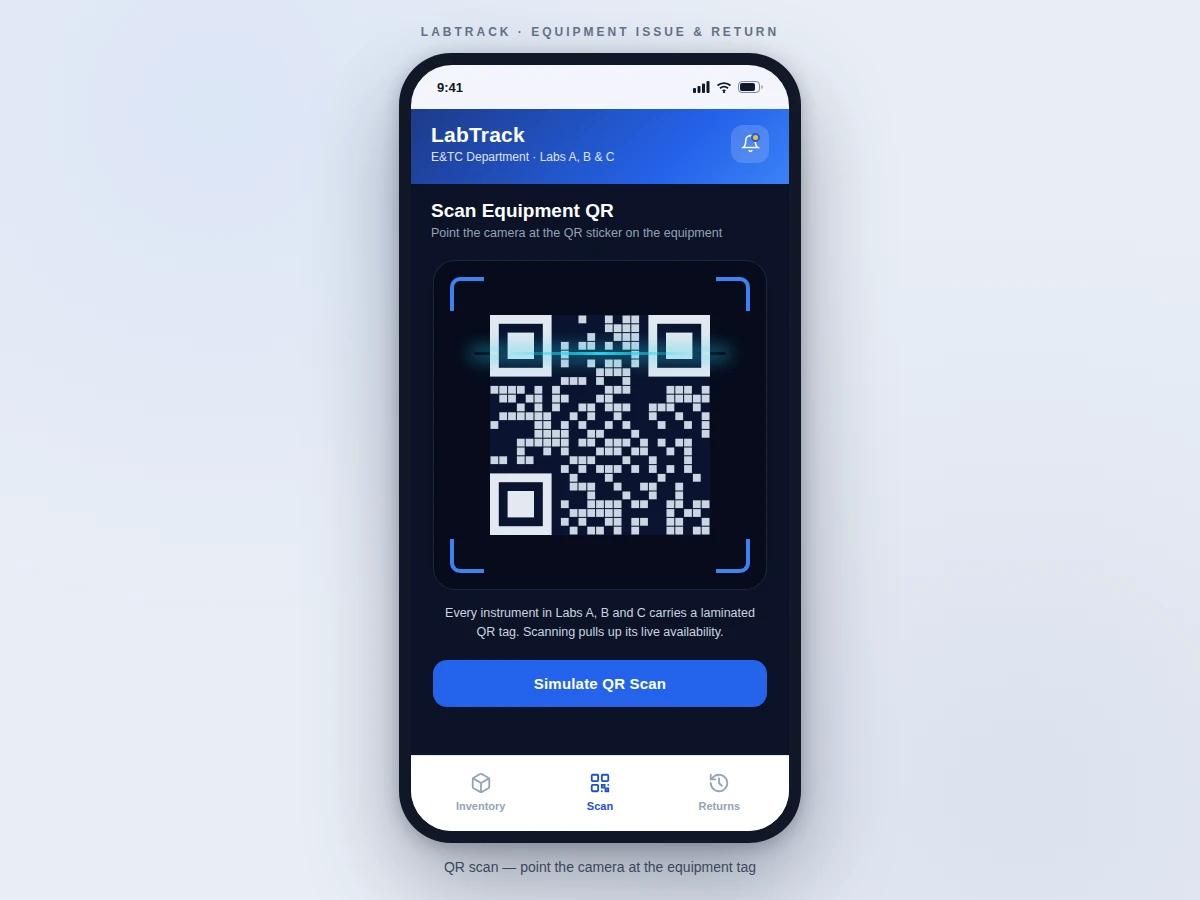
- The lab assistant opens the app and taps Scan; the camera decodes the QR tag and the app loads that instrument's record with its live available/issued counts.
- For an issue, the assistant enters the student name, roll number and duration; the app computes the due date, decrements stock and writes the timestamped issue record to the ledger.
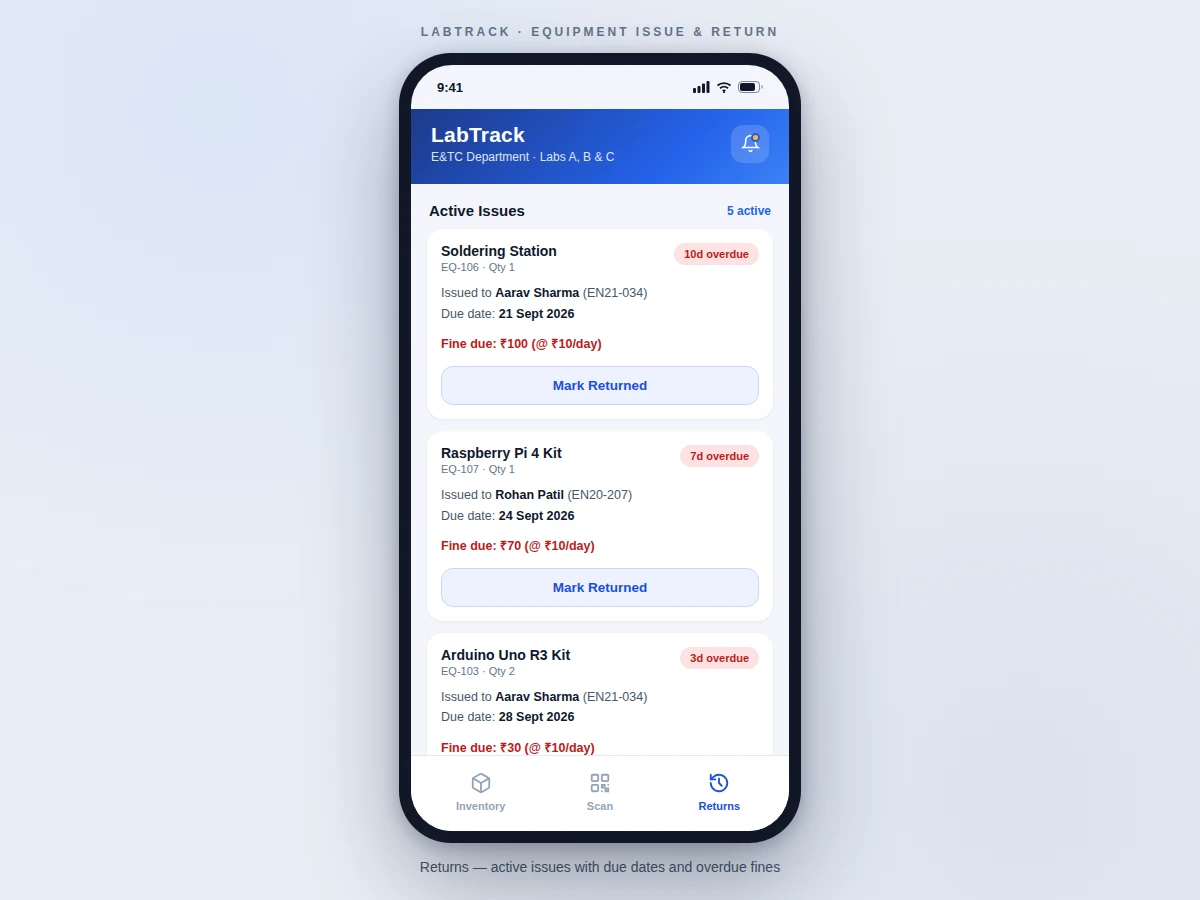
- The returns tab lists active issues sorted by overdue severity, with colour-coded due chips (green on-time, amber due-soon, red overdue with the computed fine).
- Tapping Mark Returned restores the stock count and closes the record with a return timestamp; the dashboard counts update immediately.
- The dashboard continuously aggregates the same tables into available/issued/overdue totals, so the lab in-charge sees the lab's true state without opening the register.
Tech stack:
- Kotlin · Android SDK
- CameraX · ZXing-class QR decoding
- Room · SQLite local database
- Android Studio
- Material Design 3 UI components
- Gradle build system
- Git version control
| Parameter | Value |
|---|---|
| Platform | Android (design target: API 26 / Android 8.0 and above) |
| App screens | 3 main screens (Inventory, Scan, Returns) + issue form (design) |
| QR format | Equipment ID encoded per instrument tag (design) |
| Scan library | CameraX / ZXing-class decoder (design) |
| Database | Room over SQLite, 2 tables: equipment + issue ledger (design) |
| Due-date logic | Issue date + configurable duration in days (design) |
| Fine logic | Per-day rate past due date, configurable (design: Rs. 10/day) |
| Demo inventory | 8 equipment types, 5 active issues incl. overdue examples (demo data) |
| Offline support | Fully offline; all data on-device (design) |
| Demo APK size | Approximately 15–25 MB (expected) |
Project features
- [QR scan issue flow] Scan the laminated QR tag on any instrument with the phone camera; the app decodes the equipment ID and opens its live record with current availability — no typing, no lookups.
- [Issue form with auto due-date] Enter the student name, roll number and duration; the app computes the due date, decrements available stock and writes a timestamped issue record.
- [One-tap returns] The returns screen lists every active issue; tapping Mark Returned restores stock and closes the record with a return timestamp.
- [Overdue flagging with automatic fines] Due-date chips show on-time, due-soon and overdue states; overdue items carry the computed fine at the configured per-day rate (design: Rs. 10/day).
- [Live inventory dashboard] Available, issued and overdue counts aggregate from the same tables, with per-item availability and a search bar across equipment names, specs and locations.
- [Searchable equipment ledger] Every instrument is stored with its ID, name, specification, lab location and total/issued counts — the paper register, queryable.
- [Returns sorted by severity] Active issues sort with the most overdue first, so the lab assistant always sees the worst defaulters at the top.
What is included
- Complete Android app source code (Kotlin) with the 3-screen workflow
- Demo APK installable on any Android 8.0+ device for the project demonstration
- Room/SQLite database schema for the equipment table and issue ledger
- Printable QR tag set for the demo inventory (equipment-ID encoded)
- Project report PDF (background, app architecture, database design, workflow, testing procedure)
- PPT presentation for final review
- Viva Q&A preparation document (Android components, QR decoding, Room, app lifecycle)
Limitations & prerequisites
- The built-to-order build is offline-first: there is no cloud sync, so two devices do not share one ledger unless the optional cloud extension is added.
- QR scanning needs a working rear camera and reasonable lighting; torn or faded tags must be reprinted.
- The fine is computed on return-date arithmetic only — the app does not send reminders or collect payment; collection stays a manual process.
- Damage condition is recorded as a note, not enforced — there is no photo-proof flow in the base build.
- The demo inventory ships with 8 equipment types and sample issues; the buyer enters their own lab's real inventory.
- Multi-user roles (assistant vs in-charge) are a single-role build; role-based access is listed as future scope.
Frequently Asked Questions
How does the QR scanning work in practice?
Each instrument carries a laminated QR tag encoding its equipment ID. The lab assistant taps Scan in the app, points the camera at the tag, and the app decodes the ID (CameraX/ZXing-class library) and loads that instrument's live record — name, specification, location and current availability — ready for issue or return.
What happens when equipment goes overdue?
The returns screen flags it automatically: the due chip turns red with the number of days overdue, and the app computes the fine at the configured per-day rate (design: Rs. 10/day). Overdue items sort to the top so the worst defaulters are always visible first.
Does the app need the internet?
No. The built-to-order build is fully offline — the Room/SQLite database lives on the device, so issue, return and fine logic all work without connectivity. Cloud sync across multiple devices is listed as future scope, not part of the base build.
Can the lab in-charge see the whole lab at a glance?
Yes — the dashboard aggregates the equipment and ledger tables into available, issued and overdue counts, and the inventory screen shows per-item availability with search across names, specs and locations. It replaces flipping through the paper register.
Is this project suitable for a final-year project?
Yes — for Computer Science, IT and Electronics programs. It demonstrates real Android development (camera, QR decoding, local databases, Material UI) applied to a genuine departmental problem, with a demonstrable working app for the final review. Suitable for B.E./B.Tech final-year projects in Computer Science, IT and Electronics.
Components & software requirements
- Kotlin · Android SDK
- CameraX · ZXing-class QR decoding
- Room · SQLite local database
- Android Studio
- Material Design 3 UI components
- Gradle build system
- Git version control
Delivery information
Built-to-order project. Delivery timeline is shared after order confirmation based on current queue.
Support terms
Complete documentation, setup guide, and viva preparation included. Support for setup and explanation provided.
Download free synopsis (PDF)
Enter your name and email — the synopsis PDF downloads immediately. We may send occasional project updates; no spam, unsubscribe anytime.