
More project photos (2)
The problem
Students collect revision notes across PDFs, chat messages, loose documents and half a dozen apps, so the same topic ends up scattered and almost impossible to reconnect before an exam. Even when the notes are saved, most tools store them in a proprietary format, offer only folder browsing, and give no way to see how one concept leads into another — a deadlock note never points back to the synchronisation note that explains it. This project builds a desktop knowledge base that treats a plain folder of Markdown files as the entire database: notes link to each other with double-bracket wikilinks, every note automatically lists the notes that link back to it, a graph view draws the whole connection map, and full-text search finds any term across the vault without an internet connection.
How it works
- On first launch the user picks a vault folder; the app scans that folder for .md files, reads each file once, and registers its title, tags and body text in memory.
- The editor loads the selected note into the Markdown pane; as the user types, the parser renders the preview and the file is saved back to the same .md file on disk.
- A regular-expression link extractor finds every [[...]] wikilink in every note and builds a forward link map from each note to the notes it points to.
- The backlinks index is built by inverting that forward map, so for the currently open note the app can instantly list every note that links to it without re-scanning files.
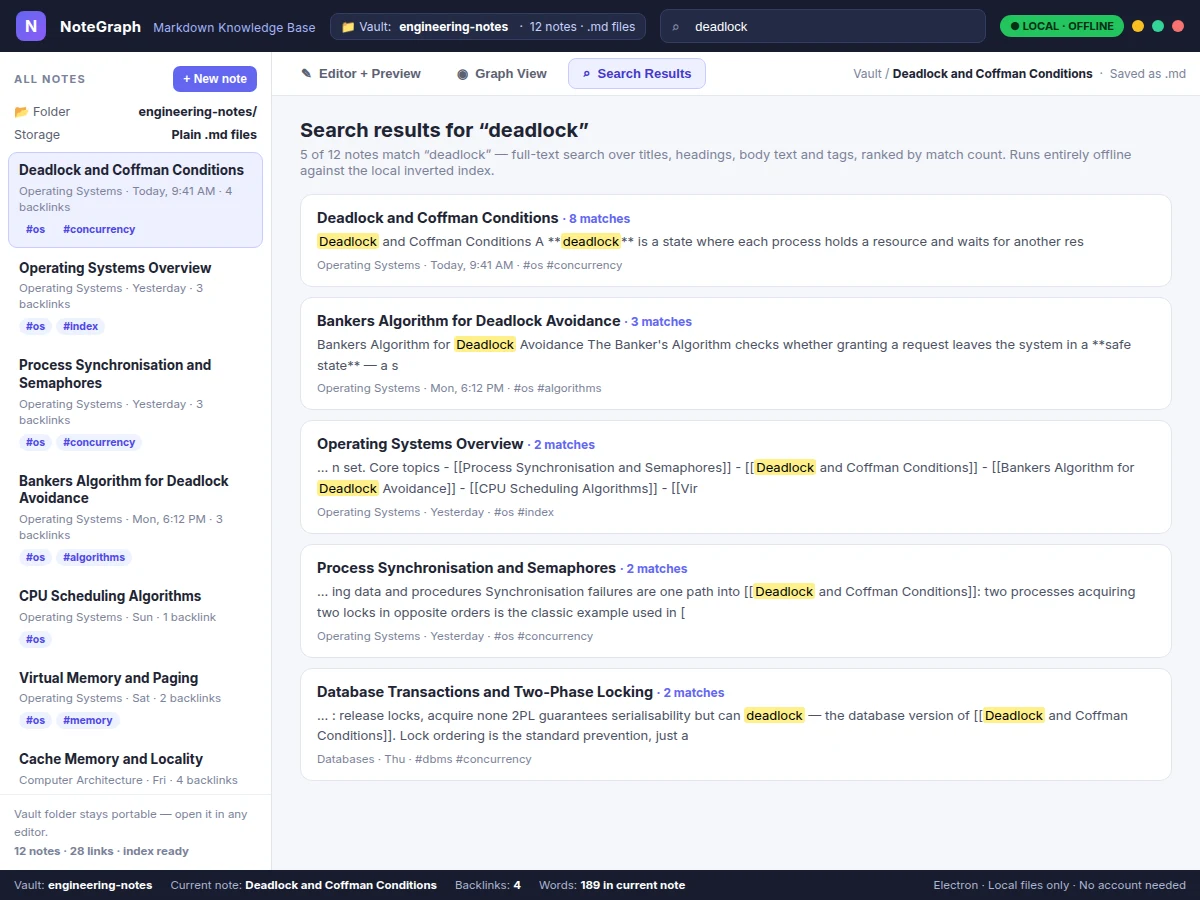
- A tokeniser splits all note text into words and builds an inverted index of word to note list; a search query looks up its terms in that index, ranks notes by match count and returns highlighted snippets.
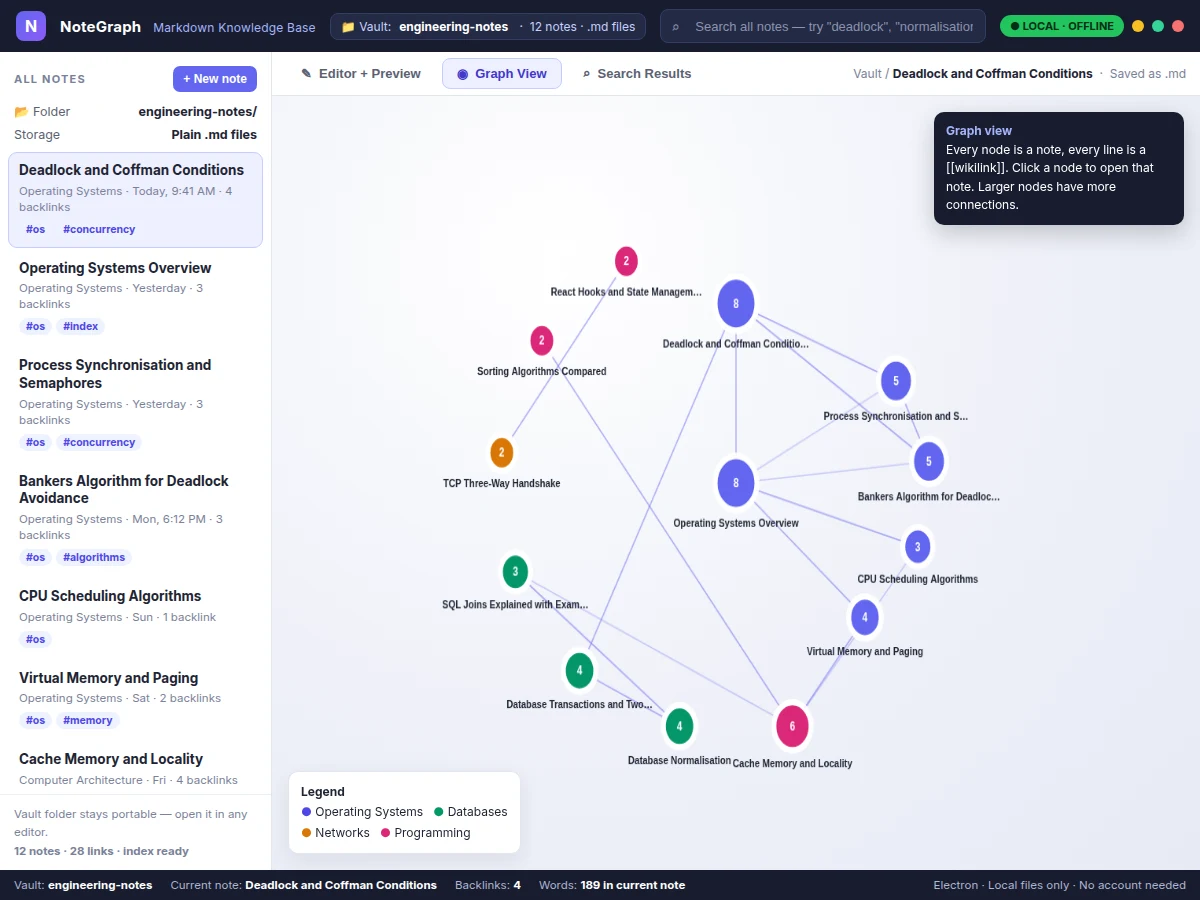
- For the graph view the same link map is handed to a canvas renderer: notes become positioned nodes, wikilinks become edges, and clicking a node navigates to that note in the editor.
- Editing any note triggers a targeted re-index of that file — its outgoing links, backlink contributions and search terms are refreshed so all three views stay consistent.
Tech stack:
- Electron
- HTML · CSS · JavaScript
- Marked.js Markdown parser
- Canvas API (graph rendering)
- Local file system (.md vault)
- Inverted index (in-memory)
- Node.js
| Parameter | Value |
|---|---|
| Platform | Desktop — Windows, macOS and Linux via Electron (design) |
| Note storage | Plain .md files in one user-chosen local folder |
| Link syntax | [[Note Title]] double-bracket wikilinks |
| Backlink method | Inverted link map built from a regex link extractor |
| Search method | Local inverted index over titles, body text and tags |
| Sample vault | 12 linked engineering notes included in the base build |
| Graph rendering | HTML Canvas — 1 node per note, 1 edge per wikilink |
| Internet requirement | None — editor, backlinks, graph and search all work offline |
| Vault size | Design target: smooth browsing for approximately 500 notes on a typical student laptop |
| Re-index trigger | On note save / edit (per-file refresh, expected) |
Project features
- [Plain-file Markdown vault] Every note is an ordinary .md file inside one local folder chosen by the user, so the vault can be opened in any text editor, copied, backed up or versioned with Git — there is no proprietary database locking the notes in. (Implemented)
- [Markdown editor with live preview] The editor pane shows raw Markdown beside a rendered preview that updates as you type, handling headings, bold text, lists, quotes, inline code and code blocks so formatting mistakes are visible immediately. (Implemented)
- [Wikilinks with automatic backlinks] Typing [[Note Title]] creates a link to another note; a link extractor scans every file, inverts the link map, and each note shows a backlinks panel listing every other note that points to it, with the linking note opening in one click. (Implemented)
- [Interactive graph view] A canvas graph draws one node per note and one edge per wikilink, colour-grouped by subject area and sized by connection count; clicking a node opens that note, which makes clusters, hub notes and isolated notes obvious at a glance. (Implemented)
- [Offline full-text search] A local inverted index maps each word to the notes containing it; searching returns ranked results with match counts and highlighted snippets across titles, headings, body text and tags, and no query ever leaves the machine. (Implemented)
- [Sidebar browsing with tags] The sidebar lists all notes with folder, last-edited label, backlink count and tags, so a vault can be browsed by recency or scanned by topic tag before opening a note. (Implemented)
- [Sample engineering vault included] The build ships with 12 linked sample notes on operating systems, databases, networks and programming topics, so backlinks, the graph and search can be demonstrated immediately and then replaced with the student's own notes. (Implemented)
- Optional / future scope: cloud synchronisation across devices, mobile companion app and PDF export themes are NOT part of the base build — notes stay on the local machine, and adding sync or a mobile viewer is listed as future scope.
What is included
- Complete Electron source code (main process, renderer, editor, preview and graph modules)
- Sample vault with 12 linked Markdown engineering notes
- Wikilink extractor, backlink inversion and full-text inverted-index modules
- Interactive canvas graph view with click-to-open navigation
- Setup guide (install dependencies, choose a vault folder, run and package the app)
- Project report PDF (background, architecture, methodology, module design)
- PPT presentation for final review
- Viva Q&A preparation document (link inversion, inverted index, Markdown parsing, Electron architecture)
Limitations & prerequisites
- Notes are plain text only in the base build — images pasted into a note are referenced as local files and are not embedded or managed by the app.
- Wikilinks match note titles exactly, so renaming a note without updating its incoming [[...]] references leaves those links unresolved until they are edited.
- Search is keyword-based over an inverted index; it does not understand synonyms or meaning, so a note using different wording for the same idea will not match.
- The graph layout is a fixed radial arrangement suited to revision-size vaults; very large vaults with hundreds of densely linked notes will look crowded without additional layout work.
- There is no multi-user editing, sharing or cloud backup in the base build — the vault is a local folder and backing it up is the user's responsibility.
- The app is a desktop build only; there is no Android, iOS or web version in the base scope.
Frequently Asked Questions
Is this project suitable for a final-year project?
Yes — Computer Engineering and Information Technology students can use it to demonstrate desktop application development with Electron, text parsing, index data structures and graph visualisation in one coherent build. The wikilink inversion and inverted-index search give concrete algorithms to explain with diagrams, and the plain-file storage decision is itself a defensible design trade-off to discuss in a viva.
Where are the notes actually stored?
In a normal folder on the user's own computer, one .md file per note. There is no server and no proprietary database file, which means the notes stay readable in any editor even without this app, can be copied with ordinary file tools, and can be put under Git version control if the student wants history.
How do backlinks work if I never create them manually?
You never add a backlink by hand. When any note contains a [[Target Note]] wikilink, the extractor records that edge while indexing, and the inverted map automatically makes the source note appear in the target note's backlinks panel. Deleting the wikilink and saving removes the backlink on the next re-index.
Does the project need internet or an account?
No. Editing, preview, backlinks, the graph and full-text search all run locally against files and in-memory indexes, so the app works fully offline and no sign-up is involved. Internet is needed only once, to download the development dependencies while setting up or packaging the build.
Can the graph view and search handle my own notes instead of the samples?
Yes. Point the app at any folder of .md files and it will index whatever it finds — titles become link targets, [[...]] references become graph edges, and body text feeds the search index. Notes without wikilinks still appear in browsing and search; they simply show no backlinks until another note links to them.
Is cloud sync or a mobile app included?
No, neither is part of the base build, and this is stated plainly. Synchronising a vault across devices and viewing notes on a phone are realistic future-scope extensions, but the delivered project is a single-machine desktop application whose notes live in one local folder.
Components & software requirements
- Electron
- HTML · CSS · JavaScript
- Marked.js Markdown parser
- Canvas API (graph rendering)
- Local file system (.md vault)
- Inverted index (in-memory)
- Node.js
Delivery information
Built-to-order project. Delivery timeline is shared after order confirmation based on current queue.
Support terms
Complete documentation, setup guide, and viva preparation included. Support for setup and explanation provided.
Download free synopsis (PDF)
Enter your name and email — the synopsis PDF downloads immediately. We may send occasional project updates; no spam, unsubscribe anytime.