
More project photos (2)
The problem
Disks fill up silently: downloads accumulate, installers pile up, old virtual machines and video renders sit untouched for months, and the operating system's storage page only shows coarse category totals. When space runs out, the usual advice is to "delete something" — but nobody can say what that something should be. Classic tools in this space show a treemap yet stop there: they offer no guided cleanup, no duplicate analysis and no safety net, so students either delete blindly or do nothing. This project closes that gap with a desktop app that scans a drive, visualizes it as an interactive treemap and a sunburst chart, ranks the largest files, flags duplicate candidates and stale large files, and turns the findings into cleanup suggestions protected by explicit safe-delete rules — system folders excluded, Recycle Bin first, every action previewed.
Selects a drive or folder to scan and picks files to clean from the visualization.
Follow the working sequence
How it works
- The scanner walks the selected drive or folder and records each file's path, size and last-modified time into an in-memory index (design target: approximately 40 s for 1.2 M files on an NVMe SSD).
- The indexer aggregates sizes up the folder tree, computing every folder's share of its parent and of the drive.
- The treemap renderer applies the squarified layout algorithm so rectangle areas stay proportional to size with readable aspect ratios; the sunburst renderer partitions the same tree into concentric rings.
- The analysis pass flags duplicate candidates (same name + same byte size), stale large files (over 2 GB, unmodified 180+ days, both configurable) and known cache/temp locations.
- The cleanup advisor applies the safe-delete rules — system folders excluded, files under 500 MB or newer than 30 days never auto-flagged — and totals reclaimable space per suggestion group.
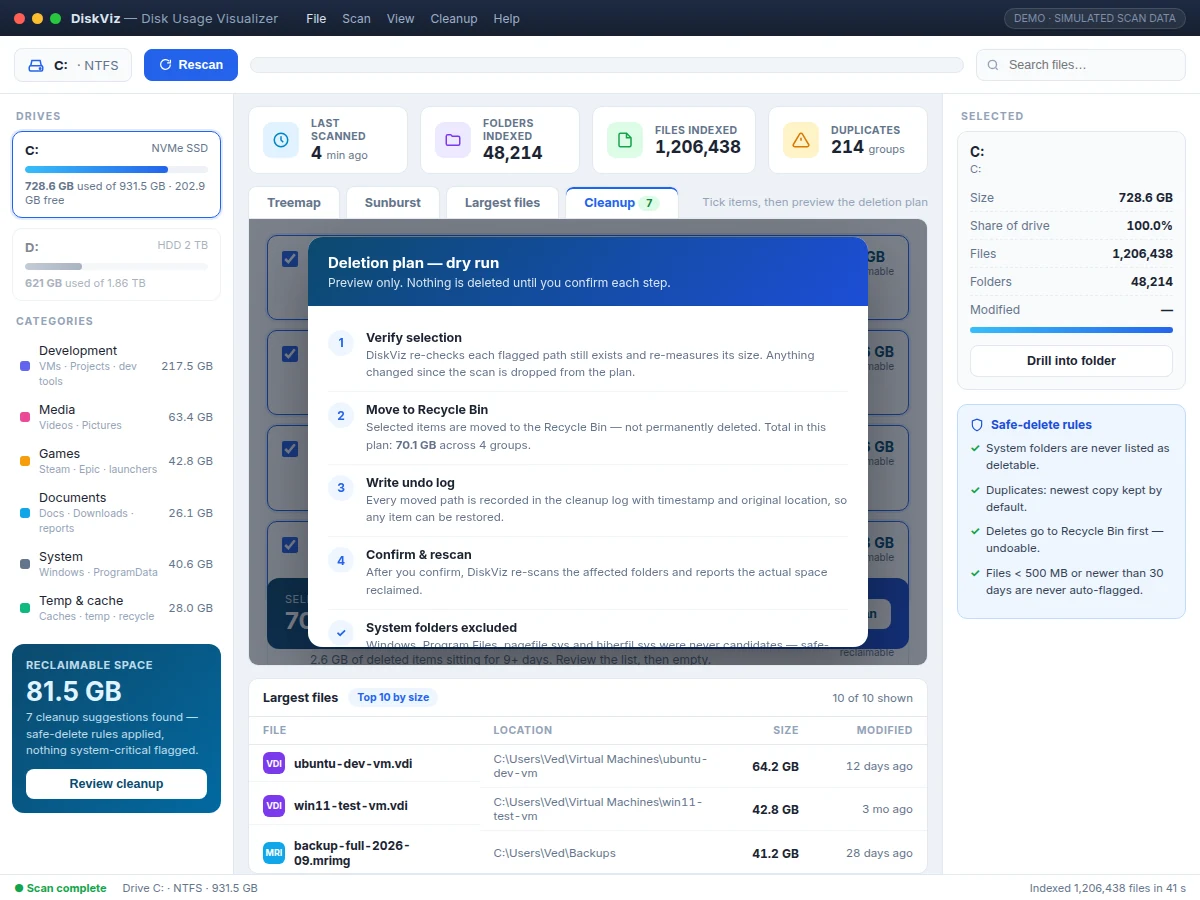
- The dry-run preview lists every affected path and the total GB; on confirmation, items move to the Recycle Bin first and each move is written to an undo log before a rescan reports actual space reclaimed.
Tech stack:
- Electron (desktop app shell)
- Node.js (scanner + indexer)
- HTML · CSS · JavaScript (UI)
- Canvas 2D (treemap + sunburst rendering)
- Squarified treemap layout algorithm
- SQLite (scan-result cache)
- NSIS (Windows installer packaging)
| Parameter | Value |
|---|---|
| Scan scope | Single drive or folder (configurable) |
| Index capacity | Approximately 1.2 M files per scan (design target) |
| Scan time | Approximately 40 s per 1.2 M files on NVMe SSD (expected) |
| Chart views | Treemap + sunburst (2 views) |
| Treemap layout | Squarified; rectangle area proportional to folder size |
| Drill-down | Click-to-drill with breadcrumb navigation |
| Duplicate rule | Same file name + same byte size (design; hash check optional) |
| Stale-file rule | Larger than 2 GB and unmodified 180+ days (configurable) |
| Auto-flag floor | Files under 500 MB or newer than 30 days never auto-flagged |
| Deletion safety | System folders excluded; Recycle Bin first; undo log |
| Platform | Windows 10/11 64-bit (design target) |
| Included demo | Simulated scan of a 931.5 GB drive |
Project features
- [Interactive treemap chart] A squarified treemap lays out the scanned drive so every rectangle's area is proportional to its folder's size; hovering shows size, share and file counts, and clicking any block drills into that folder with breadcrumb navigation.
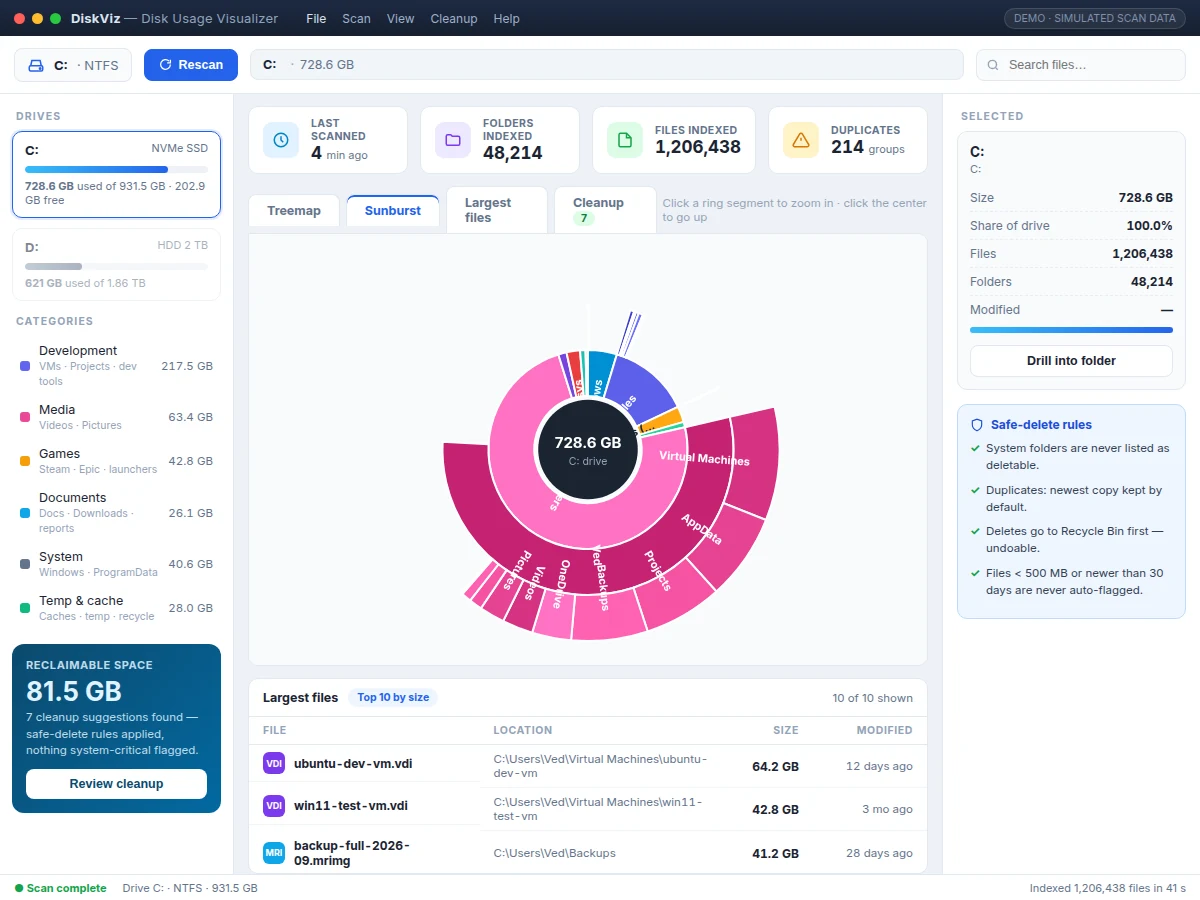
- [Sunburst chart view] The same scan tree rendered as concentric rings for a radial view of disk usage; click a ring segment to zoom into it, click the center to zoom back out.
- [Largest-files finder] A top-10-by-size table with file name, full location, size and last-modified age, plus a live search box that filters the list as you type.
- [Duplicate candidate detection] Flags files sharing the same name and byte size across different folders, presented as review groups with the newest copy kept by default — candidates, never auto-deleted.
- [Stale large-file flags] Surfaces files over 2 GB unmodified for 180+ days (both thresholds configurable), so forgotten VMs, old backups and abandoned renders are easy to spot.
- [Cleanup advisor with safe-delete rules] Seven suggestion groups — duplicates, stale backups, caches, archived node_modules, Recycle Bin, old installers, update leftovers — each with its reclaimable space; system folders are never listed and deletes go to the Recycle Bin first with an undo log.
- [Dry-run deletion preview] Before anything moves, a step-by-step plan re-verifies every flagged path, states the total GB and item count, and confirms that system folders were excluded from candidacy.
What is included
- Complete desktop app source code (Electron + Node.js)
- Interactive demo build with realistic simulated scan data
- Squarified treemap and sunburst chart rendering modules
- Cleanup advisor with safe-delete rules and dry-run deletion preview
- Project report PDF (architecture, algorithms, scan methodology, testing)
- PPT presentation for final review
- Viva Q&A preparation document (file systems, treemap algorithm, Electron architecture)
- Setup and user guide
Limitations & prerequisites
- Scan speed depends on drive type, file count and system load; the 40 s figure is an expected value on NVMe SSD, not a measured guarantee.
- Duplicate detection matches on file name + byte size, not content hashing — matches are candidates for review, not confirmed duplicates. Byte-level SHA-256 confirmation is an optional extension.
- The scanner reads file metadata (path, size, timestamps) only; it never opens file contents during a scan.
- Administrator permission is needed to scan protected system folders; without it those folders are skipped and reported as such.
- Cleanup suggestions are advisory — every deletion requires explicit confirmation after the dry-run preview.
- Packaged for Windows 10/11 64-bit; macOS and Linux builds are optional extensions, not part of the base deliverable.
Frequently Asked Questions
Is this project suitable for a final-year project?
Yes — for Computer Science, IT and Computer Engineering programs. It demonstrates file-system traversal and indexing, data aggregation over trees, an information-visualization algorithm (squarified treemaps), and real desktop-app engineering with Electron, which gives plenty of depth for the viva.
Which visualization algorithms are used?
The treemap uses the squarified layout algorithm, which keeps rectangles close to square so area comparisons stay readable, and the sunburst partitions the same scan tree into concentric rings. Both render on Canvas 2D from one shared in-memory index.
Does the app actually delete files?
Only with your explicit confirmation. Every cleanup runs through a dry-run preview first, deletions move to the Recycle Bin rather than deleting permanently, each move is written to an undo log, and system folders can never be selected for cleanup.
Can this project be customized?
Yes — realistic extensions include byte-level SHA-256 duplicate confirmation, scheduled background scans, CSV/PDF export of scan reports, a dark theme, multi-drive comparison views, and macOS/Linux packaging.
What will I receive with the project?
The complete Electron + Node.js source code, an interactive demo build with simulated scan data, the project report PDF, a PPT for the final review, a viva Q&A document, and a setup/user guide.
Components & software requirements
- Electron (desktop app shell)
- Node.js (scanner + indexer)
- HTML · CSS · JavaScript (UI)
- Canvas 2D (treemap + sunburst rendering)
- Squarified treemap layout algorithm
- SQLite (scan-result cache)
- NSIS (Windows installer packaging)
Delivery information
Built-to-order project. Delivery timeline is shared after order confirmation based on current queue.
Support terms
Complete documentation, setup guide, and viva preparation included. Support for setup and explanation provided.
Download free synopsis (PDF)
Enter your name and email — the synopsis PDF downloads immediately. We may send occasional project updates; no spam, unsubscribe anytime.