
More project photos (3)
The problem
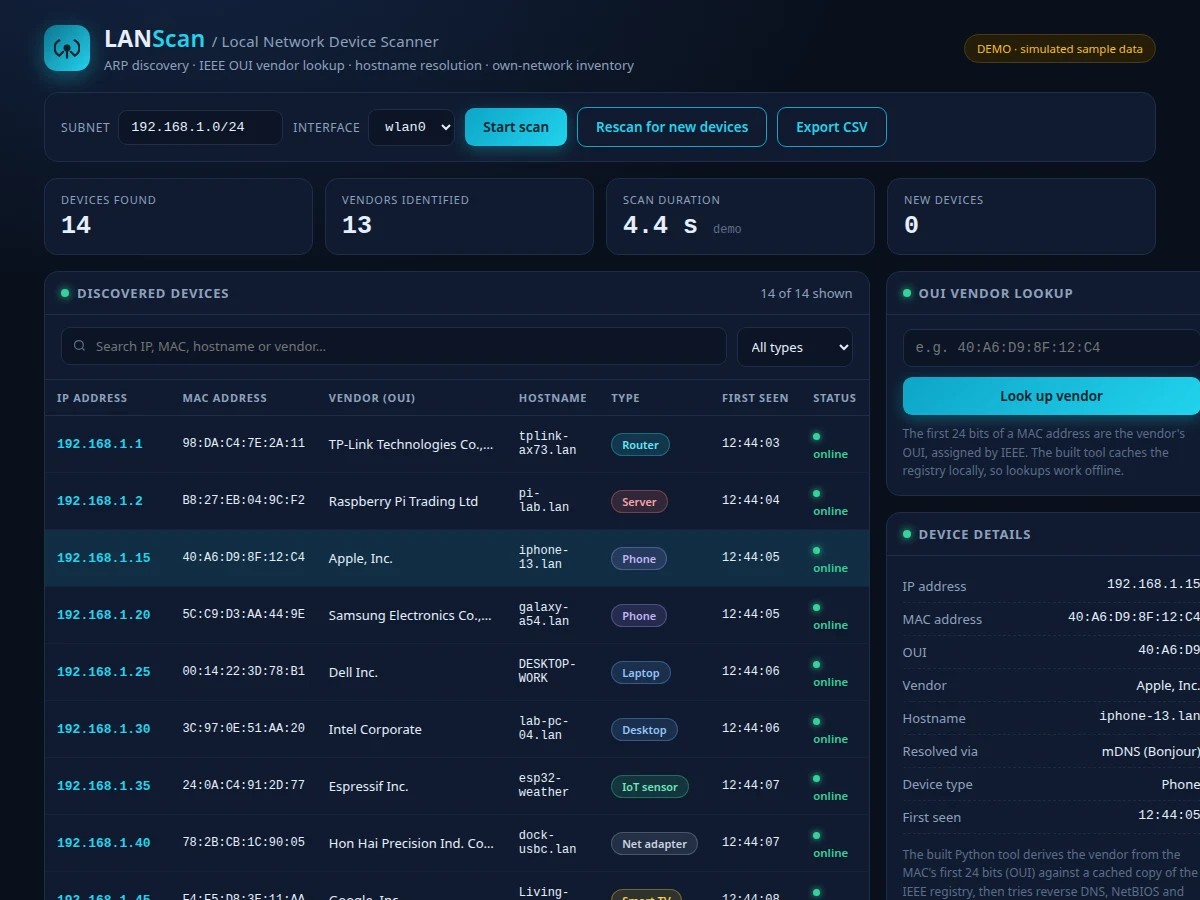
Most people have no idea what is actually connected to their own network. A home or lab LAN quietly accumulates phones, laptops, smart TVs, ESP32 boards, printers and the occasional unknown device — and the router's admin page, when it lists them at all, shows cryptic MAC addresses like 40:A6:D9:8F:12:C4 with no hint of what each device is. Unknown hardware on a network is a genuine security and housekeeping problem: rogue access points, forgotten IoT gadgets and neighbours on a shared connection all hide in that blind spot. This project builds a Python tool that removes the blind spot — it sweeps the local subnet with ARP requests, translates every MAC address into its manufacturer using the IEEE OUI registry, resolves hostnames through reverse DNS, NetBIOS and mDNS, and presents the result as a live, searchable inventory with new-device alerts and CSV export.
The operator who enters the target subnet and selects the network interface.
Follow the working sequence
How it works
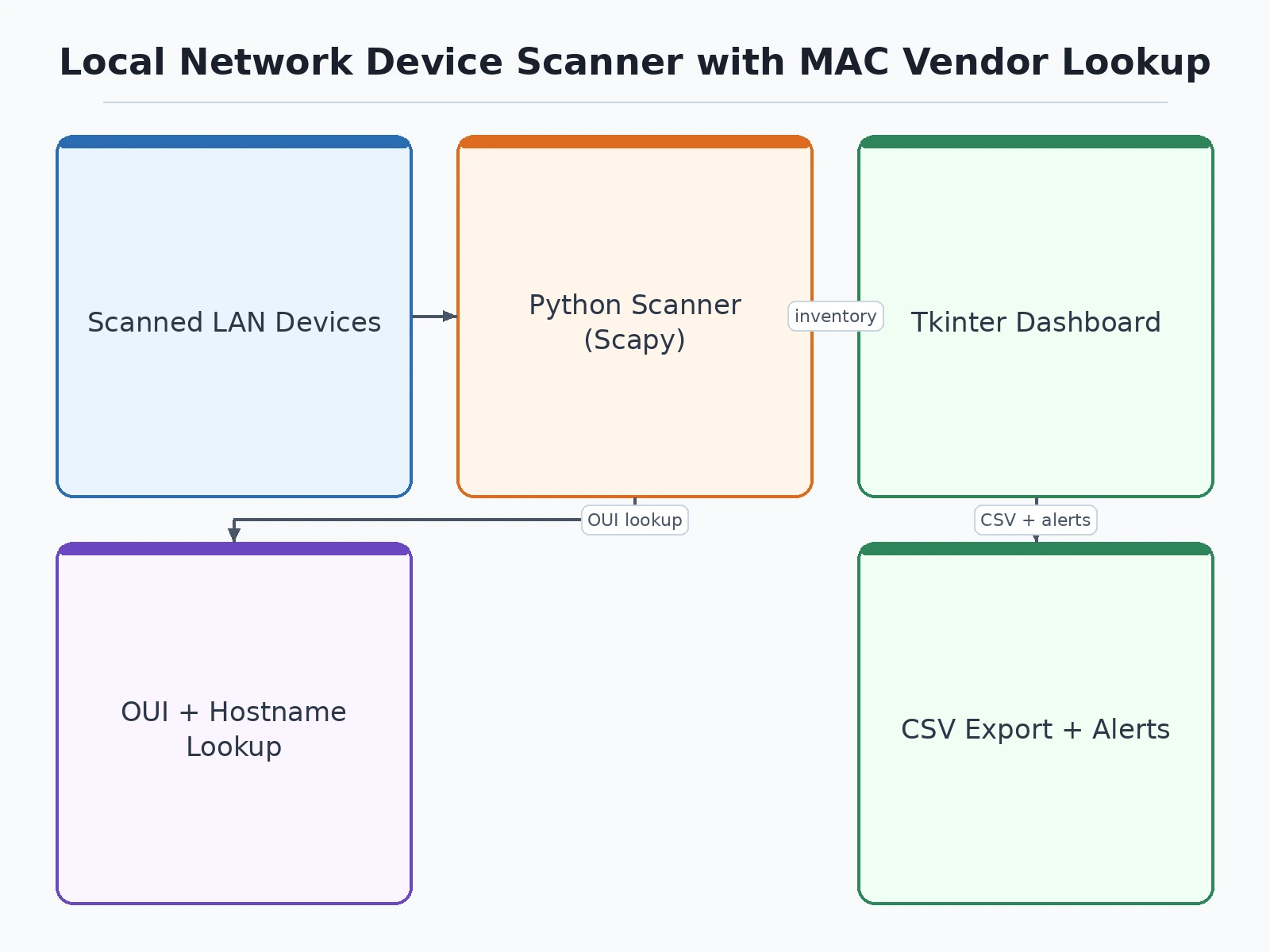
- The user enters the target subnet (for example 192.168.1.0/24) and selects the network interface in the desktop UI.
- The tool crafts ARP request packets and broadcasts them with Scapy's srp() — a layer-2 send/receive that waits for replies with a configurable timeout.
- Every live host answers with an ARP reply; the tool reads each reply's psrc (IP) and hwsrc (MAC) fields into an IP-to-MAC inventory.
- Each MAC's first 24 bits (the OUI) are looked up in the locally cached IEEE registry copy to produce the vendor name.
- Hostnames are resolved per device: reverse DNS first, then NetBIOS, then mDNS — whichever responds first wins.
- Results render in the live table; the run is diffed against the previous scan and any unseen MAC is flagged as a new device.
- One click exports the inventory to CSV. A full /24 sweep takes approximately 10–60 seconds (expected, depending on timeout and host count).
Tech stack:
- Python 3.10+
- Scapy (srp ARP sweep)
- IEEE OUI registry snapshot (locally cached)
- socket · subprocess (unprivileged fallback mode)
- Tkinter (desktop dashboard UI)
- CSV export
| Parameter | Value |
|---|---|
| Discovery method | ARP broadcast sweep via Scapy srp() at layer 2 |
| Target scope | One local subnet, e.g. 192.168.1.0/24 (configurable) |
| Scan time | Approximately 10–60 s per /24 subnet (expected, timeout- and host-dependent) |
| Vendor database | IEEE OUI registry snapshot cached on disk (tens of thousands of assignments) |
| OUI matching | First 24 bits of the MAC address per IEEE assignment |
| Hostname methods | Reverse DNS, then NetBIOS, then mDNS (in order) |
| Privileges | Admin/root required for Scapy raw sockets on some OSes; pure-socket fallback runs unprivileged (expected) |
| Output | Live desktop table plus one-click CSV export |
| Platform | Windows, Linux, macOS with Python 3.10+ |
| Network visibility | Local broadcast domain only — no cross-VLAN or internet scanning (by design) |
Project features
- [ARP-based LAN discovery] Broadcasts ARP requests across the subnet with Scapy's srp() at layer 2 and collects every replying host's IP and MAC — faster and more reliable than ping sweeps on switched LANs.
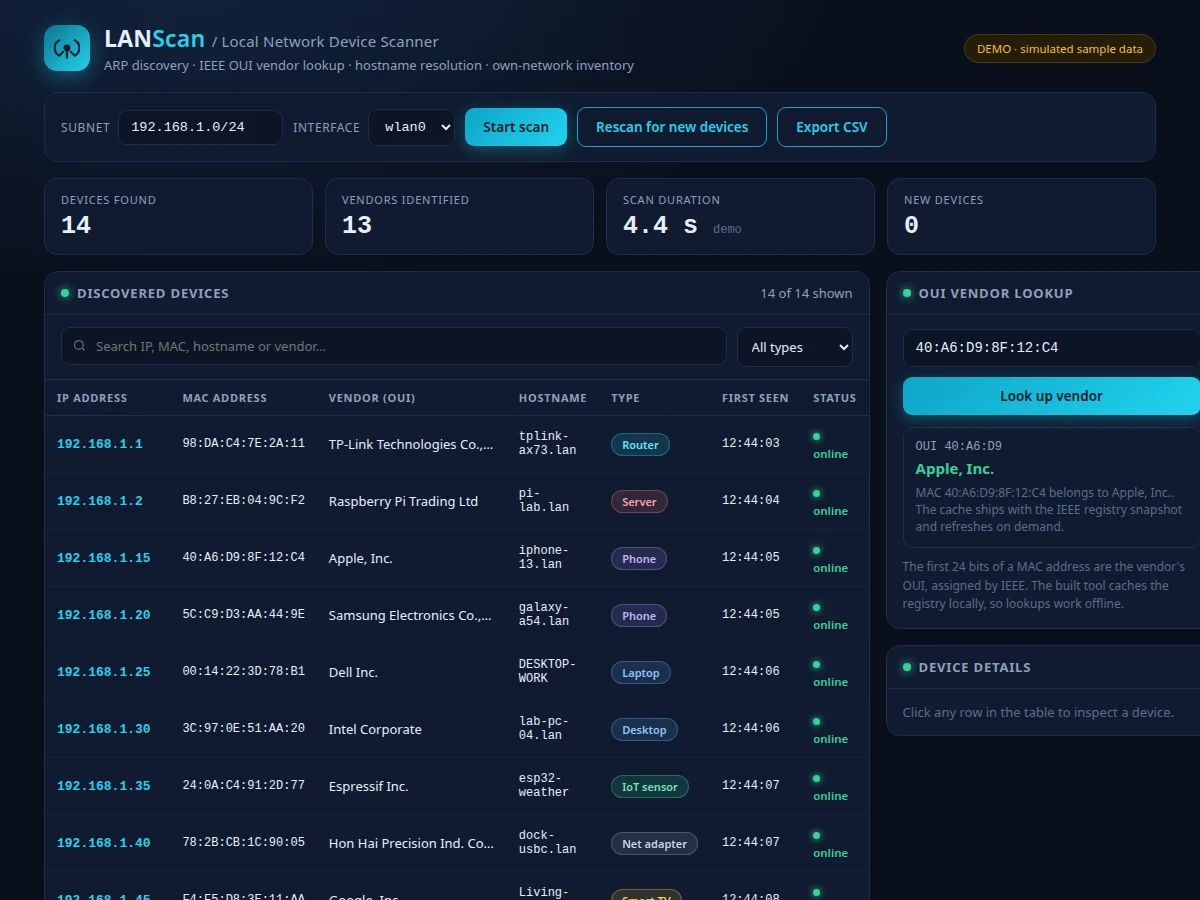
- [MAC vendor lookup from OUI] Matches the first 24 bits of each MAC against a locally cached copy of the IEEE OUI registry, so "40:A6:D9:…" resolves to "Apple, Inc." — lookups work fully offline after the first registry download.
- [Hostname resolution] Tries reverse DNS first, then NetBIOS, then mDNS, in order — so Windows PCs, phones and IoT boards each get named by whichever method their network supports.
- [Live searchable inventory table] A sortable, filterable desktop dashboard (IP, MAC, vendor, hostname, device type, first-seen) matching the screenshots above — click any row for full device details.
- [New-device alerts] Every scan is diffed against the previous run, so a MAC address that was not there before is flagged immediately — the core rogue-device detection behavior.
- [CSV export] One-click export of the complete inventory for documentation, audits and the project report.
- [Scheduled scans (optional)] Runs the discovery pass on a timer and logs changes over time for continuous visibility — an optional add-on, not part of the base build.
What is included
- Complete Python source code (scanner engine, OUI cache manager, hostname resolver, Tkinter dashboard)
- OUI registry download-and-cache script with refresh instructions
- Sample scan outputs and demo dataset for the report
- Setup guide for Windows and Linux, including the admin/root privilege notes
- Project report PDF (background, ARP and OUI theory, methodology, sample results, honest limitations)
- PPT presentation for the final review
- Viva Q&A preparation document (ARP, OUI structure, Scapy layers, raw-socket privileges)
- Abstract PDF
Limitations & prerequisites
- Sees only the local broadcast domain — ARP does not cross VLANs, routers or the internet, so remote or internet-wide scanning is impossible by design, not by omission.
- Hosts that ignore ARP requests (some firewalled or silent NICs) and stale static ARP entries may be missed by a sweep.
- Scapy's raw-socket mode needs administrator/root privileges on some operating systems; the pure-socket fallback works without elevation but scans more slowly (expected trade-off).
- Vendor names are only as fresh as the cached OUI registry copy — very recently assigned OUIs show as unknown until the cache is refreshed.
- Hostname resolution depends on a cooperating responder on the network; devices with no reverse DNS, NetBIOS or mDNS answer stay IP-only in the table.
- Scan duration is approximate (10–60 s per /24, expected) and varies with subnet size, host count and timeout settings.
- White-hat only: this is an inventory tool for your own network or one you have written permission to audit. It contains no deauthentication, MITM, password-attack or exploitation features of any kind.
Frequently Asked Questions
Is this project suitable for a final-year project?
Yes — for Computer Science and IT programs. It demonstrates layer-2/layer-3 networking concepts, packet crafting with Scapy, binary data parsing against the OUI registry, multi-method hostname resolution and a real desktop UI, all of which defend well in a viva.
Is it legal to scan a network with this tool?
Scanning your own home or lab network is legitimate inventory work, and that is exactly what the tool is built for. Scanning networks you do not own or lack written permission for is not acceptable use — the report states this boundary explicitly.
Why does it need admin or root access?
Scapy's srp() sends raw layer-2 frames, which operating systems restrict to privileged users. The tool also ships a pure-socket fallback mode that runs without elevation (slower, ARP-table based) for locked-down machines.
Does the vendor lookup need the internet?
Only once — to download the IEEE OUI registry snapshot. After that the cache lives on disk and every lookup is fully offline.
Can it find devices on another network or over the internet?
No. ARP is a broadcast-domain protocol, so the scanner fundamentally cannot see past your router. That honest limitation is documented in the report and makes a strong viva discussion point.
Can port scanning be added?
As an optional add-on: a TCP connect scan of discovered hosts can be developed on request, under the same own-network-or-written-permission rule. It is not part of the base build.
Components & software requirements
- Python 3.10+
- Scapy (srp ARP sweep)
- IEEE OUI registry snapshot (locally cached)
- socket · subprocess (unprivileged fallback mode)
- Tkinter (desktop dashboard UI)
- CSV export
Delivery information
Built-to-order project. Delivery timeline is shared after order confirmation based on current queue.
Support terms
Complete documentation, setup guide, and viva preparation included. Support for setup and explanation provided.
Download free synopsis (PDF)
Enter your name and email — the synopsis PDF downloads immediately. We may send occasional project updates; no spam, unsubscribe anytime.