
More project photos (2)
The problem
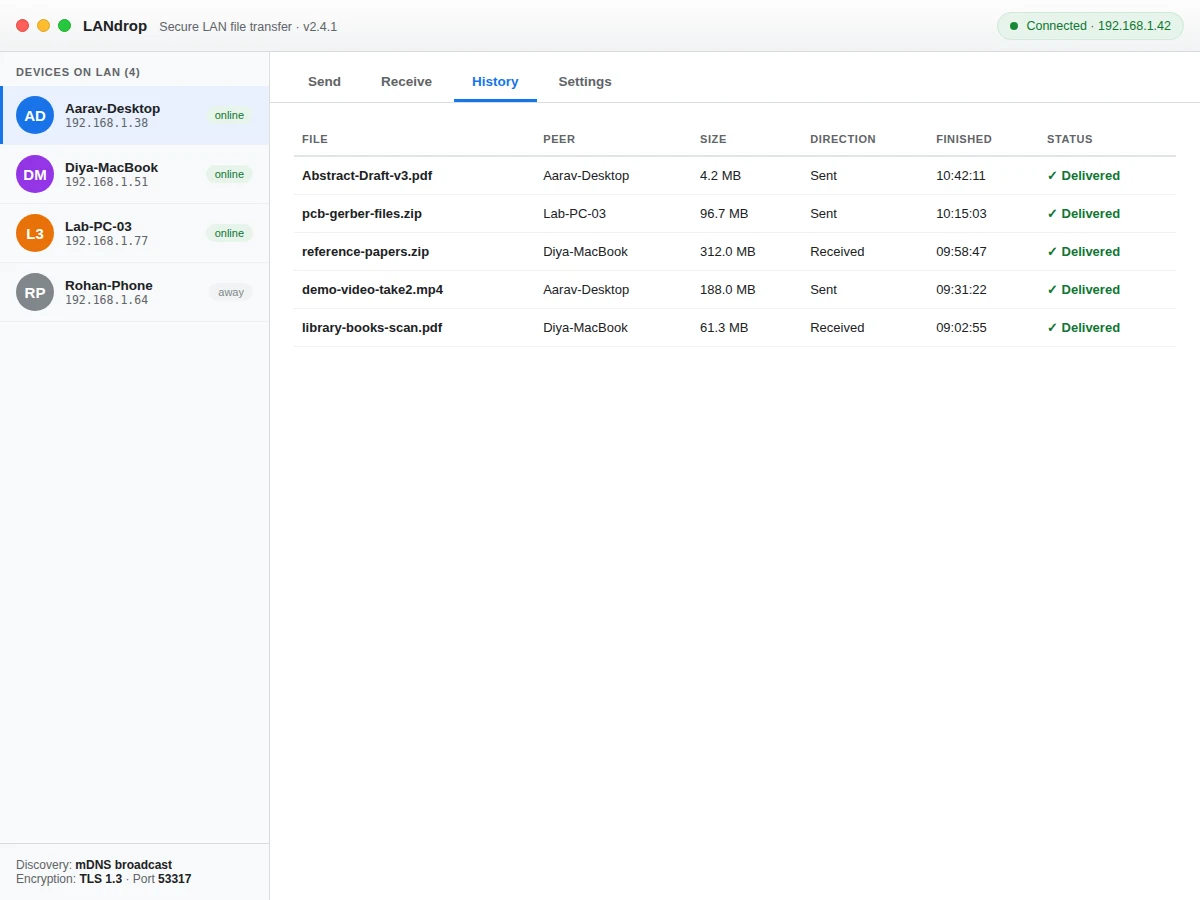
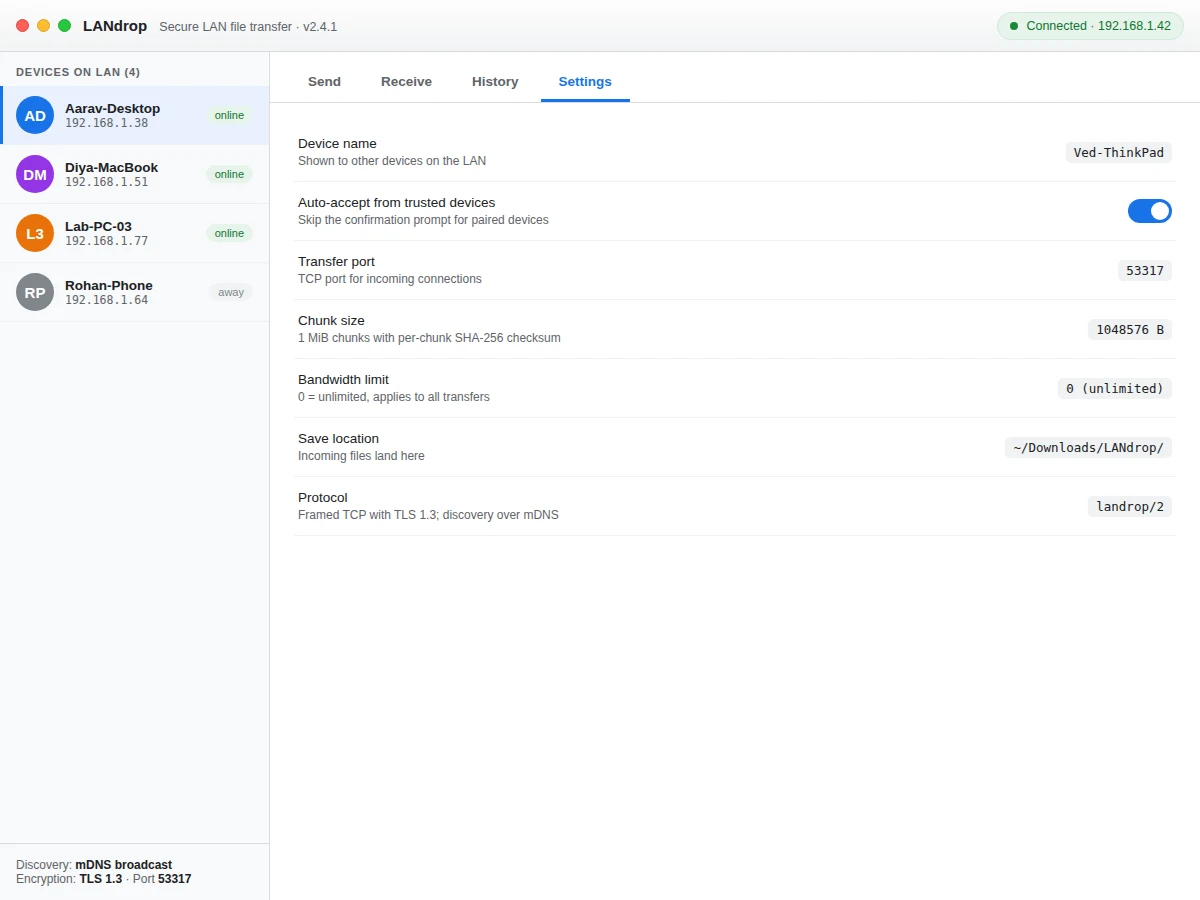
Moving large files between lab computers still means USB drives, email attachments or uploading to the cloud and downloading again — slow, and every hop leaves a copy somewhere else. On a local network, machines can talk to each other directly at full LAN speed, but students rarely get to build that path themselves: socket programming, peer discovery, chunked transfers with integrity checks, and resume logic are usually just theory. This project turns them into a working desktop app. Files are split into 1 MiB chunks, each hashed with SHA-256, streamed over a TLS-encrypted TCP connection to a peer discovered on the LAN, and reassembled at the other end. If the connection drops, the transfer resumes from the last confirmed chunk instead of starting over. The demo shows the full experience: a device list, a send queue with per-file progress and an aggregate speed chart, incoming transfer requests, a history log, and a settings panel covering ports, chunk size and bandwidth limits.
How it works
- On launch, the app broadcasts its presence on the LAN (mDNS-style discovery) and listens for other instances, building the device list.
- The user drops files into the send queue and selects a destination device from the sidebar.
- Each file is split into 1 MiB chunks; a manifest with file name, size and chunk hashes is sent first over a TLS 1.3 TCP connection on the configured port.
- Chunks stream to the peer, which acknowledges each one and verifies its SHA-256 hash before writing it to disk.
- If the connection breaks, both sides remember the last acknowledged chunk and resume from there on reconnect.
- The receiver gets an accept/decline prompt (unless the sender is a trusted device with auto-accept on), and completed files land in the configured save folder.
- Every transfer — sent or received — is recorded in the history log with timestamps for the report.
Tech stack:
- Python 3 · PyQt / Tkinter desktop UI
- TCP sockets · TLS 1.3
- mDNS-style LAN discovery
- SHA-256 chunk integrity
- Matplotlib-style live charts
- Single-file web demo (HTML/CSS/JS)
- Git
| Parameter | Value |
|---|---|
| Transfer protocol | Framed TCP with TLS 1.3 (design target) |
| Chunk size | 1 MiB, configurable (design target) |
| Integrity check | SHA-256 per chunk (design target) |
| Discovery | LAN broadcast, no manual IP entry (design target) |
| Throughput | Approximately 30–60 MB/s on Gigabit LAN (expected, network-dependent) |
| Resume granularity | Per-chunk resume after interruption (design target) |
| Platforms | Windows, macOS, Linux (expected) |
| Demo | Single-file web app replicating the desktop UI |
Project features
- [Drag-and-drop send queue] Drop files into the app or browse for them; each file queues with a per-file progress bar, live speed, chunk counter and pause/cancel controls.
- [LAN device discovery] Peers appear automatically with names and IP addresses, the way mDNS/Bonjour discovery works — no manual IP entry needed.
- [Chunked, checksummed transfer] Files move in 1 MiB chunks with a per-chunk SHA-256 hash, so corruption is detected before a single bad byte lands on disk.
- [Auto-resume] If a transfer is interrupted, it restarts from the last acknowledged chunk instead of from zero.
- [TLS encryption] All transfer traffic runs over TLS 1.3, so files cannot be sniffed on shared lab or hostel networks.
- [Live speed graph] An aggregate throughput chart plus per-session totals shows exactly how the network behaves under load.
- [Receive requests & history] Incoming transfers need an explicit accept, and every completed transfer is logged with peer, size, direction and timestamp.
- [Configurable settings] Device name, port, chunk size, bandwidth cap, save location and auto-accept rules are all adjustable from the settings panel.
What is included
- Complete desktop application source code (Python)
- Protocol design document (framing, discovery, chunk format, resume logic)
- Working demo replicating the full UI and transfer flow
- Project report PDF (background, networking concepts, methodology, testing procedure)
- PPT presentation for final review
- Viva Q&A preparation document (sockets, TCP vs UDP, TLS, hashing, discovery)
Limitations & prerequisites
- Transfers work only between devices on the same local network — there is no internet relay or NAT traversal.
- Discovery depends on the network allowing LAN broadcast/multicast; some locked-down college networks block it.
- Throughput figures are expected ranges on a Gigabit LAN, not measured claims — the report includes a buyer-run speed-test procedure.
- The demo simulates transfers in the browser; actual socket code ships in the Python application.
- Mobile apps are out of scope — this is a desktop-to-desktop utility.
Frequently Asked Questions
How is this different from cloud sharing or USB drives?
Files travel directly between the two computers over the LAN at full network speed, with no upload to a third-party server and no physical drive to lose. Everything stays inside your own network.
Does it need the internet?
No. Discovery and transfer both work on an offline LAN — a router or even a direct cable between two machines is enough.
What happens if the Wi-Fi drops mid-transfer?
The transfer pauses and resumes from the last acknowledged 1 MiB chunk when the connection returns, so a 2 GB file does not restart from zero.
Is the transfer secure?
Yes — the design uses TLS 1.3 for the transfer channel and SHA-256 hashes per chunk, so eavesdropping and silent corruption are both addressed.
What will I actually learn building this?
Socket programming, TCP framing, peer discovery, TLS setup, chunked transfer design, checksum-based integrity and desktop UI development — a complete networking project.
Is this project suitable for a final-year project?
Yes — for Computer Science and IT programs. It demonstrates applied computer networking, security basics and desktop application development with a working, demonstrable product. Suitable for B.E./B.Tech final-year projects in Computer Science and IT.
Components & software requirements
- Python 3 · PyQt / Tkinter desktop UI
- TCP sockets · TLS 1.3
- mDNS-style LAN discovery
- SHA-256 chunk integrity
- Matplotlib-style live charts
- Single-file web demo (HTML/CSS/JS)
- Git
Delivery information
Built-to-order project. Delivery timeline is shared after order confirmation based on current queue.
Support terms
Complete documentation, setup guide, and viva preparation included. Support for setup and explanation provided.