
More project photos (3)

The problem
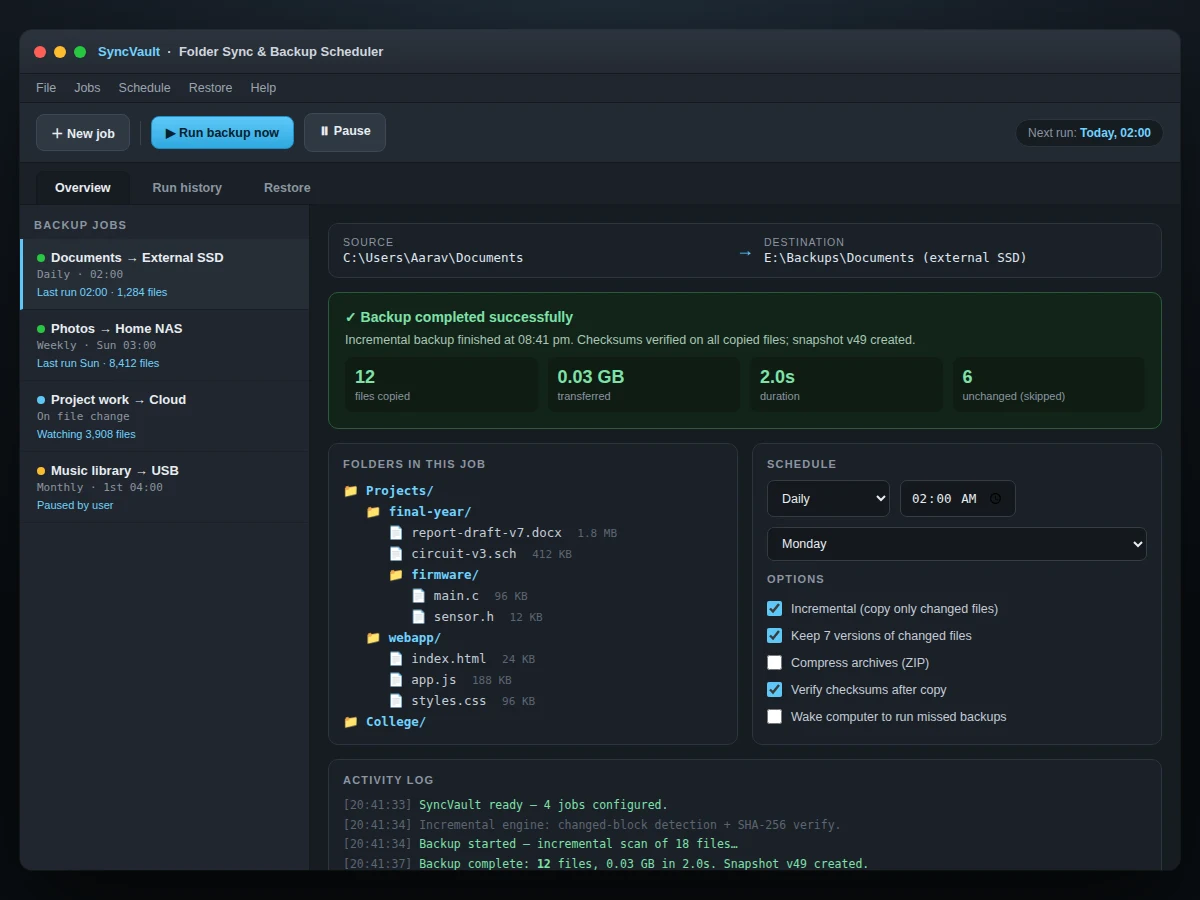
Everyone has lost work to a crashed drive or overwritten the wrong copy of a folder, yet built-in backup tools are either too opaque or too rigid: they run when they want, keep what they want, and explain nothing. This project builds a folder sync and backup scheduler as a desktop-style web app with a real, working sync engine. Users define sync pairs (source ↔ destination), choose one-way mirror or two-way merge, turn on versioned backups with retention policies, and schedule runs on a cron-style timetable. Every run is previewable as a dry run first: the engine lists exactly which files will be copied, updated, deleted or skipped, with SHA-256 hashes proving what changed. Conflicts in two-way sync are surfaced rather than silently overwritten, and a timestamped run log records every action. Because the engine is implemented from scratch in JavaScript with an honest in-browser virtual filesystem, the report can explain change detection, hashing and scheduling precisely.
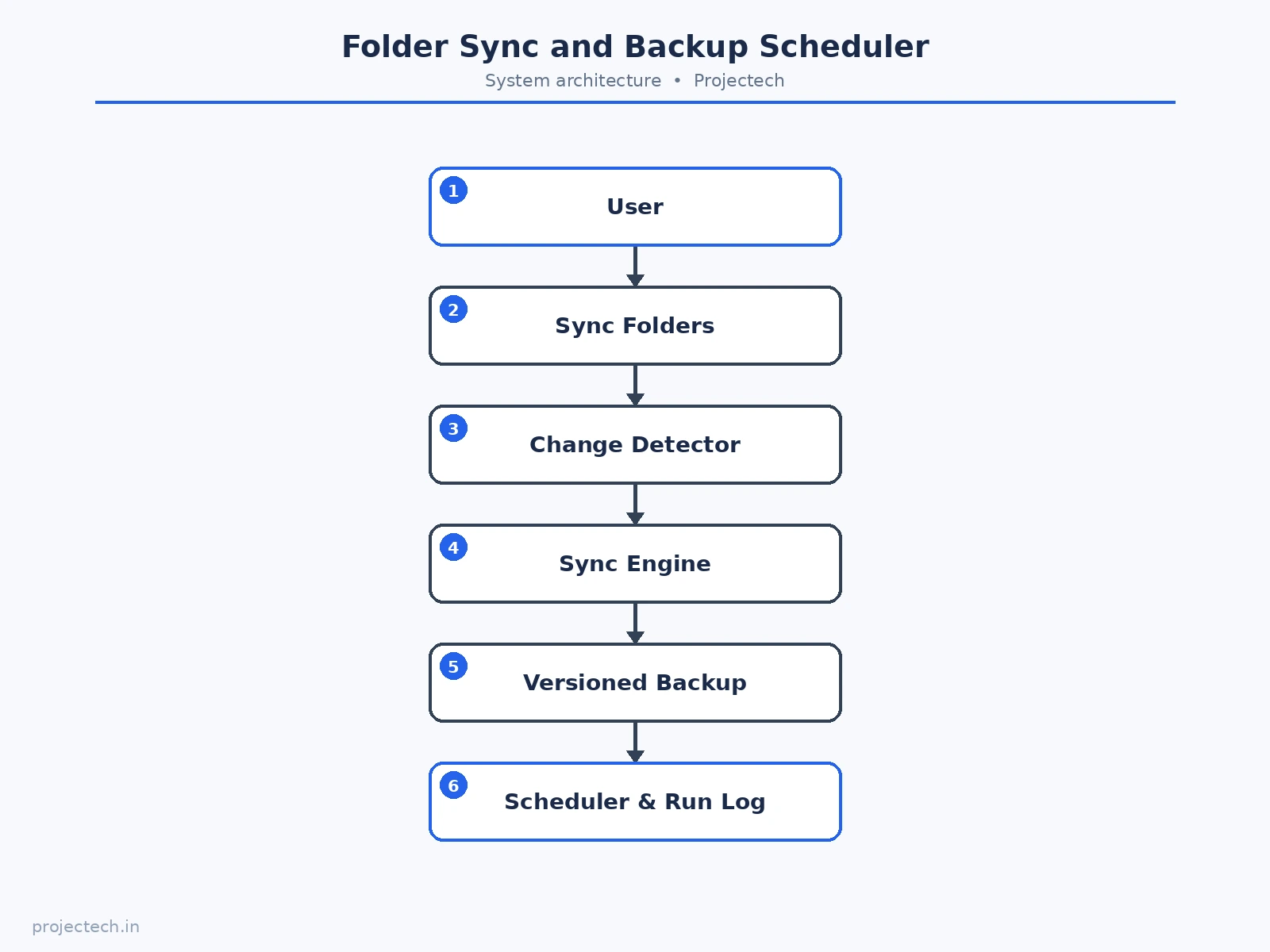
Creates sync pairs, approves the dry-run plan and restores files from the versions store.
Follow the working sequence
How it works
- The user creates a sync pair: a source folder, a destination folder, and a mode (one-way mirror or two-way merge).
- On scan, the engine walks both trees and compares size, modification time and SHA-256 hash per file.
- Differences are classified into actions: copy new, update changed, delete orphaned (mirror mode), or flag conflict (two-way mode, both sides changed).
- The dry-run view lists every planned action; the user approves before the engine executes.
- With versioning on, overwritten or deleted files are first copied into a timestamped versions store honoring the retention count.
- Scheduled pairs run automatically on their cron timetable; each run appends to the history with per-file results.
- The backup browser lets the user inspect versions and restore any file to its chosen state.
Tech stack:
- JavaScript sync engine (from scratch)
- SHA-256 file hashing
- Virtual filesystem layer
- Cron-style scheduler
- Single-file web app
- LocalStorage persistence
| Parameter | Value |
|---|---|
| Sync modes | One-way mirror; two-way merge |
| Change detection | Size + mtime + SHA-256 |
| Versioning | N versions per file, configurable retention |
| Scheduling | Per-pair cron-style timetables |
| Dry run | Full action preview before execute |
| Conflicts | Flagged for user decision, never auto-overwritten |
| Demo data | Realistic virtual folder tree included |
| Persistence | Pairs, schedules and history in LocalStorage |
Project features
- [Real sync engine] Change detection by size, mtime and SHA-256 hash; one-way mirror and two-way merge modes; conflicts flagged, never silently overwritten.
- [Dry-run previews] Every sync pair shows exactly what the next run will copy, update, delete or skip before anything is touched.
- [Versioned backups] Keep N versions of changed files with configurable retention; restore any version from the backup browser.
- [Cron-style scheduler] Minute/hour/day/week timetables per sync pair, with next-run countdown and a full history of past runs.
- [Run log with hashes] A timestamped log records each action with file hashes, doubling as an audit trail and a viva teaching aid.
- [Bandwidth-friendly incrementals] Only changed blocks are logically recopied; unchanged files are skipped by hash comparison.
- [Virtual filesystem demo] The demo ships with a realistic sample folder tree so every feature is exercisable without touching real disks.
What is included
- Single-file folder sync and backup scheduler app (working demo)
- Complete sync engine source (scan, diff, hash, execute, schedule)
- User guide: pairs, modes, versioning, schedules
- Project report PDF (change detection, hashing, scheduling theory)
- PPT presentation for final review
- Viva Q&A preparation document
Limitations & prerequisites
- The demo runs against an in-browser virtual filesystem; the shipped desktop build adapts the same engine to real disks (documented in the report).
- Two-way merge flags conflicts for the user instead of auto-merging file contents — binary files cannot be merged.
- SHA-256 hashing of very large trees takes time proportional to data size; the scheduler staggers pairs to stay responsive.
- Network destinations (NAS/SFTP) are future scope; the base build targets local folders.
- Schedule precision is to the minute; sub-minute intervals are not supported.
- Retention is count-based per file, not global quota-based.
Frequently Asked Questions
How does it detect changed files?
Each scan compares file size, modification time and a SHA-256 hash. Size/mtime give a fast first pass; the hash confirms real content changes, so timestamp-only touches don't trigger useless copies.
What happens when both sides change in two-way mode?
The pair is flagged as a conflict and shown to the user with both versions' details. Nothing is overwritten automatically — the user picks which side wins or keeps both.
Does it really do incremental backups?
Yes. Unchanged files are skipped by hash comparison, so a run only copies what actually changed. Versioning stores the replaced copies with timestamps under the retention policy.
Can I see what a run will do before it runs?
That is the dry-run view: every planned copy, update, delete and skip is listed per file before you approve execution. Scheduled runs log the same detail afterwards.
Where is my data stored?
Sync pairs, schedules and run history persist in the browser's LocalStorage in the demo; the report documents the desktop build's on-disk layout.
Is this project suitable for a final-year project?
Yes — for Computer Science and IT programs. It covers file systems, hashing, diff algorithms, scheduling and desktop application design, all working live in the demo. Suitable for B.E./B.Tech final-year projects in Computer Science and IT.
Components & software requirements
- JavaScript sync engine (from scratch)
- SHA-256 file hashing
- Virtual filesystem layer
- Cron-style scheduler
- Single-file web app
- LocalStorage persistence
Delivery information
Built-to-order project. Delivery timeline is shared after order confirmation based on current queue.
Support terms
Complete documentation, setup guide, and viva preparation included. Support for setup and explanation provided.
Download free synopsis (PDF)
Enter your name and WhatsApp number — the synopsis PDF downloads immediately. We may send occasional project updates on WhatsApp; no spam.