
More project photos (2)
The problem
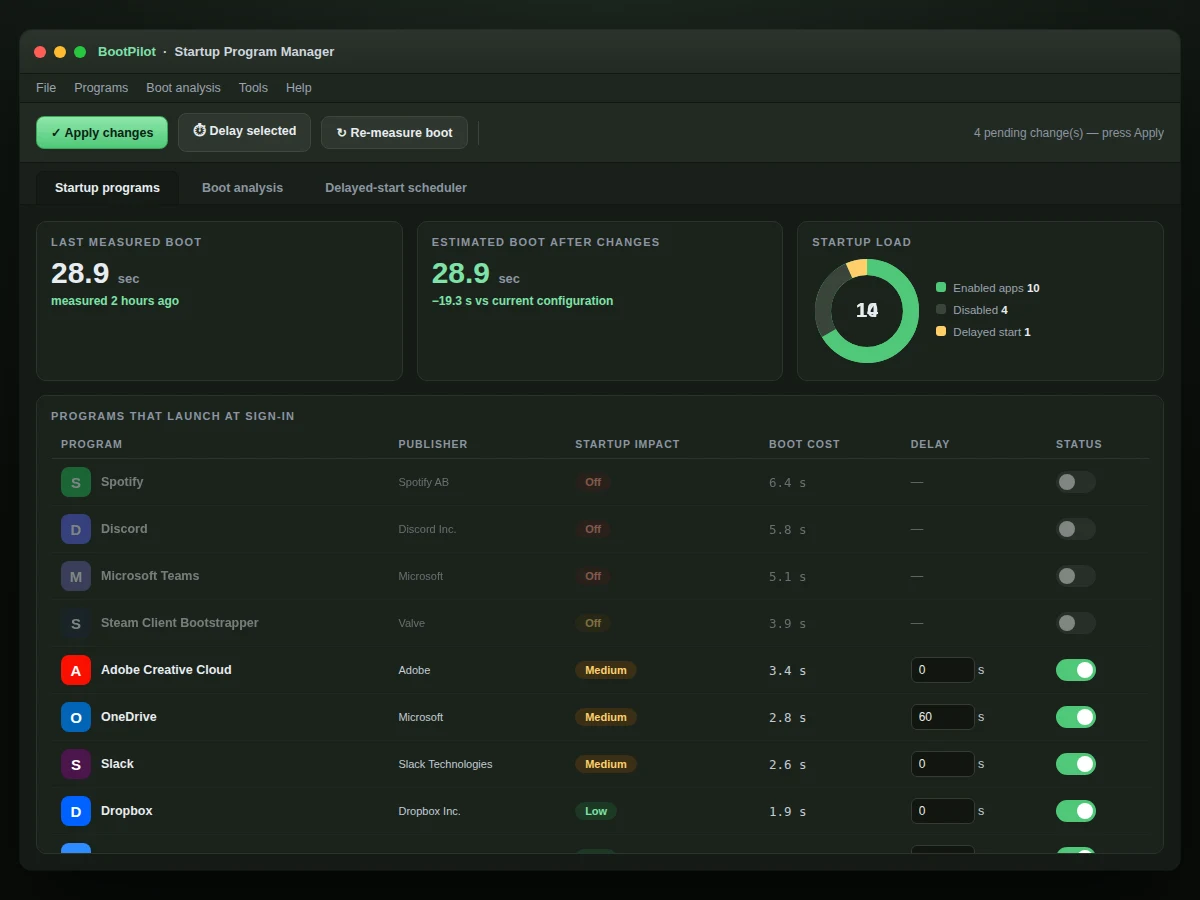
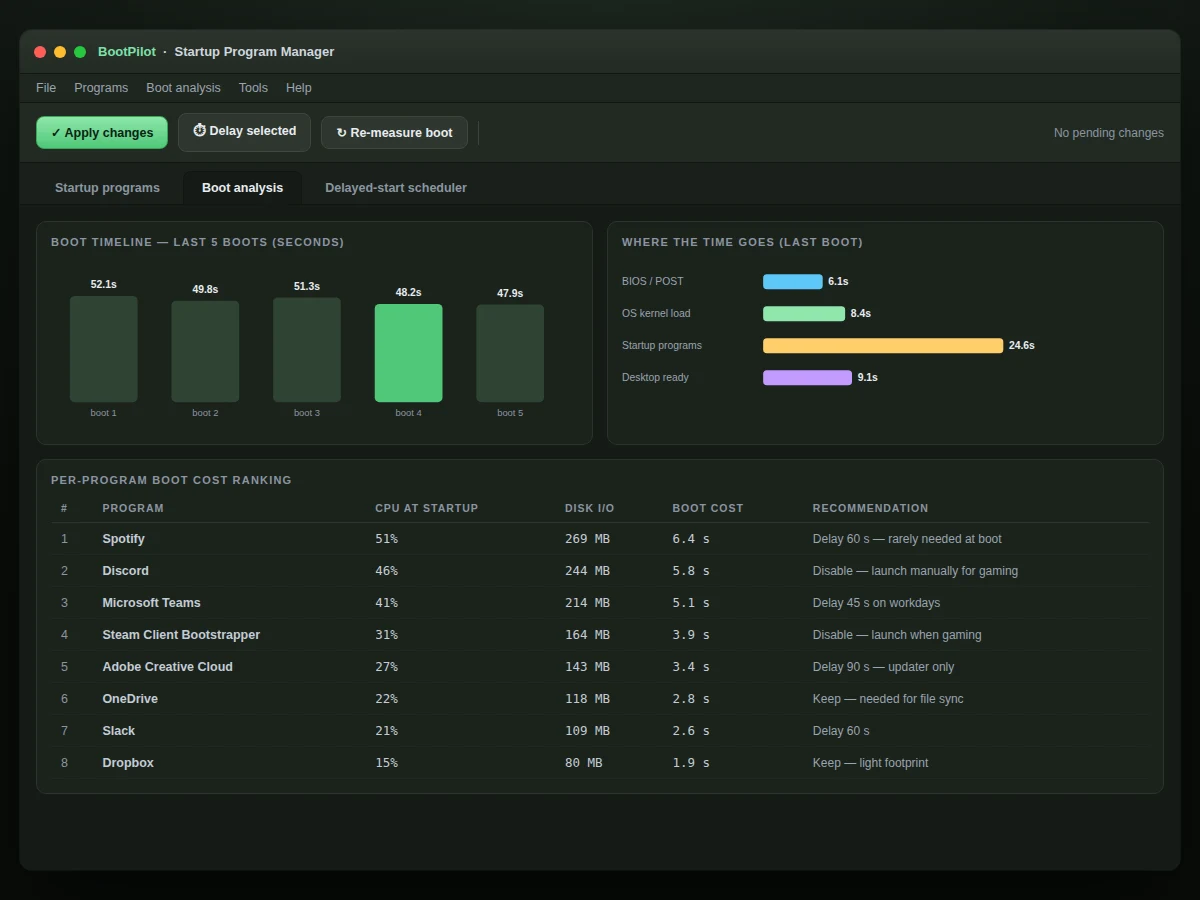
Every program that adds itself to startup makes your boot a little slower, and the built-in tools show you a flat list with no guidance about what is safe to touch. This project builds a startup program manager that treats boot as a measurable system: it inventories auto-start entries across the standard launch points (registry Run keys, Startup folders, scheduled tasks, services), scores each entry's impact on boot time from its measured load profile, and lets the user disable, delay, or re-enable items with one-click undo. A boot timeline visualizes the sequence — what loads when, what waits on what — and a simulator shows the projected boot time as entries are toggled. Safety is the core design constraint: entries are classified by risk, critical system components are locked against disabling, and every change is reversible. The demo runs against a realistic dataset of 40+ Windows-style startup entries so every feature is exercisable.
How it works
- On launch, the manager scans the standard auto-start locations and builds the inventory with metadata per entry.
- Each entry's impact score is computed from its load profile: startup CPU/disk cost plus its position in the dependency chain.
- The boot timeline lays entries on a time axis, honoring dependencies (services before dependents, delayed items shifted right).
- Toggling an entry off removes its bar from the timeline; delaying shifts it; the simulator recomputes total boot time instantly.
- Risk rules lock critical system entries against disabling and warn on caution-level ones before applying.
- Every change is recorded in an action history with one-click undo restoring the previous state.
- Export produces a before/after boot report summarizing disabled, delayed and kept entries with projected savings.
Tech stack:
- JavaScript (ES6+)
- Boot sequence model
- Impact scoring engine
- Timeline visualization (canvas)
- Single-file web app
- Realistic 40+ entry dataset
| Parameter | Value |
|---|---|
| Inventory sources | Registry Run keys, Startup folders, tasks, services |
| Demo entries | 40+ realistic Windows-style entries |
| Impact model | CPU + disk + dependency-chain scoring |
| Actions | Enable, disable, delay, undo |
| Safety | Critical entries locked; risk labels |
| Simulation | Live projected boot-time recompute |
| Export | Before/after boot report |
| Platform | Single-file web app; Windows build documented |
Project features
- [Complete startup inventory] 40+ realistic entries across registry Run keys, Startup folders, scheduled tasks and services, each with publisher, launch point and command line.
- [Boot impact scoring] Each entry gets an impact score from its load profile (CPU, disk, delay), so users see exactly what costs boot seconds.
- [Safe enable/disable with undo] Toggle entries freely; critical system items are locked, and every change can be reverted in one click.
- [Delayed start] Defer non-urgent apps by a configurable delay so the desktop becomes usable faster.
- [Boot timeline visualization] A timeline shows the boot sequence with per-entry bars, dependencies and the critical path.
- [Boot time simulator] Toggle or delay entries and watch the projected total boot time update live.
- [Risk classification] Entries are labeled safe, caution or critical based on publisher and launch point, guiding non-expert users.
What is included
- Single-file startup manager app (working demo)
- Boot model and impact-scoring source code
- 40+ entry realistic dataset
- User guide: reading the timeline, safe toggling
- Project report PDF (OS boot process, autostart mechanisms, scoring model)
- PPT presentation for final review
- Viva Q&A preparation document
Limitations & prerequisites
- The demo manages a realistic simulated entry set; the shipped Windows build hooks the real registry/task APIs (documented in the report).
- Impact scores are computed from modeled load profiles, not measured traces on the user's machine — stated as estimates throughout the UI.
- Delaying startup items improves time-to-usable-desktop, not total background load.
- Disabling the wrong third-party entry can break that app's features; the undo history is the safety net, not a guarantee.
- macOS/Linux autostart mechanisms (LaunchAgents, systemd) are future scope.
- The simulator assumes sequential-with-overlap loading; heavily parallel SSD boots will differ.
Frequently Asked Questions
How is this different from Task Manager's Startup tab?
Task Manager shows a flat list with a vague impact label. This manager adds a boot timeline with dependencies, per-entry impact scores, delayed starts, a live boot-time simulator and one-click undo — a full management workflow, not just a list.
Is it safe to disable things?
The app classifies every entry by risk and hard-locks critical system components so they cannot be disabled. Caution-level items show a warning first, and everything is reversible from the action history.
How are impact scores calculated?
From each entry's modeled load profile — CPU cost, disk cost and where it sits in the dependency chain. The UI labels them as estimates, and the report documents the scoring formula for the viva.
What does delayed start do?
It shifts a non-urgent app later in the boot sequence by your chosen delay, so the desktop becomes responsive sooner while the app still launches automatically.
Can I undo a change?
Yes — every enable, disable and delay is recorded in the action history with one-click undo, and the boot report shows before/after states.
Is this project suitable for a final-year project?
Yes — for Computer Science and IT programs. It covers operating-system boot concepts, autostart mechanisms, performance modeling and desktop UI design. Suitable for B.E./B.Tech final-year projects in Computer Science and IT.
Components & software requirements
- JavaScript (ES6+)
- Boot sequence model
- Impact scoring engine
- Timeline visualization (canvas)
- Single-file web app
- Realistic 40+ entry dataset
Delivery information
Built-to-order project. Delivery timeline is shared after order confirmation based on current queue.
Support terms
Complete documentation, setup guide, and viva preparation included. Support for setup and explanation provided.