
More project photos (2)
The problem
Teams that share drafts, certificates or invoices constantly need the same stamp — DRAFT, CONFIDENTIAL, a company name — across dozens of PDFs, and doing it one file at a time is pure drudgery. This project builds a batch PDF watermark tool as a single-file web app: queue any number of PDFs, design the watermark with full typographic control, preview it on the actual pages before committing, and process the entire batch with per-file download links. The watermarking is genuinely implemented — PDFs are parsed and rebuilt in the browser with embedded libraries, text is stamped at the PDF content level (not burned into images), and original page sizes are preserved. Because everything runs client-side, sensitive documents never leave the user's machine — a real privacy argument, not a marketing line.
How it works
- The user drops PDF files into the queue; each is parsed in the browser and its page count and size are listed.
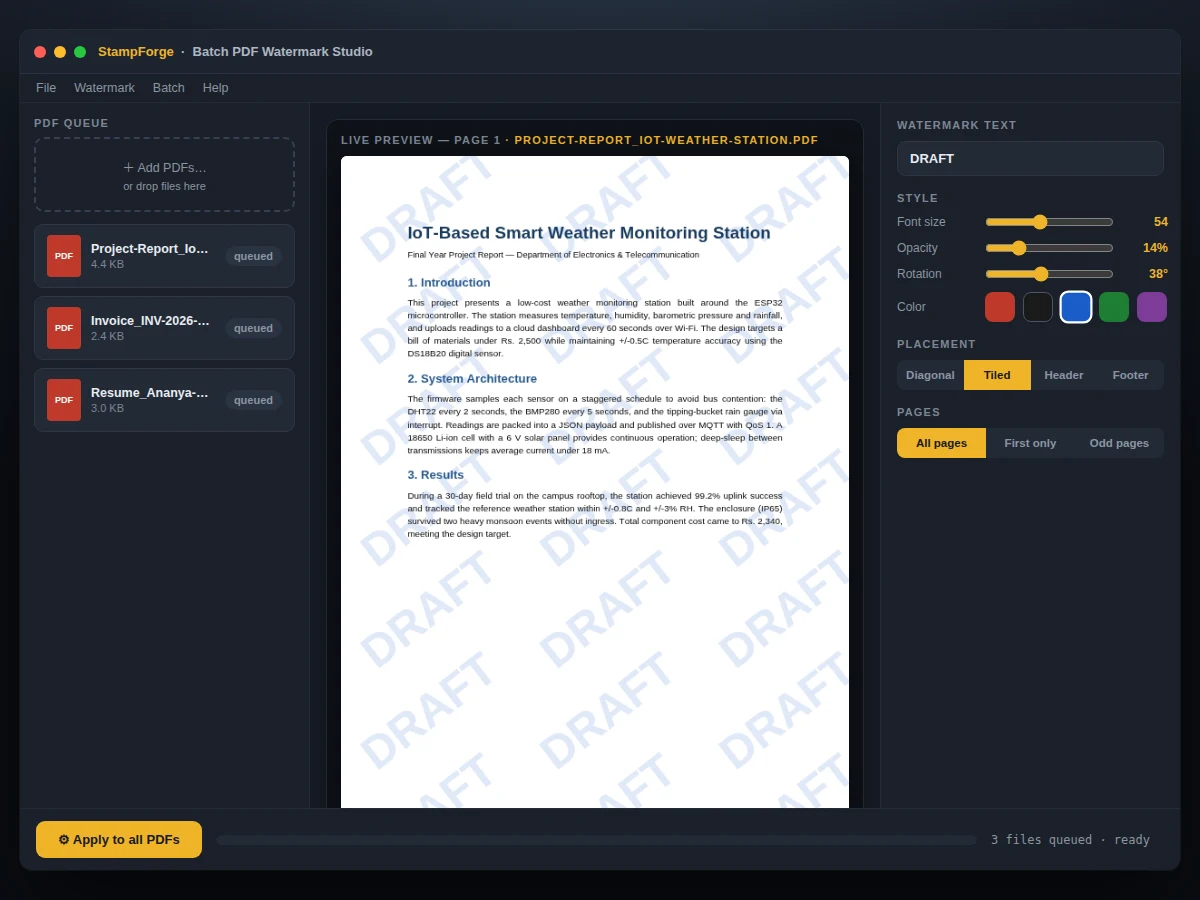
- The watermark designer sets text, font, size, color, opacity (0–100%), rotation, placement pattern and page scope.
- A live preview renders the watermark over the first page of the selected document at the chosen settings.
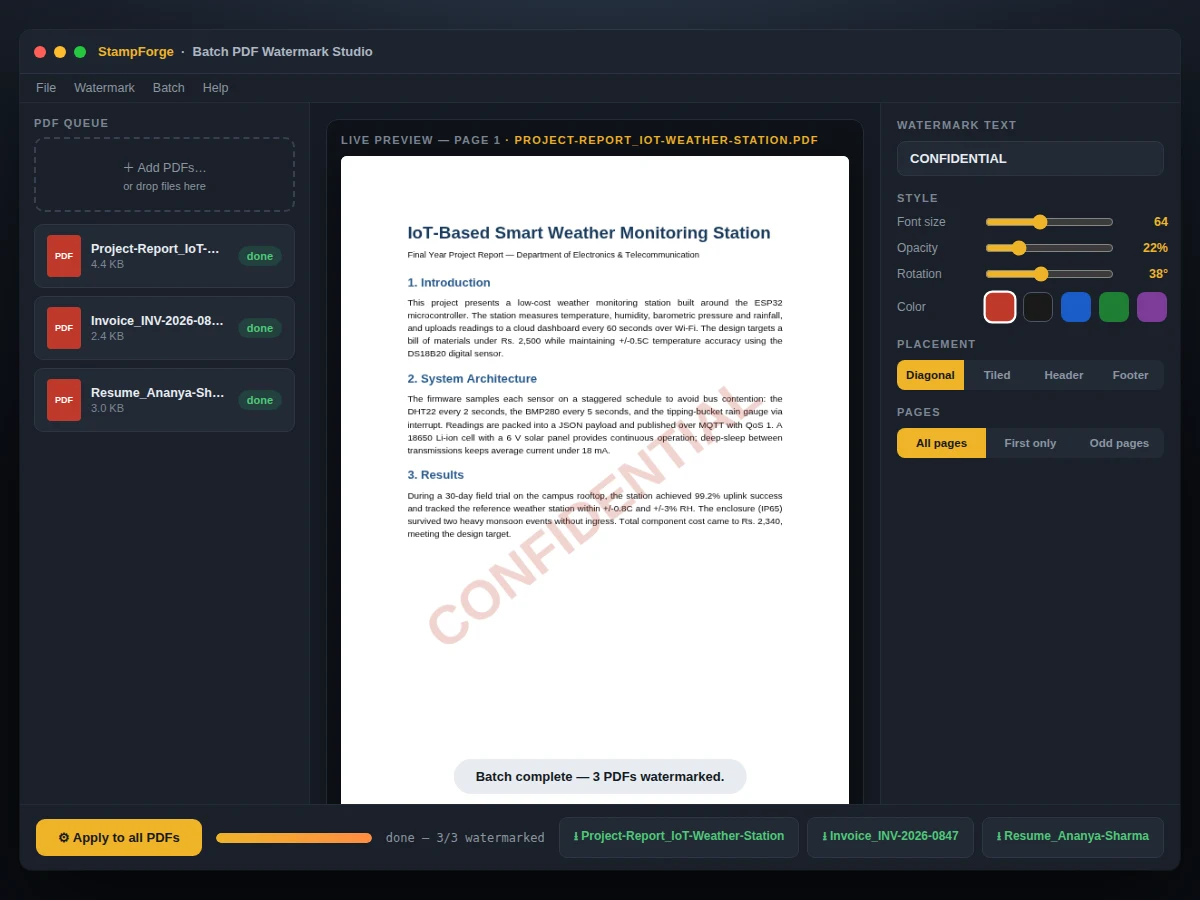
- On process, the engine iterates the queue: for each PDF it opens every in-scope page and draws the watermark text into the content stream.
- Tiled mode repeats the stamp in a grid; single mode places one instance per the position preset (center, diagonal, header, footer).
- Each finished file is offered as a download with its original filename plus a suffix; the log records pages stamped per file.
- Presets can be saved, renamed and reapplied to future batches without re-entering settings.
Tech stack:
- JavaScript (ES6+)
- pdf.js (rendering/preview)
- pdf-lib (stamping)
- In-browser PDF parsing
- Single-file web app
- LocalStorage presets
| Parameter | Value |
|---|---|
| Input | PDF files, any page size, queued in batch |
| Watermark | Text; font/size/color/opacity/rotation |
| Placement | Tiled grid or single; 5 position presets |
| Scope | All pages or first page only |
| Output | PDF, original pages preserved + watermark layer |
| Preview | Live render on real first page |
| Presets | Named, persisted in LocalStorage |
| Privacy | 100% client-side; zero uploads |
Project features
- [True batch processing] Queue unlimited PDFs; the engine stamps each file in turn with a progress log and per-file download links at the end.
- [Full watermark design] Text content, font family, size, color, opacity, rotation angle, grid/tiled or single placement, per-page or first-page-only.
- [Live preview] See the watermark on the document's real first page before processing — what you see is what gets stamped.
- [Watermark presets] Save and reuse named presets (e.g. DRAFT diagonal, CONFIDENTIAL footer) across sessions.
- [Client-side PDF engine] Real PDF parsing and generation in the browser; documents never upload anywhere.
- [Page-size preserving] Original page dimensions, content and metadata are preserved; only the watermark layer is added.
- [Sample PDFs included] Three realistic sample documents ship with the demo so the batch workflow is testable immediately.
What is included
- Single-file batch watermarking app (working demo)
- 3 realistic sample PDFs for testing
- Watermark preset system with starter presets
- User guide: design, batch runs, presets
- Project report PDF (PDF format internals, content streams, text rendering)
- PPT presentation for final review
- Viva Q&A preparation document
Limitations & prerequisites
- Text watermarks only — image/logo watermarks are future scope.
- Password-protected or encrypted PDFs cannot be opened by the browser engine.
- Very large PDFs (hundreds of pages) process page-by-page; expect proportionally longer runs.
- Scanned-image PDFs accept watermarks fine, but text underneath remains non-selectable as before.
- Font support is limited to the standard PDF base fonts plus embedded options documented in the guide.
- The tool adds watermarks; it does not remove them (removal would defeat the purpose).
Frequently Asked Questions
Does it upload my PDFs to a server?
No. Parsing, preview rendering and stamping all happen in your browser with embedded JavaScript libraries. Your documents never leave your machine, which matters for confidential files.
Is the watermark part of the PDF or just an image overlay?
It is stamped into the PDF content stream as real text at the chosen opacity, so it scales with zoom, survives printing, and sits correctly on every page size.
Can I watermark many files at once?
Yes — that is the point of the batch queue. Drop in any number of PDFs, design the watermark once, and process the whole batch with per-file downloads.
Can I reuse my watermark settings?
Named presets store the full design (text, font, size, color, opacity, rotation, placement) in LocalStorage, so a DRAFT or CONFIDENTIAL stamp is one click next time.
Will it work on scanned PDFs?
Yes. The watermark is added as a new layer above the scanned image content, so it renders correctly on scans too.
Is this project suitable for a final-year project?
Yes — for Computer Science and IT programs. It covers the PDF file format, content streams, client-side document processing and batch workflow design. Suitable for B.E./B.Tech final-year projects in Computer Science and IT.
Components & software requirements
- JavaScript (ES6+)
- pdf.js (rendering/preview)
- pdf-lib (stamping)
- In-browser PDF parsing
- Single-file web app
- LocalStorage presets
Delivery information
Built-to-order project. Delivery timeline is shared after order confirmation based on current queue.
Support terms
Complete documentation, setup guide, and viva preparation included. Support for setup and explanation provided.