
More project photos (2)
The problem
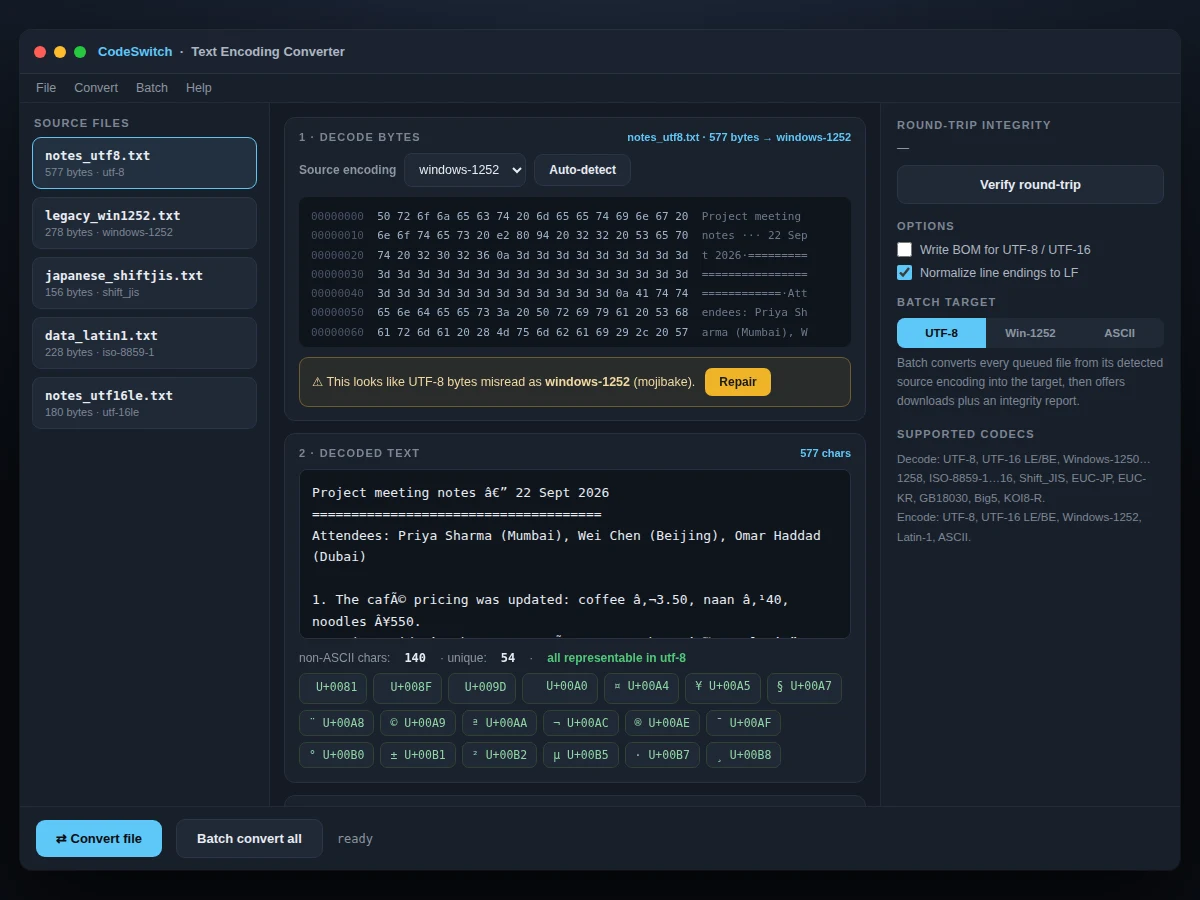
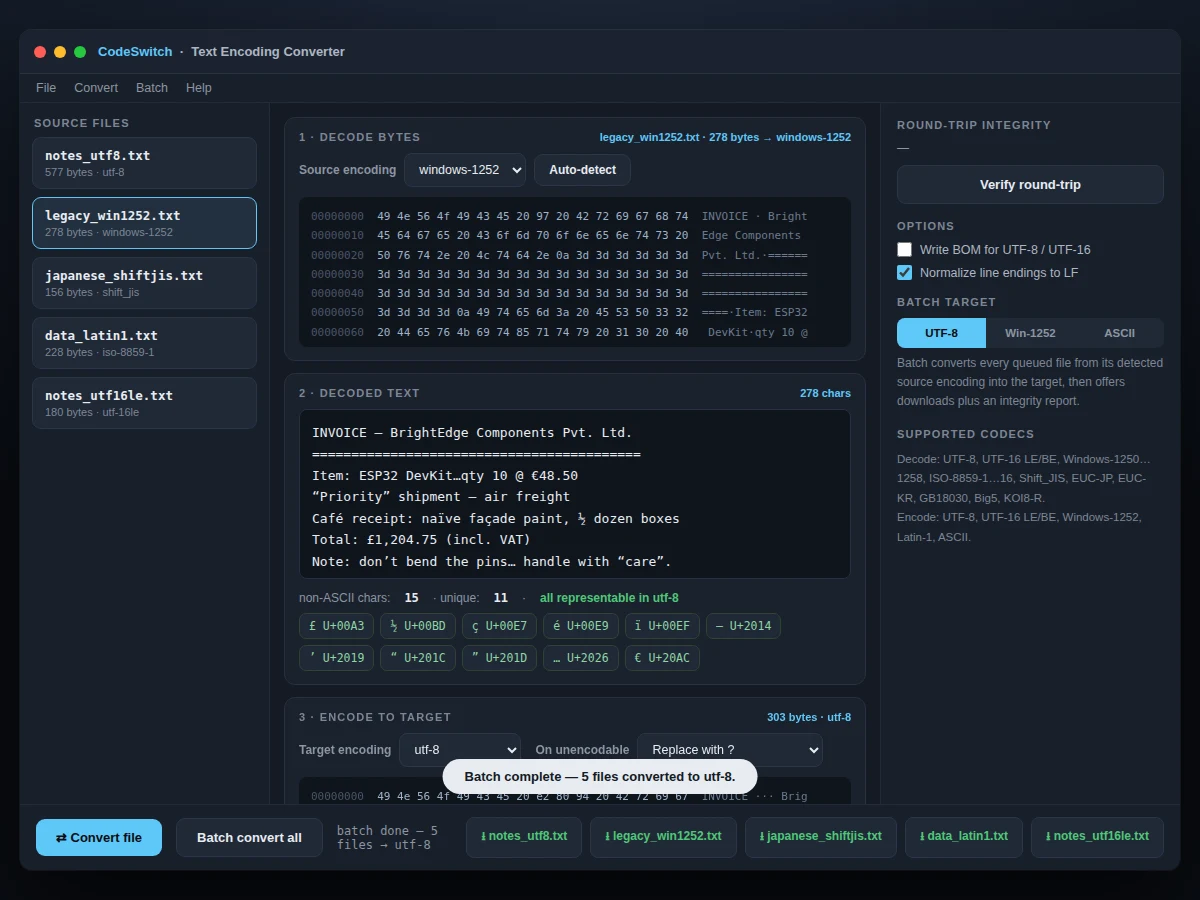
Open a legacy file in the wrong encoding and you get mojibake — 'café' becomes 'café' — and whole archives of old documents are unreadable without conversion tooling. This project builds a text encoding converter as a single-file web app with a genuinely implemented pipeline. Source files are decoded with the platform's TextDecoder across 14+ encodings (Windows-1250…1258, ISO-8859-1…16, Shift_JIS, EUC-JP, EUC-KR, GB18030, Big5, KOI8-R, UTF-16 LE/BE); target encoders for UTF-8, UTF-16 LE/BE, Windows-1252, Latin-1 and ASCII are hand-written, with four strategies for unencodable characters (replace, drop, HTML-escape, transliterate). A character inventory shows every non-ASCII code point and flags exactly which ones a target cannot represent. The mojibake detector spots UTF-8 bytes misread as legacy encodings and repairs them in one click, and a round-trip verifier proves lossless conversion. Batch mode converts entire queues with a per-file integrity report.
How it works
- The user picks a queued sample file (or the demo's real multi-encoding corpus) and selects its source encoding, or runs auto-detect (BOM sniffing + strict UTF-8 test + CJK heuristics).
- TextDecoder decodes the raw bytes; the decoded text appears in the editor with an offset hex dump of the source bytes beside it.
- The character inventory scans the text for non-ASCII code points and marks which ones the selected target encoding can represent.
- If the bytes are valid UTF-8 but were decoded as a legacy encoding, the mojibake banner appears with a one-click Repair that reinterprets them as UTF-8.
- The hand-written target encoder converts the text; unencodable characters follow the chosen strategy (replace/drop/escape/transliterate), with optional BOM.
- The output hex dump and byte counts update live; the round-trip verifier re-decodes the output and reports lossless or lossy.
- Batch mode decodes each file from its own source encoding, converts to the batch target, and emits downloads plus a per-file integrity report.
Tech stack:
- JavaScript (ES6+)
- TextDecoder API
- Hand-written encoders
- Windows-1252 mapping tables
- Transliteration tables
- Hex dump renderer
- Single-file web app
| Parameter | Value |
|---|---|
| Decode | 14+ encodings via TextDecoder |
| Encode targets | UTF-8, UTF-16 LE/BE, Win-1252, Latin-1, ASCII |
| Strategies | Replace, drop, HTML-escape, transliterate |
| Mojibake | Detect + one-click repair |
| Round-trip | Lossless/lossy verifier |
| Batch | Whole-queue conversion + integrity report |
| Inspection | Hex dumps + character inventory |
| Samples | 5 real multi-encoding files included |
Project features
- [14+ source encodings] Real TextDecoder-based decoding: Windows-1250…1258, ISO-8859-1…16, Shift_JIS, EUC-JP/KR, GB18030, Big5, KOI8-R, UTF-16 LE/BE.
- [Hand-written target encoders] UTF-8, UTF-16 LE/BE, Windows-1252 (with 0x80–0x9F mapping table), Latin-1 and ASCII encoders implemented from scratch.
- [Unencodable strategies] Replace with ?, drop, HTML-escape as &#xHHHH;, or transliterate (é→e, €→EUR) — user selectable per conversion.
- [Mojibake detection + repair] Spots UTF-8 bytes misdecoded as legacy text and reinterprets them correctly in one click.
- [Character inventory] Every non-ASCII code point listed with U+ values; flags exactly which ones the target encoding cannot represent.
- [Round-trip verifier] Encode→decode→compare proves whether a conversion was lossless.
- [Batch conversion] Convert whole file queues to a target encoding with per-file lossless/lossy integrity reporting and downloads.
- [Hex viewers] Offset-annotated hex dumps of source and output bytes for byte-level inspection.
What is included
- Single-file encoding converter app (working demo)
- 5 real sample files in UTF-8, Windows-1252, Shift_JIS, Latin-1, UTF-16LE
- Hand-written target encoder source code
- User guide: encodings, strategies, mojibake repair
- Project report PDF (character encoding theory, Unicode, codec design)
- PPT presentation for final review
- Viva Q&A preparation document
Limitations & prerequisites
- Decoding relies on the browser's TextDecoder; encodings the platform lacks cannot be added without a pure-JS codec.
- Auto-detect is heuristic (BOM + UTF-8 strictness + byte patterns) — ambiguous files may need manual selection, and the UI says so.
- Transliteration covers common Latin diacritics and symbols; CJK characters have no transliteration and fall back to the chosen strategy.
- The demo's sample corpus is fixed; users convert their own files by extending the queue (documented).
- Line-ending normalization is optional and defaults to LF — noted in the UI rather than silently applied.
- No charset conversion claims are made beyond what the verifier proves lossless.
Frequently Asked Questions
What is mojibake and how does the repair work?
Mojibake is readable text garbled by decoding bytes with the wrong encoding — e.g. UTF-8 bytes read as Windows-1252 turn 'café' into 'café'. The detector checks whether the raw bytes are valid UTF-8 that was misdecoded, and Repair simply re-decodes them as UTF-8.
Which encodings are supported?
Decoding covers 14+ legacy encodings via TextDecoder: Windows-1250 through 1258, ISO-8859-1 through 16, Shift_JIS, EUC-JP, EUC-KR, GB18030, Big5, KOI8-R, plus UTF-16 LE/BE. Encoding targets are UTF-8, UTF-16 LE/BE, Windows-1252, Latin-1 and ASCII, hand-written.
What happens to characters the target can't represent?
You choose: replace with ?, drop them, HTML-escape as &#xHHHH;, or transliterate (é→e, €→EUR). The character inventory shows in advance exactly which code points are affected.
How do I know a conversion was lossless?
The round-trip verifier re-decodes the output bytes and compares against the source text, reporting lossless or pinpointing the loss. Batch mode includes this per file in its integrity report.
Does it handle Japanese/Chinese/Korean files?
Yes for decoding — Shift_JIS, EUC-JP, EUC-KR, GB18030 and Big5 are all supported source encodings, with real sample files in the demo corpus.
Is this project suitable for a final-year project?
Yes — for Computer Science and IT programs. It covers character encoding theory, Unicode, codec implementation and data-integrity verification, all working live. Suitable for B.E./B.Tech final-year projects in Computer Science and IT.
Components & software requirements
- JavaScript (ES6+)
- TextDecoder API
- Hand-written encoders
- Windows-1252 mapping tables
- Transliteration tables
- Hex dump renderer
- Single-file web app
Delivery information
Built-to-order project. Delivery timeline is shared after order confirmation based on current queue.
Support terms
Complete documentation, setup guide, and viva preparation included. Support for setup and explanation provided.