
More project photos (3)
The problem
During exam season, students wander library floors hunting for a free desk while half the "occupied" seats sit empty — bags reserving desks for absent owners. The library has no data: no occupancy counts, no peak-hour picture, no way to plan. Camera-based counting exists but raises privacy objections and costs. This project takes the sensor-fusion route: a thin force-sensitive pad on each desk detects weight, a PIR sensor detects recent movement, and an ESP32 node fuses the two into an occupied/free verdict every 60 seconds. Pressure without recent motion for 20 minutes means the student left (bag or not); motion without sustained pressure means someone just walked past. The dashboard renders the live seat map students check before climbing the stairs, the day's occupancy curve for the librarian, and per-desk statistics that reveal the window-row desks everyone fights over. A kiosk reservation holds a free seat for 15 minutes — long enough to walk over, short enough to prevent hoarding.
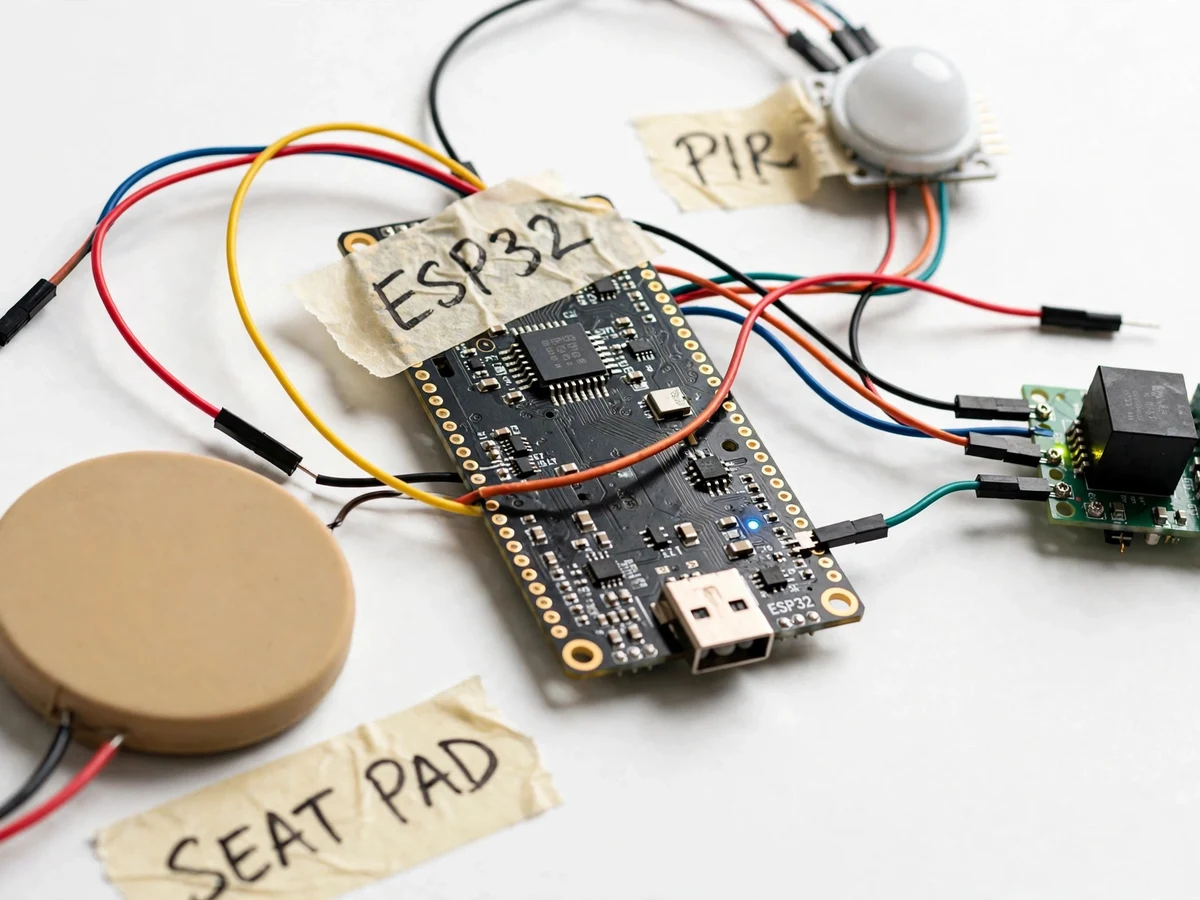
Reports pressure on the desk; sustained pressure is the primary occupied signal.
Follow the working sequence
How it works
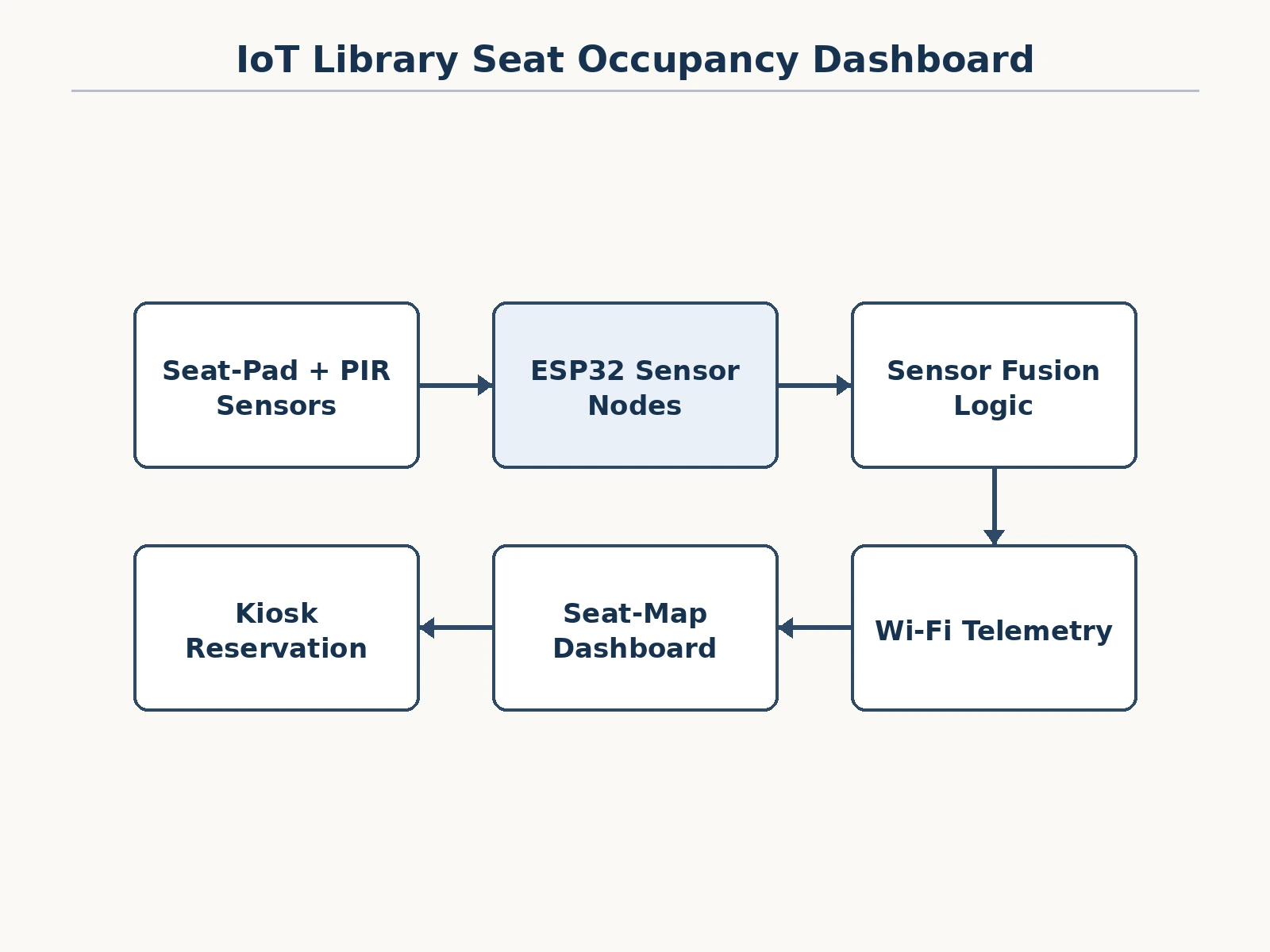
- The force-sensitive pad reports pressure; the PIR reports motion events; the ESP32 node samples both continuously.
- The fusion rule: sustained pressure + motion within the last 20 minutes = occupied; pressure with no motion for 20+ minutes = vacant (bag left behind); motion alone = passer-by, ignored.
- Each node publishes its verdict every 60 seconds over Wi-Fi to the dashboard backend.
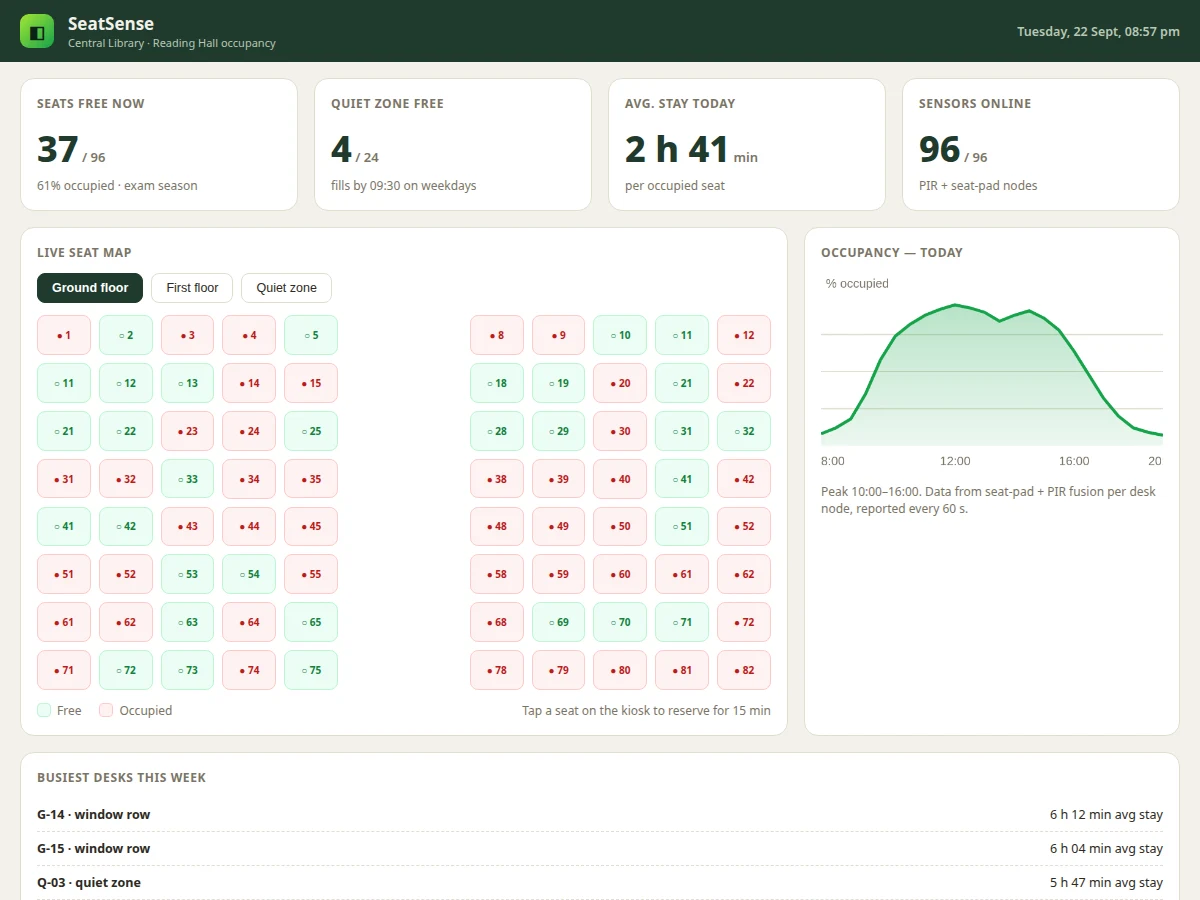
- The dashboard renders the live seat map, colouring each desk free or occupied, with floor and quiet-zone tabs.
- Analytics accumulate: the day curve, average stay, and per-desk busiest lists for the librarian view.
- The kiosk lets a student tap a free seat to hold it for 15 minutes; expiry returns it to the pool automatically.
- The student tunes the pressure threshold and absence timeout on their demo desks using the included procedure.
Tech stack:
- ESP32 sensor nodes
- Force-sensitive resistor pads
- PIR motion sensors
- Wi-Fi telemetry (60 s reports)
- Sensor-fusion firmware logic
- Seat-map dashboard (HTML/CSS/JS)
- Kiosk reservation UI
| Parameter | Value |
|---|---|
| Nodes | 96 desk nodes (design scale; demo ships 4–8) |
| Report interval | 60 s per node |
| Absence timeout | 20 min (configurable) |
| Reservation hold | 15 min, auto-expiry |
| Fusion inputs | Pressure pad + PIR per desk |
| Dashboard views | Floor map, quiet zone, analytics |
| Privacy | No cameras, no personal data |
| Power | USB per desk cluster (design) |
Project features
- [Per-desk sensor nodes] Force-sensitive pad + PIR per desk on ESP32 nodes, reporting occupied/free every 60 seconds.
- [Sensor fusion logic] Pressure AND recent-motion fusion with a 20-minute absence timeout — distinguishes a seated student from an abandoned bag.
- [Live seat map] Floor-wise grid showing free vs occupied seats, updated in real time.
- [Occupancy analytics] Today's curve, peak hours, average stay per seat, and busiest desks of the week.
- [Quiet-zone view] Dedicated view for the silent zone, which fills first on weekdays.
- [15-minute kiosk reservation] Hold a free seat from the kiosk; the hold expires automatically to prevent hoarding.
- [Librarian insights] Peak-hour data and zone utilisation supporting seating and timing decisions.
- [Privacy by design] No cameras, no identities — just binary occupancy per desk.
What is included
- Desk sensor-node prototypes (pad + PIR + ESP32)
- Fusion-logic firmware with tunable thresholds
- Seat-map dashboard web app with kiosk mode
- Threshold-tuning procedure
- Demo desk layout guide
- Project report PDF (background, sensor fusion, occupancy analytics, methodology)
- PPT presentation for final review
- Viva Q&A preparation document (FSR, PIR, fusion logic, privacy, threshold tuning)
Limitations & prerequisites
- PIR detects motion, not presence — the fusion logic handles this, but a perfectly still reader for 20+ minutes reads as absent; the timeout is tunable and the trade-off is documented.
- Force pads drift with temperature and wear; periodic re-tuning is part of the maintenance notes.
- The demo ships 4–8 desk nodes; the 96-desk figure is the design scale for the report's network planning section, not a shipped quantity.
- Reservation is kiosk-based; phone-based booking with identity is future scope (and would change the privacy story).
- Wi-Fi density in a real reading hall needs planning; the deployment notes cover channel and power considerations.
Frequently Asked Questions
Why two sensors per desk instead of just one?
Because each fails differently: a pressure pad can't tell a student from a bag; a PIR can't tell sitting from walking past. Fusing them — pressure plus recent motion — gives a verdict neither can give alone. That fusion logic is the project's technical core.
What about privacy?
There are no cameras and no identities anywhere in the system — just "desk 14: occupied". That is a deliberate design choice, and it is why sensor fusion was chosen over computer vision.
How does the 15-minute reservation work?
Tap a free seat on the kiosk; it shows as held for 15 minutes. Walk over and sit — the sensors take over. Don't arrive in time and it releases automatically, so nobody can hoard seats remotely.
What does the librarian get out of it?
Real data: peak hours, average stay, which zones fill first, busiest desks. That informs opening hours, seat allocation and whether the quiet zone needs expanding.
Can it count people entering the library?
Not in this build — it measures seat occupancy, not footfall. A door-counter extension is listed as future scope.
Is this project suitable for a final-year project?
Yes — for Electronics, Computer Science and IoT programs. It teaches sensor interfacing, fusion logic, real-time dashboards and privacy-aware design. Suitable for B.E./B.Tech final-year projects in Electronics, Computer Science and IoT & Embedded Systems.
Components & software requirements
- ESP32 sensor nodes
- Force-sensitive resistor pads
- PIR motion sensors
- Wi-Fi telemetry (60 s reports)
- Sensor-fusion firmware logic
- Seat-map dashboard (HTML/CSS/JS)
- Kiosk reservation UI
Delivery information
Built-to-order project. Delivery timeline is shared after order confirmation based on current queue.
Support terms
Complete documentation, setup guide, and viva preparation included. Support for setup and explanation provided.
Download free synopsis (PDF)
Enter your name and WhatsApp number — the synopsis PDF downloads immediately. We may send occasional project updates on WhatsApp; no spam.