
More project photos (3)
The problem
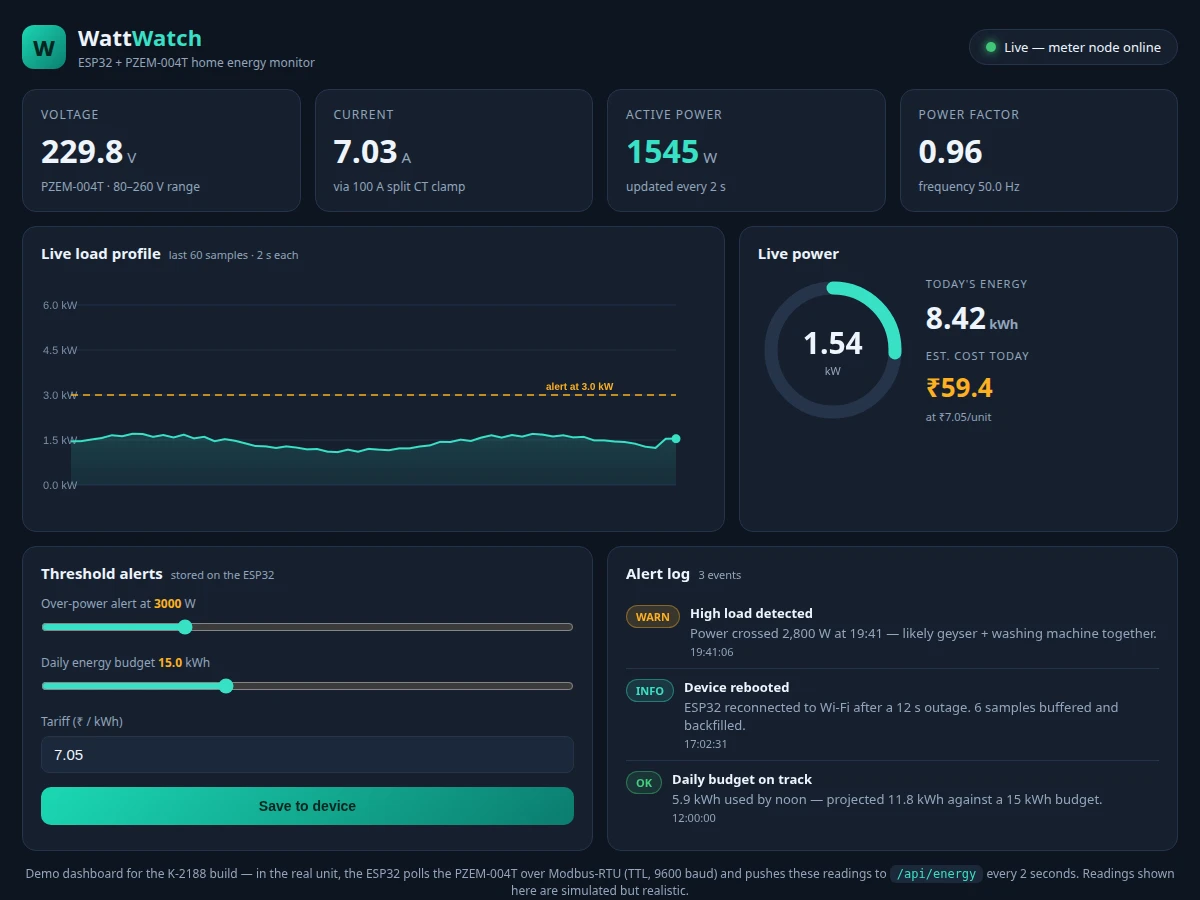
Most homes have no idea which appliances drive their electricity bill — the meter on the wall shows a single cumulative number, and by the time the bill arrives there is nothing left to learn from it. Students who want to build an energy monitor usually start with raw CT sensors and burden resistors, then drown in calibration math and unsafe mains interfacing before anything works. The PZEM-004T changes that equation: it is a self-contained AC measurement module that samples voltage and current, computes active power, power factor, frequency and cumulative energy internally, and reports everything over a simple Modbus-RTU serial link. This project pairs the 100 A variant with an ESP32 that polls the module every two seconds and pushes the readings over Wi-Fi to a companion dashboard — a live load curve, a power gauge, today's kWh, a tariff-based cost estimate, and threshold alerts you configure yourself. It is a genuinely useful build: you can watch a geyser switching on as a 2 kW step on the curve, and the report documents exactly how the numbers were calibrated.
How it works
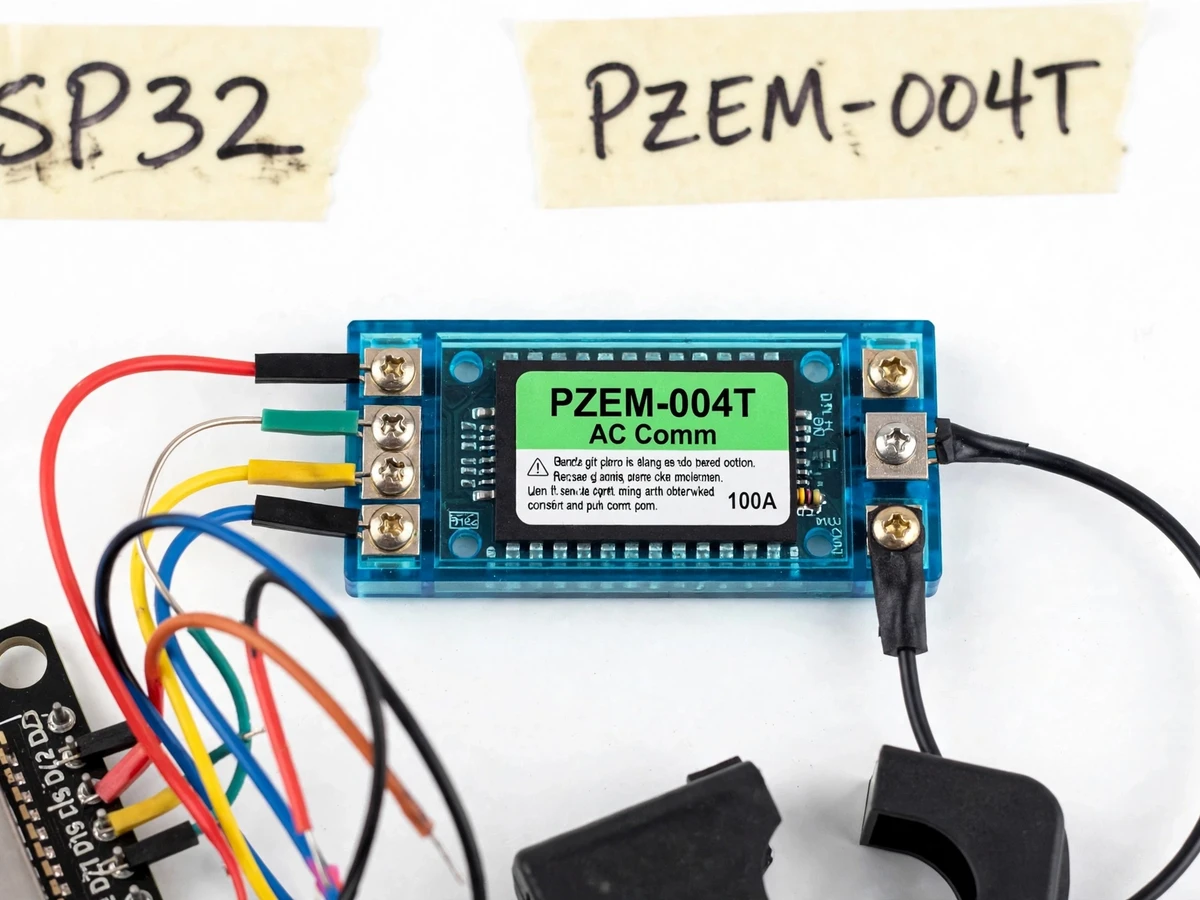
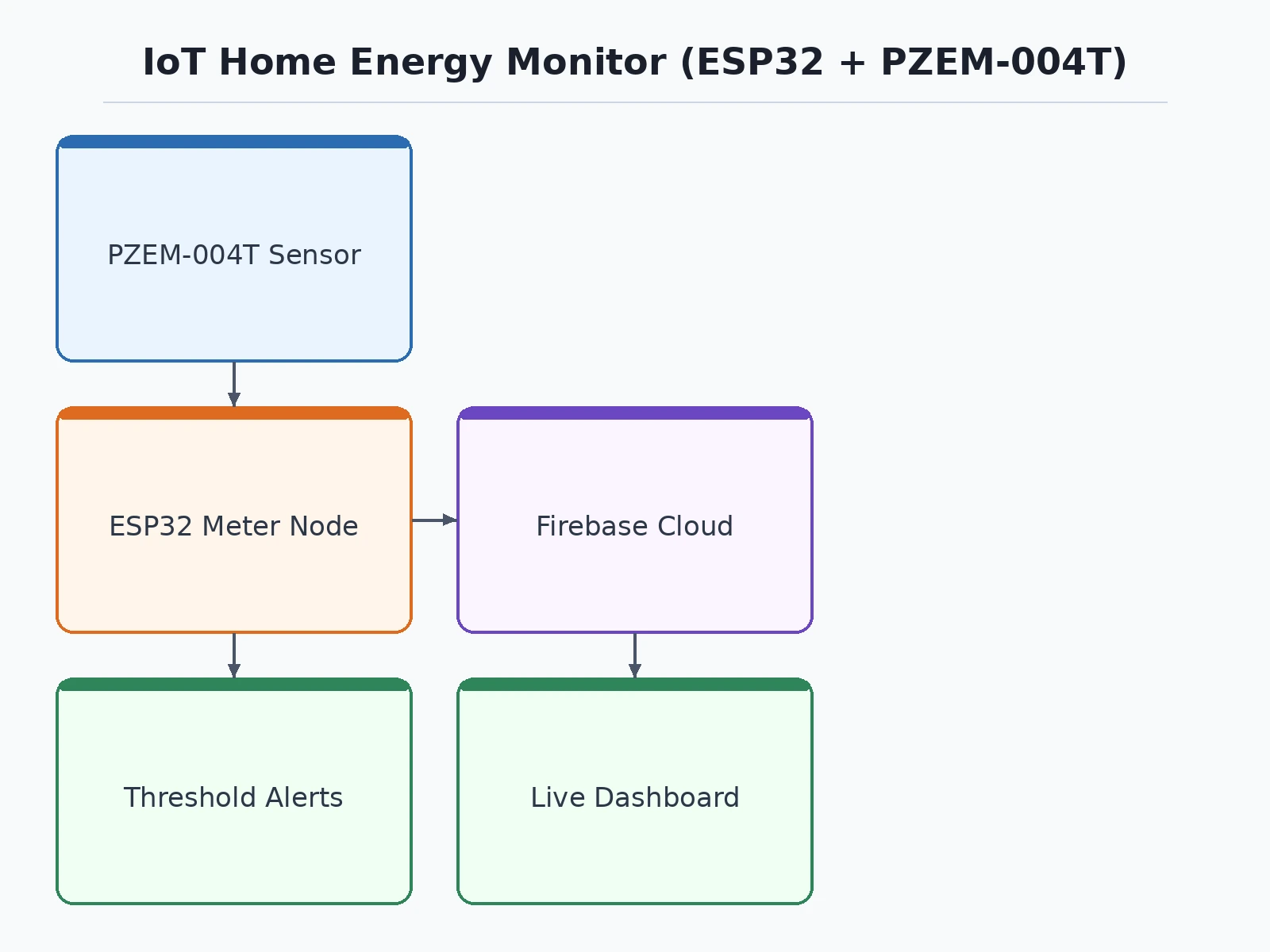
- The split-core CT clamp clips around the home's mains live conductor, and the PZEM-004T's voltage terminals connect across line and neutral — the only step that touches live mains, done per the documented safety procedure.
- The module samples voltage and current internally and computes active power, power factor, frequency and cumulative energy into its Modbus registers.
- The ESP32 polls those registers every 2 seconds over TTL serial using Modbus-RTU at 9600 baud.
- Each poll is packaged as JSON and POSTed over Wi-Fi to the dashboard; if the link is down, samples buffer in RAM and backfill on reconnection.
- The dashboard renders the live load curve, power gauge, today's kWh and estimated cost, and evaluates the alert thresholds.
- When power crosses the set over-power limit, an alert event is logged with a timestamp; the daily energy budget is tracked against the configured tariff.
- Once, at installation, the owner runs the documented calibration against a known load and stores the correction factor used in all displayed readings.
Tech stack:
- ESP32 (dual-core Wi-Fi microcontroller, meter node)
- PZEM-004T-100A AC power sensor module + 100 A split CT
- Modbus-RTU over TTL serial (9600 baud)
- Arduino-style firmware (C++)
- Wi-Fi telemetry as JSON over HTTP
- HTML/CSS/JavaScript dashboard (single-file demo)
- 5 V AC-DC power module for the node
- Calibration procedure + report/PPT/Q&A kit
| Parameter | Value |
|---|---|
| Sensor module | PZEM-004T-100A, Peacefair (Datasheet value) |
| Voltage range | 80–260 V AC (Datasheet value) |
| Voltage accuracy | ±0.5% (Datasheet value) |
| Current range | 0–100 A via external split CT (Datasheet value) |
| Current accuracy | ±0.5% (Datasheet value) |
| Active power range | 0–23 kW (Datasheet value) |
| Power accuracy | ±0.5% (Datasheet value) |
| Energy counter | 0–9999.99 kWh (Datasheet value) |
| Power factor | 0.00–1.00, ±1% (Datasheet value) |
| Frequency | 45–65 Hz, ±0.5% (Datasheet value) |
| Module interface | TTL serial, Modbus-RTU, 9600 baud (Datasheet value) |
| Poll interval | 2 s (design target) |
| Node supply | 5 V DC regulated, approx. 1–2 W self-consumption (design target) |
Project features
- [PZEM-004T-100A AC sensing] Measures voltage (80–260 V), current (0–100 A), active power (0–23 kW), power factor, frequency and cumulative energy in one module, each at the module's datasheet accuracy — no burden-resistor math needed.
- [ESP32 meter node] Polls the sensor every 2 seconds over TTL-serial Modbus-RTU at 9600 baud, keeps time, and buffers readings in RAM when Wi-Fi drops so nothing is lost during outages.
- [Live web dashboard] Real-time load curve of the last 60 samples, a live power gauge, today's energy in kWh, and an estimated daily cost — the same dashboard shipped as the working single-file demo.
- [Threshold alerts] Settable over-power limit and daily energy budget, evaluated on the device, with a timestamped alert log on the dashboard.
- [Tariff-based cost estimate] Configure your ₹/kWh slab and the dashboard converts today's kWh into an estimated cost — clearly presented as an estimate, not a billing figure.
- [Non-invasive CT clamp] The split-core 100 A CT clips around the mains conductor without cutting any wire; the report documents the safe wiring procedure step by step.
- [One-time calibration procedure] Compare the module against a known load (e.g. a 100 W bulb) and record the correction factor — documented so the viva discussion on accuracy is honest and concrete.
What is included
- Assembled prototype: ESP32 board, PZEM-004T-100A module, 100 A split CT clamp, wiring
- Firmware source code with Modbus polling, buffering and Wi-Fi telemetry
- Working single-file dashboard demo (the exact app shown in the gallery screenshot)
- Wiring diagram and safe mains-wiring procedure
- One-time calibration procedure document
- Project report PDF (background, PZEM-004T datasheet analysis, methodology, results)
- PPT presentation for final review
- Viva Q&A preparation document (Modbus, CT working, calibration, accuracy limits)
Limitations & prerequisites
- Prototype-grade monitor, not an industrial or revenue-grade certified energy meter — real accuracy depends on CT calibration, especially at low loads.
- The module's ±0.5% figures are datasheet values; the report states the calibrated error honestly instead of repeating them as measured.
- Single-phase only — a three-phase home would need one unit per phase (listed as future scope).
- The cost figure is a tariff-based estimate, not a billing instrument; slab structures vary by discom.
- The live dashboard needs Wi-Fi; without it the node only buffers recent samples locally — no on-device display is included.
- The module measures 80 V minimum and AC only; it cannot monitor DC or low-voltage circuits.
- Mains terminals carry live voltage — wiring must follow the documented procedure under supervision.
Frequently Asked Questions
Which controller is used and why?
The ESP32. It has Wi-Fi built in, hardware UARTs for the PZEM-004T's serial link, and enough RAM to buffer readings through Wi-Fi outages — one board instead of an Arduino plus a separate Wi-Fi module.
What powers the monitoring unit itself?
A small 5 V AC-DC module tapped from the same mains it monitors; the node's own draw is approximately 1–2 W, a design target, and negligible next to household loads.
Does it work without Wi-Fi?
The sensing keeps running — the ESP32 keeps polling the module and buffers recent samples in RAM. The live dashboard needs Wi-Fi, and buffered samples backfill automatically when the link returns.
How accurate is it, really?
The module's datasheet claims ±0.5% on voltage, current, power and energy. In practice the reading at low loads depends on how well the CT is calibrated against a known load — the documented procedure covers this, and the report states the achieved error honestly instead of quoting the datasheet as a result.
Is this an industrial-certified meter?
No. It is a prototype-grade monitor for learning and household awareness — not a BIS/IEC certified or revenue-grade energy meter, and the page never presents it as one.
Is this project suitable for a final-year project?
Yes — for Electrical, Electronics and IoT programs. It combines real mains sensing, an embedded firmware task, a real industrial protocol (Modbus-RTU), and a working dashboard, with calibration and accuracy limits that make strong viva material.
Components & software requirements
- ESP32 (dual-core Wi-Fi microcontroller, meter node)
- PZEM-004T-100A AC power sensor module + 100 A split CT
- Modbus-RTU over TTL serial (9600 baud)
- Arduino-style firmware (C++)
- Wi-Fi telemetry as JSON over HTTP
- HTML/CSS/JavaScript dashboard (single-file demo)
- 5 V AC-DC power module for the node
- Calibration procedure + report/PPT/Q&A kit
Delivery information
Built-to-order project. Delivery timeline is shared after order confirmation based on current queue.
Support terms
Complete documentation, setup guide, and viva preparation included. Support for setup and explanation provided.
Download free synopsis (PDF)
Enter your name and WhatsApp number — the synopsis PDF downloads immediately. We may send occasional project updates on WhatsApp; no spam.