
More project photos (3)
The problem
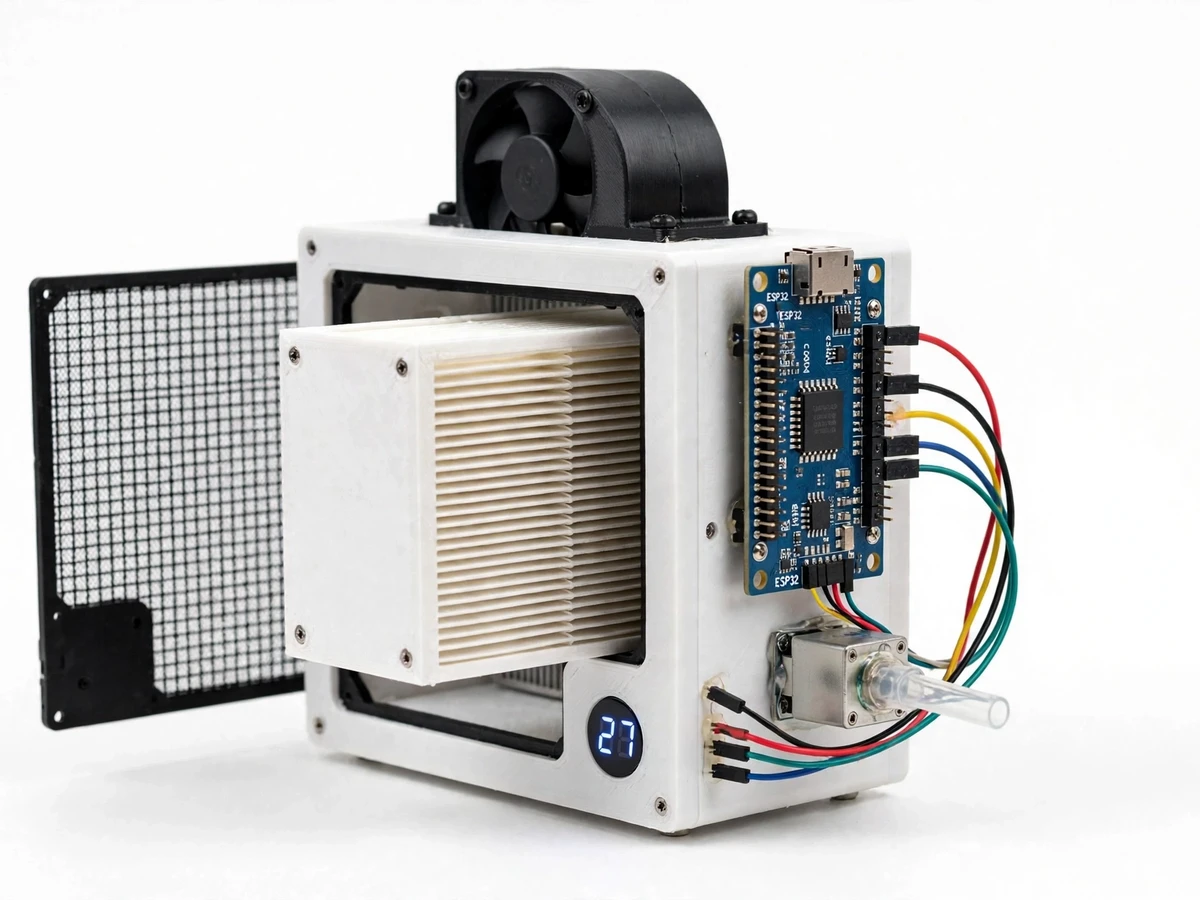
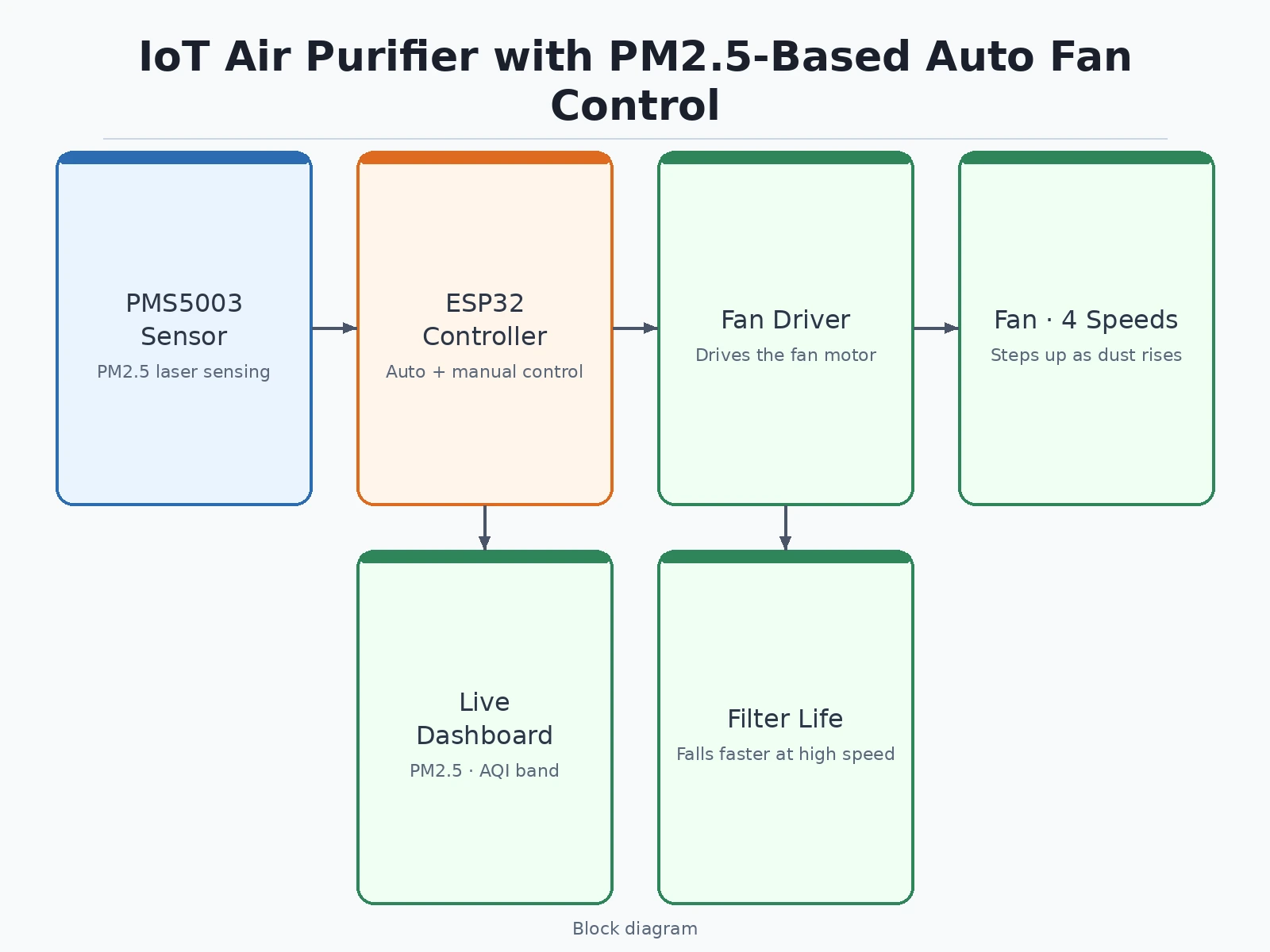
Indoor air in a dusty room, a workshop or a home near a busy road can carry fine particles that are invisible yet easy to breathe in, and a fixed-speed purifier handles this badly: it either runs loudly all day or sits idle while dust builds up. The IoT air purifier in this project answers that problem directly by watching the air continuously and matching its own effort to what it measures. A PMS5003 laser sensor measures PM2.5 in the room air, an ESP32 controller converts that reading into one of four fan speeds, and a fan pulls room air through a pleated filter at the speed the reading calls for. When the air clears, the fan slows down on its own, so the unit stays quiet instead of running flat out. A dashboard shows the live PM2.5 reading, the AQI band and the remaining filter life, so the behaviour is visible and checkable at any moment.
How it works
The IoT air purifier works as a closed loop from sensing to action: the PMS5003 sensor draws in room air and counts fine particles, the ESP32 reads that measurement and decides a fan speed, the fan pulls room air through the pleated filter at that speed, and the dashboard reports the reading, the fan state and the filter life back to the user. Inside the sensor, a laser beam crosses the sampled air stream and the light scattered by each passing particle is picked up by a photodiode, so larger bursts of scattered light mean more and larger particles in the sample. The ESP32 converts the sensor frame into a PM2.5 concentration, compares it with the four step thresholds, and applies the hysteresis rule before changing speed, which keeps the fan steady when readings wobble near a boundary. Filtered air leaves through the top outlet while the dashboard records each reading.
- Room air enters the PMS5003 sensor inlet on the room-air side of the unit, away from the filtered outlet, and the sensor reports PM2.5, PM10 and particle counts over UART.
- The ESP32 reads each sensor frame, checks it for a valid header and checksum, and converts it into a PM2.5 concentration in µg/m³ for display and control.
- In auto mode the ESP32 compares the reading with the four step thresholds and the hysteresis rule, then sets the fan to the matching speed, holding the previous speed until the reading clearly crosses back.
- The fan draws room air through the pleated filter at the chosen speed and pushes filtered air out of the top outlet, while the dashboard updates the reading, AQI band and fan state.
- The dashboard appends each reading to its history chart and reduces the filter-life percentage faster at higher fan speeds, giving a maintenance cue over time.
- In manual mode the fan holds the speed chosen on the dashboard instead, so a fixed-speed run can be compared with an auto run in the same room.
- The demonstration repeats a dusty-air and clean-air sequence, showing the fan stepping up with dust and stepping down as the air clears, with the chart as evidence.
Tech stack:
- ESP32 · sensor reading and fan control
- PMS5003 laser sensor · PM2.5 measurement
- DC fan with PWM driver · four-speed airflow
- Pleated HEPA-style filter · particle capture
- Wi-Fi dashboard · live readings and fan control
- UART sensor link · PMS5003 data frames
- Arduino-compatible firmware · threshold logic
- Filter-life estimator · usage-based wear model
| Parameter | Value |
|---|---|
| Controller | ESP32 development board (design target) |
| Sensor | PMS5003 laser particulate sensor (datasheet value) |
| Particle-size bins | 0.3–10 µm particle-size bins (datasheet value) |
| PM2.5 effective range | 0–500 µg/m³ (datasheet value) |
| PM2.5 resolution | 1 µg/m³ (datasheet value) |
| Sensor supply | 5 V typical · 4.5–5.5 V range (datasheet value) |
| Sensor response | Less than 10 s total response time (datasheet value) |
| Fan speeds | Four speeds plus off · OFF · LOW · MEDIUM · HIGH · TURBO (design target) |
| Fan step-up thresholds | 35 · 75 · 150 · 250 µg/m³ (design target) |
| Fan step-down hysteresis | 10 µg/m³ below each step-up threshold (design target) |
| Filter | Pleated filter cartridge · replaceable (design target) |
| Dashboard | Local Wi-Fi dashboard · live reading · AQI band · history chart (design target) |
| Not included | Certified air cleaning · medical or health claims · virus removal (not in this build) |
Project features
The IoT air purifier is built around four capabilities that work together: automatic fan control that follows the measured PM2.5 reading, a live dashboard that shows PM2.5, the AQI band and a short reading history, a filter-life indicator that falls faster when the fan works harder, and a manual override that lets a user fix the fan speed for comparison tests. Automatic control is the core of the project, because it turns a passive filter box into a system that reacts to its own sensor. The dashboard makes that reaction observable, so a reviewer can watch a reading rise and see the fan step up in response. Filter-life tracking adds a maintenance story, since a filter used at high speed in dusty air wears out sooner than one used gently in clean air. Manual override completes the set by letting the builder prove the auto logic against a fixed speed.
- [PM2.5-based auto fan control] The ESP32 steps the fan through four speeds from the live PM2.5 reading, rising as dust increases and falling as air clears, without any user input in auto mode. Implemented in the base prototype.
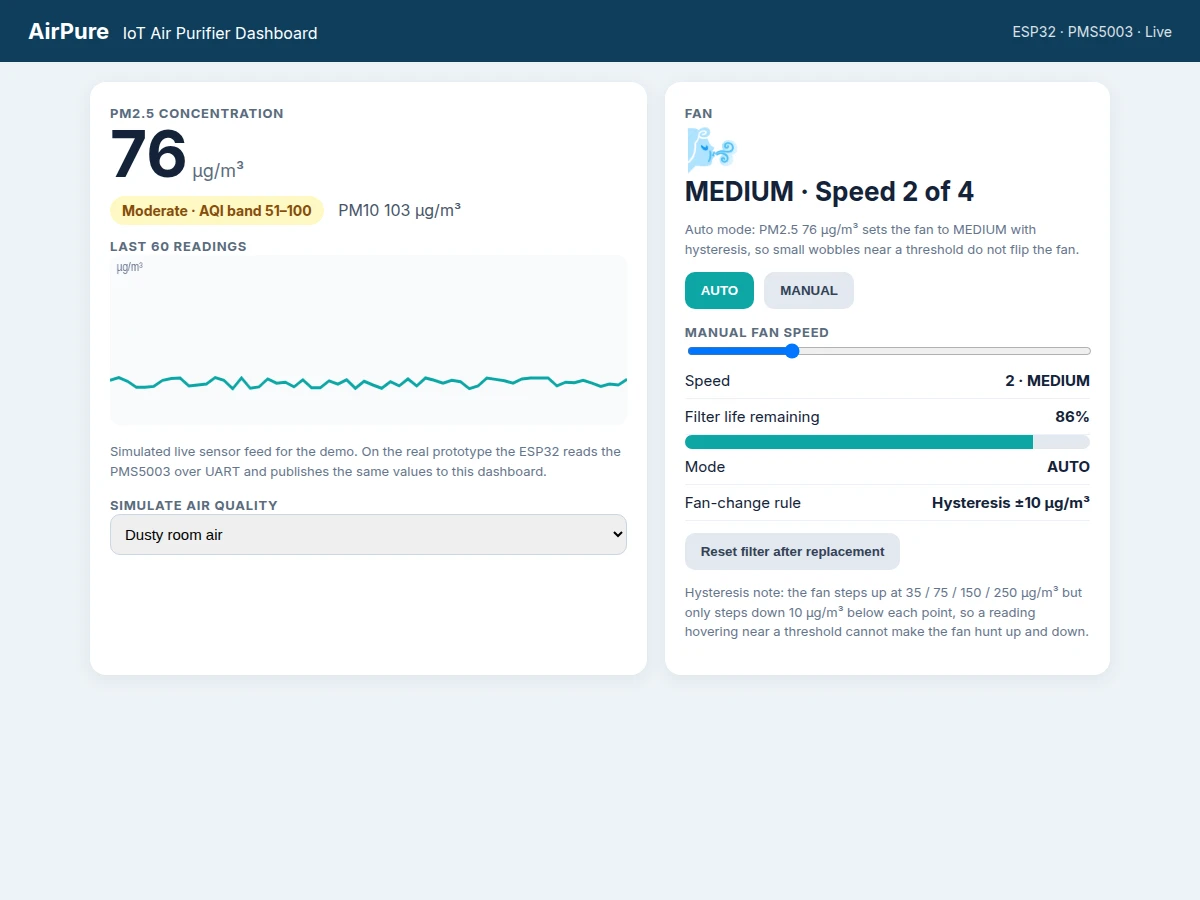
- [Live dashboard with AQI band] The dashboard shows the current PM2.5 reading, the matching AQI band, PM10 for context and a history chart of recent readings, all updated as new sensor frames arrive. Implemented in the base prototype.
- [Filter-life indicator] Filter life starts at 100% and falls faster at higher fan speeds, so the dashboard gives a visible cue for when the filter should be checked or replaced. Implemented in the base prototype.
- [Manual override mode] A manual mode fixes the fan at a chosen speed, so the auto logic can be compared against a fixed-speed run during testing and demonstration. Implemented in the base prototype.
- [Hysteresis fan stepping] The fan steps up at one PM2.5 threshold and only steps down 10 µg/m³ below it, so a reading hovering near a threshold cannot make the fan hunt up and down. Implemented in the base prototype.
- [Room-air sensor placement] The sensor inlet sits on the room-air side of the unit, measuring the air before it passes through the filter, so the fan reacts to the room rather than to already-filtered air. Implemented in the base prototype.
- [Threshold tuning] The four switch points are set in firmware and can be retuned for a dustier workshop or a cleaner bedroom without changing the hardware. Configurable in the base prototype.
- [Remote dashboard access] Viewing the dashboard from another device on the same Wi-Fi network is an optional addition, developed on request, and is not part of the base local-dashboard build. Optional customization, not in the base prototype.
What is included
- Working prototype: ESP32 board, PMS5003 sensor, PWM fan driver and fan, pleated filter and housing, wired and tested
- Firmware for sensor reading, threshold and hysteresis fan control, and dashboard data
- Working single-file dashboard demo with live reading, AQI band, history chart, auto/manual toggle and filter-life indicator
- Circuit and wiring documentation with labelled connections for every wire
- Component list with the exact parts used in the build
- Demonstration procedure, including the dusty-air and clean-air fan-stepping sequence and how to read the history chart as evidence
- Project report PDF (background, laser-scattering sensing, threshold control, hysteresis, methodology, limitations)
- PPT presentation for final review
- Viva Q&A preparation document (sensor limits, threshold choice, hysteresis, filter limits, dashboard limits)
Limitations & prerequisites
- This is an educational prototype, not a certified air purifier: it must not be presented as certified air cleaning, and no medical or health outcome is claimed for using it.
- PM2.5 readings are indicative: the PMS5003 is a low-cost laser sensor, and its readings vary with humidity, particle type and placement, so they are for demonstration and comparison, not for regulatory or health decisions.
- The prototype does not remove viruses or bacteria, and no such claim is made: it filters particles through a pleated filter, and the page and report state that boundary explicitly.
- The fan and filter suit one room at demonstration scale: a large hall, an open workshop or a heavily smoky space is outside its intended demonstration range.
- The dashboard runs over local Wi-Fi in the base build: remote access from outside the local network is an optional addition, not included by default.
- Filter life is an estimate from fan use, not a measurement of the filter itself: a visibly dirty or damaged filter should be replaced regardless of the displayed percentage.
Frequently Asked Questions
Is this project suitable for a final-year project?
Yes, it fits Electronics, Electrical and IoT degree submissions because it combines sensor interfacing, threshold control logic, PWM fan driving and a live dashboard in one verifiable build. The demonstration is easy to run in a room: dusty air steps the fan up, clean air steps it down, and the history chart records the change, so a reviewer can check the control logic rather than taking it on trust.
How does the fan know which speed to use?
The fan speed follows the live PM2.5 reading through four thresholds, so dustier air means a faster fan and clearer air means a slower fan, with no user input in auto mode. The ESP32 reads each PMS5003 frame, compares the PM2.5 value with the step thresholds at 35, 75, 150 and 250 µg/m³, and sets the matching speed, so the behaviour is a direct, checkable function of the measurement.
Why does the fan not flicker when the reading hovers near a threshold?
It does not flicker because the control uses hysteresis: the fan steps up at a threshold but only steps down 10 µg/m³ below it, so small wobbles cannot flip it back and forth. This builder choice came from the actual demo build, where a single-threshold rule made the fan hunt audibly whenever dust readings wobbled near a boundary, and the 10 µg/m³ gap removed that hunting in testing.
Which sensor is used, and what does it actually measure?
The PMS5003 laser sensor measures particulate matter, reporting PM1.0, PM2.5 and PM10 concentrations plus particle counts in size bins from 0.3 µm to 10 µm. Inside it, a laser beam crosses sampled air and a photodiode picks up the light scattered by passing particles, so the ESP32 receives a concentration in µg/m³ rather than a simple dusty-or-clean signal.
Does it work without internet?
Yes, the base dashboard works over local Wi-Fi without internet access, because the ESP32 serves the dashboard on the local network and the sensor, control and display all run locally. Internet is only needed if remote access from outside the local network is added as an optional customization, which is a separate scope item.
Can the thresholds or the fan be changed?
Yes, the four thresholds are set in firmware and can be retuned for a dustier or cleaner room, and the fan can be fixed at one speed in manual mode for comparison tests. Changing the filter size, the fan rating or the sensor model is possible on request, but each change needs its thresholds and wiring rechecked, since the control logic is tuned to the parts in the base build.
Components & software requirements
- ESP32 · sensor reading and fan control
- PMS5003 laser sensor · PM2.5 measurement
- DC fan with PWM driver · four-speed airflow
- Pleated HEPA-style filter · particle capture
- Wi-Fi dashboard · live readings and fan control
- UART sensor link · PMS5003 data frames
- Arduino-compatible firmware · threshold logic
- Filter-life estimator · usage-based wear model
Delivery information
Built-to-order project. Delivery timeline is shared after order confirmation based on current queue.
Support terms
Complete documentation, setup guide, and viva preparation included. Support for setup and explanation provided.
Download free synopsis (PDF)
Enter your name and WhatsApp number — the synopsis PDF downloads immediately. We may send occasional project updates on WhatsApp; no spam.