
More project photos (2)
The problem
An IoT-Based Smart Wardrobe with Humidity Control and Auto Dehumidifier is a small wardrobe fitted with a humidity sensor, a controller and a Peltier dehumidifier that keeps the air inside the wardrobe dry without manual checks. Clothes in a closed wardrobe in humid weather absorb moisture from still air, and once fabric stays damp, musty smell and mould follow — usually found only when the garment is needed. Silica gel packs help for a while, then saturate silently, and a fan alone helps only when room air is drier than wardrobe air, which it often is not in the monsoon. This project replaces guesswork with a closed loop: a DHT22 sensor measures the wardrobe air every 2 seconds, an ESP32 compares the reading with a set threshold, and a Peltier dehumidifier condenses the moisture out of the air and drains it into a tray. The dashboard shows live humidity, dehumidifier state and a 6-hour trend, so drying stays visible.
| Drying approach | How moisture leaves | What it cannot do |
|---|---|---|
| Auto Peltier dehumidifier (this project) | Cold plate condenses vapour; water drains to a tray | Needs 12 V power; sized for a model wardrobe |
| Silica gel packs | Gel absorbs a fixed amount of moisture | Saturates silently; needs drying or replacement; no sensing |
| Ventilation fan only | Exchanges wardrobe air with room air | Useless when room air is as damp as wardrobe air |
Measures temperature and relative humidity inside the wardrobe every 2 seconds.
Follow the working sequence
How it works
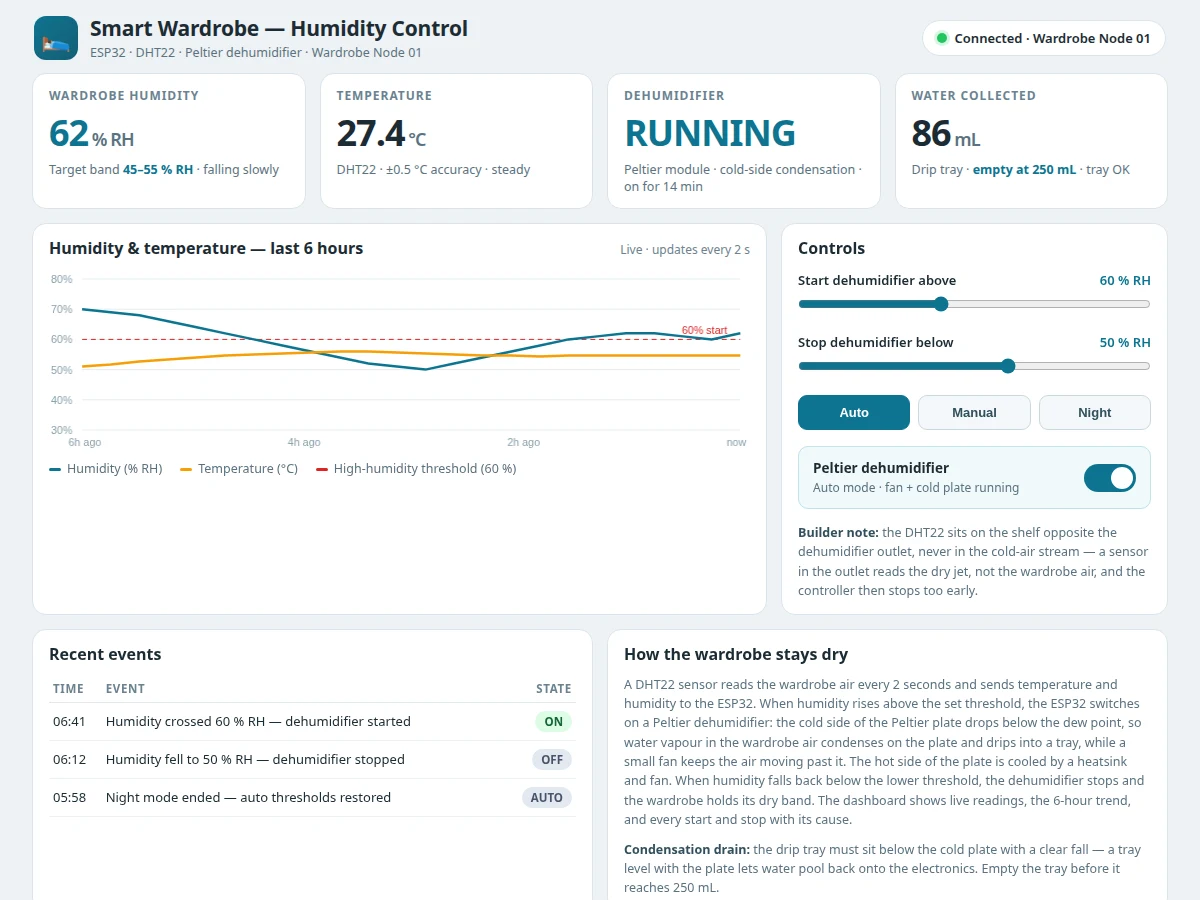
The end-to-end mechanism runs from a humidity reading inside the wardrobe to water dripping into a tray, repeating every 2 seconds while powered. The DHT22 measures temperature and relative humidity in the wardrobe air and sends both values to the ESP32 over a single digital line. The ESP32 compares humidity with the start threshold — 60 % RH as a design target — and, when the air is too damp, closes a relay that powers the Peltier dehumidifier and its fan. Current through the Peltier module makes one face cold; air blown across that face cools below its dew point, water vapour condenses on the plate and drips into the tray below, while the hot face is cooled by a heatsink and fan. When humidity falls to the stop threshold of 50 % RH, the relay opens and the dehumidifier rests. The OLED and the dashboard update together, and every start and stop is logged with its cause.
- The builder mounts the DHT22 sensor on the wardrobe shelf opposite the dehumidifier outlet, away from the cold-air stream, because a sensor in the outlet reads the dry jet, not the wardrobe air, and the controller then stops too early.
- The builder wires the DHT22 and the OLED to the ESP32, and wires the Peltier module and its fan through the relay module, keeping the 12 V power wiring inside the controller box.
- The builder sets the start threshold, the stop threshold and the mode from the Wi-Fi dashboard, starting from the design targets of 60 % RH to start and 50 % RH to stop.
- Every 2 seconds the ESP32 reads the DHT22, checks the reading is valid, and updates the OLED and the dashboard with the new humidity, temperature and dehumidifier state.
- If humidity rises above the start threshold, the relay closes and the Peltier dehumidifier runs: the cold plate condenses moisture out of the wardrobe air and the water drips into the tray below.
- If humidity falls to the stop threshold, the relay opens and the dehumidifier stops; the gap between the two thresholds keeps it from switching rapidly when the reading hovers near one value.
- Every dehumidifier start and stop is written to the dashboard event log with its cause, and the dashboard flags a reminder when the collected water approaches the tray limit.
Tech stack:
- ESP32 development board · Wi-Fi controller and dashboard host
- DHT22 temperature and humidity sensor · digital single-bus output
- Peltier thermoelectric dehumidifier module · cold-side condensation
- 2-channel relay module · opto-isolated dehumidifier switching
- 0.96 inch OLED display · local humidity and temperature readout
- 12 V DC power supply · Peltier module and fan
- Arduino IDE · ESP32 firmware development
- Wi-Fi web dashboard · live readings and threshold control
| Parameter | Value |
|---|---|
| Controller | ESP32 · dual-core Xtensa LX6 processor up to 240 MHz (Datasheet value) |
| Sensor | DHT22 · temperature range −40 °C to +80 °C · accuracy ±0.5 °C (Datasheet value) |
| Sensor humidity | DHT22 · range 0 % RH to 100 % RH · accuracy ±2 % RH typical to ±5 % RH maximum (Datasheet value) |
| Sensor sampling | 1 reading per 2 seconds · 0.5 Hz (Datasheet value) |
| Dehumidifier | Peltier thermoelectric module · 12 V DC (Design target) · cold side condenses wardrobe moisture |
| Start threshold | 60 % RH (Design target) · adjustable from the dashboard |
| Stop threshold | 50 % RH (Design target) · adjustable from the dashboard |
| Hysteresis | 10 % RH gap between start and stop thresholds (Design target) |
| Drip tray | 250 mL capacity (Design target) · reminder at 200 mL |
| Local display | 0.96 inch OLED · humidity · temperature · dehumidifier state |
| Dashboard | Wi-Fi web dashboard · live readings · 6-hour chart · event log |
| Power | 12 V DC for Peltier module and fan · 5 V USB for ESP32 (Design target) |
| First-principles rule | The Peltier cold side must fall below the dew point of the wardrobe air: only then does water vapour condense on the plate instead of passing over it |
| Builder note | The DHT22 sits opposite the dehumidifier outlet, never in the cold-air stream, and the drip tray sits below the cold plate with a clear fall, so water cannot pool back onto the electronics |
Project features
The smart wardrobe stands on four capabilities that work together as one drying loop rather than four separate gadgets. First, automatic Peltier dehumidification condenses moisture out of the wardrobe air instead of masking it — the cold side of the Peltier plate drops below the dew point, water beads on it and drips into a tray, so the moisture physically leaves the wardrobe. Second, DHT22 sensing every 2 seconds with adjustable start and stop thresholds means the dehumidifier runs only when the wardrobe actually needs drying, with a hysteresis gap that stops it switching on and off around one value. Third, the Wi-Fi dashboard and the local OLED show the same live humidity, temperature and dehumidifier state, so the loop is checkable from a phone or from the wardrobe itself. Fourth, the drip-tray reminder and the manual, auto and night modes cover the everyday realities: a full tray, a noisy fan at night, and a hands-on test during a demonstration.
- [Automatic Peltier dehumidifier] When humidity crosses the start threshold, the ESP32 powers a Peltier module whose cold side condenses wardrobe moisture onto the plate; the water drips into a tray below, and a small fan keeps air moving across the plate — implemented in the base build.
- [DHT22 sensing every 2 seconds] The DHT22 measures temperature and relative humidity inside the wardrobe and sends both values to the ESP32 on a single digital line, with the sensor's checksum used to reject bad reads — implemented in the base build.
- [Adjustable thresholds with hysteresis] Start and stop humidity thresholds are set from the dashboard (60 % RH and 50 % RH as design targets), and the gap between them stops the dehumidifier chattering on and off around one value — implemented in the base build.
- [Wi-Fi dashboard with live chart] The ESP32 serves a dashboard with live humidity and temperature, a 6-hour trend chart, threshold controls, mode buttons and an event log of every dehumidifier start and stop with its cause — implemented in the base build.
- [Local OLED display] A 0.96 inch OLED at the wardrobe mirrors humidity, temperature and the dehumidifier state, so the loop can be read without opening a phone — implemented in the base build.
- [Drip-tray water reminder] The dashboard flags when collected water approaches the tray limit (reminder at 200 mL against a 250 mL tray, design targets), so the tray is emptied before it can overflow — implemented in the base build.
- [Auto, manual and night modes] Auto runs the threshold loop, manual switches the dehumidifier on or off for a demonstration, and night mode raises the start threshold so the fan stays quiet overnight — implemented in the base build.
What is included
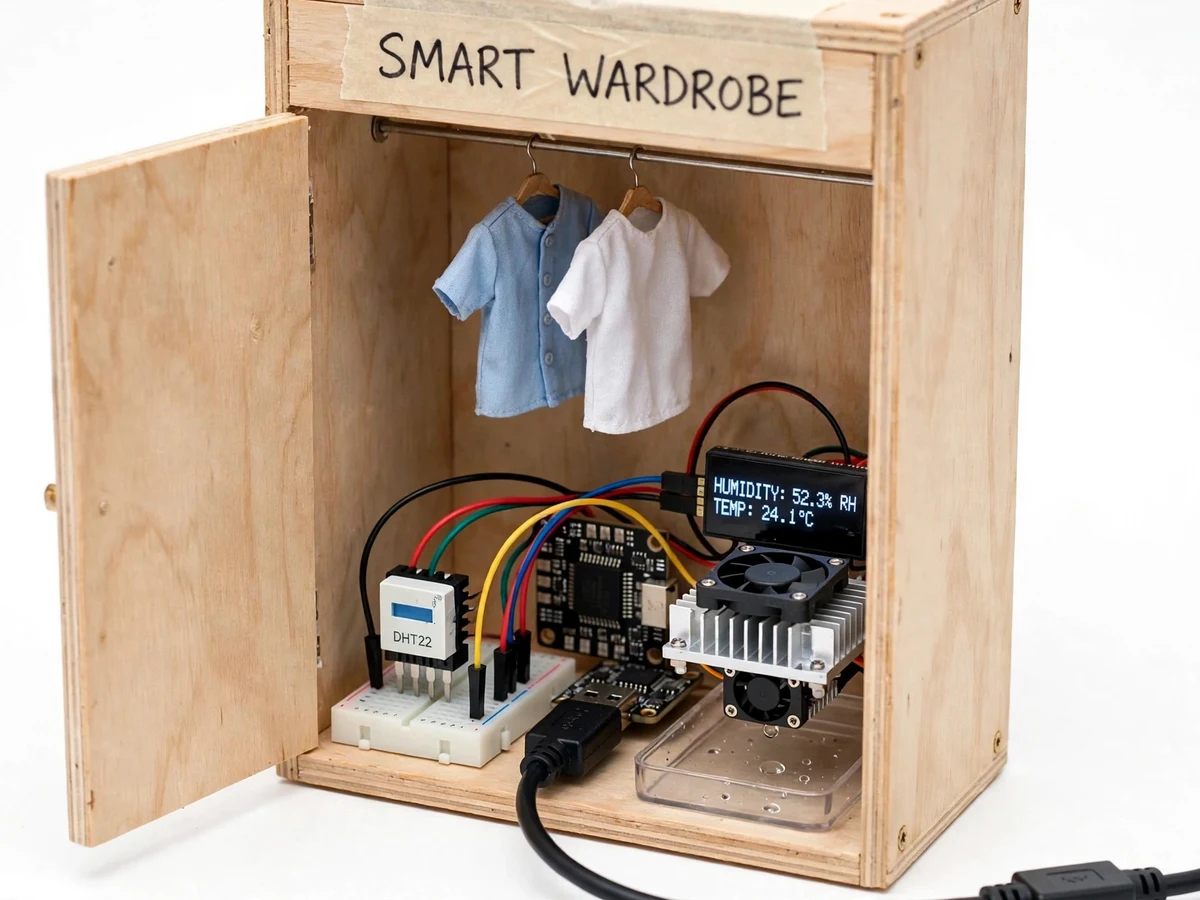
- Wired model-wardrobe prototype (model wardrobe with hanging rail, ESP32 controller box, DHT22 sensor, Peltier dehumidifier module with heatsink and fan, drip tray, OLED display)
- ESP32 firmware (sensor reading, threshold and hysteresis control, relay switching, OLED output, Wi-Fi dashboard server)
- Wi-Fi dashboard demo (live readings, threshold controls, auto/manual/night modes, 6-hour chart, event log)
- Circuit and wiring documentation (sensor placement rule, drain-fall note, relay wiring)
- Project report PDF (wardrobe damp background, Peltier condensation mechanism, control logic, calibration procedure, results template)
- PPT presentation for final review
- Viva Q&A preparation document (DHT22 sensing, Peltier condensation, hysteresis, relay isolation, wardrobe versus shed-controller differences)
Limitations & prerequisites
- Model wardrobe scale: the delivered prototype is a bench model wardrobe, not a full-size wardrobe, and the Peltier module is sized for the model volume; a full wardrobe would need a larger dehumidifier unit.
- Small-capacity dehumidifier: the Peltier unit removes moisture slowly by design, so a wardrobe that is already very damp takes time to dry — the dashboard trend shows the progress.
- Sensor limits apply: DHT22 readings carry the datasheet accuracy above, and a failed read puts the controller in a safe state (dehumidifier off) rather than guessing.
- Drip tray must be emptied: the tray holds 250 mL as a design target, and if it is ignored past the reminder, overflow water can reach the electronics.
- Wi-Fi dashboard needs a local network: the OLED keeps working without Wi-Fi, but remote readings, threshold changes and the event log need the wardrobe network to be up.
- Hot-side cooling matters: the Peltier heatsink fan must stay clear, because a blocked fan reduces condensation and lets the module run hot.
- Not a leak fix: if water is entering the wardrobe through a wall or roof leak, drying the air does not fix the leak — the cause still needs repair.
Frequently Asked Questions
Is this project suitable for a final-year project?
Yes — for Electronics, IoT and Electrical Engineering programmes. It combines sensor interfacing, relay switching, threshold and hysteresis logic, thermoelectric condensation and a working Wi-Fi dashboard in one model that can be demonstrated live. The demonstration is straightforward: warm damp air near the sensor starts the dehumidifier, and the dashboard shows the humidity falling. The viva thread is easy to follow: how one humidity reading becomes a dehumidifier start, why the cold plate condenses water, and why the sensor must sit away from the dehumidifier outlet.
How does the Peltier dehumidifier actually remove moisture?
It does not absorb moisture like silica gel — it condenses it out of the air. Electric current through the Peltier module makes one face cold, below the dew point of the wardrobe air. Wardrobe air blown across that cold face cools, its water vapour condenses into droplets on the plate, and the droplets run down into a tray. The hot face is kept cool by a heatsink and fan, and the moisture physically leaves the wardrobe when the tray is emptied.
How is this different from a poultry-farm temperature controller?
The controlled space, the purpose and the actuator are all different. A poultry shed controller stages exhaust fans and a heat lamp to hold a whole shed inside a temperature band, and treats humidity by ventilation. This wardrobe controller protects clothes in a small closed space, removing humidity by condensing it with a Peltier module. It has no fan staging, no heat lamp and no day and night setpoints.
Does it work without Wi-Fi?
Yes, the core loop works without Wi-Fi. The ESP32 keeps reading the DHT22 and switching the dehumidifier on its thresholds, and the OLED keeps showing humidity, temperature and the dehumidifier state. Nothing in the drying loop depends on the network, so a dropped connection never leaves the wardrobe damp. Only the remote dashboard — live readings on a phone, threshold changes and the event log — needs the local network to be up.
What power supply does it need?
The Peltier module and its fan run on 12 V DC, while the ESP32 runs on 5 V USB power, so the build uses a 12 V adapter with a 5 V regulator for the controller as a design target. The dashboard shows the dehumidifier state, so a student can confirm the relay and the module are drawing power during a demonstration.
Components & software requirements
- ESP32 development board · Wi-Fi controller and dashboard host
- DHT22 temperature and humidity sensor · digital single-bus output
- Peltier thermoelectric dehumidifier module · cold-side condensation
- 2-channel relay module · opto-isolated dehumidifier switching
- 0.96 inch OLED display · local humidity and temperature readout
- 12 V DC power supply · Peltier module and fan
- Arduino IDE · ESP32 firmware development
- Wi-Fi web dashboard · live readings and threshold control
Delivery information
Built-to-order project. Delivery timeline is shared after order confirmation based on current queue.
Support terms
Complete documentation, setup guide, and viva preparation included. Support for setup and explanation provided.
Download free synopsis (PDF)
Enter your name and WhatsApp number — the synopsis PDF downloads immediately. We may send occasional project updates on WhatsApp; no spam.