
More project photos (2)
The problem
Booking an intercity bus still means juggling operator websites, phone calls and station counters, and the passenger often discovers the exact seat only after paying. Seat choice matters on overnight and long-distance routes: a berth near the driver, a window seat away from the door, or two seats together for a family can decide whether the journey is comfortable. This project builds an Intercity Bus Reservation Android App with Live Seat Map and QR Boarding Pass that puts that choice in the passenger's hands before payment. Travellers search routes, compare departures, pick exact seats or berths on a live coach map, and receive a QR boarding pass the moment a booking is confirmed. The app also states its cancellation and reschedule windows up front, so a change of plan is handled by a rule the passenger has already seen, not by a phone call.
How it works
The Intercity Bus Reservation Android App moves a passenger from route search to boarding pass in one continuous flow, with the seat map as the centre of the journey. A search returns matching departures for the chosen route and date, and the passenger picks boarding and dropping points from that route's own stops. Tapping seats on the live coach map holds them under a countdown timer, and confirming the booking converts the hold into a confirmed reservation with a QR pass. Cancellation and rescheduling then follow the trip's stated windows, and every booking remains visible in the passenger's booking history. Builder note from the demo build: the hold timer is wired directly to seat state, so a seat whose timer expires returns to the free pool without a page reload — the same state transition the delivered app performs server-side before confirming a booking.
- The passenger enters origin, destination and date, then picks a boarding point and a dropping point from the route's stop list; the app lists matching departures with timings, coach type, fare and seats left.
- Opening a departure loads that coach's exact layout — a two-plus-two seater map or lower and upper sleeper decks — with every seat or berth marked free, held or booked.
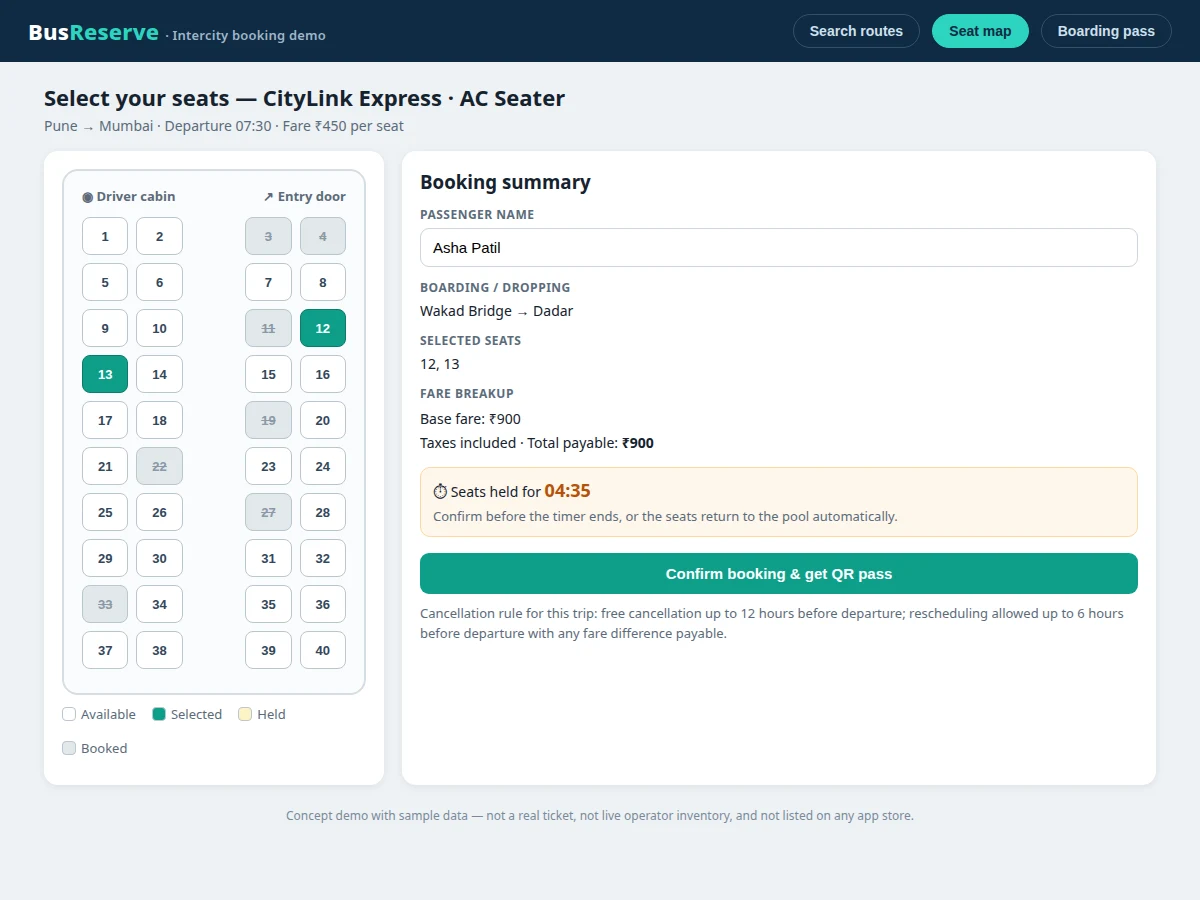
- Tapping a free seat marks it held and starts the five-minute countdown, while the booking summary updates with the selected seats and fare breakup.
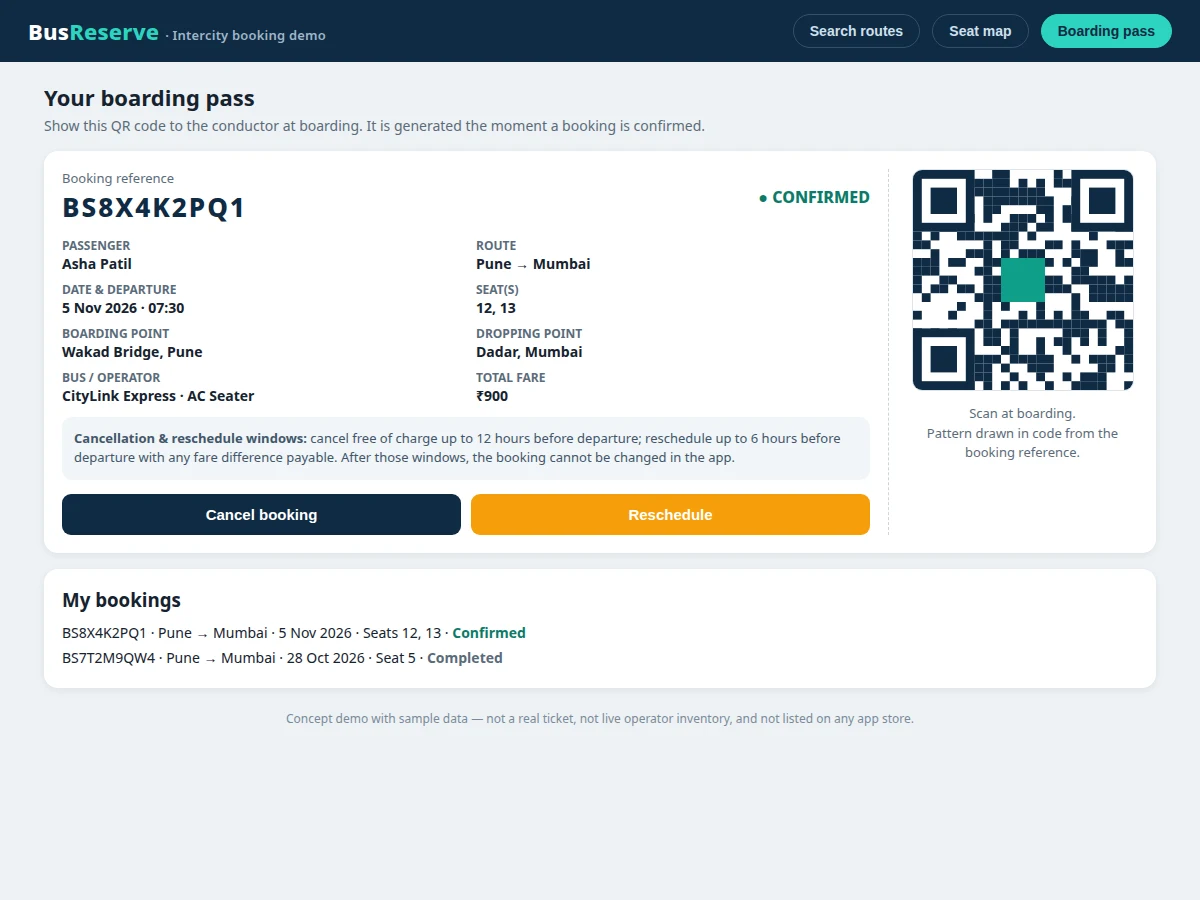
- Confirming inside the window converts the hold into a confirmed booking, generates a 10-character booking reference, and produces the QR boarding pass.
- The booking appears in booking history with route, date, seats, boarding point and fare, and the QR pass stays available until travel.
- A cancellation or reschedule request is checked against the trip's windows — free cancellation up to 12 hours before departure, rescheduling up to 6 hours before — and applied or refused with a stated reason.
- At boarding, the passenger shows the QR pass to the conductor, and the booking remains in history afterwards as a completed record.
Tech stack:
- Kotlin for Android
- Jetpack Compose UI
- Room local database
- Retrofit · REST API client
- ZXing QR code generation
- Material Design 3 components
- Gradle · Android Studio build tools
- JSON trip and booking data service
| Parameter | Value |
|---|---|
| Platform | Android app in Kotlin (design target) |
| Seater coach layout | 40 seats in 2+2 rows (demo layout count) |
| Sleeper coach layout | 30 berths, 15 per deck (demo layout count) |
| Seat-hold timeout | 5 minutes (app rule) |
| Cancellation window | Free up to 12 hours before departure (app rule) |
| Reschedule window | Up to 6 hours before departure, fare difference payable (app rule) |
| Booking reference | 10-character PNR (design format) |
| Demo dataset | 8 scheduled trips across 4 routes (demo data count) |
| QR boarding pass | Generated on confirmed booking (per booking) |
Project features
The Intercity Bus Reservation Android App is built around four capabilities that together cover the whole booking journey: a live seat and berth map, route search with boarding and dropping points, a held-seat countdown that protects a selection while the passenger confirms, and a QR boarding pass generated on booking. Around those four, the app adds fare breakup, booking history, and cancellation and reschedule windows that are enforced as rules rather than left to manual handling. Each capability is implemented in the base build and demonstrated in the working demo: the search filters real sample trips, the map reflects booked, held and free seats, and the pass carries the booking reference, seat numbers and boarding point together. Anything not yet built, such as live payment processing, is kept in the customization and limitations sections rather than presented as finished.
- [Live seat and berth map] The coach layout for the chosen trip is drawn seat by seat, with free, held and booked states shown distinctly. Seater coaches use a two-plus-two row layout and sleeper coaches use lower and upper berth decks.
- [Route search with boarding and dropping points] Passengers search by origin, destination and date, then pick a boarding point and a dropping point from that route's own stop list, so the booking records exactly where the passenger boards and alights.
- [Held-seat countdown timer] Tapping a free seat holds it under a visible five-minute countdown. Confirming inside the window converts the hold into a booking; letting it expire releases the seat back to the free pool automatically.
- [QR boarding pass] Every confirmed booking generates a QR pass carrying the booking reference, route, date, departure time, seat numbers, boarding point and fare, ready to show to the conductor at boarding.
- [Cancellation and reschedule windows] Cancellation is free up to 12 hours before departure and rescheduling is allowed up to 6 hours before departure with any fare difference payable. The app enforces these windows and refuses changes outside them with a stated reason.
- [Fare breakup and booking summary] Before confirming, the passenger sees the selected seats, boarding and dropping points, base fare and total payable in one summary, so the amount paid matches the amount shown.
- [Booking history] Confirmed and completed bookings stay listed in the passenger's history with route, date, seats and status, giving a single place to revisit past trips and current passes.
What is included
- Complete Android app source code (Kotlin, Jetpack Compose)
- REST API and database schema for trips, seats, bookings and windows
- Seat-map component (seater and sleeper layouts) and QR pass generation module
- Sample trip dataset: 8 scheduled trips across 4 routes with boarding and dropping points
- Project report PDF (background, design, data model, hold-timeout state machine, QR payload)
- PPT presentation for final review
- Viva Q&A preparation document (booking flow, seat-hold logic, cancellation rules, API design)
- Setup guide and project abstract PDF
Limitations & prerequisites
- The demo uses sample trip data, not live operator inventory, so the seats shown are illustrative rather than bookable with any real operator.
- No real payment gateway is included in the base build: the fare is shown and the booking is confirmed in-app, but no card or wallet payment is processed.
- The QR pass in the demo is a code-drawn pattern keyed to the booking reference, not a ticket accepted by any bus operator.
- No live bus tracking (GPS) is included in the base build; it is available as a customization.
- Cancellation and reschedule windows are configurable app rules, not any operator's actual policy, and must be set to match the operator before real use.
- The delivered app needs network access for live trip and seat data; the demo itself runs offline on sample data.
Frequently Asked Questions
Is this project suitable for a final-year project?
Yes. The project fits Computer Science, IT and Android application development programmes because it combines a mobile user interface, a booking state machine, a REST API with a database, and QR generation in one demonstrable system. Students can explain the seat-hold logic, the cancellation rules and the booking flow end to end in a review. The report documents the data model, the hold-timeout state machine and the QR payload, so the review discussion can focus on design decisions rather than screenshots.
How does the live seat map work?
The live seat map shows the actual coach layout for the chosen trip, with each seat or berth marked as free, held or already booked, and the passenger taps seats directly on that map instead of choosing from a list. Seater coaches use a two-plus-two row layout and sleeper coaches use lower and upper berth decks, so the map matches the vehicle being booked. Booked seats cannot be selected, and a held seat shows its countdown so the passenger knows how long the selection is protected.
What happens if the held-seat timer runs out?
If the countdown reaches zero before confirmation, the held seats are released automatically and return to the free pool for other passengers, and the passenger must select seats again. This prevents a seat from being blocked indefinitely by an abandoned booking, which is the exact failure that makes a first-come list unfair during peak demand. The release needs no action from the passenger and no reload of the screen.
Is payment gateway integration included?
No. The base build shows the full fare breakup and a confirmed booking, but it does not process real card or wallet payments, and no payment gateway credentials are included. A gateway such as Razorpay or Stripe can be added as a customization, with the booking confirmed only after the gateway callback succeeds. Until then, the fare shown is the amount the booking would charge.
Can routes, operators and cancellation rules be changed?
Yes. Routes, operators, boarding and dropping points, fares, seat layouts and the cancellation and reschedule windows are all data-driven, so new cities and operators can be added without changing the app's screens. The demo itself carries 8 scheduled trips across 4 routes to show how that data drives the search results and seat maps. An operator view for managing trips can also be added as a customization.
Components & software requirements
- Kotlin for Android
- Jetpack Compose UI
- Room local database
- Retrofit · REST API client
- ZXing QR code generation
- Material Design 3 components
- Gradle · Android Studio build tools
- JSON trip and booking data service
Delivery information
Built-to-order project. Delivery timeline is shared after order confirmation based on current queue.
Support terms
Complete documentation, setup guide, and viva preparation included. Support for setup and explanation provided.
Download free synopsis (PDF)
Enter your name and WhatsApp number — the synopsis PDF downloads immediately. We may send occasional project updates on WhatsApp; no spam.